

Your Browsing History
- Free 30-day Returns
$162.99

Meet Your Seller



KVM Switch 2 Monitors 2 Computers HDMI 8K@60Hz, USB3.0 4K@144Hz Dual Monitor KVM Switch with 3 USB 3.0 Ports Sharing Keyboard and Mouse Printer Scanner, KVM Switches with Desktop Controller
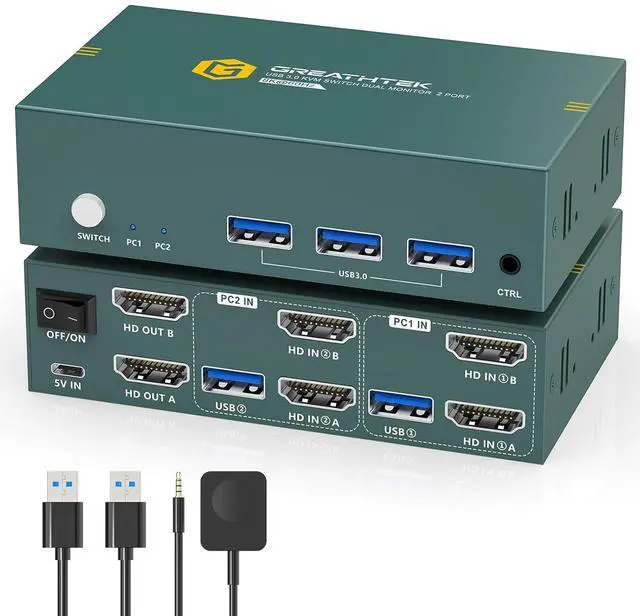
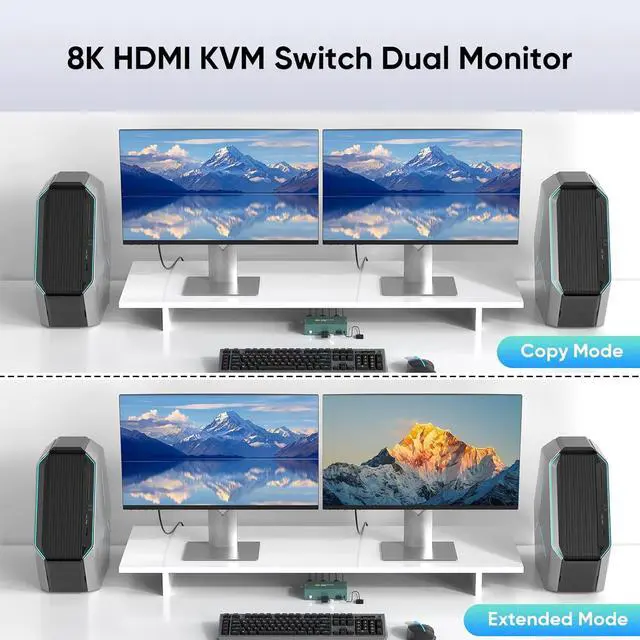
- HDMI KVM Switch 2 Monitors 2 ComputersThe KVM switches allow two computers to share two monitors, a keyboard and mouse, which can dramatically increase work efficiency. Easily switch to control any computer with a simple keystroke. Ideal for work presentations and school classroom lectures. This dual monitor KVM switch support duplication and expansion modes for different usage needs
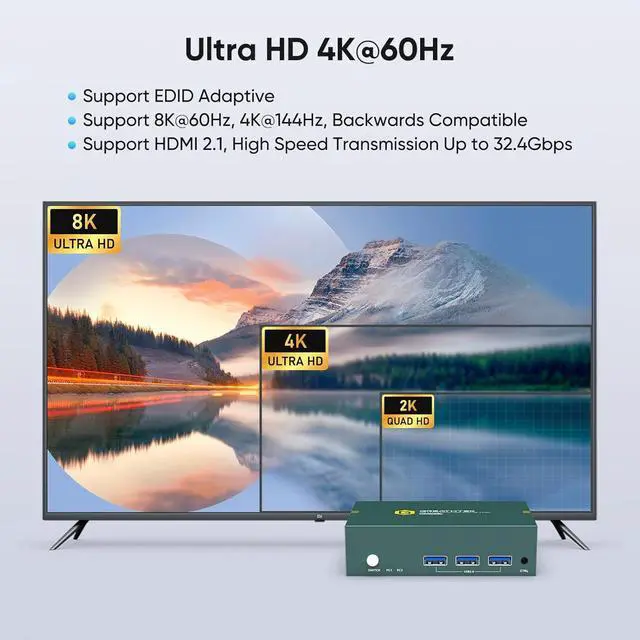
- Ultra HD 8K@60HzThe KVM switch 2 monitors 2 computers supports resolutions up to 8K@60Hz and is backward compatible 4K@144Hz, 4K@120Hz, 4K@60Hz, and lower formats, providing you with extremely clear and detailed images. The KVM switch supports the HDMI2.1 standard and HDCP2.3 (Note: To achieve the highest resolution, your computer and monitor need to support 8K resolution and connect the device using an HDMI 2.1 cable)
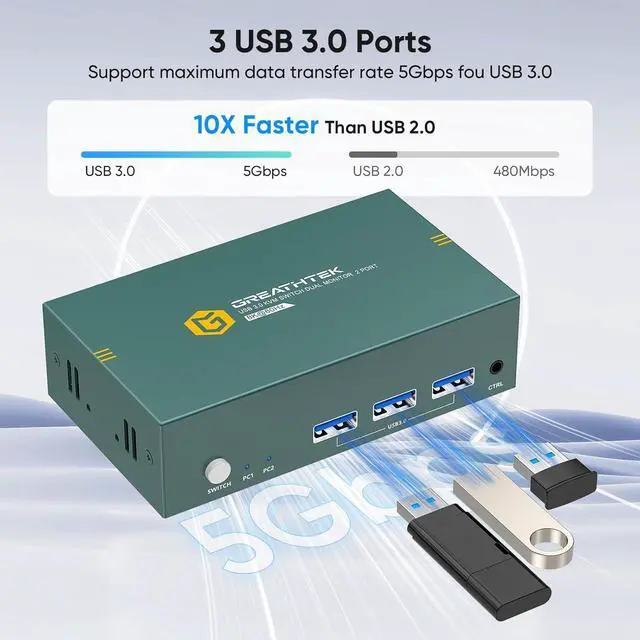
- USB3.0 KVM SwitchThis KVM switch 2 monitors 2 computers with 3 USB 3.0 ports,can provide up to 5Gbps transfer rates, which is 10 times the transfer rate of USB 2.0. When you share d
+
+
Overview
Specs
Reviews

Any questions? Our AI mode will help you find out quickly.
Try me now
HDMI KVM Switch 2 Monitors 2 ComputersThe KVM switches allow two computers to share two monitors, a keyboard and mouse, which can dramatically increase work efficiency. Easily switch to control any computer with a simple keystroke. Ideal for work presentations and school classroom lectures. This dual monitor KVM switch support duplication and expansion modes for different usage needs
Ultra HD 8K@60HzThe KVM switch 2 monitors 2 computers supports resolutions up to 8K@60Hz and is backward compatible 4K@144Hz, 4K@120Hz, 4K@60Hz, and lower formats, providing you with extremely clear and detailed images. The KVM switch supports the HDMI2.1 standard and HDCP2.3 (Note: To achieve the highest resolution, your computer and monitor need to support 8K resolution and connect the device using an HDMI 2.1 cable)
USB3.0 KVM SwitchThis KVM switch 2 monitors 2 computers with 3 USB 3.0 ports,can provide up to 5Gbps transfer rates, which is 10 times the transfer rate of USB 2.0. When you share devices such as printers, cameras, scanners, or USB flash drives between two computers, the data reading speed will be significantly faster and greatly enhancing your work efficiency
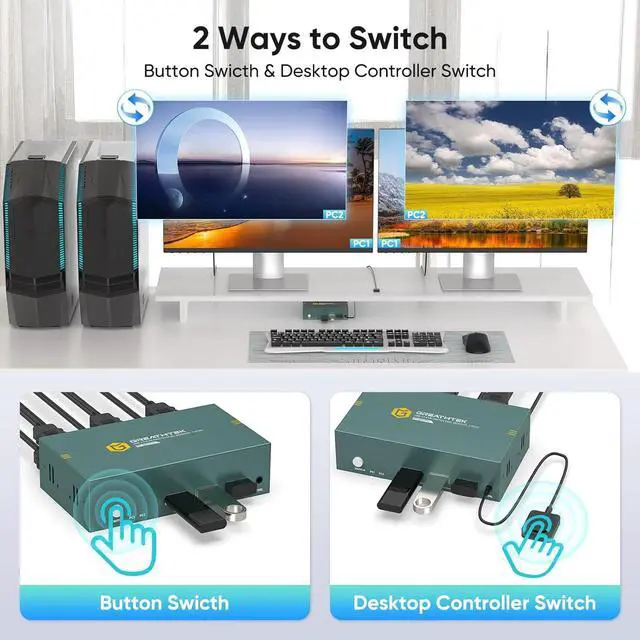
Two Switch Methods This KVM switch dual monitor offers two convenient switching methods: button swich and desktop controller. The desktop controller is designed to be user-friendly and easy to operate, and can hide the device to ensure a tidy desktop. Perfect for mobile teaching, office crowds and gamers.Note that the device does not support switching via hotkeys)
Wide Application Those KVM switch , plug and play, no driver required. Compatible with Windows, Mac OS, Linux and other operating systems. This HDMI KVM switch can be widely used in business, office, multimedia teaching, conference room, game room, research and testing scenarios
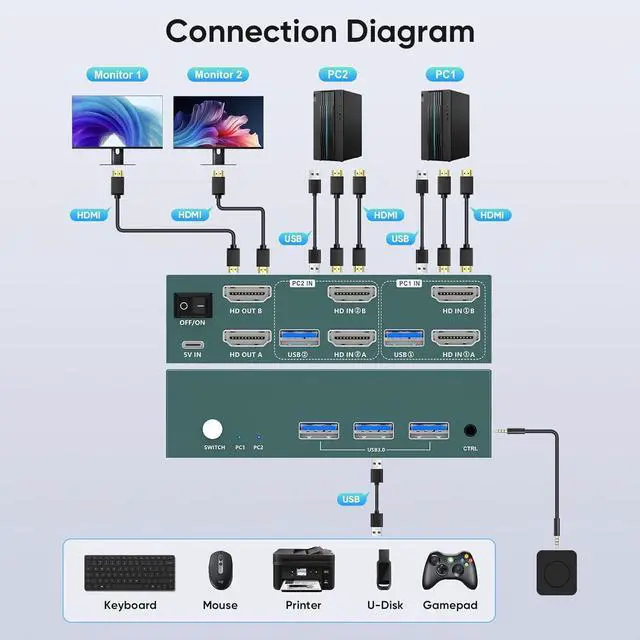
Important Notes 11. Please make sure that the computer you are connecting to itself supports at least two monitors working at the same time. 2.Keep the cable wires connected correctly (please refer to the connection schematic in the picture). 3.If you encounter any problems while using the HDMI KVM switch, please contact our professional technical team for assistance
Important Notes 2 Each computer needs to be connected with 2*HDMI cable + 1*USB cable to get dual screen display properly. For computers that do not have two HDMI port, you will need to use them with a reliable adapter or USB C docking station to expand the HDMI signal. Before purchasing, please make sure that each of your computers can support dual screen display. Test method: You can connect your computer directly to two monitors (not via KVM)
Ultra HD 8K@60HzThe KVM switch 2 monitors 2 computers supports resolutions up to 8K@60Hz and is backward compatible 4K@144Hz, 4K@120Hz, 4K@60Hz, and lower formats, providing you with extremely clear and detailed images. The KVM switch supports the HDMI2.1 standard and HDCP2.3 (Note: To achieve the highest resolution, your computer and monitor need to support 8K resolution and connect the device using an HDMI 2.1 cable)
USB3.0 KVM SwitchThis KVM switch 2 monitors 2 computers with 3 USB 3.0 ports,can provide up to 5Gbps transfer rates, which is 10 times the transfer rate of USB 2.0. When you share devices such as printers, cameras, scanners, or USB flash drives between two computers, the data reading speed will be significantly faster and greatly enhancing your work efficiency
Two Switch Methods This KVM switch dual monitor offers two convenient switching methods: button swich and desktop controller. The desktop controller is designed to be user-friendly and easy to operate, and can hide the device to ensure a tidy desktop. Perfect for mobile teaching, office crowds and gamers.Note that the device does not support switching via hotkeys)
Wide Application Those KVM switch , plug and play, no driver required. Compatible with Windows, Mac OS, Linux and other operating systems. This HDMI KVM switch can be widely used in business, office, multimedia teaching, conference room, game room, research and testing scenarios
Important Notes 11. Please make sure that the computer you are connecting to itself supports at least two monitors working at the same time. 2.Keep the cable wires connected correctly (please refer to the connection schematic in the picture). 3.If you encounter any problems while using the HDMI KVM switch, please contact our professional technical team for assistance
Important Notes 2 Each computer needs to be connected with 2*HDMI cable + 1*USB cable to get dual screen display properly. For computers that do not have two HDMI port, you will need to use them with a reliable adapter or USB C docking station to expand the HDMI signal. Before purchasing, please make sure that each of your computers can support dual screen display. Test method: You can connect your computer directly to two monitors (not via KVM)
Warranty & Returns
Warranty, Returns, And Additional Information
Warranty
- Please contact the Seller directly for warranty information. Warranty information may also be found on the Manufacturer's website.
- CONTACT
Return Policies
- Return for refund within: 30 days
- Return for replacement within: 30 days
- This item is covered by Chinathru Trading Co., Limited Return Policy
Manufacturer Contact Info
- For a directory of all our manufacturers, please click below.
- Manufacturers Directory
LOADING...