

Your Browsing History
- Free 30-day Returns
$432.99

Meet Your Seller

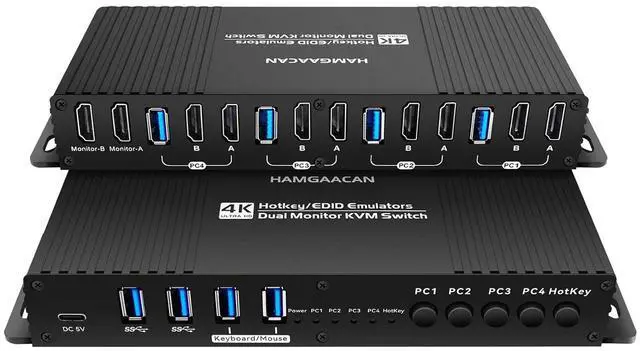
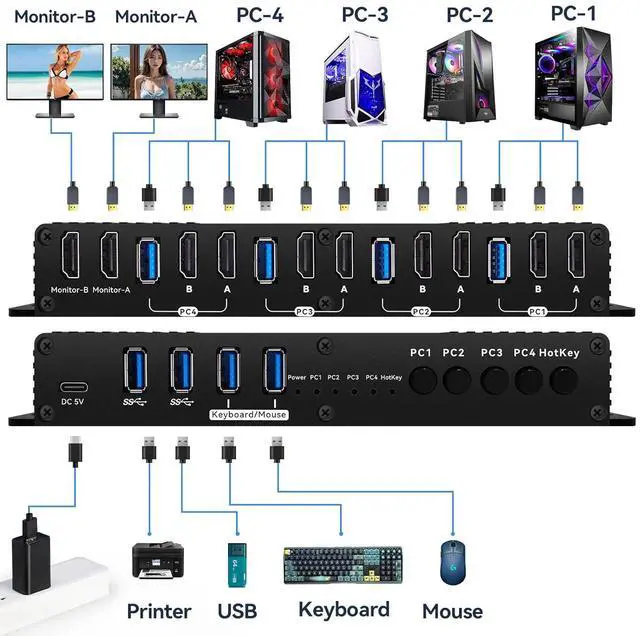


Hdmi Kvm Switch 2 Monitors 4 Computers 4K 60Hz EDID Emulator Hotkey Switching Kvm Switches EDID Extended Display Dual 4 PC USB3.0 (kvm hdmi Edid 4 * 2 Hotkey)
- kvm Switch 2 Monitors 4 Computers hdmi edid 4k 60hz :the hdmi kvm switch edid support hotkey switching , you can use hotkey to switch between 4 computers,Right Control two times and number 1 and EnterRight Ctrl+Right ctrl+1+Enteryou will switch to PC-1 and Right Ctrl+Right ctrl+2+Enter you will switch to PC-2. switch to PC-1 and Right Ctrl+Right ctrl+3+Enter you will switch to PC-3 switch to PC-4 and Right Ctrl+Right ctrl+4+Enter you will switch to PC-2You can use Keyboard Hotkey Right Ctrl+Right ctrl+B+Enter to turn off or turn on the Beep for the dual monitor kvm switch.
- kvm Switch hdmi 2 Monitors 4 Computers edid 2k 144hz Detailed Resolusion: The hdmi2.0 KVM switch 4 computers 2 monitors edid emulator 2K 144hz supports max. resolution of 4K@60Hz 4 computer 2 monitor, 4k 60Hz, 2k 120hz,2K 144Hz, 1080P 165hz ,1080@240Hz , 2560x1440@144Hz . Final resolution is also subject to graphic cards, monitors, cables and adapters and there work together;
- hdmi kvm Switch 2 Monitors
+
+
Overview
Specs
Reviews

Any questions? Our AI mode will help you find out quickly.
Try me now
kvm Switch 2 Monitors 4 Computers hdmi edid 4k 60hz :the hdmi kvm switch edid support hotkey switching , you can use hotkey to switch between 4 computers,Right Control two times and number 1 and EnterRight Ctrl+Right ctrl+1+Enteryou will switch to PC-1 and Right Ctrl+Right ctrl+2+Enter you will switch to PC-2. switch to PC-1 and Right Ctrl+Right ctrl+3+Enter you will switch to PC-3 switch to PC-4 and Right Ctrl+Right ctrl+4+Enter you will switch to PC-2You can use Keyboard Hotkey Right Ctrl+Right ctrl+B+Enter to turn off or turn on the Beep for the dual monitor kvm switch.
kvm Switch hdmi 2 Monitors 4 Computers edid 2k 144hz Detailed Resolusion: The hdmi2.0 KVM switch 4 computers 2 monitors edid emulator 2K 144hz supports max. resolution of 4K@60Hz 4 computer 2 monitor, 4k 60Hz, 2k 120hz,2K 144Hz, 1080P 165hz ,1080@240Hz , 2560x1440@144Hz . Final resolution is also subject to graphic cards, monitors, cables and adapters and there work together;
hdmi kvm Switch 2 Monitors 4 Computers 2k 144hz COMPATABILITY: the Kvm switch 2 monitors 4 computers hdmi 2k 144hz supports most major operation systems like Windows, Linux, Mac and more; also support switch between devices without keyboard and mouse like DVR and NVR; Support webcam, speaker / headphone and microphone;
kvm Switch 2 Monitors 4 Computers hdmi edid 4k 60hz compatable: This HDMI kvm switch dual monitor 4 computer edid clone 2K 144hz helps you to Hook up 2 computers to share one set of keyboard, mouse with hotkey,and there are three modes ,videowall,dual extended or mirrored monitors, with 1 extra high speed USB 3.0 hub port for sharing USB peripheral; Perfect for IT specialist, gaming(with high Frame), and other multi task
dual monitor kvm switch hdmi edid Switching Mode: the Dual Monitor kvm Switch hdmi edid 2k 144hz Supports Four switching methods to meet with different needs, including keyboard hotkeys, mouse hotkeys, push button, wired remote ; switching only takes several seconds after first set-up;
Attention : the powered HDMI to DP adapters are support; This hdmi KVM switch Dual monitor 4 computer 2k 144hz support EDID emulation ,the hdmi 2.0kvm switch 2 pc two monitors can support adapters, adapters cables and docking station,you should use hdmi2.1 cables if you want more good quality.
kvm hdmi Switch 2 Monitors 4 Computers edid emulater 4k 60hz : the kvm hdmi edid is very suitable for gaming kvm swtich ,the edid emulator make you gaming fluent,make it don't ficker.It will not resize the desktop. when you computer is thunderbolt output ,and you want one thunderbolt kvm switch edid clone ,you can use type c TO Dual hdmi MST +kvm switch hdmi edid+4k hdmi 2.0 cable to monitor,them the thunderbolt input will be edid emulator.
kvm Switches hdmi 2 Monitors 4 Computers edid 4k 60hz : when you computer is dp output ,and you want one Displayport kvm switch edid clone ,you can use DP TO Dual hdmi MST +kvm switch hdmi edid+4k hdmi 2.0 cable to monitor,them the displayport input will be edid emulator.
kvm Switch 2 Monitors 4 Computers hdmi edid 2k 144hz : when you computer is type c output ,and you want one type-c kvm switch edid clone ,you can use type c TO Dual hdmi MST +kvm switch hdmi edid+4k hdmi 2.0 cable to monitor,them the type c input will be edid emulator.
kvm switch hdmi dual monitor 4 computer edid The kvm switch hdmi edid can support type C TO hdmi .You can use type C TO Dual hdmi MST and the HDMI kvm edid to became usb c , Thunderbolt Type c Mac kvm Switch 2 Monitors 2 Computers Type c 1440P 120Hz 144Hz mac kvm Switch
kvm Switch hdmi 2 Monitors 4 Computers edid 2k 144hz Detailed Resolusion: The hdmi2.0 KVM switch 4 computers 2 monitors edid emulator 2K 144hz supports max. resolution of 4K@60Hz 4 computer 2 monitor, 4k 60Hz, 2k 120hz,2K 144Hz, 1080P 165hz ,1080@240Hz , 2560x1440@144Hz . Final resolution is also subject to graphic cards, monitors, cables and adapters and there work together;
hdmi kvm Switch 2 Monitors 4 Computers 2k 144hz COMPATABILITY: the Kvm switch 2 monitors 4 computers hdmi 2k 144hz supports most major operation systems like Windows, Linux, Mac and more; also support switch between devices without keyboard and mouse like DVR and NVR; Support webcam, speaker / headphone and microphone;
kvm Switch 2 Monitors 4 Computers hdmi edid 4k 60hz compatable: This HDMI kvm switch dual monitor 4 computer edid clone 2K 144hz helps you to Hook up 2 computers to share one set of keyboard, mouse with hotkey,and there are three modes ,videowall,dual extended or mirrored monitors, with 1 extra high speed USB 3.0 hub port for sharing USB peripheral; Perfect for IT specialist, gaming(with high Frame), and other multi task
dual monitor kvm switch hdmi edid Switching Mode: the Dual Monitor kvm Switch hdmi edid 2k 144hz Supports Four switching methods to meet with different needs, including keyboard hotkeys, mouse hotkeys, push button, wired remote ; switching only takes several seconds after first set-up;
Attention : the powered HDMI to DP adapters are support; This hdmi KVM switch Dual monitor 4 computer 2k 144hz support EDID emulation ,the hdmi 2.0kvm switch 2 pc two monitors can support adapters, adapters cables and docking station,you should use hdmi2.1 cables if you want more good quality.
kvm hdmi Switch 2 Monitors 4 Computers edid emulater 4k 60hz : the kvm hdmi edid is very suitable for gaming kvm swtich ,the edid emulator make you gaming fluent,make it don't ficker.It will not resize the desktop. when you computer is thunderbolt output ,and you want one thunderbolt kvm switch edid clone ,you can use type c TO Dual hdmi MST +kvm switch hdmi edid+4k hdmi 2.0 cable to monitor,them the thunderbolt input will be edid emulator.
kvm Switches hdmi 2 Monitors 4 Computers edid 4k 60hz : when you computer is dp output ,and you want one Displayport kvm switch edid clone ,you can use DP TO Dual hdmi MST +kvm switch hdmi edid+4k hdmi 2.0 cable to monitor,them the displayport input will be edid emulator.
kvm Switch 2 Monitors 4 Computers hdmi edid 2k 144hz : when you computer is type c output ,and you want one type-c kvm switch edid clone ,you can use type c TO Dual hdmi MST +kvm switch hdmi edid+4k hdmi 2.0 cable to monitor,them the type c input will be edid emulator.
kvm switch hdmi dual monitor 4 computer edid The kvm switch hdmi edid can support type C TO hdmi .You can use type C TO Dual hdmi MST and the HDMI kvm edid to became usb c , Thunderbolt Type c Mac kvm Switch 2 Monitors 2 Computers Type c 1440P 120Hz 144Hz mac kvm Switch
Warranty & Returns
Warranty, Returns, And Additional Information
Warranty
- Please contact the Seller directly for warranty information. Warranty information may also be found on the Manufacturer's website.
- CONTACT
Return Policies
- Return for refund within: 30 days
- Return for replacement within: 30 days
- This item is covered by Chinathru Trading Co., Limited Return Policy
Manufacturer Contact Info
- For a directory of all our manufacturers, please click below.
- Manufacturers Directory
LOADING...