

Your Browsing History
- Free 30-day Returns
$502.99

Meet Your Seller

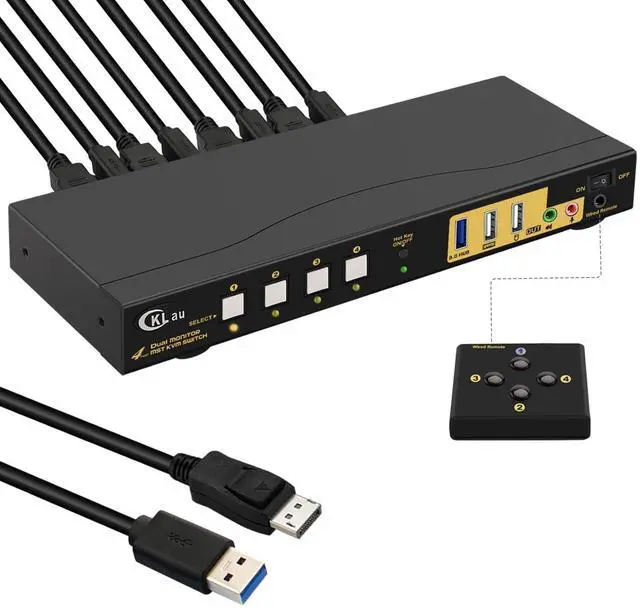
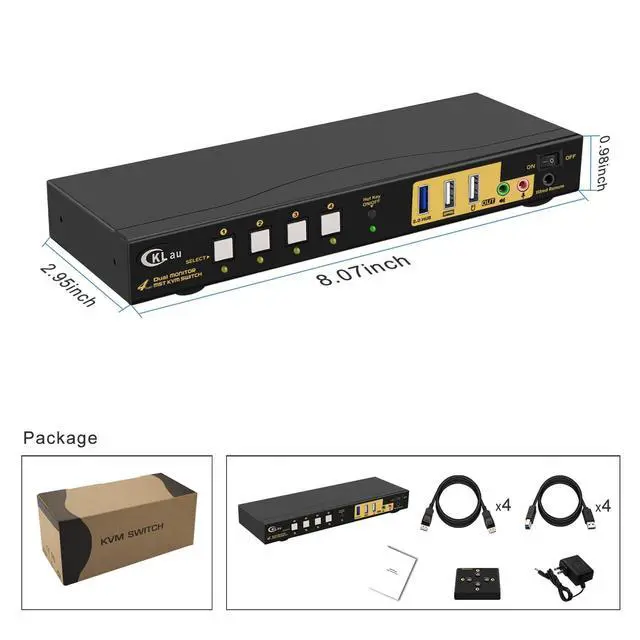


CKLau 4K60Hz 2K@144Hz MST KVM Switch 2 Monitors 4 Compuers (1 DP in, DP + HDMI Out) with Cables, Audio, Microphone, USB 3.0 Hub Supports Keyboard Mouse Switching Suit for Laptops, PCs
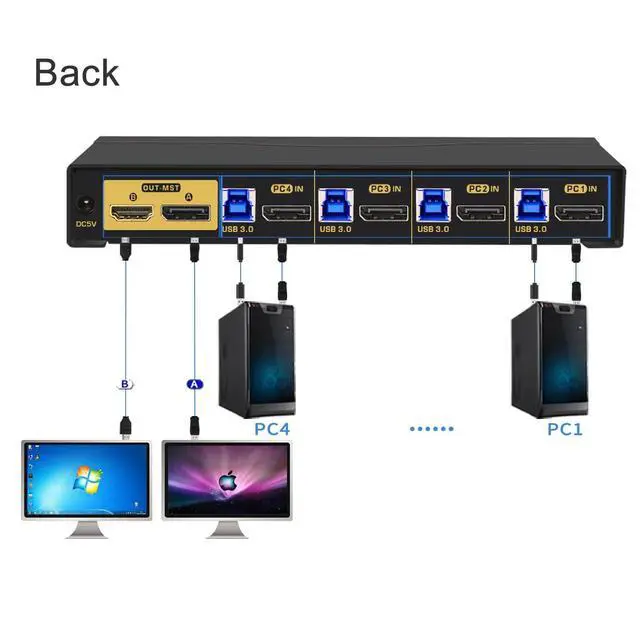
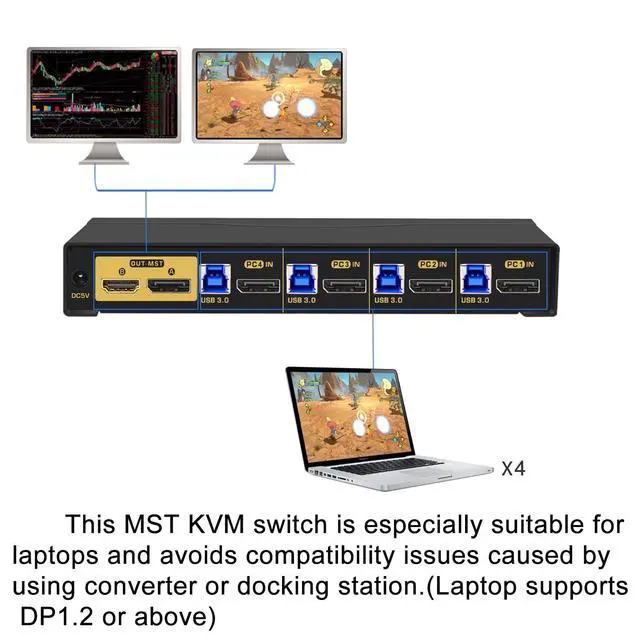
- 1. MST 4 Port KVM Switch HDMI DP: 1 Displayport in, Displayport + HDMI out. This MST KVM switch is especially suited for the laptop with a Displayport port output, to avoid compatibility issues caused by using an adapter/docking station. (you should confirm your laptop supports DP 1.2 output). (Tips: This KVM switch doesn't support MAC laptops.)
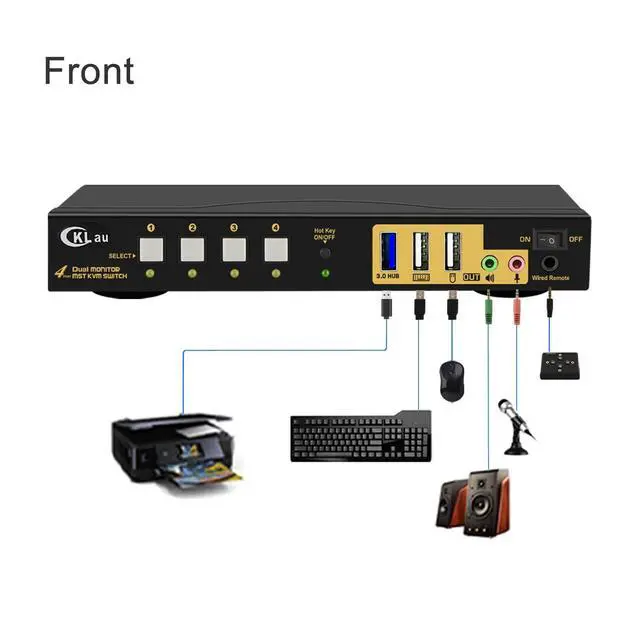
- 2. DP HDMI KVM Switch 4 Port: It allows 4 computers to share one USB set of keyboard & mouse, 2 monitors, 1 USB peripheral, headset, and speaker. (Notices: 1. This is DP 1.2 KVM switch, you should set your devices as 4K@60Hz before use. 2. This KVM switch does not support emulation EDID. )
- 3. 4 Computers 2 Monitors Switch: Displayport KVM MST: We are certified HDMI adopter over 10 years. Excellent image processing and transmission capacity, make the output signal more smoothly and steady. Resolution compatible 4096x2160@60Hz, 3840x2160@60Hz, 3840x1620@60Hz, 3440x1600@60Hz, 3440x1440@60Hz, 3840x1080@60Hz, 3200x1800@60Hz, 2560x1440@60/120/144/
+
+
Overview
Reviews

Any questions? Our AI mode will help you find out quickly.
Try me now
1. MST 4 Port KVM Switch HDMI DP: 1 Displayport in, Displayport + HDMI out. This MST KVM switch is especially suited for the laptop with a Displayport port output, to avoid compatibility issues caused by using an adapter/docking station. (you should confirm your laptop supports DP 1.2 output). (Tips: This KVM switch doesn't support MAC laptops.)
2. DP HDMI KVM Switch 4 Port: It allows 4 computers to share one USB set of keyboard & mouse, 2 monitors, 1 USB peripheral, headset, and speaker. (Notices: 1. This is DP 1.2 KVM switch, you should set your devices as 4K@60Hz before use. 2. This KVM switch does not support emulation EDID. )
3. 4 Computers 2 Monitors Switch: Displayport KVM MST: We are certified HDMI adopter over 10 years. Excellent image processing and transmission capacity, make the output signal more smoothly and steady. Resolution compatible 4096x2160@60Hz, 3840x2160@60Hz, 3840x1620@60Hz, 3440x1600@60Hz, 3440x1440@60Hz, 3840x1080@60Hz, 3200x1800@60Hz, 2560x1440@60/120/144/165Hz, 2048x1536@60/120/144Hz, 2048x1280@60/120/144Hz, 2048x1080@60/120/144Hz, 1920x1200@60/120/144Hz, 1920x1080@60/120/144Hz, etc.
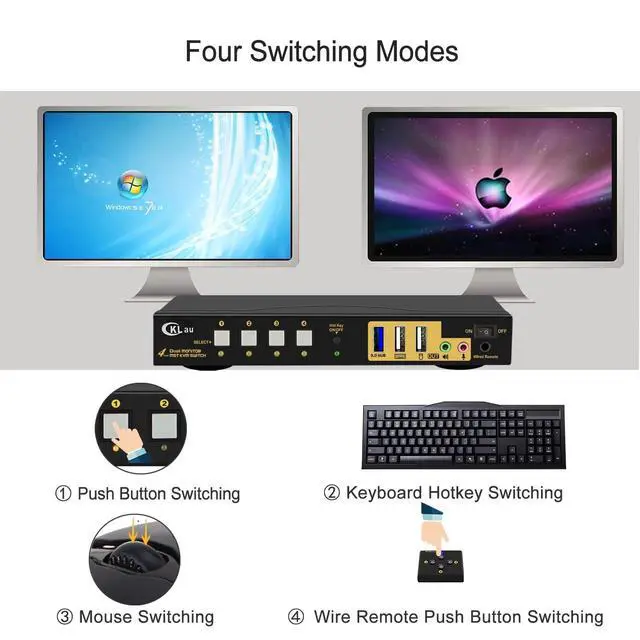
4. Supports four switching ways: Hotkey switching (Num Lock + Num Lock + 1 / 2 / 3 / 4 + Enter, or Ctrl + Ctrl + 1 / 2 / 3 / 4 + Enter, or Scroll Lock+ Scroll Lock+ 1 / 2 / 3 / 4 + Enter), mouse switching (click mouse wheel 2 times + left button / right button), manual button switching, wired remote push button switching. Support extended display, mirror display, and splice wall display.
5. 4 Port HDMI DP KVM Switch: Support wired/wireless/unify/Bluetooth keyboard/mouse, Apple keyboard. (Bluetooth keyboard/mouse should with a receiver, it does not support built-in Bluetooth keyboard/mouse). Supports touch screen, OLED screen, 16:9 widescreen, 21:9 ultra-wide monitors, etc. Support auto-detection, waking up, and auto-scan mode.
2. DP HDMI KVM Switch 4 Port: It allows 4 computers to share one USB set of keyboard & mouse, 2 monitors, 1 USB peripheral, headset, and speaker. (Notices: 1. This is DP 1.2 KVM switch, you should set your devices as 4K@60Hz before use. 2. This KVM switch does not support emulation EDID. )
3. 4 Computers 2 Monitors Switch: Displayport KVM MST: We are certified HDMI adopter over 10 years. Excellent image processing and transmission capacity, make the output signal more smoothly and steady. Resolution compatible 4096x2160@60Hz, 3840x2160@60Hz, 3840x1620@60Hz, 3440x1600@60Hz, 3440x1440@60Hz, 3840x1080@60Hz, 3200x1800@60Hz, 2560x1440@60/120/144/165Hz, 2048x1536@60/120/144Hz, 2048x1280@60/120/144Hz, 2048x1080@60/120/144Hz, 1920x1200@60/120/144Hz, 1920x1080@60/120/144Hz, etc.
4. Supports four switching ways: Hotkey switching (Num Lock + Num Lock + 1 / 2 / 3 / 4 + Enter, or Ctrl + Ctrl + 1 / 2 / 3 / 4 + Enter, or Scroll Lock+ Scroll Lock+ 1 / 2 / 3 / 4 + Enter), mouse switching (click mouse wheel 2 times + left button / right button), manual button switching, wired remote push button switching. Support extended display, mirror display, and splice wall display.
5. 4 Port HDMI DP KVM Switch: Support wired/wireless/unify/Bluetooth keyboard/mouse, Apple keyboard. (Bluetooth keyboard/mouse should with a receiver, it does not support built-in Bluetooth keyboard/mouse). Supports touch screen, OLED screen, 16:9 widescreen, 21:9 ultra-wide monitors, etc. Support auto-detection, waking up, and auto-scan mode.
Warranty & Returns
Warranty, Returns, And Additional Information
Warranty
- Please contact the Seller directly for warranty information. Warranty information may also be found on the Manufacturer's website.
- CONTACT
Return Policies
- Return for refund within: 30 days
- Return for replacement within: 30 days
- This item is covered by Chinathru Trading Co., Limited Return Policy
Manufacturer Contact Info
- For a directory of all our manufacturers, please click below.
- Manufacturers Directory
LOADING...