

Your Browsing History
- Free 30-day Returns
$266.99

Meet Your Seller

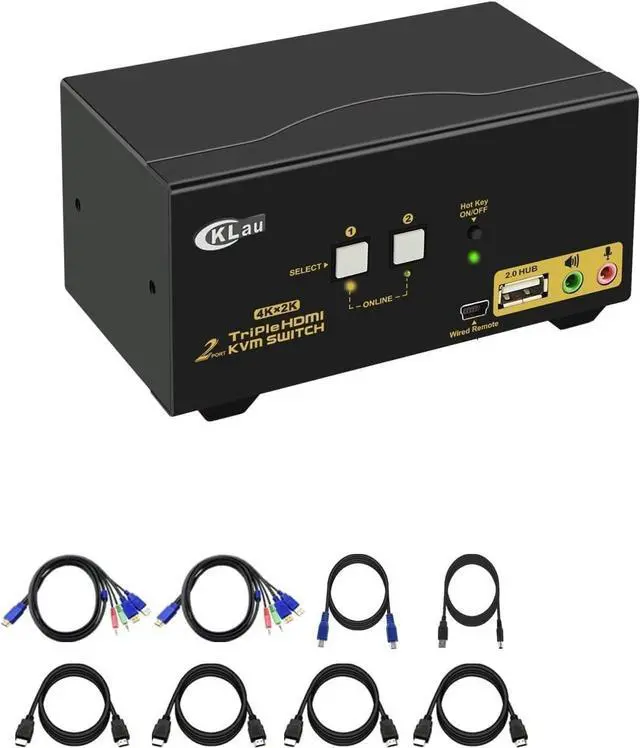
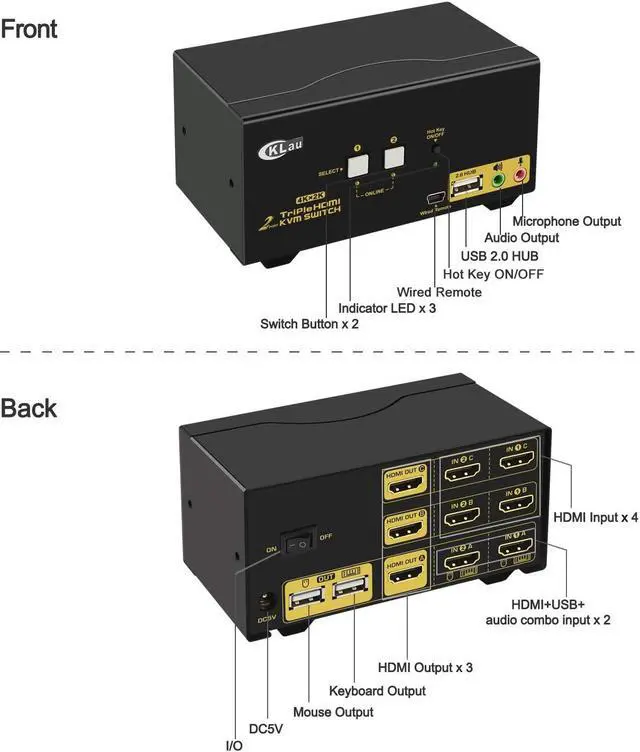


CKLau 4Kx2K@60Hz Dual Port 3 Monitor KVM Switch HDMI with Audio and Cables, KVM Switch 3 Monitors 2 Computers Supports Emulation EDID, Hotkey Switching
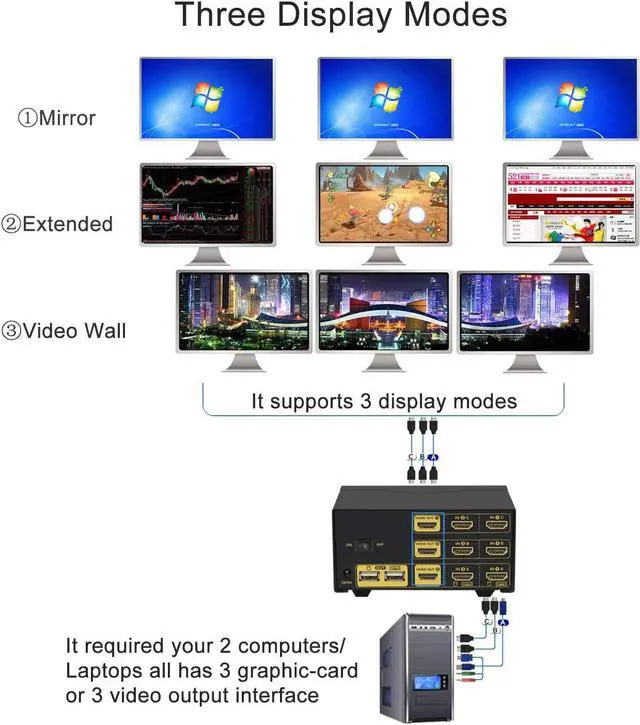
- 1. KVM HDMI USB Switch: 2 computers sharing one set of keyboard & mouse, 3 monitors, 1 USB 2.0 peripheral. With audio & microphone output, with 1 USB 2.0 hub, with all input cables. Support HDMI 2.0, HDCP 2.2, HDR 10.
- 2. 2 Port KVM HDMI and USB Switch: We are certified HDMI adopter over 10 years. Excellent image processing and transmission capacity, make the output signal is more smooth and steady. Drive-free for Windows 10/7/2000/XP/Vista, Linux, Mac, Debian, Ubuntu, Fedora, Raspbian, Ubuntu, etc.
- 3. HDMI KVM Switches: Resolution compatible 4096x2160@60Hz 4:4:4, 3840x2160@60hz, 3840x1620@60Hz, 3440x1600@60Hz, 3440x1440@60Hz, 3840x1080@240Hz, 3200x1800@60Hz, 2560x1440@60Hz, 2048x1536@60Hz, 2048x1280@60Hz, 2048x1080@60Hz, 1920x1200@60Hz, 1920x1080@60Hz, etc. Support wired/wireless keyboard mouse, support Apple keyboard(Hot Key is changeable).
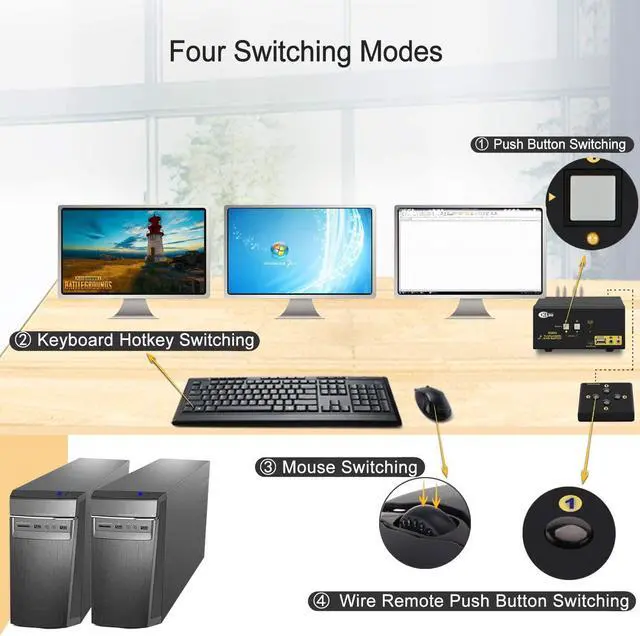
- 4. HDMI KVM Switch 2 Port: Four switching way optional: Hotkey switching(NumLock + NumLock + 1 / 2 + Enter, or Ctrl + Ctrl + 1 / 2 + E
+
+
Overview
Reviews

Any questions? Our AI mode will help you find out quickly.
Try me now
Computer Switch for 2 Computers Monitor Switch for Multiple Computers KVM for Mac 4K KVM USB KVM USB HDMI Switch KVM USB Switch 2 Port HDMI KVM Switch Monitor Keyboard Mouse Switch Keyboard Mouse Monitor Switch
Installation Step
1. Turn off all your devices and unplug all the cables;
2. Plug DC5V 2A power adapter into KVM switch and AC socket;
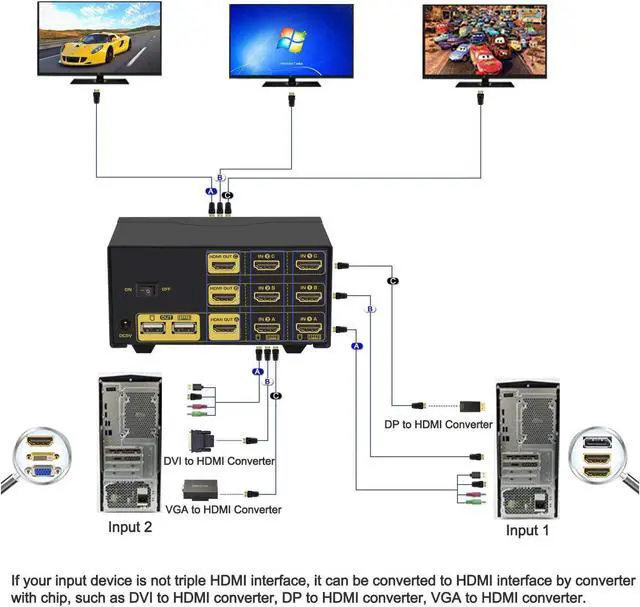
3. Plug KVM cables(cable A), HDMI cables(cable B and cable C) into KVM switch and your computers;
4. Plug HDMI cable into KVM switch and your monitor;
5. Plug mouse into mouse slot of KVM switch, plug keyboard into keyboard slot of KVM switch;
6. Plug speaker or microphone or other USB 2.0 peripheral into KVM switch if needed;
7. Turn on KVM switch;
8. Turn on your computers.
Package Content
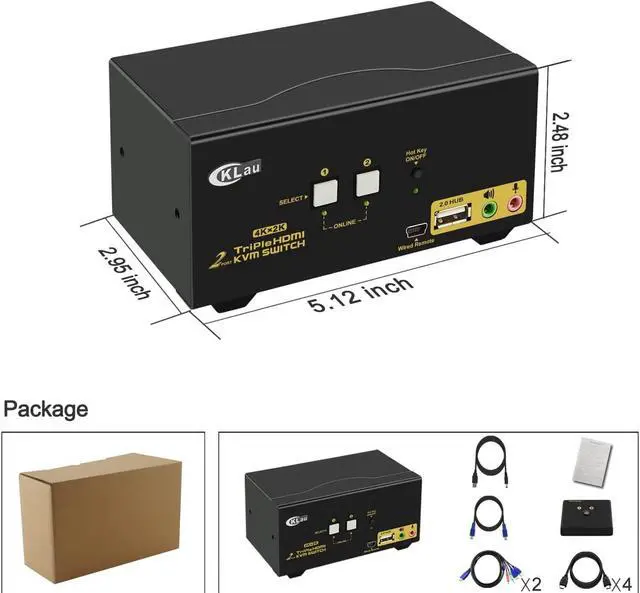
1 * 2 Port Triple Monitor HDMI KVM Switch
2 * KVM cable
4 * HDMI cable
1 * User Manual in English
1* DC 5V 2A Power Adapter (US Plug)
1 * wire remote push button switch
Tips:
If your computer without HDMI port, you should purchase the reliable converter with chip. The quality of converter will affect the function of KVM switch.
Installation Step
1. Turn off all your devices and unplug all the cables;
2. Plug DC5V 2A power adapter into KVM switch and AC socket;
3. Plug KVM cables(cable A), HDMI cables(cable B and cable C) into KVM switch and your computers;
4. Plug HDMI cable into KVM switch and your monitor;
5. Plug mouse into mouse slot of KVM switch, plug keyboard into keyboard slot of KVM switch;
6. Plug speaker or microphone or other USB 2.0 peripheral into KVM switch if needed;
7. Turn on KVM switch;
8. Turn on your computers.
Package Content
1 * 2 Port Triple Monitor HDMI KVM Switch
2 * KVM cable
4 * HDMI cable
1 * User Manual in English
1* DC 5V 2A Power Adapter (US Plug)
1 * wire remote push button switch
Tips:
If your computer without HDMI port, you should purchase the reliable converter with chip. The quality of converter will affect the function of KVM switch.
Warranty & Returns
Warranty, Returns, And Additional Information
Warranty
- Please contact the Seller directly for warranty information. Warranty information may also be found on the Manufacturer's website.
- CONTACT
Return Policies
- Return for refund within: 30 days
- Return for replacement within: 30 days
- This item is covered by Chinathru Trading Co., Limited Return Policy
Manufacturer Contact Info
- For a directory of all our manufacturers, please click below.
- Manufacturers Directory
LOADING...