Your Browsing History
Meet Your Seller
USB C Switch, Bi-Directional USB-C Switcher 2 Computers, USB Type C KVM Switch 8K @60Hz 4K@120Hz Video/10Gbps Data Transfer/100W Charging,Compatible with Thunderbolt Device (Black)
Limited time offer, ends 07/26 By LUOYIMAN
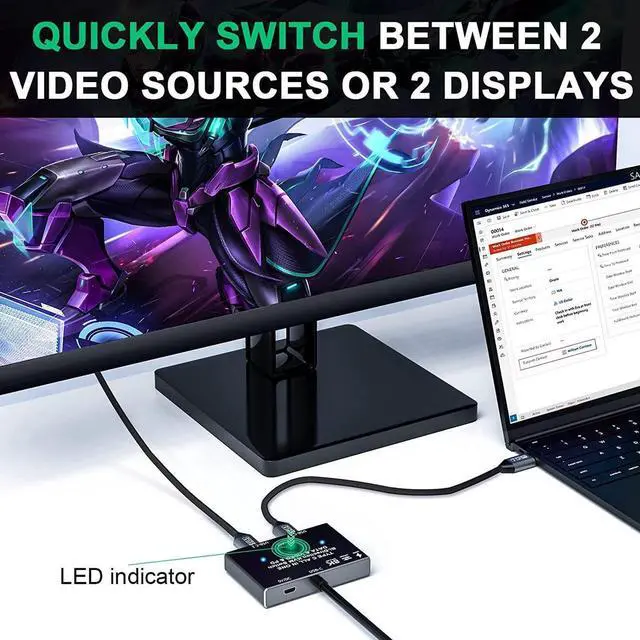
- [Bidirectional USB C Switch Selector] This USB-C switch allows 2 USB-C video source share 1 display or 1 source share 2 displays. NOTE:Two displays CANNOT display simultaneously. You need to use a standard USB-C USB3.1 version Gen-2 Cable to connect this switch and use the USB cable to power the switch.
- [Max 10Gbps Data Transfer Rate] It supports Max Transmissions Speed 10Gbps(USB3.1 Gen2), Transfer music, movies, or entire seasons of TV shows in seconds. you can charge your phone, tablet and other devices, and you can also transfer data from your computer, phone, etc. to your U disk and other devices.
+
+
Overview
Specs
Reviews
Any questions? Our AI beta will help you find out quickly.
Try me now
Work as a USB C switcher, 2 video sources share 1 display.
You can share 1 display device by one-click switching between video sources such as computer, laptop, tablet, mobile phone and game console (monitor with HDMI port require USB-C / HDMI adapter or a USB-C / HDMI hub).
Work as a USB C spliiter, 1 video source share 2 displays.
One video source can be switched between two display devices.
note that this is not a USB-C hub, so it is only one link activated at a time.
Please follow the following instruction to operate:
Connect the two included USB 3.1 Gen 2 Cable from our USB-C Switch's USB-C 1 and USB-C 2 Port to your USB-C Source Devices (or display devices);
Connect the fixed USB-C cable at the USB-C position to the USB-C port of the monitor (or source device), please make sure that the USB-C port of the monitor supports video transmission and the video function is turned on;
Connect the included Micro USB to USB-A cable with the switch to the power supply (Must power the USB-C switch, otherwise the monitor won't show anything);
Press the [Select] button to switch between the two video sources (or display devices).

You can share 1 display device by one-click switching between video sources such as computer, laptop, tablet, mobile phone and game console (monitor with HDMI port require USB-C / HDMI adapter or a USB-C / HDMI hub).
Work as a USB C spliiter, 1 video source share 2 displays.
One video source can be switched between two display devices.
note that this is not a USB-C hub, so it is only one link activated at a time.
Please follow the following instruction to operate:
Connect the two included USB 3.1 Gen 2 Cable from our USB-C Switch's USB-C 1 and USB-C 2 Port to your USB-C Source Devices (or display devices);
Connect the fixed USB-C cable at the USB-C position to the USB-C port of the monitor (or source device), please make sure that the USB-C port of the monitor supports video transmission and the video function is turned on;
Connect the included Micro USB to USB-A cable with the switch to the power supply (Must power the USB-C switch, otherwise the monitor won't show anything);
Press the [Select] button to switch between the two video sources (or display devices).
Warranty & Returns
Warranty, Returns, And Additional Information
Warranty
- Please contact the Seller directly for warranty information. Warranty information may also be found on the Manufacturer's website.
- CONTACT
Return Policies
- Return for refund within: 30 days
- Return for replacement within: 30 days
- This item is covered by LUOYIMAN Return Policy
Manufacturer Contact Info
- For a directory of all our manufacturers, please click below.
- Manufacturers Directory
LOADING...