• $42.99
  • Free 30-day Returns
  • Ships from China.
    Price alert
    Shop it at NeweggBusiness.

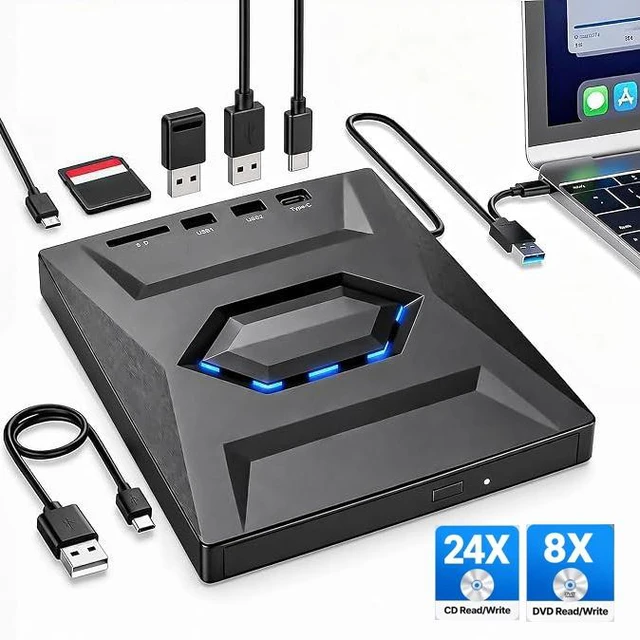
    AUTYUE USB 3.0 & USB C External CD/DVD Drive with SD Card Reader & USB Hub, USB3.0 External DVD Optical Disk Drive for laptop and desktop, Windows & Mac Compatible, CD-ROM burner, Portable and Compact

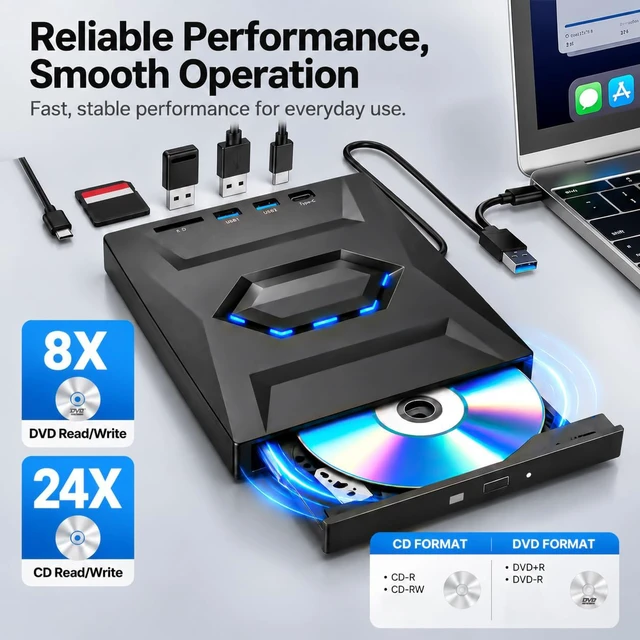
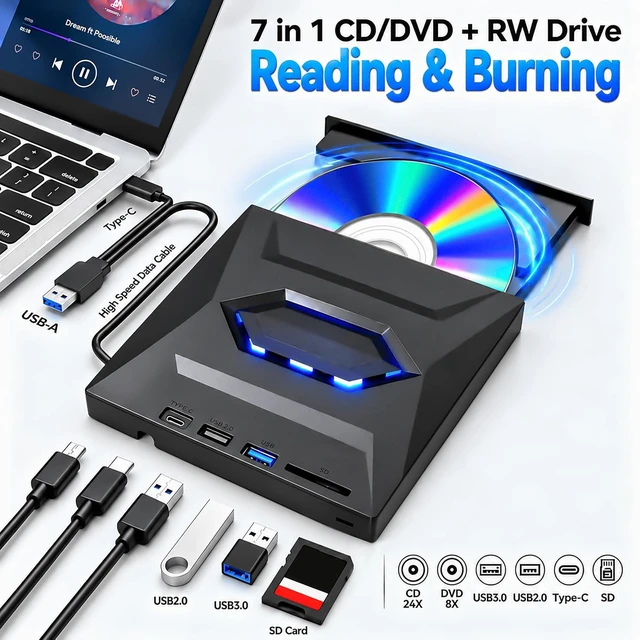
    • EXTERNAL CD/DVD DRIVE: Portable USB-C CD/DVD drive for reading and burning CDs and DVDs, ideal for laptop and desktop PC.
    • VERSATILE HUB: Built-in multi-port USB 3.0 hub and USB-C port for fast data transfer and easy device expansion.
    • SD Card Reader: Built-in SD and Micro SD card reader allows you to quickly read and transfer files directly from storage medium.
    • Wide compatibility: compatible with Windows, Linux and A-p-p-l-e Mac - works with laptops and desktop PCs without additional drivers.
    • Plug & Play: Easy setup via USB-C or USB-A port no additional power supply required, ready to use.
    +
    +
    Overview
    Specs
    Reviews

    Any questions? Ask CelesteSM will help you find out quickly.

    USB 3.0 & USB C External CD/DVD Drive with SD Card Reader & USB Hub, USB3.0 External DVD Optical Dis
    External CD DVD player


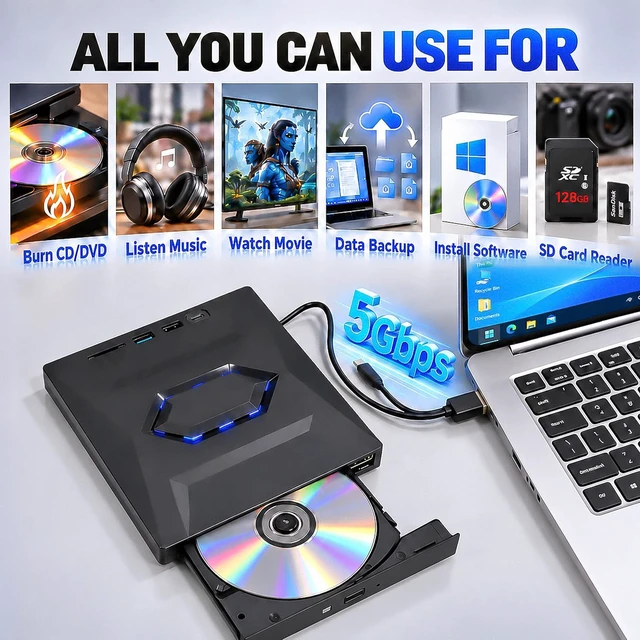
    With this external DVD player, you have the ability to watch movie DVDs, listen to audio CDs, burn and extract optical media, copy your photo clips, install software, games or operating systems, perform data backups, and many other uses. Compact and lightweight, it fits effortlessly in your travel bag: it is the perfect companion for DVD enthusiasts, to take and use wherever you are.

    external CD DVD player
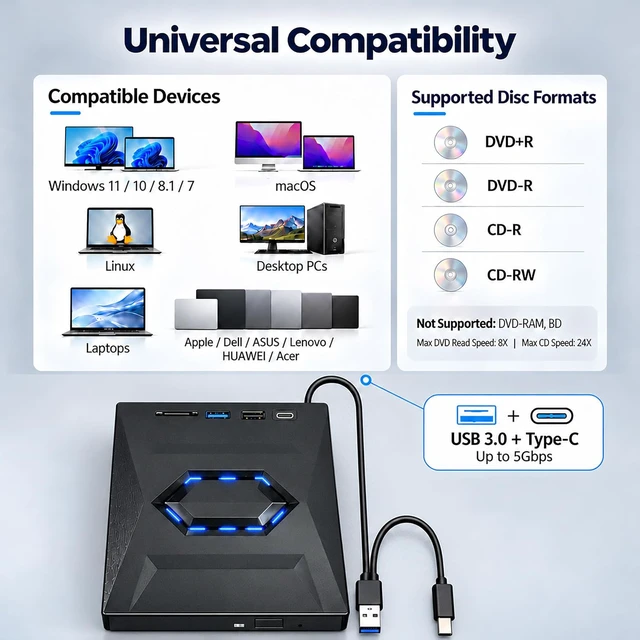
    Supports various disk formats:


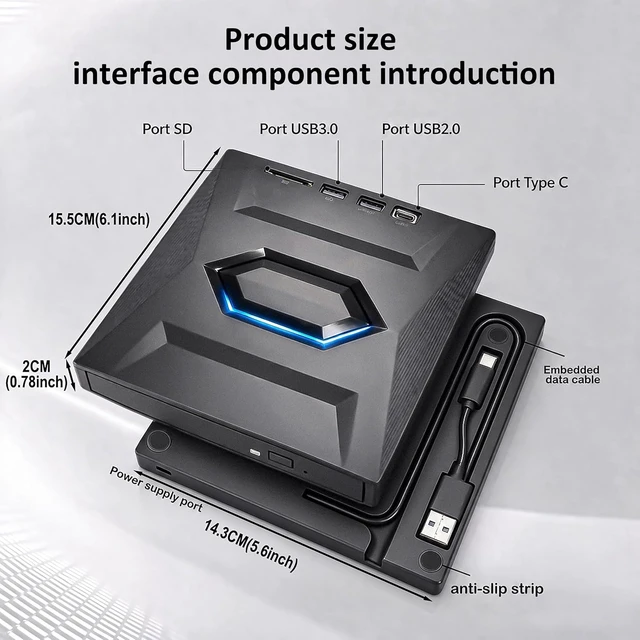
    Available interfaces: USB 3.0, Type-C

    Maximum transfer rate: 5 Gbps

    Supported disc formats: DVD+R, DVD-R, CD-R, CD-RW

    Not supported: DVD-RAM, Blu-ray discs (BD), some proprietary formats

    Maximum DVD playback speed: 8x

    Maximum CD read and write speed: 24x

    Supports various disk formats:
    Built-in SD/TF card reader

    It is not only a USB external DVD player, but also an SD and TF card player. Simply transfer your photos and videos from your camera to the computer via the dedicated location. Note: SD and TF slots do not work at the same time.

    Built-in SD/TF card reader
    2-in-1 USB 3.0 connector

    It integrates a USB-A interface as well as a USB-A to USB-C adapter. It easily connects to many laptops and desktops, without the need for an additional USB hub or adapter. Plug it in and it is ready for use.

    2-in-1 USB 3.0 connector
    High Performance

    This enhanced DVD player benefits from increased speed, low impedance and excellent interference resistance, for smoother and more responsive use.

    High Performance
    The package contains

    External CD Player * 1

    User manual * 1

    Packaging box * 1

    Power cable* 1

    The package contains
    The external CD/DVD player also allows you to play your audio CDs and enjoy your music collection on computer.
    • Connect the external DVD burner to the USB port on your computer. For a stable connection, prefer a USB port directly connected to the motherboard.
    • Press the eject button on the drive to open the drawer.
    • Place your audio CD in the drawer, printed face up, then close the drawer.
    • Wait for the system to detect the disk. Select the audio tracks you want to listen to, then start playing. If nothing appears automatically, open Windows Media Player manually.
    The external CD/DVD player also allows you to play your audio CDs and enjoy your music collection on
    Backup your computer files to CD or DVD
    • Backup your documents on optical media against data loss.
    • Insert a blank CD-R/RW, DVD+R/DVD-R into the burner.
    • Open "Start", go to the files folder.
    • Select your files, right click to copy to the optical drive.
    • Choose us as the destination, validate and wait for the end before ejecting.
    Backup your documents on optical media against data loss. Insert a blank CD-R/RW, DVD+R/DVD-R into t
    Before using it, make sure your laptop has software that supports DVD playback.
    • Click the "Start" menu on your laptop, then look for "Windows Media Player"  to open it.
    • Connect your external DVD burner directly to a USB port on your computer. For fixed computers, give preference to the USB ports located on the back of the motherboard; Avoid USB hubs and extension cables.
    • Then insert a compatible DVD into the player.
    • Select your DVD and click "Play". You can then watch your movie DVD on your laptop.
    DVD
    If your computer does not have a built-in optical drive, the external DVD burner allows you to install and run software or programs from CDs and DVDs.
    • This DVD drive is equipped with USB 3.0 and Type-C connectivity, offering transfer rates of up to 5 Gbps for smoother use.
    • It is compatible with most laptops and desktops, under Windows 11/10/8.1/7, Linux and macOS.
    • Plug it directly into a USB port on the motherboard to ensure sufficient power supply. Avoid USB hubs and extension cables.
    • Important: This drive is designed for computer use only. It is not compatible with TVs, tablets, game consoles, car radios or standalone Blu-ray players. It does not support DVD-RAM discs or Blu-ray discs (BD).
    This  drive is equipped with USB 3.0 and Type-C connectivity, offering transfer rates of up to 5


    In case of malfunction, follow these troubleshooting steps. First, make sure that the computer detects the external CD/DVD player correctly.


    First, check that your computer properly detects the external DVD burner.


    • On Windows: if the burner is recognized, the "DVD RW Drive" icon appears in "This PC".
    • On macOS: the drive icon only shows up after a disc is inserted and successfully read.

    If the USB burner is not detected or operates unstably, follow the steps below:

    Plug the burner directly into a USB port on the motherboard, preferably on the rear of the desktop computer. Avoid USB hubs, extension cables and concentrators, as they may cause insufficient power supply or disconnection.

    Some USB ports cannot supply enough power to run the burner stably. If the device is connected but rarely recognized or keeps interrupting, use an additional 5V power supply via a power adapter or external battery.

    CD/DVD drive drivers are generally integrated into the operating system. If necessary, uninstall the device driver in Device Manager, then restart the computer to let it reinstall automatically.

    Some operating systems require media playback software to access the content on the disc. For example, Windows 11 requires a compatible player such as VLC, as well as an active Internet connection to download the necessary components.

    If the USB burner is not detected or operates unstably, follow the steps below:  Plug the burner di
    Some important things to know:


    • Plug the DVD player directly into the computer's USB port, avoid USB hubs. On a fixed computer, prioritize the motherboard's back ports.
    • Make sure the disk is properly positioned and free of scratches.
    • Check for software compatibility or test the device on another computer.
    • If the USB power supply is insufficient, use an external adapter to bring more power.
    • Prepare reading software such as VLC before use.
    • Do not look directly at the internal laser, it can damage your eyes.
    • Remove the device from powerful magnets.
    • The transfer speed depends on the environment and the computer system.
    • This device is not compatible with TV, car radio, Blu-ray player, projector, tablet, smartphone, ChromeBook or Ubuntu.
    Features
    1. EXTERNAL CD/DVD DRIVE:Portable USB-C CD/DVD drive for reading and burning CDs and DVDs, ideal for laptop and desktop PC.
    2. VERSATILE HUB: Built-in multi-port USB 3.0 hub and USB-C port for fast data transfer and easy device expansion.
    3. SD Card Reader: Built-in SD and Micro SD card reader allows you to quickly read and transfer files directly from storage medium.
    4. Wide compatibility: compatible with Windows, Linux and A-p-p-l-e Mac - works with laptops and desktop PCs without additional drivers.
    5. Plug & Play: Easy setup via USB-C or USB-A port no additional power supply required, ready to use.


    The package contains

    External CD Player * 1

    User manual * 1

    Power cable* 1

    Warranty & Returns

    Warranty, Returns, And Additional Information

    Warranty

    • Please contact the Seller directly for warranty information. Warranty information may also be found on the Manufacturer's website.
    • CONTACT

    Return Policies

    Manufacturer Contact Info

    LOADING...