• $99.99
  • Free 30-day Returns
  • Ships from China.
    Price alert
    Shop it at NeweggBusiness.

    AUTYUE External Blu Ray Drive, 100GB Blu Ray Burner and DVD CD Writer, USB 3.0 Type-C DVD Drive, 7-in-1 Hub, SD TF Card Reader, 24X CD 8X DVD 6X BD, Compatible with Windows 11/10/8/7, Mac OS, Linux

    Limited time offer, ends 12/05 By Shenzhen Qiuyiyue Store

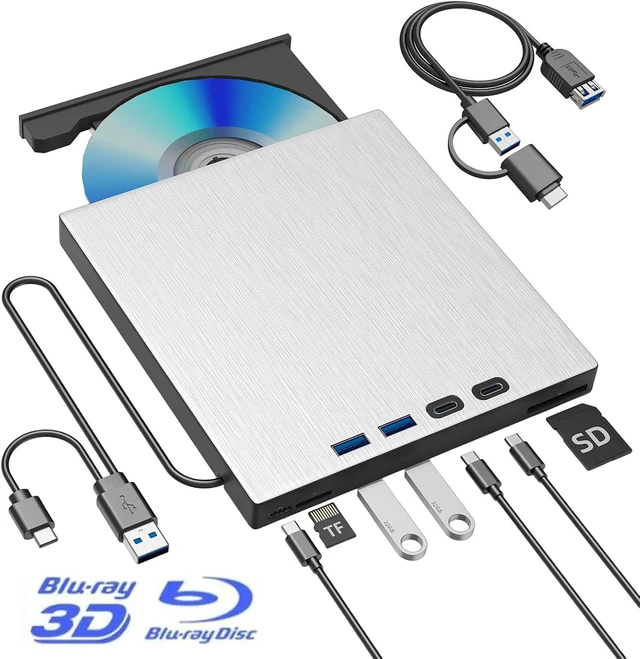
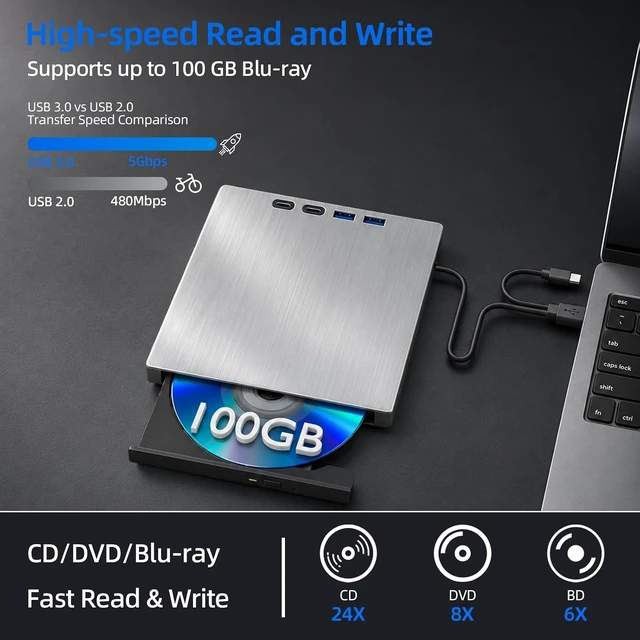
    • 100GB BDXL Blu-ray Burner and Writer: This external blu ray burner reads and writes CDs, DVDs and Blu-ray discs, with support for high-capacity Blu-ray media up to 100GB. Maximum writing speed reaches 24X for CDs, 8X for DVDs and 6X for BDs. Suited to backing up videos, files, games and system installation files on high-capacity discs.
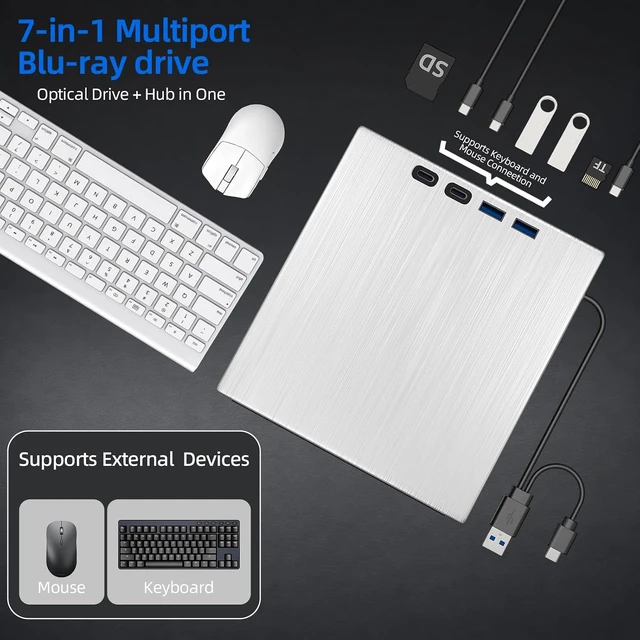
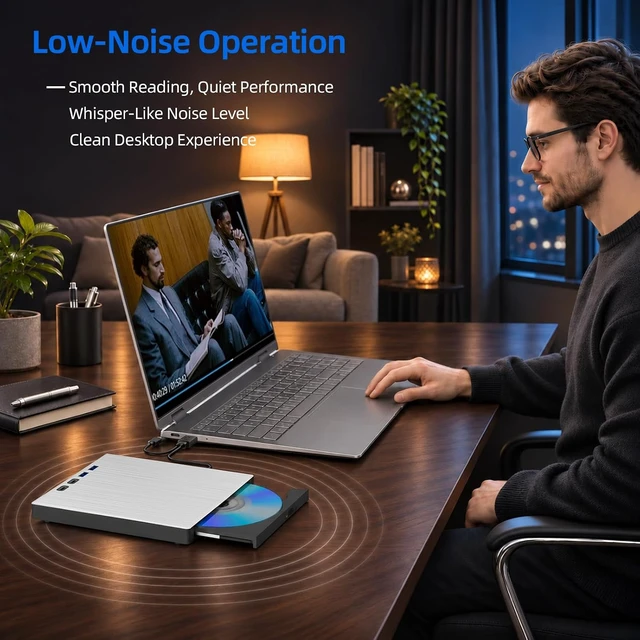
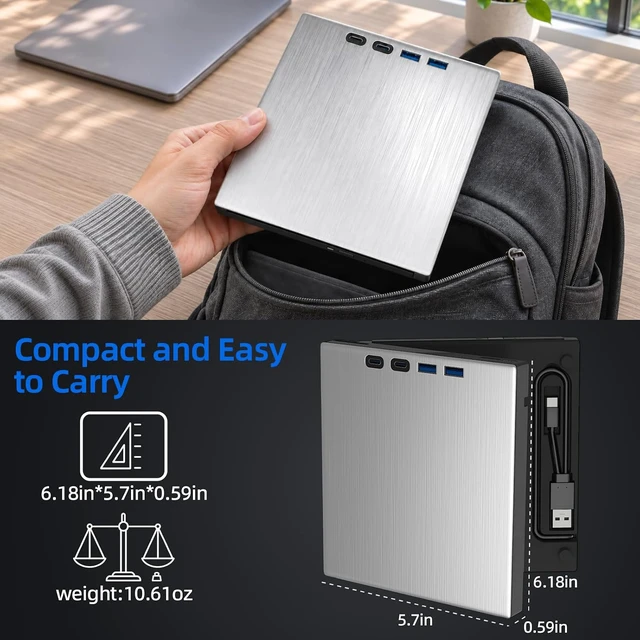
    • 7-in-1 Versatile Expansion Hub: Built-in USB 3.0, USB 2.0, dual Type-C ports and SD and TF card readers. Note that the SD and TF slots cannot be used at the same time. USB 3.0 data transfer up to 5Gbps supports smooth 1080P video playback. Backward compatible with USB 2.0. Plug and play, low-noise operation, this external blueray/dvd drive for pc accesses optical discs while peripherals are connected.
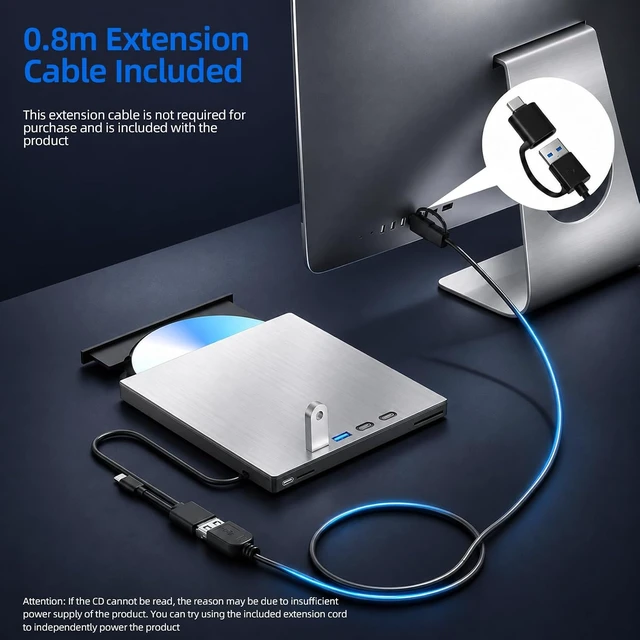
    • Extra Extension Cable and Power Port: A 31.5in / 0.8m extension cable allows flexible placement of this USB blu ray drive away from the host device. The additional power port ensures steady reading and burning performance during long-time operation.
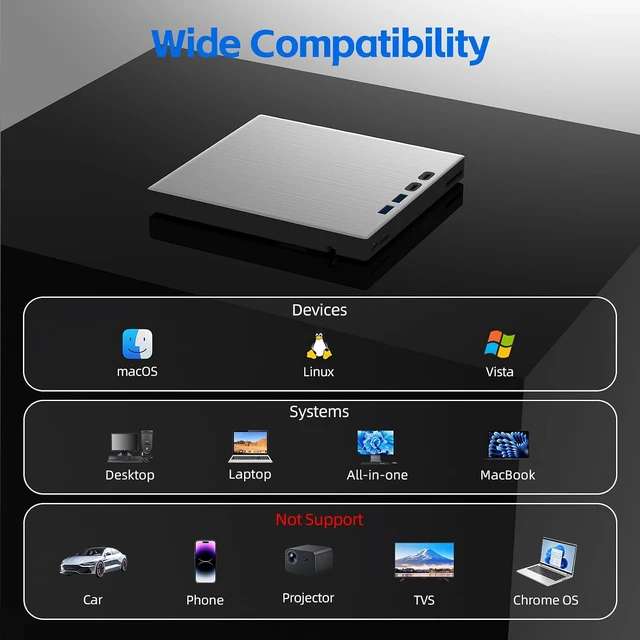
    • Wide System Compatibility: Works with Windows 11/10/8/7, Mac OS and Linux on Laptop and Desktop PC. Note: does not support 4K Ultra HD Blu-ray discs. No playback software is included - third-party media software (VLC,PowerDVD, Leawo) is required for Blu-ray playback. Not compatible with mobile phones, tablets, TVs or projectors.
    • Multiple Region Code Switching: This product supports 8 switchable region codes; please note the region code can be changed a total of 4 to 5 times only.
    +
    +
    Overview
    Specs
    Reviews

    Any questions? Ask CelesteSM will help you find out quickly.

    External Blu Ray Drive, 100GB Blu Ray Burner and DVD CD Writer, USB 3.0 Type-C DVD Drive, 7-in-1 Hub
    External Blu Ray Drive, 100GB Blu Ray Burner and DVD CD Writer, USB 3.0 Type-C DVD Drive, 7-in-1 Hub
    External Blu Ray Drive, 100GB Blu Ray Burner and DVD CD Writer, USB 3.0 Type-C DVD Drive, 7-in-1 Hub
    External Blu Ray Drive, 100GB Blu Ray Burner and DVD CD Writer, USB 3.0 Type-C DVD Drive, 7-in-1 Hub
    External Blu Ray Drive, 100GB Blu Ray Burner and DVD CD Writer, USB 3.0 Type-C DVD Drive, 7-in-1 Hub
    External Blu Ray Drive, 100GB Blu Ray Burner and DVD CD Writer, USB 3.0 Type-C DVD Drive, 7-in-1 Hub
    External Blu Ray Drive, 100GB Blu Ray Burner and DVD CD Writer, USB 3.0 Type-C DVD Drive, 7-in-1 Hub
    External Blu Ray Drive, 100GB Blu Ray Burner and DVD CD Writer, USB 3.0 Type-C DVD Drive, 7-in-1 Hub
    External Blu Ray Drive, 100GB Blu Ray Burner and DVD CD Writer, USB 3.0 Type-C DVD Drive, 7-in-1 Hub
    External Blu Ray Drive, 100GB Blu Ray Burner and DVD CD Writer, USB 3.0 Type-C DVD Drive, 7-in-1 Hub
    External Blu Ray Drive, 100GB Blu Ray Burner and DVD CD Writer, USB 3.0 Type-C DVD Drive, 7-in-1 Hub
    External Blu Ray Drive, 100GB Blu Ray Burner and DVD CD Writer, USB 3.0 Type-C DVD Drive, 7-in-1 Hub
    External Blu Ray Drive, 100GB Blu Ray Burner and DVD CD Writer, USB 3.0 Type-C DVD Drive, 7-in-1 Hub

    Q&A

    Quesion1: The external Blu ray drive shows a connection failure with the computer.

    1. Pls check if the optical drive is being recognizes by your computer.

    For Windows OS: You can see the BD RW icon in Windows explorer. Use the data cables on the back (bottom) of the optical drive to connect your computer's USB port or desktop computer host. We have a power cord that we recommend using together. Do not connect USB extension hub.

    For Mac OS: The Mac OS computer will not display the device icon until the disc is placed in the optical drive and read successfully.


    2. Pls check the Device Manager: If the optical drive displays a yellow exclamation mark or question mark, there may be a driver issue. You need to right-click and select 'Update Driver', or uninstall the driver and restart the computer, then connect the optical drive, and the system will reinstall the driver automatically.

    3. Pls check the BIOS settings: Enter the computer's BIOS settings interface to see if the optical drive is disabled. If it is disabled, enable it.

    Quesion2: The optical drive connection is successful, but the disc still cannot be played.

    Step1: Set the region code (CDs do not have region code). The disc can only be played when there on code of the DVD drive matchesthe DVD. (Note: Only allows to change the region code 4-5 times.The operating steps are on the last page of the manual.)

    Step2: Insert your CDs or DVDs, Use a media player. If playing Blu ray disc, it is necessary to download Blu ray playback software in advance. (For Windows, such as PowerDVD,VLC etc. For Mac OS, such as Macgo Blu ray Player,etc.) Pls make sure Blu-ray playback software is compatible with your computer system. Test it by downloading the software 'Cyberlink BD & 3D Advisor'. The software will verify whether your computer is equipped for Blu-ray or 3D playback. This product does NOT include playback software.

    Note: 

    Please ensure that the optical drive is clean: As any dirt may prevent it from functioning correctly. It is recommended that a professional optical drive cleaner or cotton swab be used to gently clean the read-write head of the optical drive.

    Features
    1. 100GB BDXL Blu-ray Burner and Writer: This external blu ray burner reads and writes CDs, DVDs and Blu-ray discs, with support for high-capacity Blu-ray media up to 100GB. Maximum writing speed reaches 24X for CDs, 8X for DVDs and 6X for BDs. Suited to backing up videos, files, games and system installation files on high-capacity discs.
    2. 7-in-1 Versatile Expansion Hub: Built-in USB 3.0, USB 2.0, dual Type-C ports and SD and TF card readers -- note that the SD and TF slots cannot be used at the same time. Bi-directional data transfer up to 5Gbps supports smooth 1080P video playback. Backward compatible with USB 2.0 and plug and play for stable, low-noise operation, this external blueray/dvd drive for pc accesses optical discs while peripherals are connected.
    3. Extra Extension Cable and Power Port: A 31.5in / 0.8m extension cable allows flexible placement of this usb blu ray drive away from the host device. The additional power port ensures steady reading and burning performance during long-time operation.
    4. Wide System Compatibility: This external blu ray drive works with Windows 11/10/8/7, Mac OS and Linux on Laptop and Desktop PC. Note: does not support 4K Ultra HD Blu-ray discs. No playback software is included third-party media software (VLC,PowerDVD, Leawo) is required for Blu-ray playback. Not compatible with mobile phones, tablets, TVs or projectors.
    5. Multiple Region Code Switching: This product supports 8 switchable region codes; please note the region code can be changed a total of 4 to 5 times only. If you encounter any issues after purchase, contact customer service promptly.


    Warranty & Returns

    Warranty, Returns, And Additional Information

    Warranty

    • Please contact the Seller directly for warranty information. Warranty information may also be found on the Manufacturer's website.
    • CONTACT

    Return Policies

    Manufacturer Contact Info

    LOADING...