• $79.99
  • $89.99
  • Save: $10.00 (11%)
  • Free 30-day Returns
  • Sold by Direct from manufacturerVIVO
    Top Rated
    4.7 (2,010 seller ratings)

    Shipped by Direct from manufacturerVIVO

    Price alert
    Shop it at NeweggBusiness.

    Meet Your Seller

    VIVO Office Chair Mounted 26 x 12 inch Full Motion Keyboard and Mouse Tray

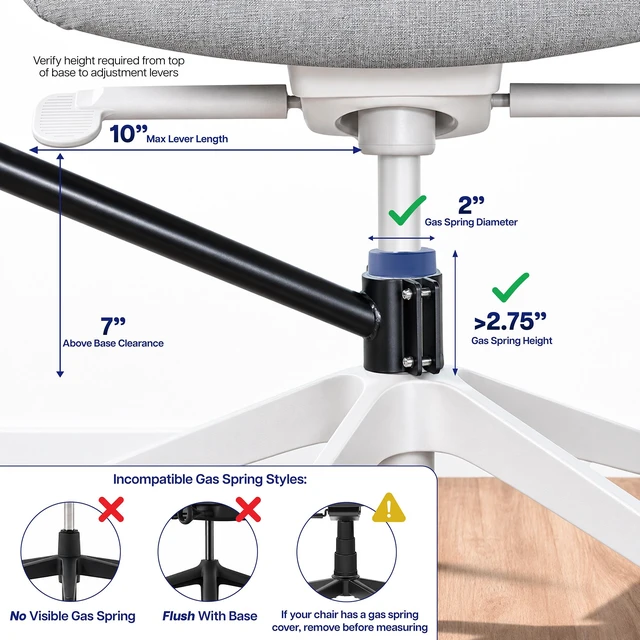
    • Over Chair Keyboard Tray: Steel arm support attaches to the bottom tube section (1.7" to 2" in diameter) of a standard height adjustable office chair for ergonomic typing angles and customized placement --Patent Pending--
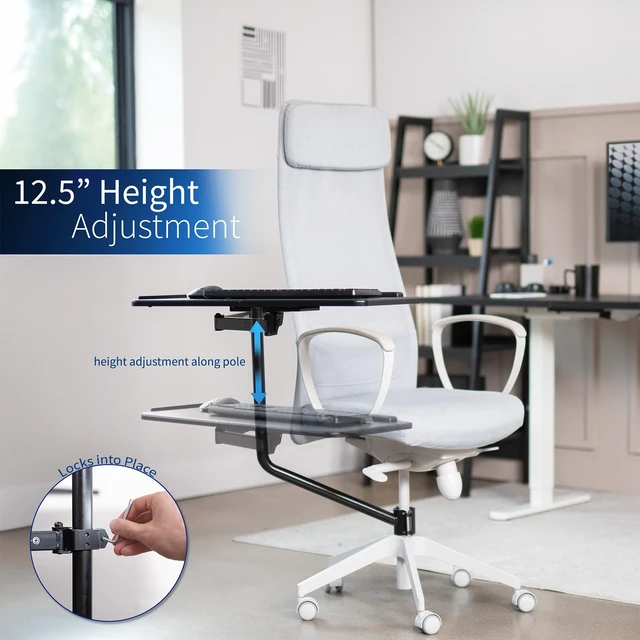
    • Adjustable Tilt and Rotation: Enjoy comfortable typing with a tilting surface and full 360° rotation for flexible positioning. Accommodates both left and right-handed users
    • Convenient Setup: No need to attach a keyboard tray to your desk or wall with this innovative chair mount. Perfect for gamers, professionals with large screen setups, and everyday computer use
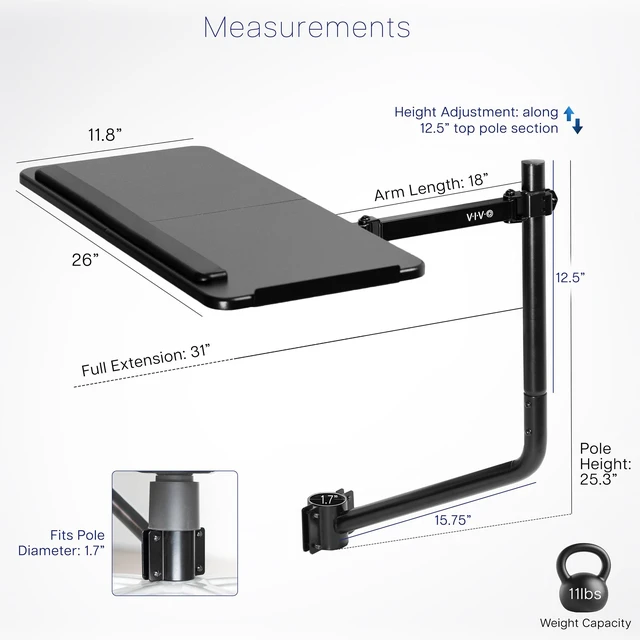
    • Large Keyboard Surface: The spacious 26" x 11.8" platform fits most standard and oversized keyboards on the market, and wrist padding increases overall comfort
    • Added Protection: The tray's raised side edge keeps your equipment safe, preventing anything from sliding off
    +
    +
    Overview
    Specs
    Reviews

    Any questions? Ask CelesteSM will help you find out quickly.

    Attach a keyboard tray directly to your office chair with the Black Office Chair Mounted Keyboard Tray (MOUNT-KB08C) from VIVO! This innovative mount complements large screen and gaming setups, along with everyday computer work. Easily back away from your screen while keeping control of your keyboard and mouse. The tray features adjustable tilt and full rotation for convenient placement and comfortable typing angles, and wrist padding provides additional support. Upgrade your workstation today, and enjoy ergonomic typing angles personalized to your needs.

    Compatibility

    • Fits Pole Diameter: 1.7 to 2
    • Weight Capacity: 11 lbs

    Specifications

    • Color: Black
    • Material: Particle Board, Steel
    • Keyboard Tray Dimensions: 26 x 11.8 x 0.5
    • Full Extension: 31
    • Arm Lenth: 18
    • Total Pole Height: 25.3
    • Height Adjustment: Provided along the 12.5 top section of center pole
    • Tilting Capability: Yes
    • Articulation: 360° rotation

    Warranty & Returns

    Warranty, Returns, And Additional Information

    Warranty

    • Please contact the Seller directly for warranty information. Warranty information may also be found on the Manufacturer's website.
    • CONTACT

    Return Policies

    • Return for refund within: 30 days
    • Return for replacement within: 30 days
    • This item is covered by VIVO Return Policy

    Manufacturer Contact Info

    LOADING...

    The VIVO chair-mounted keyboard and mouse tray adds a tilting, 360-degree rotating 26 × 11.8-inch work surface to compatible height-adjustable office chairs, making it suitable for gamers and computer users who want flexible keyboard placement without attaching a tray to a desk or wall.

    Recommended For

    • Gamers or multi-screen users who sit back from a large display and want the keyboard and mouse to move with their chair rather than stay on the desk.
    • Home-office users whose desk has no room for an under-desk tray or is not suitable for mounting one, and who can attach the tray to a compatible chair.
    • Users who want to adjust keyboard placement for left- or right-handed use, or change the tray angle and orientation while seated.
    • People who prefer their keyboard and mouse closer to their seated position instead of reaching toward a desk, and are willing to spend time adjusting the chair-mounted setup.

    Real-World Use Scenarios

    • When a desk’s shape or material makes an under-desk tray impractical, attach the keyboard and mouse to a compatible chair instead; the controls move with the user rather than depending on a desk mount.
    • For a large-screen workstation, keep the keyboard and mouse close while sitting back from the monitor; the tray rotates with the chair, so the controls stay with the user as they reposition.
    • During everyday computer work, adjust the tray’s angle and position to bring the keyboard and mouse within reach; this may help users who find themselves leaning forward to reach desk-level controls.
    • For left-handed mouse use, rotate the tray to place the mouse on the preferred side of the keyboard; the full-motion design allows flexible positioning.
    • When getting into or out of the chair, rotate the tray away to clear space; users should check that the arm’s placement works with their chair and movement routine.