Meet Your Seller
VIVO White Clamp-on Vertebrae Cable Management Kit, Desk 4 Entry Wire Organizer
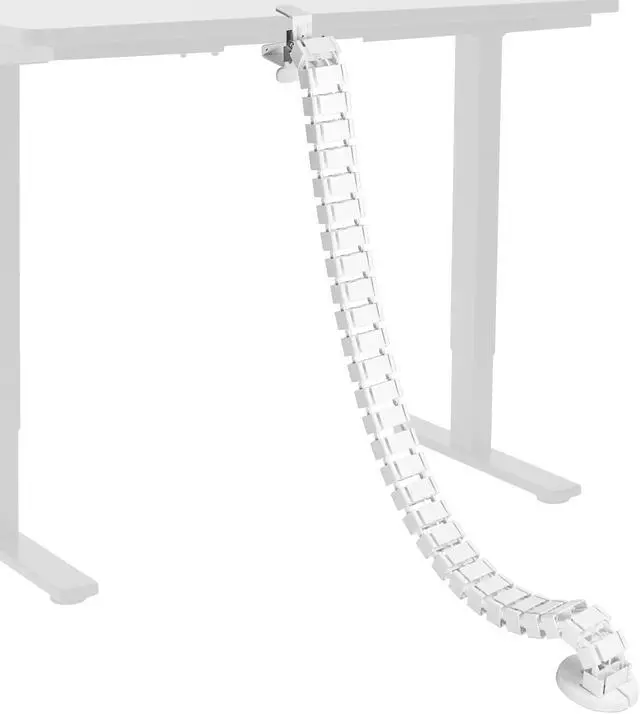
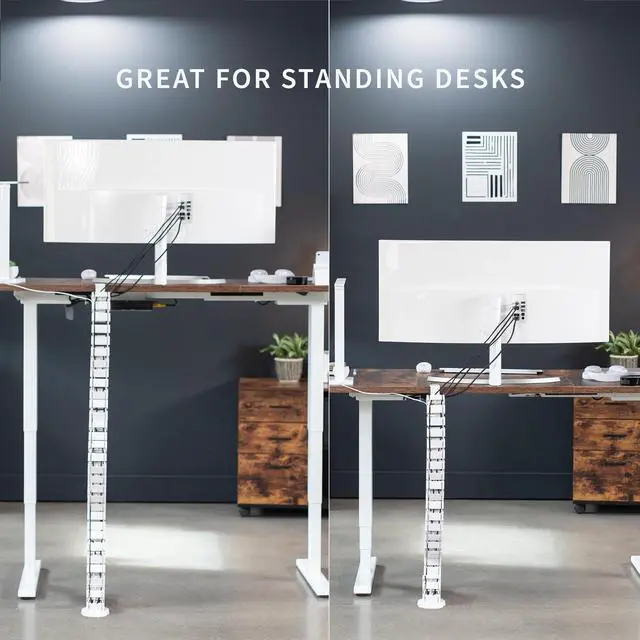
- Vertebrae Cable Management: Clamping to the edge of your desktop, this product is designed to protect and organize AV and power cords. Great for height adjustable or stationary desk systems
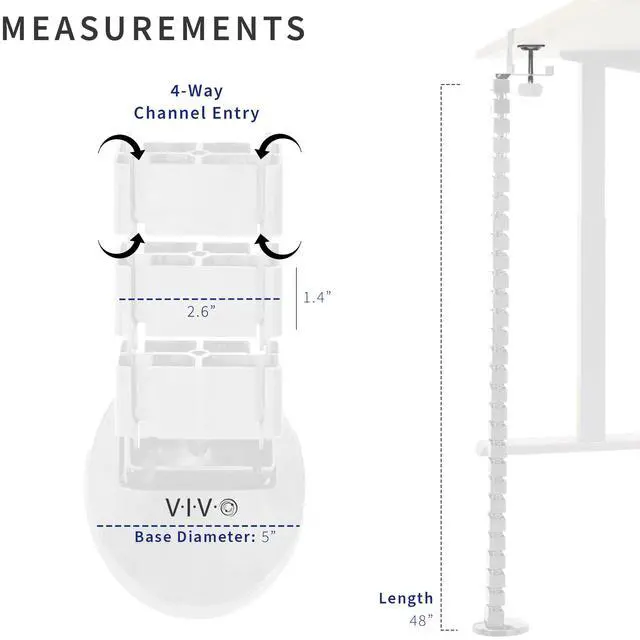
- Block System: Features snap-together interlink blocks with a 5-inch diameter steel base plate for stability. The 4-way channel entry design makes it easy to slip cables in at any angle
- Heavy Duty C-clamp: Easily clamps to the back of your desk with a small footprint. No drilling is required. Clamp padding protects your table surface from scuffs and scratches
- Desk to Floor: The 4-foot cable management strip ensures that your cords will be kept organized from your work surface to the floor
- Stay Organized: Keeping your workspace clean and tidy creates a non-cluttered environment that encourages focus and concentration
Any questions? Ask CelesteSM will help you find out quickly.
Cable management is made easy with the White Clamp-on Vertebrae Cable Management Kit for Desks (DESK-AC01P-W) from VIVO! This flexible, clamp-on strip provides modern and attractive desk-to-floor cable management for your work area, perfect for height adjustable and standard desks alike. The square interlocking clips are built with ergonomics and versatility in mind, featuring a quad entry cabling system for efficient cord organization. Keep unsightly and hazardous A/V and power cords clean and protected with this convenient addition to your work environment.
Compatibility
- Desktop Thickness for Clamp: 0.4 to 2.0
- Desktop Thickness for Screw: At least 1 thick (optional)
- Mounting Options: Study C-clamp or Screw Mounting (if desired)
Specifications
- Color: White
- Material: Steel, Plastic
- Type: 4-way Channel Entry
- Vertebrae Length: 4 ft
- Block Dimensions (each): 2.6 x 1.4
- Base Diameter: 5
Warranty & Returns
Warranty, Returns, And Additional Information
Warranty
- Please contact the Seller directly for warranty information. Warranty information may also be found on the Manufacturer's website.
- CONTACT
Return Policies
- Return for refund within: 30 days
- Return for replacement within: 30 days
- This item is covered by VIVO Return Policy
Manufacturer Contact Info
- For a directory of all our manufacturers, please click below.
- Manufacturers Directory
The VIVO White Clamp-on Vertebrae Cable Management Kit is a 4-foot, desk-to-floor cable organizer for people who want to route AV and power cords neatly along a stationary or height-adjustable desk. Its padded C-clamp installs without drilling, and the interlocking blocks accept cables from four directions.
Recommended For
- Sit-stand desk owners who need to guide power, video, network, or peripheral cables from the moving desktop toward the floor as the desk changes height.
- Desk owners who want a cable route from desktop to floor without drilling into the desk; the clamp is suited to desktops 0.4–2.0 inches thick.
- Workstations with several A/V and power cords that need a flexible desk-to-floor route, rather than loose cables hanging beside the desk.
- Users who want a white cable-management spine to coordinate with a white desk or workspace while keeping cords routed along the desk edge.
Real-World Use Scenarios
- On a sit-stand desk, route the cables that must run from the desktop to the floor through the spine; they stay gathered in one guided path as the desk changes height, rather than dangling separately.
- For a home-office setup with a monitor, dock, and peripherals, gather the cables running from the desk toward the floor into one organized route; this can make the area behind and beneath the desk look less tangled.
- When a desk sits away from the wall or has no built-in cable route, use the clamp-on spine to guide cords from the desktop edge toward the floor without drilling into the desk.
- For a fixed-height desk with several power and A/V cords, run them together from the work surface toward the floor so they are less exposed and easier to keep out of the way.
- When rearranging a workstation or adding equipment, use the spine’s cable-entry channels to route cords into the run from different directions, keeping the desktop-to-floor bundle organized.