

Your Browsing History
- Free 30-day Returns
$30.99
Ships from China.


Meet Your Seller

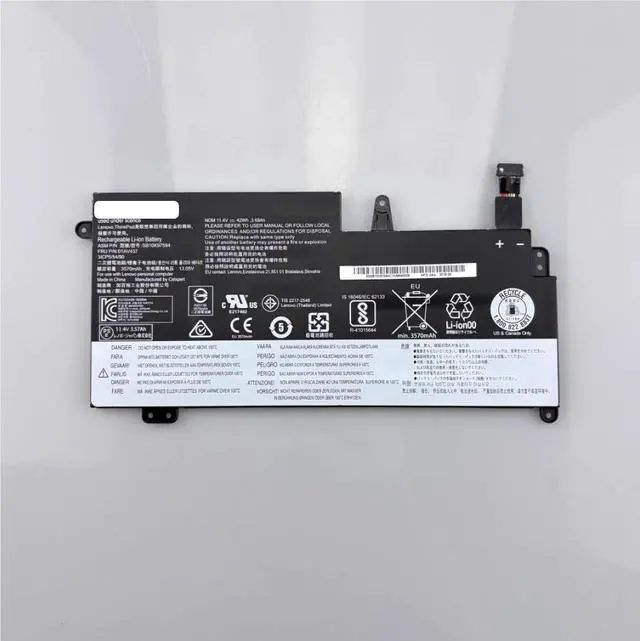
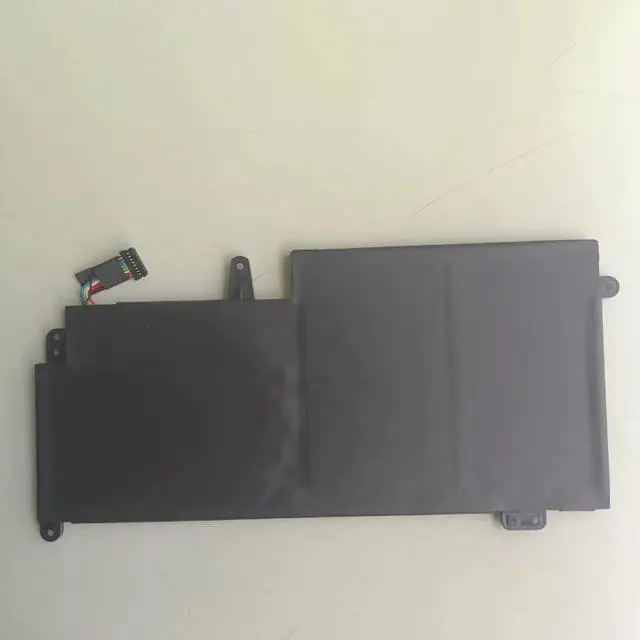
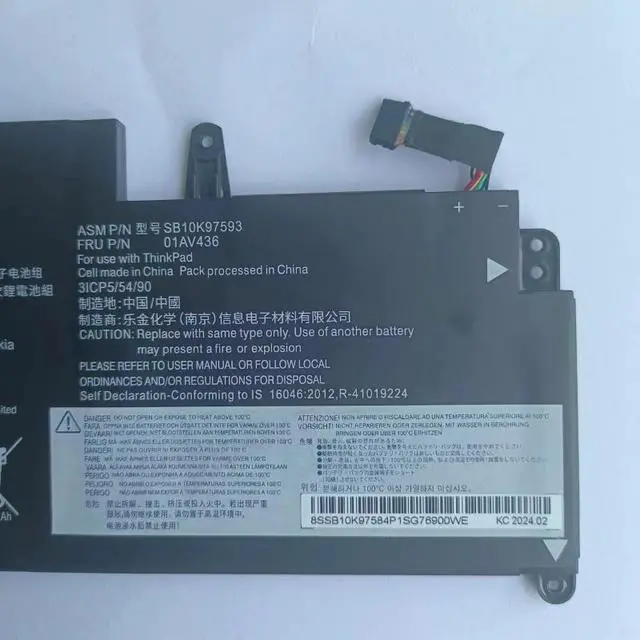


01AV400 42Wh 11.4V Replacement Battery for Lenovo ThinkPad 13 S2 1st/2nd Gen Series Compatible with 01AV401 01AV402 SB10J78997 Li-ion
- Part Number: 01AV400 Direct replacement for multiple OEM variants
- Battery Type: 3-Cell Lithium-Ion (Li-ion)
- Voltage: 11.4V
- Capacity: 3685mAh / 42Wh
- Color: Black
- Condition: Brand New, 100% Tested, Grade A+ Cells
- Warranty: 12-Month Warranty
- Compatible Part Numbers: 01AV401, 01AV402, 01AV435, 01AV436, 01AV437, SB10J78997, SB10J78998, SB10J78999, SB10K97592, SB10K97593, SB10K97594
- Compatible Laptop Series: Lenovo ThinkPad S2 (1st/2nd Gen), ThinkPad 13 (1st/2nd Gen), ThinkPad 13 Chromebook
+
+
Overview
Specs
Reviews

Any questions? Our AI beta will help you find out quickly.
Try me now
This is a brand new, high-performance replacement battery for select Lenovo ThinkPad 13 and S2 series laptops. With a model number of 01AV400, this 42Wh lithium-ion battery is designed to meet or exceed original OEM specifications. It provides reliable, long-lasting power for your daily computing needs, whether you are working, studying, or streaming.
Key Compatibility Information (Please Verify Before Purchasing):
To ensure you receive the correct battery for your device, please follow these steps
BEFORE ordering:
PRIMARY METHOD - Check Your Original Part Number: This is the most reliable way. Remove your laptop's battery and read the Model/Part Number (P/N) on its label. This battery is compatible if the part number matches any of the following:
Series Compatible Part Numbers
01AV Series 01AV400, 01AV401, 01AV402, 01AV435, 01AV436, 01AV437
SB10 Series SB10J78997, SB10J78998, SB10J78999, SB10K97592, SB10K97593, SB10K97594
Check Your Laptop Model: This battery is specifically designed to fit the following Lenovo laptop series. Please verify your exact model number (e. g., 20GJ, 20GK, 20GL, 20GM) on the label on the bottom of your device:
Series Compatible Models / Machine Type Models (MTM)
ThinkPad S2 Series ThinkPad S2 1st Gen, ThinkPad S2 2nd Gen
ThinkPad 13 Series ThinkPad 13 1st Gen (20GJ), ThinkPad 13 2nd Gen (20GK), ThinkPad 13 Chromebook (20GL/20GM)
Verify
Voltage: 11.4V
Capacity: 42Wh
Connector: Please carefully compare the connector type, position, and the overall shape of your original battery with the product images provided.
If you are unsure about compatibility, please contact us with your laptop model number or a clear photo of your original battery label and connector before purchasing we are happy to help you confirm.
Technical
Specification
Model Number 01AV400 / SB10J78997
Battery Chemistry Lithium-Ion (Li-ion)
Voltage 11.4V
Capacity 3685mAh / 42Wh
Cell Configuration 3-Cells
Color Black
Condition Brand New
Performance & Safety:
This battery is built with high-quality Grade A+ cells and a premium protection circuit module. It is designed to meet or exceed OEM performance standards and features multiple built-in safety protections for worry-free operation:
Over-Charge Protection
Over-Discharge Protection
Over-Voltage Protection
Over-Current Protection
Short-Circuit Protection
Over-Temperature Protection
Based on typical usage, this 42Wh battery can provide up to 6-8 hours of runtime depending on screen brightness and applications.
Package Includes:
1 x Brand New 42Wh Replacement Battery (01AV400)
Note: This listing is for the battery only. Laptop, charger, and other accessories are not included. Professional installation is recommended.
Warranty & Support:
We stand behind our product with a 12-month warranty against manufacturing defects. If you have any questions about compatibility, installation, or performance, please contact us we are here to help.
Battery Care Tips:
For first-time use, fully discharge the battery to around 5% and then charge it to 100% without interruption. Repeating this cycle 2-3 times can help calibrate the new battery.
Avoid leaving your laptop plugged in constantly; occasional discharge cycles help maintain battery health.
Store the battery in a cool, dry place if not used for an extended period.
Key Compatibility Information (Please Verify Before Purchasing):
To ensure you receive the correct battery for your device, please follow these steps
BEFORE ordering:
PRIMARY METHOD - Check Your Original Part Number: This is the most reliable way. Remove your laptop's battery and read the Model/Part Number (P/N) on its label. This battery is compatible if the part number matches any of the following:
Series Compatible Part Numbers
01AV Series 01AV400, 01AV401, 01AV402, 01AV435, 01AV436, 01AV437
SB10 Series SB10J78997, SB10J78998, SB10J78999, SB10K97592, SB10K97593, SB10K97594
Check Your Laptop Model: This battery is specifically designed to fit the following Lenovo laptop series. Please verify your exact model number (e. g., 20GJ, 20GK, 20GL, 20GM) on the label on the bottom of your device:
Series Compatible Models / Machine Type Models (MTM)
ThinkPad S2 Series ThinkPad S2 1st Gen, ThinkPad S2 2nd Gen
ThinkPad 13 Series ThinkPad 13 1st Gen (20GJ), ThinkPad 13 2nd Gen (20GK), ThinkPad 13 Chromebook (20GL/20GM)
Verify
Specifications
:Voltage: 11.4V
Capacity: 42Wh
Connector: Please carefully compare the connector type, position, and the overall shape of your original battery with the product images provided.
If you are unsure about compatibility, please contact us with your laptop model number or a clear photo of your original battery label and connector before purchasing we are happy to help you confirm.
Technical
Specifications
:Specification
Details
Model Number 01AV400 / SB10J78997
Battery Chemistry Lithium-Ion (Li-ion)
Voltage 11.4V
Capacity 3685mAh / 42Wh
Cell Configuration 3-Cells
Color Black
Condition Brand New
Performance & Safety:
This battery is built with high-quality Grade A+ cells and a premium protection circuit module. It is designed to meet or exceed OEM performance standards and features multiple built-in safety protections for worry-free operation:
Over-Charge Protection
Over-Discharge Protection
Over-Voltage Protection
Over-Current Protection
Short-Circuit Protection
Over-Temperature Protection
Based on typical usage, this 42Wh battery can provide up to 6-8 hours of runtime depending on screen brightness and applications.
Package Includes:
1 x Brand New 42Wh Replacement Battery (01AV400)
Note: This listing is for the battery only. Laptop, charger, and other accessories are not included. Professional installation is recommended.
Warranty & Support:
We stand behind our product with a 12-month warranty against manufacturing defects. If you have any questions about compatibility, installation, or performance, please contact us we are here to help.
Battery Care Tips:
For first-time use, fully discharge the battery to around 5% and then charge it to 100% without interruption. Repeating this cycle 2-3 times can help calibrate the new battery.
Avoid leaving your laptop plugged in constantly; occasional discharge cycles help maintain battery health.
Store the battery in a cool, dry place if not used for an extended period.
Warranty & Returns
Warranty, Returns, And Additional Information
Warranty
- Please contact the Seller directly for warranty information. Warranty information may also be found on the Manufacturer's website.
- CONTACT
Return Policies
- Return for refund within: 30 days
- Return for replacement within: 30 days
- This item is covered by Ebuy limited Return Policy
Manufacturer Contact Info
- For a directory of all our manufacturers, please click below.
- Manufacturers Directory
LOADING...