here!
here!
I’m your shopping assistant for PC builds, upgrades, and everything tech.
Got questions? Ask away!
Start a conversation
here!
I’m your shopping assistant for PC builds, upgrades, and everything tech.
Got questions? Ask away!
Start a conversation
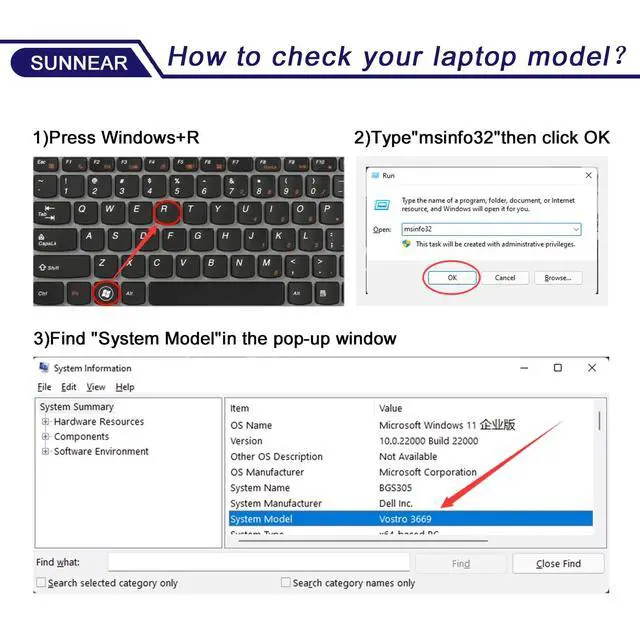



Any questions? Ask CelesteSM will help you find out quickly.


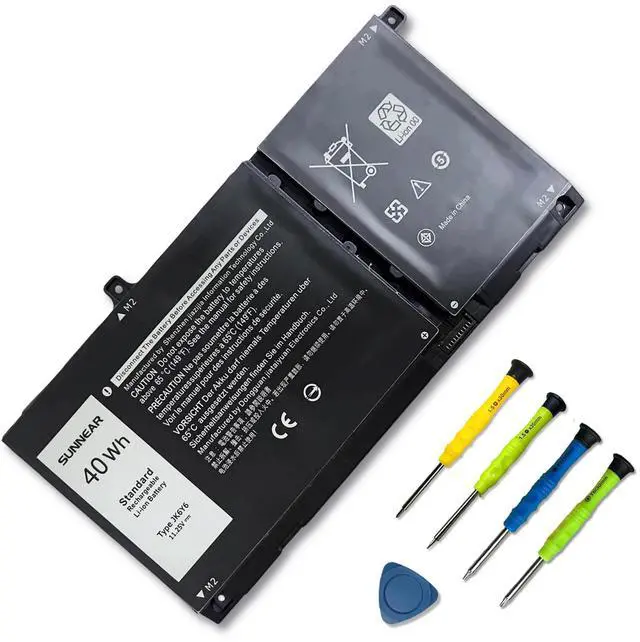
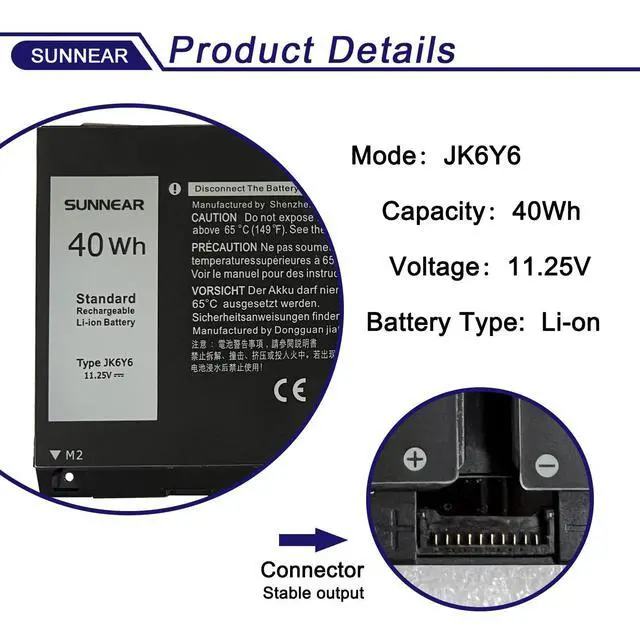
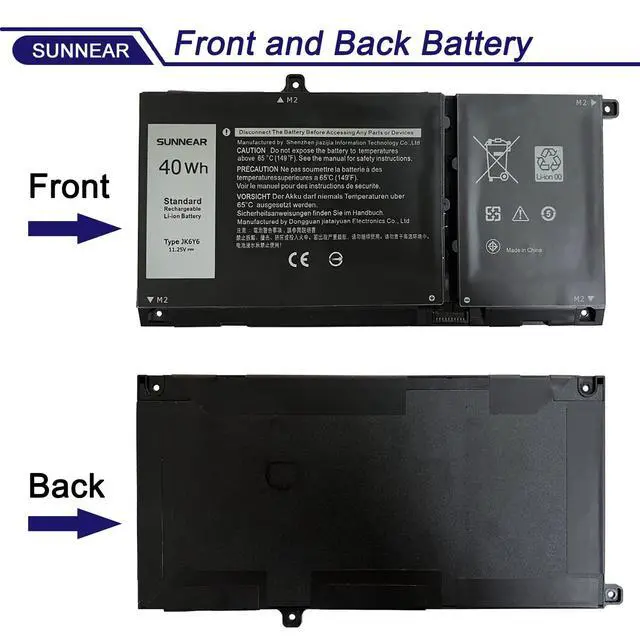
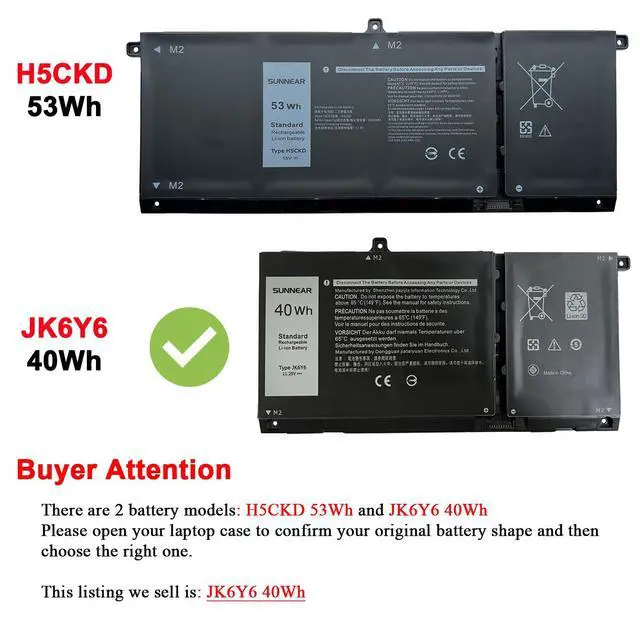
Please open your laptop case, check and confirm your original battery model and appearance, compared with our battery image, make sure that's what you need. Especially the location of the connector and the cable length (long or short).

Models:JK6Y6
Voltage:11.25V
Capacity:40Wh/3350mAh
Battery Type:Li-ion
Battery Condition:Brand New
Compatible Part Number:JK6Y6 CF5RH C5KG6.


The above notebook models are compatible with two batteries:
Before you buy, please open your laptop case, check and confirm your original battery type and appearance, compare it with our battery pictures to make sure it is the one you need. In particular, the location of the connector and the length of the cable (long or short). There are three different types of batteries, so please check which model you need before you buy. If you need an H5CKD battery, scroll down to the list to purchase.

1. When you get the new battery, run it down to 5% (not 0%), then power it up to 95%, and repeat this cycle 3-4 times to wake up the new battery.
2. The important point is to carry out a full run-down and power-up cycle every other month to extend the battery life.
3. When using the battery, do not keep it connected to the adapter for a long time, as this may damage the battery.
4. Avoid subjecting the battery to manual impact, disassembly, crushing, or puncturing. Do not dispose of the battery in fire or water.

Brand new from manufacturer. Tested with strict quality control standards
up to 600 reusable power cycles
Grade A cells ensure High capacity and smart chip ensure low power consumption
CE / FCC / RoHS certified for safety and stability

 6GTPY Laptop Battery 97Wh Replacement for Dell XPS 15 9550 9560 9570 ... |  RJ40G 15.2V 63Wh Laptop Battery Replacement for Dell Latitude 14 5420... |  69KF2 Laptop Battery Replacement for Dell XPS 15 9500 P91F P91F001 Al... |  7XNTR Laptop Battery Compatible with Dell Latitude 12 7202 7212 Rugge... |  J0PGR Laptop Battery Replacement for Dell Latitude 12 5285 E5285 5290... | |
|---|---|---|---|---|---|
| Customer Reviews | — | — | — | — | — |
| Price | — no data | — | — no data | — | — |
| Model | 6GTPY | RJ40G | 69KF2 | 7XNTR | J0PGR |
| Battery Type | Li-ion | Li-ion | Li-ion | Li-ion | Li-ion |
| Voltage | 11.4V | 11.2V | 11.4V | 7.4V | 7.6V |
| Capacity | 97Wh | 63Wh | 86Wh | 26Wh | 42Wh |
Please open your laptop case, check and confirm your original battery model and appearance, compared with our battery image, make sure that's what you need. Especially the location of the connector and the cable length (long or short).
Models:JK6Y6
Voltage:11.25V
Capacity:40Wh/3350mAh
Battery Type:Li-ion
Battery Condition:Brand New
Compatible Part Number:JK6Y6 CF5RH C5KG6.
The above notebook models are compatible with two batteries:
Before you buy, please open your laptop case, check and confirm your original battery type and appearance, compare it with our battery pictures to make sure it is the one you need. In particular, the location of the connector and the length of the cable (long or short). There are three different types of batteries, so please check which model you need before you buy. If you need an H5CKD battery, scroll down to the list to purchase.
1. When you get the new battery, run it down to 5% (not 0%), then power it up to 95%, and repeat this cycle 3-4 times to wake up the new battery.
2. The important point is to carry out a full run-down and power-up cycle every other month to extend the battery life.
3. When using the battery, do not keep it connected to the adapter for a long time, as this may damage the battery.
4. Avoid subjecting the battery to manual impact, disassembly, crushing, or puncturing. Do not dispose of the battery in fire or water.
Brand new from manufacturer. Tested with strict quality control standards
up to 600 reusable power cycles
Grade A cells ensure High capacity and smart chip ensure low power consumption
CE / FCC / RoHS certified for safety and stability
6GTPY Laptop Battery 97Wh Replacement for Dell XPS 15 9550 9560 9570 ... | RJ40G 15.2V 63Wh Laptop Battery Replacement for Dell Latitude 14 5420... | 69KF2 Laptop Battery Replacement for Dell XPS 15 9500 P91F P91F001 Al... | 7XNTR Laptop Battery Compatible with Dell Latitude 12 7202 7212 Rugge... | J0PGR Laptop Battery Replacement for Dell Latitude 12 5285 E5285 5290... | |
|---|---|---|---|---|---|
| Customer Reviews | — | — | — | — | — |
| Price | — no data | — | — no data | — | — |
| Model | 6GTPY | RJ40G | 69KF2 | 7XNTR | J0PGR |
| Battery Type | Li-ion | Li-ion | Li-ion | Li-ion | Li-ion |
| Voltage | 11.4V | 11.2V | 11.4V | 7.4V | 7.6V |
| Capacity | 97Wh | 63Wh | 86Wh | 26Wh | 42Wh |
*About SUNNEAR:
SUNNEAR focus on laptop batteries, to each of our customers with high-quality laptop battery. The satisfaction from customer is our forever target.
We have a professional team, focus our major and value every client. Thanks for your purchase!
*Specification:
*Voltage: 11.25V.
*Capacity: 40Wh/3550mAh.
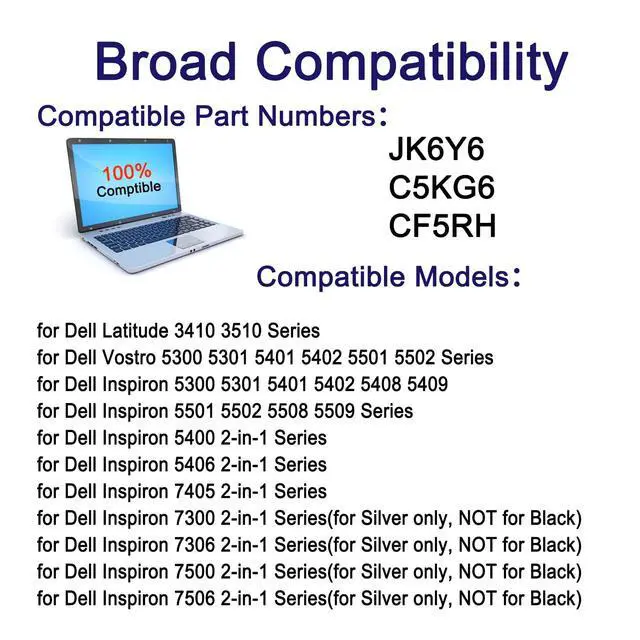
*Compatible Part Numbers:
JK6Y6 C5KG6 CF5RH
*Fit for:(Use "Ctrl" + "F" to find your models quickly)
Not all models are listed, please check the part number of your original battery.
for Dell Latitude 3410 3510 Series
for Dell Vostro 5300 5301 5401 5402 5501 5502 Series
for Dell Inspiron 5300 5301 5401 5402 5408 5409 5501 5502 5508 5509 Series
for Dell Inspiron 5400 2-in-1 Series
for Dell Inspiron 5406 2-in-1 Series
for Dell Inspiron 7405 2-in-1 Series
for Dell Inspiron 7300 2-in-1 Series(for Silver only, NOT for Black)
for Dell Inspiron 7306 2-in-1 Series(for Silver only, NOT for Black)
for Dell Inspiron 7500 2-in-1 Series(for Silver only, NOT for Black)
for Dell Inspiron 7506 2-in-1 Series(for Silver only, NOT for Black)
*Package Included :
1x JK6Y6 battery
*Worry-Free Warranty:
At SUNNEAR, we believe in our battery. That's why we back them all with a 12-months warranty and provide friendly customer service, easy-to-reach support.
*For Optimal Use Battery:
Run down the new battery to 5% (not 0%), then replenish power and cycle 3-4 times to wake up the new battery.
The important point is to perform a full power run-down followed by a full power replenishment every other month to extend battery life.
When using external power for a long time, it is recommended to remove the battery to avoid affecting battery life.
Avoid artificial shocks, disassembly, fall, heat or short circuit.
| Number of Batteries | 1 Lithium Polymer batteries required. (included) |
| Brand | SUNNEAR |
| Battery Cell Composition | Lithium Ion |
| Battery Capacity | 3350 Milliampere Hour (mAh) |
| Recommended Uses For Product | Laptop |
| Package Dimensions | 8.78 x 4.96 x 1.18 inches |
| Item Weight | 9 ounces |
| Item model number | JK6Y6 |
| Batteries | 1 Lithium Polymer batteries required. (included) |
| Is Discontinued By Manufacturer | No |
| Date First Available | December 19, 2018 |
| Manufacturer | Shenzhen Sunnear Technology Co., Ltd. |