

Your Browsing History
- Free 30-day Returns
$134.00
Ships from Hong Kong.

Meet Your Seller

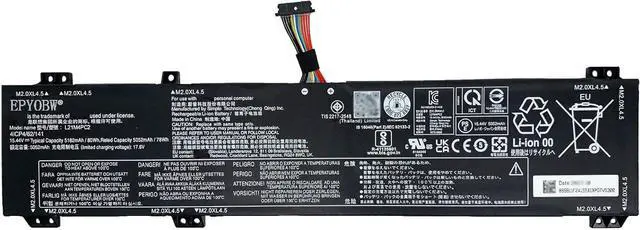
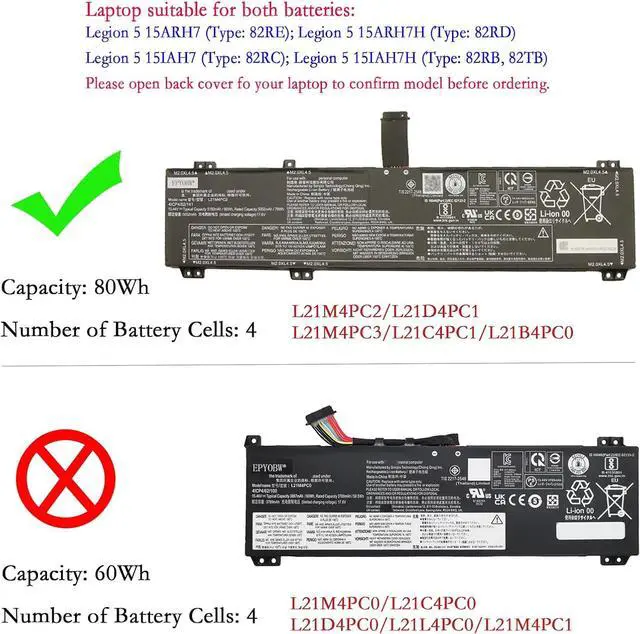
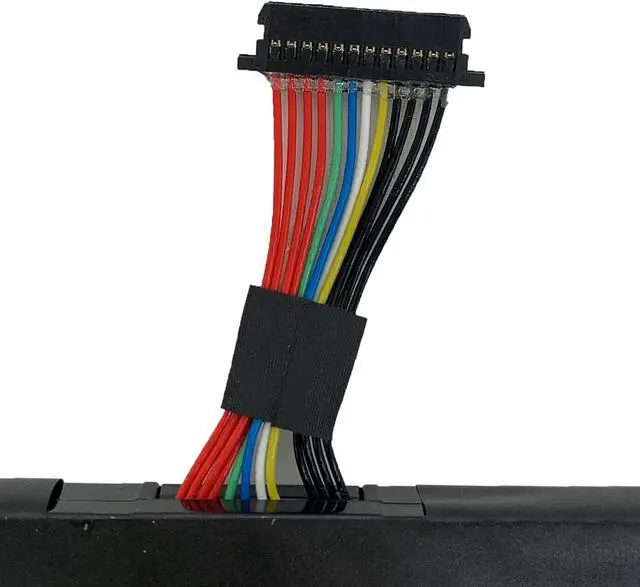
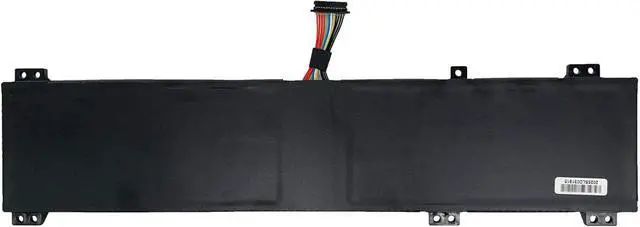


L21M4PC2 Laptop Battery 80Wh Compatible with Lenovo Legion 5 15IAH7H 15IAH7 15ARH7H 15ARH7 / Legion 5 Pro 16IAH7H 16ARH7H 16ARH7 16IAH7 Series L21M4PC3 L21D4PC1 L21C4PC1 L21B4PC0
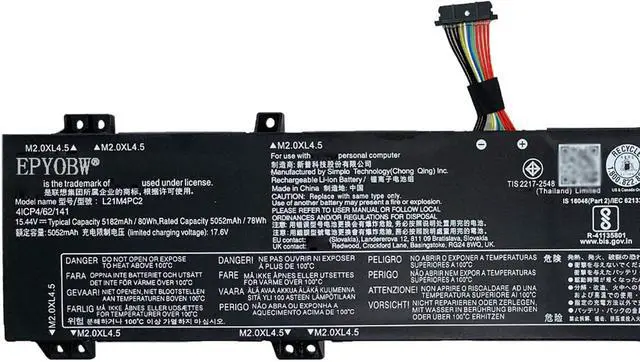
- Specifications Battery Model: L21M4PC2 / Voltage: 15.44V / Capacity: 80Wh 5182mAh 4-Cell / Color: Black / Condition: Brand New.
- Replace Part Number L21M4PC2 SB11F24155 5B11F24152 SB11N47458 5B11N47460 L21C4PC1 SB11F24149 5B11F24161 SB11N47422 5B11N47511 L21M4PC3 SB11F24164 5B11F24148 SB11N47481 5B11N47420 L21B4PC0 SB11F24159 5B11F24147 SB11N47469 5B11N47436 L21D4PC1 SB11F24153 5B11F24156 SB11N47491 5B11N47509
- Compatible with Laptop Models for Lenovo Legion 5 15ARH7 (Type: 82RE) series; for Lenovo Legion 5 15ARH7H (Type: 82RD) series; for Lenovo Legion 5 15IAH7 (Type: 82RC) series; for Lenovo Legion 5 15IAH7H (Type: 82RB, 82TB) series; for Lenovo Legion 5 Pro 16IAH7 (Type: 82S0); for Lenovo Legion 5 Pro 16IAH7H (Type: 82RF) series; for Lenovo Legion 5 Pro 16ARH7 (Type: 82RY) series; for Lenovo Legion 5 Pro 16ARH7H (Type: 82RG) series
- Purchase Skills Please open the back cover of the laptop before ordering and make sure that the original battery model is consistent with the l
+
+
Overview
Reviews

Any questions? Our AI mode will help you find out quickly.
Try me now
EPYOBW is a professional laptop battery supplier that continues to provide durable and safe laptop batteries. Wish you a happy shopping
Step 1: Press the "Windows + R" keys to pop up the window.
Step 2: Enter "msinfo32" and click "OK".
Step 3: View the "System Model" in the right pane.
Step 1: Shut down the laptop and unplug the power cord.
Step 2: Carefully use a screwdriver to remove the back panel to prevent damage to laptop components.
Step 3: Disconnect the cable connected to the battery, then you can check the model number and specific specifications on the battery.
Brand new battery
Rechargeable up to 1000+ times
Overcharging protection
Overheating protection
Short circuit protection
professional
Battery Model: L21M4PC2
Capacity: 80Wh 5182mAh 4-Cell
Voltage: 15.44V
Battery Type: Li-ionCondition: Brand NewColor: Black
Replace Part Number:
L21M4PC2 SB11F24155 5B11F24152 SB11N47458 5B11N47460
L21D4PC1 SB11F24153 5B11F24156 SB11N47491 5B11N47509
L21C4PC1 SB11F24149 5B11F24161 SB11N47422 5B11N47511
L21M4PC3 SB11F24164 5B11F24148 SB11N47481 5B11N47420
L21B4PC0 SB11F24159 5B11F24147 SB11N47469 5B11N47436
for Lenovo Legion 5 15ARH7 (Type: 82RE) series
for Lenovo Legion 5 15ARH7H (Type: 82RD) series
for Lenovo Legion 5 15IAH7 (Type: 82RC) series
for Lenovo Legion 5 15IAH7H (Type: 82RB, 82TB) series
for Lenovo Legion 5 Pro 16IAH7 (Type: 82S0)
for Lenovo Legion 5 Pro 16IAH7H (Type: 82RF) series
for Lenovo Legion 5 Pro 16ARH7 (Type: 82RY) series
for Lenovo Legion 5 Pro 16ARH7H (Type: 82RG) series
Brand new battery
100% compatible
Meet OEM specifications
Rechargeable up to 1000+ times
capacity is true, stable current, low self-discharge
short circuit, overheat, and overload protections
Multiple protection
Strong battery life
Good "core" quality
After getting the battery, please install the battery correctly, make sure that the battery connector is firmly connected to the laptop motherboard, and start charging the laptop. Discharge the new battery to 5% (not 0%), then charge and cycle 3-4 times to wake up the new battery.
Remember not to discharge the battery to 0%, otherwise the battery will be easily damaged.
After the battery is exhausted, please charge it in time. If it is not charged for a long time, the battery may be damaged.
If the battery is not used for a long time, it needs to be charged to more than 70% for storage. The storage time should not exceed 3 months.
If you often use it with a charger, please use the battery power regularly and use it more than once a week.
Please use original chargers. Inferior chargers will affect the normal charging of the battery.
Regularly clean the fan dust to increase the heat dissipation effect and reduce power consumption, which can effectively extend the battery life.
Help others learn more about this product by uploading a video!EPYOBW L21M4PC2 Laptop Battery 80Wh Compatible with Lenovo Legion 5 15IAH7H 15IAH7 15ARH7H 15ARH7 / Legion 5 Pro 16IAH7H 16ARH7H 16ARH7 16IAH7 Series L21M4PC3 L21D4PC1 L21C4PC1 L21B4PC0
Share:
Found a lower price? Let us know. Although we can't match every price reported, we'll use your feedback to ensure that our prices remain competitive.
Fields with an asterisk * are required
**
Step 1: Press the "Windows + R" keys to pop up the window.
Step 2: Enter "msinfo32" and click "OK".
Step 3: View the "System Model" in the right pane.
Step 1: Shut down the laptop and unplug the power cord.
Step 2: Carefully use a screwdriver to remove the back panel to prevent damage to laptop components.
Step 3: Disconnect the cable connected to the battery, then you can check the model number and specific specifications on the battery.
Brand new battery
Rechargeable up to 1000+ times
Overcharging protection
Overheating protection
Short circuit protection
professional
Battery Model: L21M4PC2
Capacity: 80Wh 5182mAh 4-Cell
Voltage: 15.44V
Battery Type: Li-ionCondition: Brand NewColor: Black
Replace Part Number:
L21M4PC2 SB11F24155 5B11F24152 SB11N47458 5B11N47460
L21D4PC1 SB11F24153 5B11F24156 SB11N47491 5B11N47509
L21C4PC1 SB11F24149 5B11F24161 SB11N47422 5B11N47511
L21M4PC3 SB11F24164 5B11F24148 SB11N47481 5B11N47420
L21B4PC0 SB11F24159 5B11F24147 SB11N47469 5B11N47436
for Lenovo Legion 5 15ARH7 (Type: 82RE) series
for Lenovo Legion 5 15ARH7H (Type: 82RD) series
for Lenovo Legion 5 15IAH7 (Type: 82RC) series
for Lenovo Legion 5 15IAH7H (Type: 82RB, 82TB) series
for Lenovo Legion 5 Pro 16IAH7 (Type: 82S0)
for Lenovo Legion 5 Pro 16IAH7H (Type: 82RF) series
for Lenovo Legion 5 Pro 16ARH7 (Type: 82RY) series
for Lenovo Legion 5 Pro 16ARH7H (Type: 82RG) series
Brand new battery
100% compatible
Meet OEM specifications
Rechargeable up to 1000+ times
capacity is true, stable current, low self-discharge
short circuit, overheat, and overload protections
Multiple protection
Strong battery life
Good "core" quality
After getting the battery, please install the battery correctly, make sure that the battery connector is firmly connected to the laptop motherboard, and start charging the laptop. Discharge the new battery to 5% (not 0%), then charge and cycle 3-4 times to wake up the new battery.
Remember not to discharge the battery to 0%, otherwise the battery will be easily damaged.
After the battery is exhausted, please charge it in time. If it is not charged for a long time, the battery may be damaged.
If the battery is not used for a long time, it needs to be charged to more than 70% for storage. The storage time should not exceed 3 months.
If you often use it with a charger, please use the battery power regularly and use it more than once a week.
Please use original chargers. Inferior chargers will affect the normal charging of the battery.
Regularly clean the fan dust to increase the heat dissipation effect and reduce power consumption, which can effectively extend the battery life.
Help others learn more about this product by uploading a video!EPYOBW L21M4PC2 Laptop Battery 80Wh Compatible with Lenovo Legion 5 15IAH7H 15IAH7 15ARH7H 15ARH7 / Legion 5 Pro 16IAH7H 16ARH7H 16ARH7 16IAH7 Series L21M4PC3 L21D4PC1 L21C4PC1 L21B4PC0
Share:
Found a lower price? Let us know. Although we can't match every price reported, we'll use your feedback to ensure that our prices remain competitive.
Fields with an asterisk * are required
**
Warranty & Returns
Warranty, Returns, And Additional Information
Warranty
- Please contact the Seller directly for warranty information. Warranty information may also be found on the Manufacturer's website.
- CONTACT
Return Policies
- Return for refund within: 30 days
- Return for replacement within: 30 days
- This item is covered by AyeFlow Return Policy
Manufacturer Contact Info
- For a directory of all our manufacturers, please click below.
- Manufacturers Directory
LOADING...