Your Browsing History
- Free 30-day Returns
$158.00
Ships from Hong Kong.
Meet Your Seller
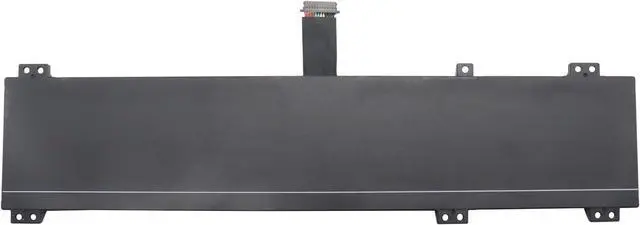
L21B4PC0 Laptop Battery 80Wh Compatible with Lenovo Legion 5 15IAH7H 15IAH7 15ARH7H 15ARH7 / Legion 5 Pro 16IAH7H 16ARH7H 16ARH7 16IAH7 Series L21M4PC2 L21D4PC1 L21C4PC1 L21M4PC3
- Specifications Battery Model: L21B4PC0 / Voltage: 15.44V / Capacity: 80Wh 5182mAh 4-cell / Color: Black / Condition: Brand New.
- Replace Part Number L21B4PC0 SB11F24159 5B11F24147 SB11N47469 5B11N47436 L21M4PC2 SB11F24155 5B11F24152 SB11N47458 5B11N47460 L21C4PC1 SB11F24149 5B11F24161 SB11N47422 5B11N47511 L21M4PC3 SB11F24164 5B11F24148 SB11N47481 5B11N47420 L21D4PC1 SB11F24153 5B11F24156 SB11N47491 5B11N47509
- Compatible with Laptop Models for Lenovo Legion 5 15ARH7 (Type: 82RE) series; for Lenovo Legion 5 15ARH7H (Type: 82RD) series; for Lenovo Legion 5 15IAH7 (Type: 82RC) series; for Lenovo Legion 5 15IAH7H (Type: 82RB, 82TB) series; for Lenovo Legion 5 Pro 16IAH7 (Type: 82S0); for Lenovo Legion 5 Pro 16IAH7H (Type: 82RF) series; for Lenovo Legion 5 Pro 16ARH7 (Type: 82RY) series; for Lenovo Legion 5 Pro 16ARH7H (Type: 82RG) series
- Purchase Skills Please open the back cover of the laptop before ordering and make sure that the original battery model is consistent with the l
+
+
Overview
Reviews
Any questions? Our AI beta will help you find out quickly.
Try me now
EPYOBW is a professional laptop battery supplier that continues to provide durable and safe laptop batteries. Wish you a happy shopping
Step 1: Press the "Windows + R" keys to pop up the window.
Step 2: Enter "msinfo32" and click "OK".
Step 3: View the "System Model" in the right pane.
Step 1: Shut down the laptop and unplug the power cord.
Step 2: Carefully use a screwdriver to remove the back panel to prevent damage to laptop components.
Step 3: Disconnect the cable connected to the battery, then you can check the model number and specific specifications on the battery.
Brand new battery
Rechargeable up to 1000+ times
Overcharging protection
Overheating protection
Short circuit protection
professional
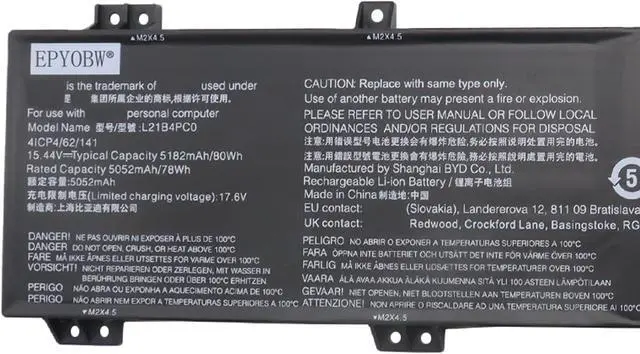
Battery Model: L21B4PC0
Capacity: 80Wh 5182mAh 4-Cell
Voltage: 15.44V
Battery Type: Li-ion
Condition: Brand New Color: Black
Replace Part Number:
L21B4PC0 SB11F24159 5B11F24147 SB11N47469 5B11N47436 L21M4PC2 SB11F24155 5B11F24152
SB11N47458 5B11N47460 L21C4PC1 SB11F24149 5B11F24161 SB11N47422 5B11N47511
L21M4PC3 SB11F24164 5B11F24148 SB11N47481 5B11N47420
L21D4PC1 SB11F24153 5B11F24156 SB11N47491 5B11N47509
for Lenovo Legion 5 15ARH7 (Type: 82RE) series
for Lenovo Legion 5 15ARH7H (Type: 82RD) series
for Lenovo Legion 5 15IAH7 (Type: 82RC) series
for Lenovo Legion 5 15IAH7H (Type: 82RB, 82TB) series
for Lenovo Legion 5 Pro 16IAH7 (Type: 82S0) series
for Lenovo Legion 5 Pro 16IAH7H (Type: 82RF) series
for Lenovo Legion 5 Pro 16ARH7 (Type: 82RY) series
for Lenovo Legion 5 Pro 16ARH7H (Type: 82RG) series
Notice needing attention:
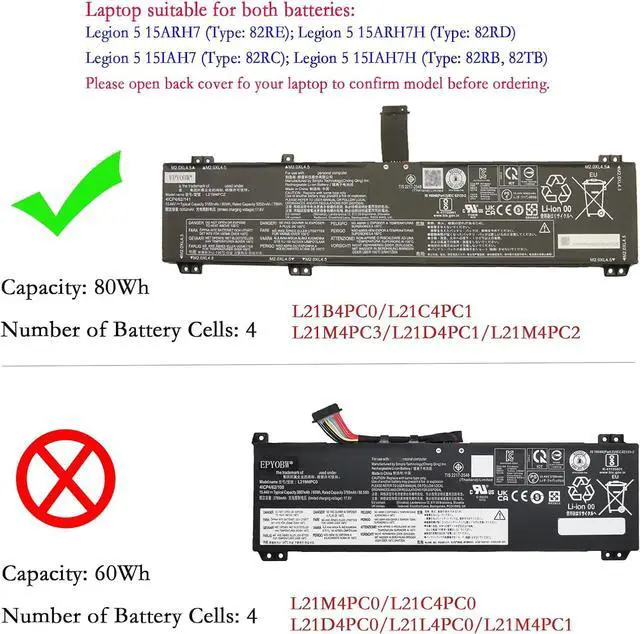
Legion 5 15ARH7 & Legion 5 15ARH7H & Legion 5 15IAH7 & Legion 5 15IAH7H laptop have two batteries of type (L21B4PC0 80Wh & L21M4PC0 60Wh),
Please open back cover fo your laptop to confirm model before ordering. (Please see the sub-picture for details.)
Please feel free to choose us Welcome to EPYOBW How to get the correct battery? Method 1: Use the shortcut "Window+R" to check your laptop model. Method 2: Open the back cover of the laptop and confirm the battery type, capacity, and laptop model. Brand: EPYOBW Specification Compatible Laptop Models:(use"Ctrl+F to find your model quickly")

Step 1: Press the "Windows + R" keys to pop up the window.
Step 2: Enter "msinfo32" and click "OK".
Step 3: View the "System Model" in the right pane.
Step 1: Shut down the laptop and unplug the power cord.
Step 2: Carefully use a screwdriver to remove the back panel to prevent damage to laptop components.
Step 3: Disconnect the cable connected to the battery, then you can check the model number and specific specifications on the battery.
Brand new battery
Rechargeable up to 1000+ times
Overcharging protection
Overheating protection
Short circuit protection
professional
Battery Model: L21B4PC0
Capacity: 80Wh 5182mAh 4-Cell
Voltage: 15.44V
Battery Type: Li-ion
Condition: Brand New Color: Black
Replace Part Number:
L21B4PC0 SB11F24159 5B11F24147 SB11N47469 5B11N47436 L21M4PC2 SB11F24155 5B11F24152
SB11N47458 5B11N47460 L21C4PC1 SB11F24149 5B11F24161 SB11N47422 5B11N47511
L21M4PC3 SB11F24164 5B11F24148 SB11N47481 5B11N47420
L21D4PC1 SB11F24153 5B11F24156 SB11N47491 5B11N47509
for Lenovo Legion 5 15ARH7 (Type: 82RE) series
for Lenovo Legion 5 15ARH7H (Type: 82RD) series
for Lenovo Legion 5 15IAH7 (Type: 82RC) series
for Lenovo Legion 5 15IAH7H (Type: 82RB, 82TB) series
for Lenovo Legion 5 Pro 16IAH7 (Type: 82S0) series
for Lenovo Legion 5 Pro 16IAH7H (Type: 82RF) series
for Lenovo Legion 5 Pro 16ARH7 (Type: 82RY) series
for Lenovo Legion 5 Pro 16ARH7H (Type: 82RG) series
Notice needing attention:
Legion 5 15ARH7 & Legion 5 15ARH7H & Legion 5 15IAH7 & Legion 5 15IAH7H laptop have two batteries of type (L21B4PC0 80Wh & L21M4PC0 60Wh),
Please open back cover fo your laptop to confirm model before ordering. (Please see the sub-picture for details.)
Please feel free to choose us Welcome to EPYOBW How to get the correct battery? Method 1: Use the shortcut "Window+R" to check your laptop model. Method 2: Open the back cover of the laptop and confirm the battery type, capacity, and laptop model. Brand: EPYOBW Specification Compatible Laptop Models:(use"Ctrl+F to find your model quickly")
Warranty & Returns
Warranty, Returns, And Additional Information
Warranty
- Please contact the Seller directly for warranty information. Warranty information may also be found on the Manufacturer's website.
- CONTACT
Return Policies
- Return for refund within: 30 days
- Return for replacement within: 30 days
- This item is covered by AyeFlow Return Policy
Manufacturer Contact Info
- For a directory of all our manufacturers, please click below.
- Manufacturers Directory
LOADING...