

Your Browsing History
- Free 30-day Returns
$139.00
Ships from Hong Kong.
Best Sellers
 Top Rated
- $139.00
- + FREE SHIPPING

Meet Your Seller


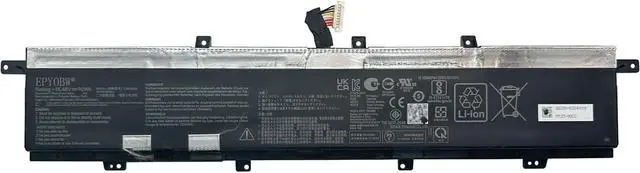
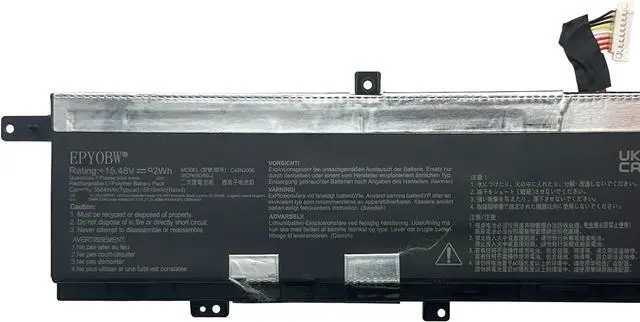
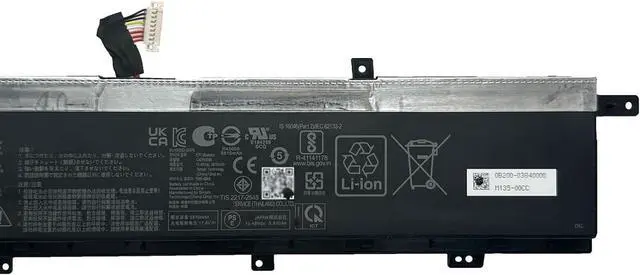
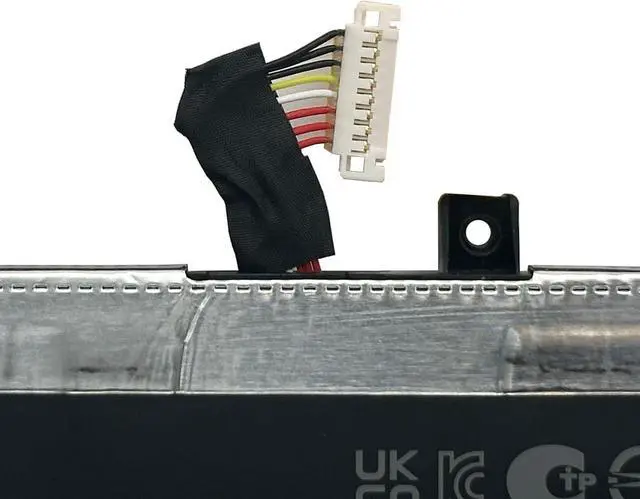
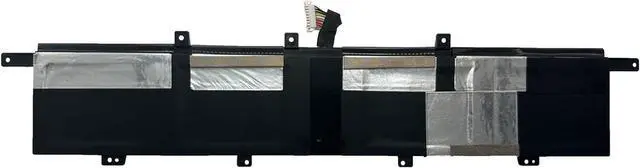


C42N2008 Laptop Battery 92Wh Compatible with Asus ZenBook Pro Duo 15 OLED UX582HM UX582HS UX582LR UX582ZM UX582ZW / ZenBook Pro 15 UX582LR / ZenBook Pro Duo UX582LR Series 0B200-03840000
- Specifications Battery Model: C42N2008 / Voltage: 15.48V / Capacity: 92Wh 5810mAh 4-Cell / Color: Black / Condition: Brand New.
- Replace Part NumberC42N2008 0B200-03840000 0B20003840000 4ICP6/50/69-2
- Compatible with Laptop Models for Asus ZenBook Pro 15 UX582LR Series; for Asus ZenBook Pro Duo UX582LR Series; for Asus ZenBook Pro Duo 15 OLED UX582HM Series; for Asus ZenBook Pro Duo 15 OLED UX582HS Series; for Asus ZenBook Pro Duo 15 OLED UX582LR Series; for Asus Zenbook Pro Duo 15 OLED UX582ZM Series; for Asus Zenbook Pro Duo 15 OLED UX582ZW Series
- Purchase Skills Please open the back cover of the laptop before ordering and make sure that the original battery model is consistent with the listing. After getting the battery, please install the battery correctly, make sure that the battery connector is firmly connected to the laptop motherboard, and use the original charger to charge the laptop.Discharge the new battery to 5% (not 0%), then charge and cycle 3-4 times to wake up
+
+
Overview
Reviews

Any questions? Our AI mode will help you find out quickly.
Try me now
EPYOBW is a professional laptop battery supplier that continues to provide durable and safe laptop batteries. Wish you a happy shopping
Step 1: Press the "Windows + R" keys to pop up the window.
Step 2: Enter "msinfo32" and click "OK".
Step 3: View the "System Model" in the right pane.
Step 1: Shut down the laptop and unplug the power cord.
Step 2: Carefully use a screwdriver to remove the back panel to prevent damage to laptop components.
Step 3: Disconnect the cable connected to the battery, then you can check the model number and specific specifications on the battery.
Brand new battery
Rechargeable up to 1000+ times
Overcharging protection
Overheating protection
Short circuit protection
professional
Battery Model: C42N2008
Capacity: 92Wh 5810mAh 4-Cell
Voltage: 15.48V
Battery Type: Li-ion
Condition: Brand New
Color: Black
Replace Part Number:
C42N2008 0B200-03840000 0B20003840000 4ICP6/50/69-2
Compatible Laptop Models: (use "Ctrl+F" to find your model quickly)
for Asus ZenBook Pro 15 UX582LR Series:
UX582LR-H2002R
for Asus ZenBook Pro Duo UX582LR Series:
UX582LR-1BH2 UX582LR-XS74
for Asus ZenBook Pro Duo 15 OLED UX582HM Series:
UX582HM-KY004W UX582HM-H2052W UX582HM-KY012X UX582HM-H2901W UX582HM-KY063W
UX582HM-KV011T UX582HM-KY002X UX582HM-H2044W UX582HM-KY012W UX582HM-H2054W
UX582HM-KY037X UX582HM-H701WS UX582HM-KY002W UX582HM-H2023W UX582HM-XH96T
UX582HM-AOU80095WT
for Asus ZenBook Pro Duo 15 OLED UX582HS Series:
UX582HS-H2003W UX582HS-H2003T UX582HS-H2025W UX582HS-H2016W UX582HS-H2002X
UX582HS-H2031X UX582HS-H2033X UX582HS-H2003X UX582HS-H2902X UX582HS-XH99T
UX582HS-H2902WS UX582HS-H2002WS UX582HS-H2014WS UX582HS-91D38AP UX582HS-AOU90097XT
for Asus ZenBook Pro Duo 15 OLED UX582LR Series:
UX582LR-H2003R UX582LR-H2014R UX582LR-H2025R UX582LR-H2002R UX582LR-H2013T
UX582LR-H2014T UX582LR-H2017T UX582LR-BP1979R UX582LR-XS74T UX582LR-XS94T
UX582LR-H0701TS UX582LR-H2002TS
for Asus Zenbook Pro Duo 15 OLED UX582ZM Series:
UX582ZM-H2030W UX582ZM-H2005W UX582ZM-H2036W UX582ZM-KY012W UX582ZM-H2057X
UX582ZM-H2009X UX582ZM-H2029X UX582ZM-H2022X UX582ZM-H2046X UX582ZM-H2030X
UX582ZM-H2056X UX582ZM-KY019X UX582ZM-H2043W UX582ZM-XS99T UX582ZM-AS76T
UX582ZM-H2026WS UX582ZM-H701WS UX582ZM-H2081WS UX582ZM-H2901WS UX582ZM-KY038WS
UX582ZM-AOU29095W UX582ZM-OLED032W UX582ZM-OLED109W UX582ZM-0021B12900H
for Asus Zenbook Pro Duo 15 OLED UX582ZW Series:
UX582ZW-H2002W UX582ZW-H2004W UX582ZW-H2035W UX582ZW-H2028X UX582ZW-H2030X
UX582ZW-H2033X UX582ZW-AOU29097X UX582ZW-AB76T UX582ZW-XB91T
Brand new battery
100% compatible
Meet OEM specifications
Rechargeable up to 1000+ times
capacity is true, stable current, low self-discharge
short circuit, overheat, and overload protections
Multiple protection
Strong battery life
Good "core" quality
After getting the battery, please install the battery correctly, make sure that the battery connector is firmly connected to the laptop motherboard, and start charging the laptop. Discharge the new battery to 5% (not 0%), then charge and cycle 3-4 times to wake up the new battery.
Remember not to discharge the battery to 0%, otherwise the battery will be easily damaged.
After the battery is exhausted, please charge it in time. If it is not charged for a long time, the battery may be damaged.
If the battery is not used for a long time, it needs to be charged to more than 70% for storage. The storage time should not exceed 3 months.
If you often use it with a charger, please use the battery power regularly and use it more than once a week.
Please use original chargers. Inferior chargers will affect the normal charging of the battery.
Regularly clean the fan dust to increase the heat dissipation effect and reduce power consumpt
Step 1: Press the "Windows + R" keys to pop up the window.
Step 2: Enter "msinfo32" and click "OK".
Step 3: View the "System Model" in the right pane.
Step 1: Shut down the laptop and unplug the power cord.
Step 2: Carefully use a screwdriver to remove the back panel to prevent damage to laptop components.
Step 3: Disconnect the cable connected to the battery, then you can check the model number and specific specifications on the battery.
Brand new battery
Rechargeable up to 1000+ times
Overcharging protection
Overheating protection
Short circuit protection
professional
Battery Model: C42N2008
Capacity: 92Wh 5810mAh 4-Cell
Voltage: 15.48V
Battery Type: Li-ion
Condition: Brand New
Color: Black
Replace Part Number:
C42N2008 0B200-03840000 0B20003840000 4ICP6/50/69-2
Compatible Laptop Models: (use "Ctrl+F" to find your model quickly)
for Asus ZenBook Pro 15 UX582LR Series:
UX582LR-H2002R
for Asus ZenBook Pro Duo UX582LR Series:
UX582LR-1BH2 UX582LR-XS74
for Asus ZenBook Pro Duo 15 OLED UX582HM Series:
UX582HM-KY004W UX582HM-H2052W UX582HM-KY012X UX582HM-H2901W UX582HM-KY063W
UX582HM-KV011T UX582HM-KY002X UX582HM-H2044W UX582HM-KY012W UX582HM-H2054W
UX582HM-KY037X UX582HM-H701WS UX582HM-KY002W UX582HM-H2023W UX582HM-XH96T
UX582HM-AOU80095WT
for Asus ZenBook Pro Duo 15 OLED UX582HS Series:
UX582HS-H2003W UX582HS-H2003T UX582HS-H2025W UX582HS-H2016W UX582HS-H2002X
UX582HS-H2031X UX582HS-H2033X UX582HS-H2003X UX582HS-H2902X UX582HS-XH99T
UX582HS-H2902WS UX582HS-H2002WS UX582HS-H2014WS UX582HS-91D38AP UX582HS-AOU90097XT
for Asus ZenBook Pro Duo 15 OLED UX582LR Series:
UX582LR-H2003R UX582LR-H2014R UX582LR-H2025R UX582LR-H2002R UX582LR-H2013T
UX582LR-H2014T UX582LR-H2017T UX582LR-BP1979R UX582LR-XS74T UX582LR-XS94T
UX582LR-H0701TS UX582LR-H2002TS
for Asus Zenbook Pro Duo 15 OLED UX582ZM Series:
UX582ZM-H2030W UX582ZM-H2005W UX582ZM-H2036W UX582ZM-KY012W UX582ZM-H2057X
UX582ZM-H2009X UX582ZM-H2029X UX582ZM-H2022X UX582ZM-H2046X UX582ZM-H2030X
UX582ZM-H2056X UX582ZM-KY019X UX582ZM-H2043W UX582ZM-XS99T UX582ZM-AS76T
UX582ZM-H2026WS UX582ZM-H701WS UX582ZM-H2081WS UX582ZM-H2901WS UX582ZM-KY038WS
UX582ZM-AOU29095W UX582ZM-OLED032W UX582ZM-OLED109W UX582ZM-0021B12900H
for Asus Zenbook Pro Duo 15 OLED UX582ZW Series:
UX582ZW-H2002W UX582ZW-H2004W UX582ZW-H2035W UX582ZW-H2028X UX582ZW-H2030X
UX582ZW-H2033X UX582ZW-AOU29097X UX582ZW-AB76T UX582ZW-XB91T
Brand new battery
100% compatible
Meet OEM specifications
Rechargeable up to 1000+ times
capacity is true, stable current, low self-discharge
short circuit, overheat, and overload protections
Multiple protection
Strong battery life
Good "core" quality
After getting the battery, please install the battery correctly, make sure that the battery connector is firmly connected to the laptop motherboard, and start charging the laptop. Discharge the new battery to 5% (not 0%), then charge and cycle 3-4 times to wake up the new battery.
Remember not to discharge the battery to 0%, otherwise the battery will be easily damaged.
After the battery is exhausted, please charge it in time. If it is not charged for a long time, the battery may be damaged.
If the battery is not used for a long time, it needs to be charged to more than 70% for storage. The storage time should not exceed 3 months.
If you often use it with a charger, please use the battery power regularly and use it more than once a week.
Please use original chargers. Inferior chargers will affect the normal charging of the battery.
Regularly clean the fan dust to increase the heat dissipation effect and reduce power consumpt
Warranty & Returns
Warranty, Returns, And Additional Information
Warranty
- Please contact the Seller directly for warranty information. Warranty information may also be found on the Manufacturer's website.
- CONTACT
Return Policies
- Return for refund within: 30 days
- Return for replacement within: 30 days
- This item is covered by AyeFlow Return Policy
Manufacturer Contact Info
- For a directory of all our manufacturers, please click below.
- Manufacturers Directory
LOADING...
LOADING...