Your Browsing History
Meet Your Seller
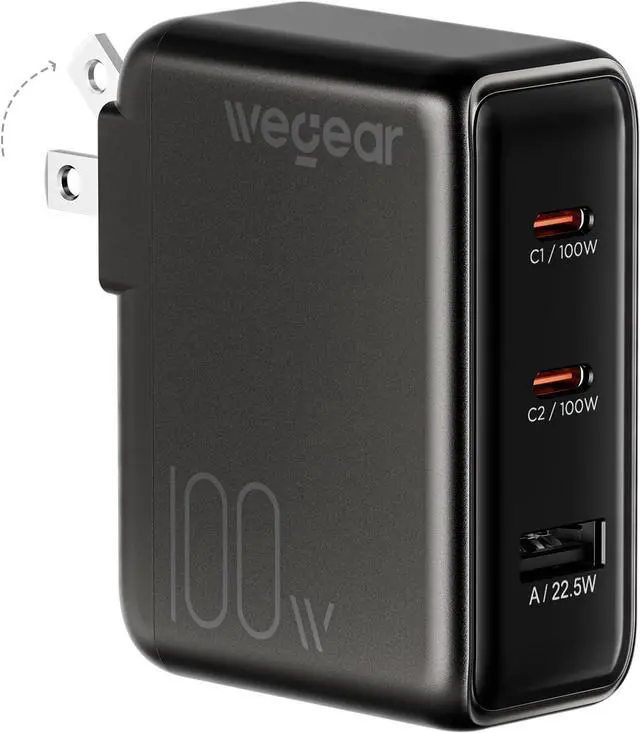
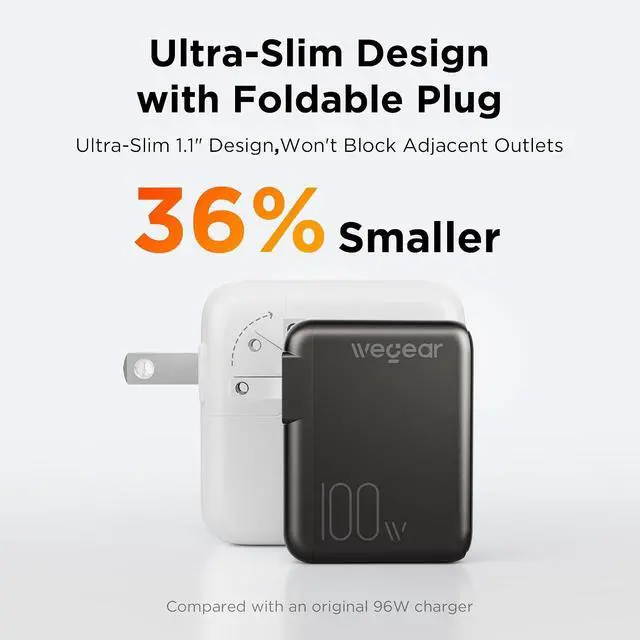
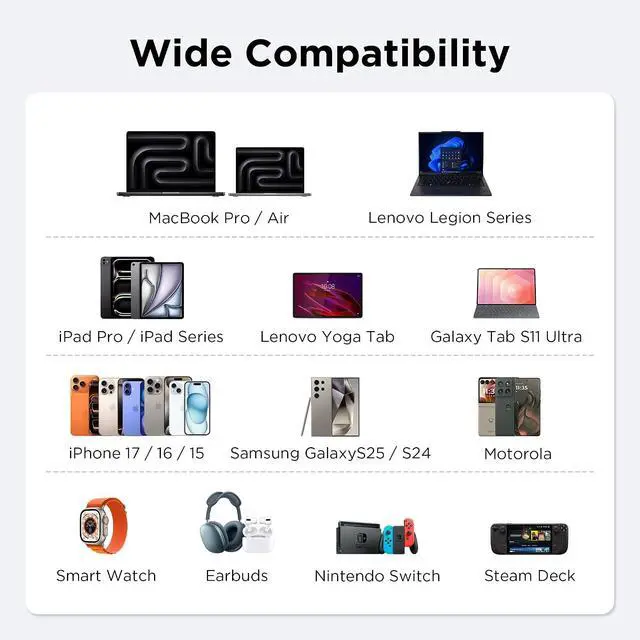
100W GaN USB C Charger Block, 3-Port Slim Foldable Fast Wall Charger for MacBook Pro, iPad, iPhone 17/16/15 Series, Galaxy S25/S24, Dell XPS, Steam Deck, Compact Travel Power Adapter (Black)
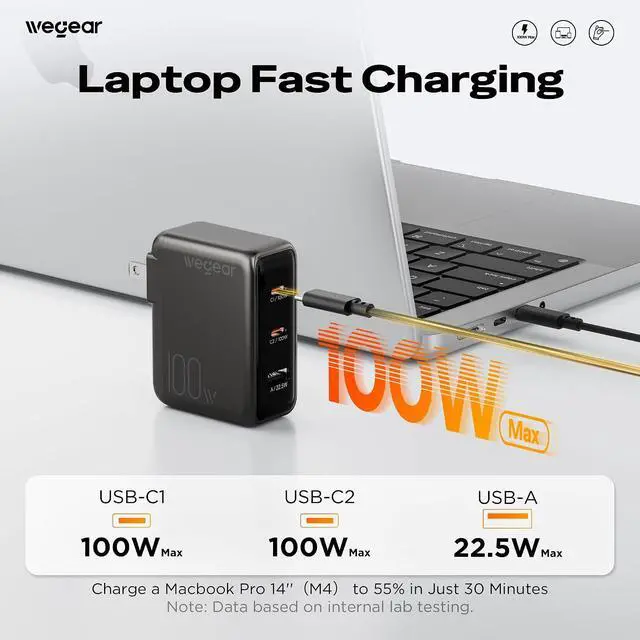
- [100W Ultra-Fast Charging] Power up your MacBook Pro 14" (M5) to 55% in just 30 minutes with true 100W output via a single USB-C port (100W 5A cable required). Advanced GaN III technology delivers ultra-efficient, high-speed charging for laptops, tablets, and phonesperfect for busy professionals and travelers who need power on the go.
- [70-Minute Sustained 100W Output] Unlike standard chargers that drop power after 25 minutes, our wall charger maintains a constant 100W output for up to 70 continuous minutes. Keep your high-performance laptop running at full speed during intensive tasks like video editing, 3D rendering, gaming, or running local AI models without thermal throttling.
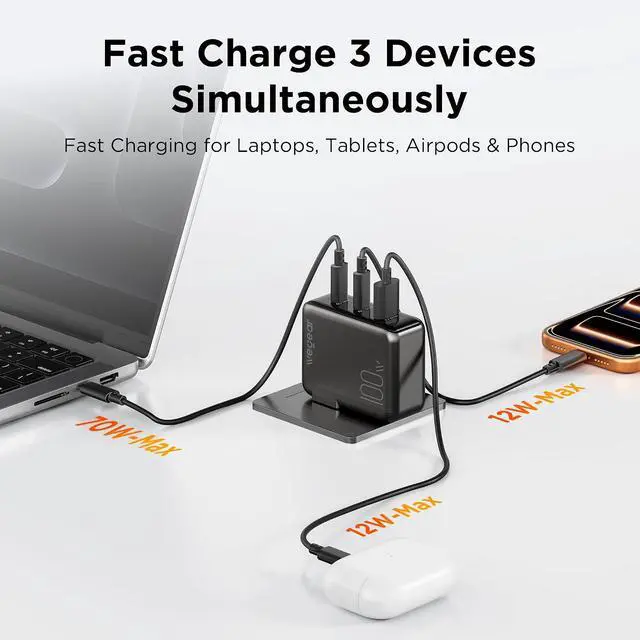
- [Charge 3 Devices Simultaneously] Equipped with 2× USB-C and 1× USB-A ports, this 100W charger block intelligently distributes power across all connected devices. Charge your MacBook, iPhone, and AirPods together at optimal speedsone charger for your entire tech setup, whether you're working at a café or
+
+
Overview
Specs
Reviews
Any questions? Our AI mode will help you find out quickly.
Try me now
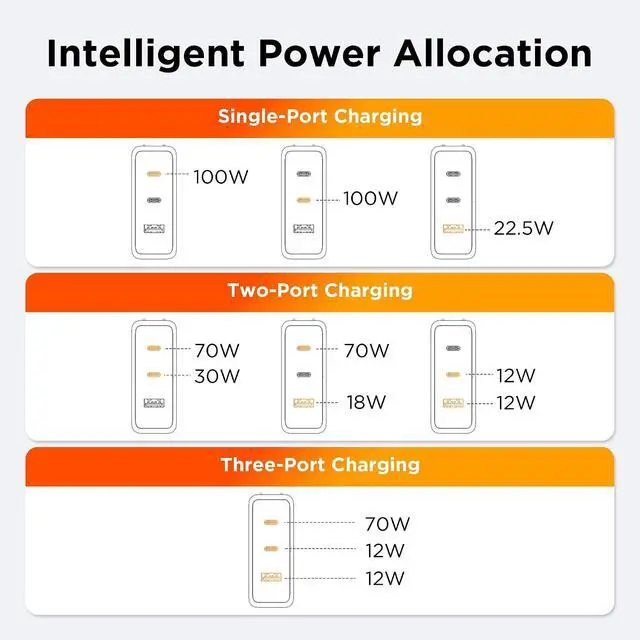
1Keep Your Desktop Tidy2Charge 3 Devices at Once3One-Port Charging4Two-Port Charging5Three-Port Charging
Product Name wegear 100W GaN 3-Port Slim Foldable Fast USB C Charger Block Input 100-240V/ 50-60Hz Single Port Output USB-C 1 (100W Max) / USB-C 2 (100W Max) / USB-A (22.5W Max) Only 2 Ports Used Together USB-C 1 + USB-C 2 (70W Max + 30W Max) / USB-C 1 + USB-A (70W Max + 18W) / USB-C 2 + USB-A (12W Max + 12W Max) 3 Ports Used Together USB-C 1 (70W Max), USB-C 2 (12W Max), USB-A (12W Max) Dimensions 2.80 in × 2.2 in × 1.13 in (71 mm × 56 mm × 28.8 mm) Protection Over-Temperature / Over-Voltage / Over-Current / Short-Circuit Protection Protocol USB-C1: 100W Max Support (PPS/AVS/PD3.0/QC3.0/QC2.0/SCP/FCP/Apple2.4A/SAMSUNG 2.0A/BC1.2); USB-C2: 100W Support (PPS/PD3.0/QC3.0/QC2.0/SCP/FCP/Apple2.4A/SAMSUNG 2.0A/BC1.2); USB-A: 22.5W Support (SCP 22.5W/QC3.0/QC2.0/Apple2.4A/SAMSUNG 2.0A/BC1.2) Laptops Compatible with MacBook Pro 16", MacBook Pro 14", MacBook Pro 13", MacBook Air, Dell XPS/Inspiron, HP Elite, Google Pixelbook, Microsoft Surface Book 2, ThinkPad, etc. Tablet Compatible with iPad 12.9", iPad Pro 11", iPad mini 5, iPad Air 3, etc. Mobile Phone Compatible with iPhone 17 / 16 / 15 / 15 Pro / 15 Pro Max; Samsung Galaxy S23 Ultra / S23 / S22+ / S21 / S21+ / S20 / S20+ / S20 Ultra / S10 / S10e / S10+ / S9 / S9+ / S8 / S8+ / Note 20 Ultra / Note 20 / Note 10 / Note 9 / Note 8; Google Pixel 3XL / 3 / 2XL / 2; Sony Xperia, etc Other Compatible with Switch Host, Switch Dock, DJI Mavic 3 / Air 2S, AirPods, Apple Watch, Steam Deck, etc. Note 1 Use a USB-C to Lightning cable for Lightning devices and use a USB-C to USB-C cable for USB-C devices (cables sold separately). Note 2 Charge your Apple Watch first when charging multiple devices. If the watch charger is connected to the USB-A port without an Apple Watch connected, unplug and reconnect it before charging. Note 3 Please unplug the cable if it is not in use in case the max output power of other ports is restricted. Why is the actual charging power lower than the rated power?
This is normal. 100W is the maximum power output, not a constant value. The wegear 100W GaN charger intelligently adjusts the power output based on your devices needs (battery level, power consumption, and temperature) to prevent overcharging.
Why isn't my laptop charging at full power?
Laptop's charging power depends not only on the charger but also on the device's charging protocol and power management system. Some laptop may adjust the input power based on their design,so the actual charging speed may differ from what you expect.
Is it normal for the charger to get hot during use?
This is normal. High-power GaN chargers produce heat when converting energy. Our built-in thermal control system regulates temperature. It may get warm under 100W fast charging but stays within safe limits.
Can I use it to charge low-power devices like headphones or cameras?
Of course. Our smart power distribution chip automatically detects the devices power requirements. Whether youre charging a high-performance laptop or a low-power accessory, the charger will deliver the precise and safe current needed.
How do I use this charger to charge my device at 100W?
To charge at 100W, your device must support 100W input, have a Power Delivery 3.0 port, be connected to only one USB-C port, and use a USB-C cable rated for 100W.
Why is the actual charging power lower than the rated power?
Why isn't my laptop charging at full power?
Is it normal for the charger to get hot during use?
Can I use it to charge low-power devices like headphones or cameras?
How do I use this charger to charge my device at 100W?

Product Name wegear 100W GaN 3-Port Slim Foldable Fast USB C Charger Block Input 100-240V/ 50-60Hz Single Port Output USB-C 1 (100W Max) / USB-C 2 (100W Max) / USB-A (22.5W Max) Only 2 Ports Used Together USB-C 1 + USB-C 2 (70W Max + 30W Max) / USB-C 1 + USB-A (70W Max + 18W) / USB-C 2 + USB-A (12W Max + 12W Max) 3 Ports Used Together USB-C 1 (70W Max), USB-C 2 (12W Max), USB-A (12W Max) Dimensions 2.80 in × 2.2 in × 1.13 in (71 mm × 56 mm × 28.8 mm) Protection Over-Temperature / Over-Voltage / Over-Current / Short-Circuit Protection Protocol USB-C1: 100W Max Support (PPS/AVS/PD3.0/QC3.0/QC2.0/SCP/FCP/Apple2.4A/SAMSUNG 2.0A/BC1.2); USB-C2: 100W Support (PPS/PD3.0/QC3.0/QC2.0/SCP/FCP/Apple2.4A/SAMSUNG 2.0A/BC1.2); USB-A: 22.5W Support (SCP 22.5W/QC3.0/QC2.0/Apple2.4A/SAMSUNG 2.0A/BC1.2) Laptops Compatible with MacBook Pro 16", MacBook Pro 14", MacBook Pro 13", MacBook Air, Dell XPS/Inspiron, HP Elite, Google Pixelbook, Microsoft Surface Book 2, ThinkPad, etc. Tablet Compatible with iPad 12.9", iPad Pro 11", iPad mini 5, iPad Air 3, etc. Mobile Phone Compatible with iPhone 17 / 16 / 15 / 15 Pro / 15 Pro Max; Samsung Galaxy S23 Ultra / S23 / S22+ / S21 / S21+ / S20 / S20+ / S20 Ultra / S10 / S10e / S10+ / S9 / S9+ / S8 / S8+ / Note 20 Ultra / Note 20 / Note 10 / Note 9 / Note 8; Google Pixel 3XL / 3 / 2XL / 2; Sony Xperia, etc Other Compatible with Switch Host, Switch Dock, DJI Mavic 3 / Air 2S, AirPods, Apple Watch, Steam Deck, etc. Note 1 Use a USB-C to Lightning cable for Lightning devices and use a USB-C to USB-C cable for USB-C devices (cables sold separately). Note 2 Charge your Apple Watch first when charging multiple devices. If the watch charger is connected to the USB-A port without an Apple Watch connected, unplug and reconnect it before charging. Note 3 Please unplug the cable if it is not in use in case the max output power of other ports is restricted. Why is the actual charging power lower than the rated power?
This is normal. 100W is the maximum power output, not a constant value. The wegear 100W GaN charger intelligently adjusts the power output based on your devices needs (battery level, power consumption, and temperature) to prevent overcharging.
Why isn't my laptop charging at full power?
Laptop's charging power depends not only on the charger but also on the device's charging protocol and power management system. Some laptop may adjust the input power based on their design,so the actual charging speed may differ from what you expect.
Is it normal for the charger to get hot during use?
This is normal. High-power GaN chargers produce heat when converting energy. Our built-in thermal control system regulates temperature. It may get warm under 100W fast charging but stays within safe limits.
Can I use it to charge low-power devices like headphones or cameras?
Of course. Our smart power distribution chip automatically detects the devices power requirements. Whether youre charging a high-performance laptop or a low-power accessory, the charger will deliver the precise and safe current needed.
How do I use this charger to charge my device at 100W?
To charge at 100W, your device must support 100W input, have a Power Delivery 3.0 port, be connected to only one USB-C port, and use a USB-C cable rated for 100W.
Why is the actual charging power lower than the rated power?
Why isn't my laptop charging at full power?
Is it normal for the charger to get hot during use?
Can I use it to charge low-power devices like headphones or cameras?
How do I use this charger to charge my device at 100W?
Warranty & Returns
Warranty, Returns, And Additional Information
Warranty
- Please contact the Seller directly for warranty information. Warranty information may also be found on the Manufacturer's website.
- CONTACT
Return Policies
- Return for refund within: 30 days
- Return for replacement within: 30 days
- This item is covered by LionTech Direct Return Policy
Manufacturer Contact Info
- For a directory of all our manufacturers, please click below.
- Manufacturers Directory
LOADING...