Your Browsing History
Meet Your Seller
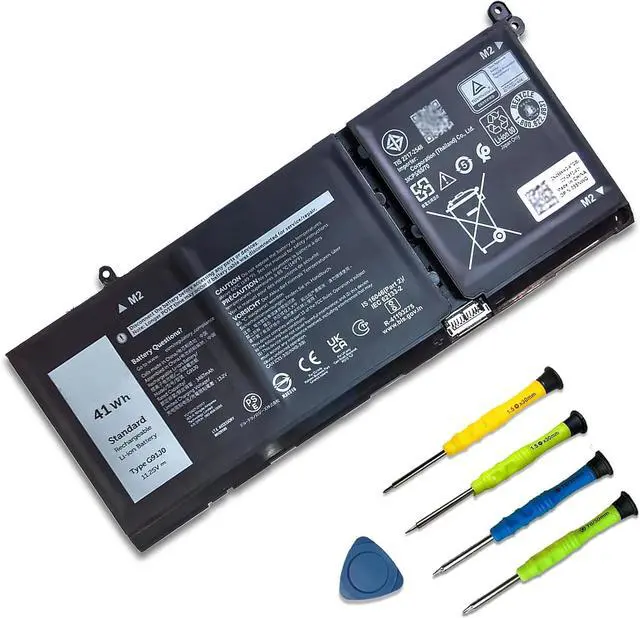
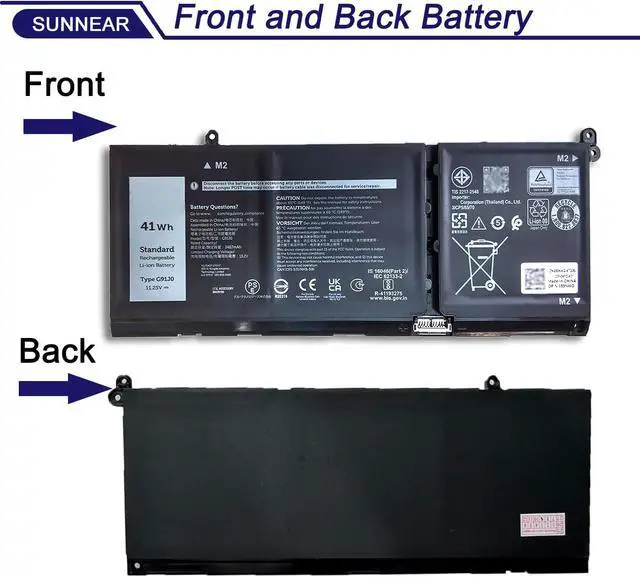
41Wh G91J0 Laptop Battery Dell Latitude 3520 3420 3320 3330 Inspiron 3510 3511 3515 3525 3530 5310 5410 5418 5510 5515 5518 14 Plus 7420 7415 2-in-1 Vostro 5620 5625 11.25V
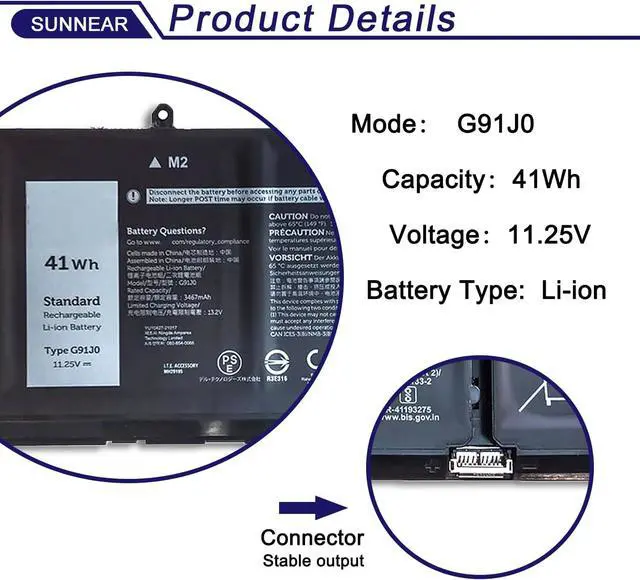
- SpecificationsModel: G91J0 ; Voltage: 11.25V; Capacity: 41Wh 3467mAh); Battery type: Li-ion. (We only use grade A battery cells that provide up to 500 power cycles over the life of the battery. Come with screwdrivers.)
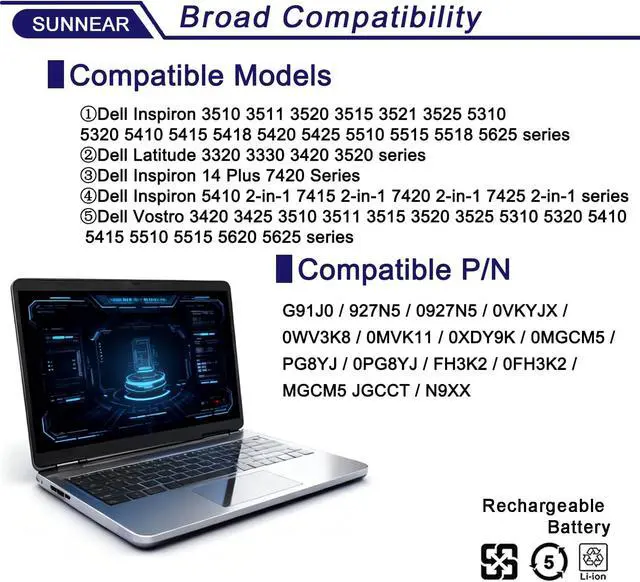
- Compatible LaptopNotebook Modelsfor For Dell Inspiron 3510 3511 3520 3515 3521 3525 5310 5320 5410 5415 5418 5420 5425 5510 5515 5518 5625 series For Dell Latitude 3320 3330 3420 3520 series For Dell Inspiron 14 Plus 7420 Series For Dell Inspiron 5410 2-in-1 7415 2-in-1 7420 2-in-1 7425 2-in-1 series For Dell Vostro 3420 3425 3510 3511 3515 3520 3525 5310 5320 5410 5415 5510 5515 5620 5625 series
- Compatible Part Number G91J0 TN70C 927N5 0927N5 0VKYJX 0WV3K8 0MVK11 0XDY9K 0MGCM5 PG8YJ 0PG8YJ FH3K2 0FH3K2 MGCM5 JGCCT N9XX
- Purchasing NoteDue to the complexity of laptop battery models, you may not be able to accurately determine the model you need to purchase,Please open the back cover of the laptop to confirm the original battery model number
- TipsIf
+
+
Overview
Specs
Reviews
Any questions? Our AI mode will help you find out quickly.
Try me now
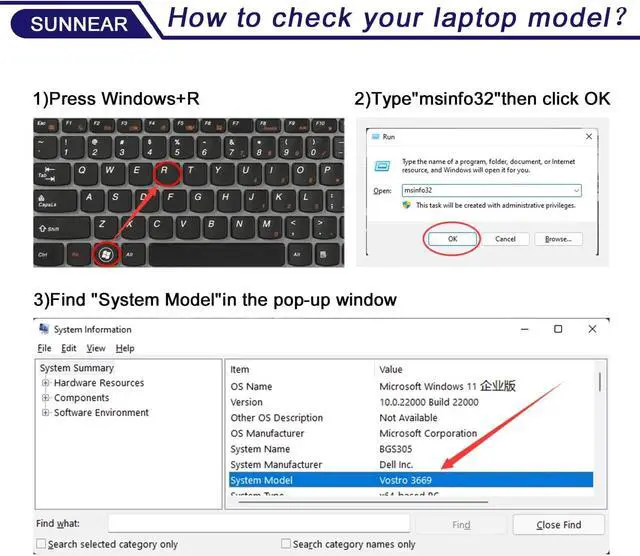
Step 1. Press Win + R
Step 2. Type"msinfo32" click OK
Step 3. Find "System Model"in the pop-up window
Step 4. check if the computer model is compatible with the battery.
Compatible Part Numbers G91J0 / TN70C / 927N5 / 0927N5 / 0VKYJX / 0WV3K8 / 0MVK11 / 0XDY9K / 0MGCM5 / PG8YJ / 0PG8YJ / FH3K2 / 0FH3K2 / MGCM5 JGCCT / N9XX Compatible Laptop Models Dell Inspiron 15 3510 3511 3515 3520 3525 3530 3535 Series, Compatible Laptop Models Dell Inspiron 13 5310 5320 5330 Series, Compatible Laptop Models Dell Inspiron 14 5410 5415 5418 5420 5425 5430 5435 Series, Compatible Laptop Models Dell Inspiron 14 Plus 7420 Series, Compatible Laptop Models Dell Inspiron 15 5510 5515 5518 Series, Compatible Laptop Models Dell Inspiron 16 5625 5630 5635 Series, Compatible Laptop Models Dell Inspiron 14 5410 7420 7425 7430 7435 7430 7435 2-in-1 Series, Compatible Laptop Models Dell Inspiron 16 7620 2-in-1 Series, Compatible Laptop Models Dell Latitude 3320 3330 3420 3520 Series, Compatible Laptop Models Dell Vostro 15 3510 3511 3515 3520 3525 Series, Compatible Laptop Models Dell Vostro 13 5310 5320 Series, Compatible Laptop Models Dell Vostro 14 3420 3425 5410 5415 Series, Compatible Laptop Models Dell Vostro 15 5510 5515 Series, Compatible Laptop Models Dell Vostro 5620 5625 Series. What initial checks and procedures should be performed upon receiving a new battery?
After unpacking, check the battery for physical damage (such as cracks or leakage) and verify its compatibility with your device. Carefully read the accompanying safety manual and operating instructions.
What to do if your laptop won't power on after replacing the battery?
Check battery installation and clean contacts. Try starting with power adapter only to isolate issue. Ensure adapter works and internal hardware (like RAM) is secure. Reset BIOS/UEFI to defaults if needed.
What are the correct steps to take if a laptop battery is bulging?
Power off and unplug device. Wearing gloves, carefully remove battery in open area without bending/piercing. Place in non-flammable container. Contact e-waste center or professional service. Do not discard or disassemble.
Battery Maintenance Methods for Optimal Use
For optimal battery health, conduct a full power cycle each month. Avoid prolonged adapter connection during use. Protect from impacts, disassembly, crushing, or piercing. Keep away from fire and water.
What can you do if the battery performance does not meet expectations?
Contact SUNNEAR for assistance. We offer a one-year support on all battery products.
How to check your laptop model? COMPATIBLE MODELS(use "Ctrl+F" to find your model quickly): What initial checks and procedures should be performed upon receiving a new battery?
What to do if your laptop won't power on after replacing the battery?
What are the correct steps to take if a laptop battery is bulging?
Battery Maintenance Methods for Optimal Use
What can you do if the battery performance does not meet expectations?

Step 2. Type"msinfo32" click OK
Step 3. Find "System Model"in the pop-up window
Step 4. check if the computer model is compatible with the battery.
Compatible Part Numbers G91J0 / TN70C / 927N5 / 0927N5 / 0VKYJX / 0WV3K8 / 0MVK11 / 0XDY9K / 0MGCM5 / PG8YJ / 0PG8YJ / FH3K2 / 0FH3K2 / MGCM5 JGCCT / N9XX Compatible Laptop Models Dell Inspiron 15 3510 3511 3515 3520 3525 3530 3535 Series, Compatible Laptop Models Dell Inspiron 13 5310 5320 5330 Series, Compatible Laptop Models Dell Inspiron 14 5410 5415 5418 5420 5425 5430 5435 Series, Compatible Laptop Models Dell Inspiron 14 Plus 7420 Series, Compatible Laptop Models Dell Inspiron 15 5510 5515 5518 Series, Compatible Laptop Models Dell Inspiron 16 5625 5630 5635 Series, Compatible Laptop Models Dell Inspiron 14 5410 7420 7425 7430 7435 7430 7435 2-in-1 Series, Compatible Laptop Models Dell Inspiron 16 7620 2-in-1 Series, Compatible Laptop Models Dell Latitude 3320 3330 3420 3520 Series, Compatible Laptop Models Dell Vostro 15 3510 3511 3515 3520 3525 Series, Compatible Laptop Models Dell Vostro 13 5310 5320 Series, Compatible Laptop Models Dell Vostro 14 3420 3425 5410 5415 Series, Compatible Laptop Models Dell Vostro 15 5510 5515 Series, Compatible Laptop Models Dell Vostro 5620 5625 Series. What initial checks and procedures should be performed upon receiving a new battery?
After unpacking, check the battery for physical damage (such as cracks or leakage) and verify its compatibility with your device. Carefully read the accompanying safety manual and operating instructions.
What to do if your laptop won't power on after replacing the battery?
Check battery installation and clean contacts. Try starting with power adapter only to isolate issue. Ensure adapter works and internal hardware (like RAM) is secure. Reset BIOS/UEFI to defaults if needed.
What are the correct steps to take if a laptop battery is bulging?
Power off and unplug device. Wearing gloves, carefully remove battery in open area without bending/piercing. Place in non-flammable container. Contact e-waste center or professional service. Do not discard or disassemble.
Battery Maintenance Methods for Optimal Use
For optimal battery health, conduct a full power cycle each month. Avoid prolonged adapter connection during use. Protect from impacts, disassembly, crushing, or piercing. Keep away from fire and water.
What can you do if the battery performance does not meet expectations?
Contact SUNNEAR for assistance. We offer a one-year support on all battery products.
How to check your laptop model? COMPATIBLE MODELS(use "Ctrl+F" to find your model quickly): What initial checks and procedures should be performed upon receiving a new battery?
What to do if your laptop won't power on after replacing the battery?
What are the correct steps to take if a laptop battery is bulging?
Battery Maintenance Methods for Optimal Use
What can you do if the battery performance does not meet expectations?
Warranty & Returns
Warranty, Returns, And Additional Information
Warranty
- Please contact the Seller directly for warranty information. Warranty information may also be found on the Manufacturer's website.
- CONTACT
Return Policies
- Return for refund within: 30 days
- Return for replacement within: 30 days
- This item is covered by LionTech Direct Return Policy
Manufacturer Contact Info
- For a directory of all our manufacturers, please click below.
- Manufacturers Directory
LOADING...