Your Browsing History
Meet Your Seller
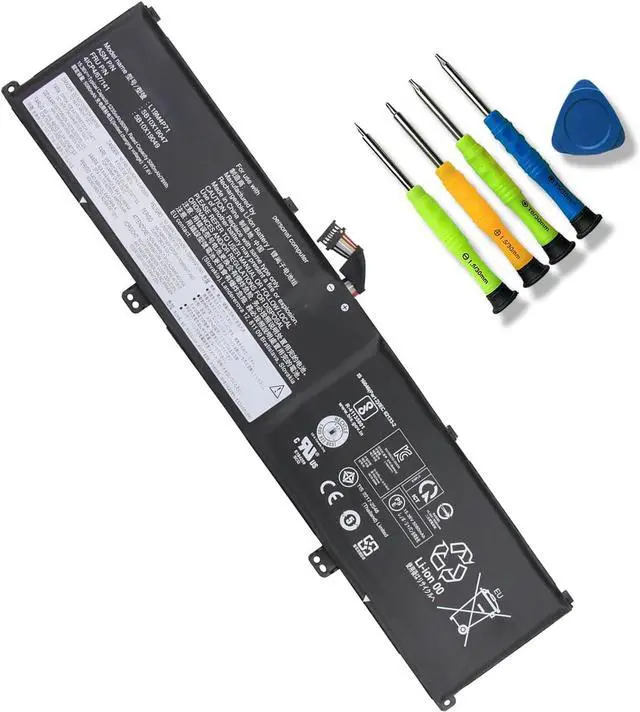
JOTACT L19M4P71 Laptop Battery Compatible with Lenovo ThinkPad X1 Extreme P1 3rd Gen Series Notebook L19C4P71 5B10X19047 5B10X19049 5B10X19048 5B10X19050 15.36V 80Wh
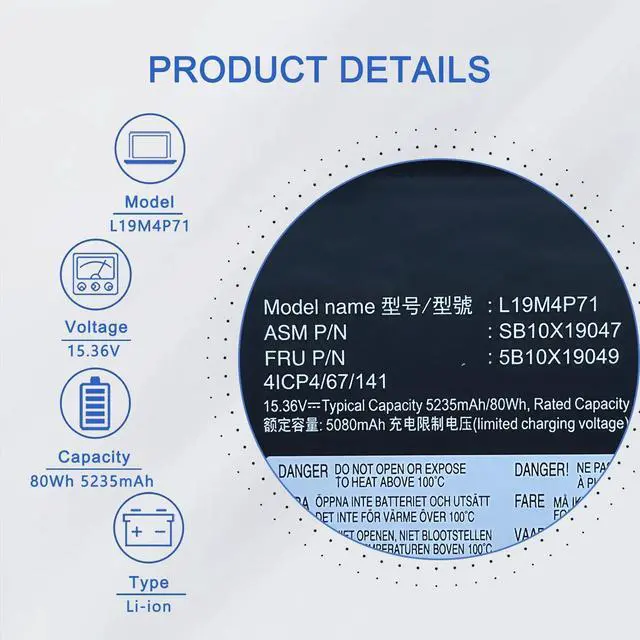
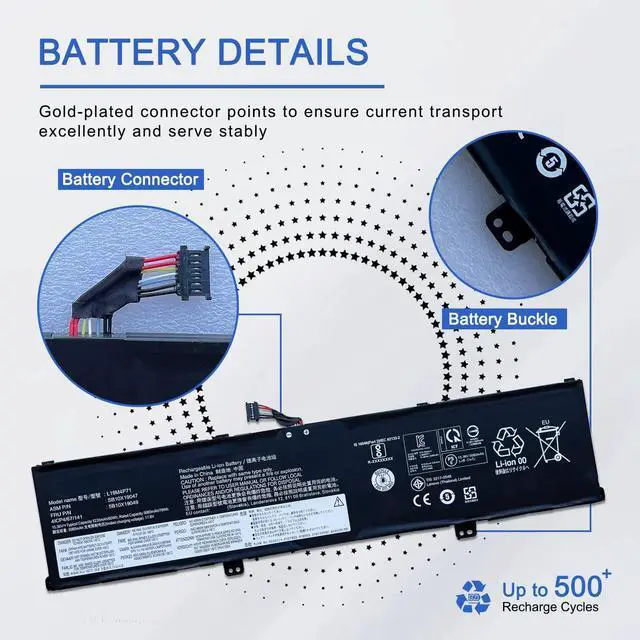
- SpecificationsItem Model: L19M4P71 ; Product Type: Replacement battery; Battery Type: Li-ion; Voltage: 15.36V; Capacity: 80Wh 5235mAh; Battery Life: Up to 500 recharge cycles over the life of the battery.
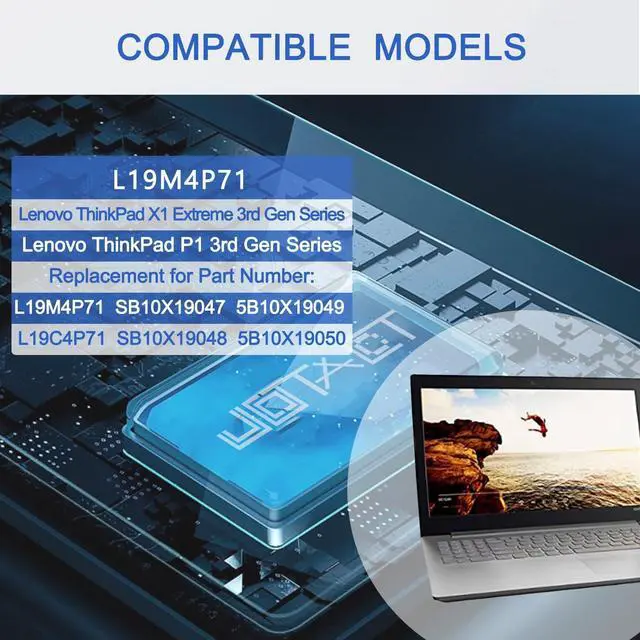
- Replacement for Part NumberL19M4P71 L19C4P71 5B10X19048 5B10X19050 5B10X19047 5B10X19049
- Compatible with Laptop ModelsLenovo ThinkPad X1 Extreme 3rd Gen ThinkPad P1 3rd Gen Series Notebook
- Use SkillsBefore installing the replacement battery, please read the manual carefully.
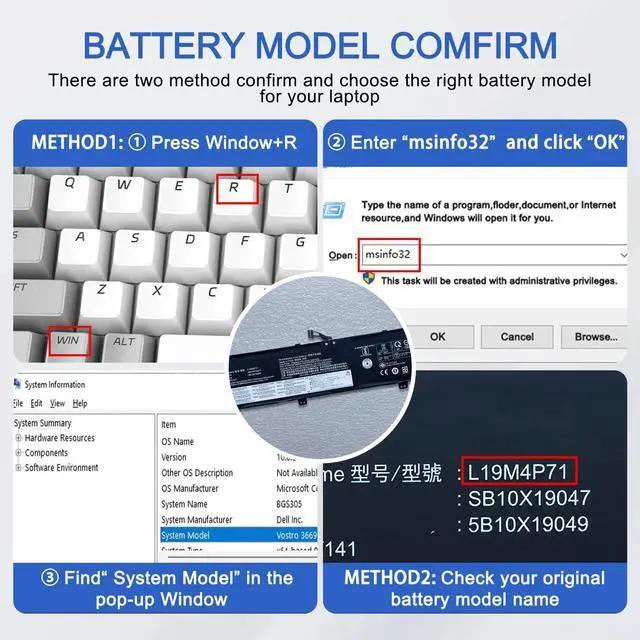
- NotesBefore placing your order, we highly suggest you to open the back case of your laptop and check out the exact part number and connector from your laptop's original battery.
+
+
Overview
Specs
Reviews
Any questions? Our AI mode will help you find out quickly.
Try me now
Model: L19M4P71
Capacity: 80Wh 5235mAh
Voltage: 15.36V
1. Battery Buckle
The laptop is tightly connected to the buckle, stabilizing the battery to ensure no loosening, solid and safe.
2. Battery Connector
Interface metal and fixed insulator are made of good materials to ensure stable current input and durability.
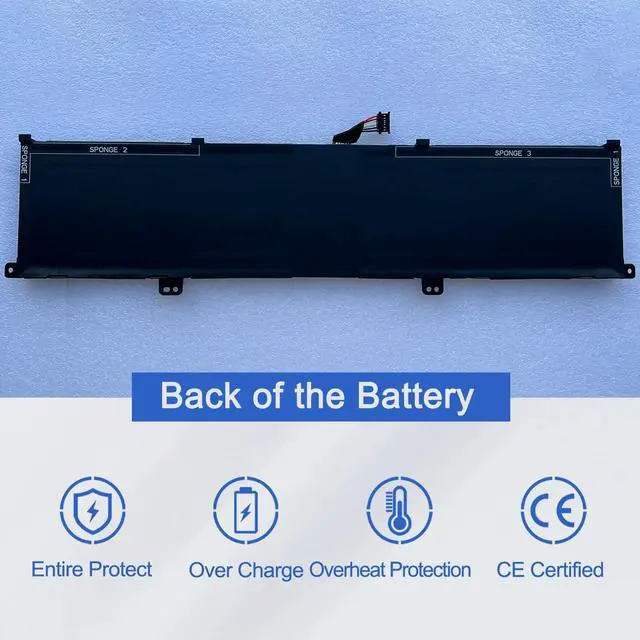
3. Back of the Battery
The shell is made of ABS + PC composite material casting, good heat and flame retardant performance, good resistance to wear and tear, safe to use. Designed same size as original battery, 100% compatible to meet OEM specifications.
4. Grade A Cells
All of our batteries are brand new and use Grade A battery cells to ensure longer battery life, durability, and lower power consumption.
Replacement Part Numbers
L19M4P71 / L19C4P71 / 5B10X19048 / 5B10X19050 / 5B10X19047 / 5B10X19049
Compatible Laptop Models(use "Ctrl+F to find your model quickly")
Lenovo ThinkPad P1 3rd Gen 2020 Series
ThinkPad P1 Gen 3 20THS0M200, ThinkPad P1 Gen 3 20THS0NB00, ThinkPad P1 Gen 3 20THS07F00, ThinkPad P1 Gen 3 20THS09B00,
ThinkPad P1 Gen 3 20TH002LAU, ThinkPad P1 Gen 3 20THCTO1WW, ThinkPad P1 Gen 3 20THS0B200, ThinkPad P1 Gen 3 20THS0BJ00,
ThinkPad P1 Gen 3 20THS0BK00, ThinkPad P1 Gen 3 20THS0C400, ThinkPad P1 Gen 3 20THS0CM00, ThinkPad P1 Gen 3 20THS0J900,
ThinkPad P1 Gen 3 20TJS0CX0X, ThinkPad P1 Gen 3 20TJS0D000, ThinkPad P1 Gen 3 20TJS0D100, ThinkPad P1 Gen 3 20TJS0DK00,
ThinkPad P1 Gen 3 20TJS0DR00, ThinkPad P1 Gen 3 20TJS0QS00, ThinkPad P1 Gen 3 20TJS0RP00, ThinkPad P1 Gen 3 20TJS0RQ00,
ThinkPad P1 Gen 3 20TJS0SG00, ThinkPad P1 Gen 3 20TJS0UA00, ThinkPad P1 Gen 3 20TJS0UG01, ThinkPad P1 Gen 3 20TJS02Q28,
ThinkPad P1 Gen 3 20TJS03800, ThinkPad P1 Gen 3 20TJS05L00, ThinkPad P1 Gen 3 20TJS1B100, ThinkPad P1 Gen 3 20TJS1HN1Z,
ThinkPad P1 Gen 3 20TJS1LF1C, ThinkPad P1 Gen 3 20TJS1MQ00, ThinkPad P1 Gen 3 20TJS1N90Q, ThinkPad P1 Gen 3 20TJS1PM00,
ThinkPad P1 Gen 3 20TJS1QB00, ThinkPad P1 Gen 3 20TJS1QF01, ThinkPad P1 Gen 3 20TJS1RT00, ThinkPad P1 Gen 3 20TJS1VT00,
For Lenovo ThinkPad X1 Extreme 3rd Gen Series:
ThinkPad X1 Extreme 3rd Gen 20TK0007AU, ThinkPad X1 Extreme 3rd Gen 20TLS12201, ThinkPad X1 Extreme Gen 3 20TK000AMH,
ThinkPad X1 Extreme 3rd Gen 20TK0008AU, ThinkPad X1 Extreme 3rd Gen 20TKCTO1WW, ThinkPad X1 Extreme 3rd Gen 20TKS0C300,
ThinkPad X1 Extreme 3rd Gen 20TKS0C400, ThinkPad X1 Extreme 3rd Gen 20TLS0G004,ThinkPad X1 Extreme 3rd Gen 20TLS0G105,
ThinkPad X1 Extreme 3rd Gen 20TLS0LQ00, ThinkPad X1 Extreme 3rd Gen 20TLS0QF00,ThinkPad X1 Extreme 3rd Gen 20TLS0SL00,
For Lenovo ThinkPad X1 Extreme Gen 3 Series:
ThinkPad X1 Extreme Gen 3 20TK000DGE, ThinkPad X1 Extreme Gen 3 20TK000DUK, ThinkPad X1 Extreme Gen 3 20TK000QMH,
ThinkPad X1 Extreme Gen 3 20TK000UCA, ThinkPad X1 Extreme Gen3 20TLS0UV00 .ThinkPad X1 Extreme Gen 3 20TK0006AD, ThinkPad X1 Extreme Gen 3 20TK001DUS,
If you often connect the charger to use the laptop, please use the battery power regularly, more than once a week.
Please use the original charger or well-known brand charger, inferior charger will affect the normal charging of the battery.
Regularly clean fan dust to increase heat dissipation and reduce power consumption, which can effectively extend the battery life.
New battery received, please discharge to roughly 10% ~ 20%, then charge it to full. Repeat 3 ~ 5 times to wake up the battery performance.
Do not discharge to 0%, it may damage the battery cells.
After the battery power is exhausted, please charge in time, if not charged for a long time, it may lead to battery damage.
If you plan not to use your laptop for a long time, you need to charge it to more than 70% for storage, and the best storage time is no more than 3 months.
Battery Usage Maintenance

Capacity: 80Wh 5235mAh
Voltage: 15.36V
1. Battery Buckle
The laptop is tightly connected to the buckle, stabilizing the battery to ensure no loosening, solid and safe.
2. Battery Connector
Interface metal and fixed insulator are made of good materials to ensure stable current input and durability.
3. Back of the Battery
The shell is made of ABS + PC composite material casting, good heat and flame retardant performance, good resistance to wear and tear, safe to use. Designed same size as original battery, 100% compatible to meet OEM specifications.
4. Grade A Cells
All of our batteries are brand new and use Grade A battery cells to ensure longer battery life, durability, and lower power consumption.
Replacement Part Numbers
L19M4P71 / L19C4P71 / 5B10X19048 / 5B10X19050 / 5B10X19047 / 5B10X19049
Compatible Laptop Models(use "Ctrl+F to find your model quickly")
Lenovo ThinkPad P1 3rd Gen 2020 Series
ThinkPad P1 Gen 3 20THS0M200, ThinkPad P1 Gen 3 20THS0NB00, ThinkPad P1 Gen 3 20THS07F00, ThinkPad P1 Gen 3 20THS09B00,
ThinkPad P1 Gen 3 20TH002LAU, ThinkPad P1 Gen 3 20THCTO1WW, ThinkPad P1 Gen 3 20THS0B200, ThinkPad P1 Gen 3 20THS0BJ00,
ThinkPad P1 Gen 3 20THS0BK00, ThinkPad P1 Gen 3 20THS0C400, ThinkPad P1 Gen 3 20THS0CM00, ThinkPad P1 Gen 3 20THS0J900,
ThinkPad P1 Gen 3 20TJS0CX0X, ThinkPad P1 Gen 3 20TJS0D000, ThinkPad P1 Gen 3 20TJS0D100, ThinkPad P1 Gen 3 20TJS0DK00,
ThinkPad P1 Gen 3 20TJS0DR00, ThinkPad P1 Gen 3 20TJS0QS00, ThinkPad P1 Gen 3 20TJS0RP00, ThinkPad P1 Gen 3 20TJS0RQ00,
ThinkPad P1 Gen 3 20TJS0SG00, ThinkPad P1 Gen 3 20TJS0UA00, ThinkPad P1 Gen 3 20TJS0UG01, ThinkPad P1 Gen 3 20TJS02Q28,
ThinkPad P1 Gen 3 20TJS03800, ThinkPad P1 Gen 3 20TJS05L00, ThinkPad P1 Gen 3 20TJS1B100, ThinkPad P1 Gen 3 20TJS1HN1Z,
ThinkPad P1 Gen 3 20TJS1LF1C, ThinkPad P1 Gen 3 20TJS1MQ00, ThinkPad P1 Gen 3 20TJS1N90Q, ThinkPad P1 Gen 3 20TJS1PM00,
ThinkPad P1 Gen 3 20TJS1QB00, ThinkPad P1 Gen 3 20TJS1QF01, ThinkPad P1 Gen 3 20TJS1RT00, ThinkPad P1 Gen 3 20TJS1VT00,
For Lenovo ThinkPad X1 Extreme 3rd Gen Series:
ThinkPad X1 Extreme 3rd Gen 20TK0007AU, ThinkPad X1 Extreme 3rd Gen 20TLS12201, ThinkPad X1 Extreme Gen 3 20TK000AMH,
ThinkPad X1 Extreme 3rd Gen 20TK0008AU, ThinkPad X1 Extreme 3rd Gen 20TKCTO1WW, ThinkPad X1 Extreme 3rd Gen 20TKS0C300,
ThinkPad X1 Extreme 3rd Gen 20TKS0C400, ThinkPad X1 Extreme 3rd Gen 20TLS0G004,ThinkPad X1 Extreme 3rd Gen 20TLS0G105,
ThinkPad X1 Extreme 3rd Gen 20TLS0LQ00, ThinkPad X1 Extreme 3rd Gen 20TLS0QF00,ThinkPad X1 Extreme 3rd Gen 20TLS0SL00,
For Lenovo ThinkPad X1 Extreme Gen 3 Series:
ThinkPad X1 Extreme Gen 3 20TK000DGE, ThinkPad X1 Extreme Gen 3 20TK000DUK, ThinkPad X1 Extreme Gen 3 20TK000QMH,
ThinkPad X1 Extreme Gen 3 20TK000UCA, ThinkPad X1 Extreme Gen3 20TLS0UV00 .ThinkPad X1 Extreme Gen 3 20TK0006AD, ThinkPad X1 Extreme Gen 3 20TK001DUS,
If you often connect the charger to use the laptop, please use the battery power regularly, more than once a week.
Please use the original charger or well-known brand charger, inferior charger will affect the normal charging of the battery.
Regularly clean fan dust to increase heat dissipation and reduce power consumption, which can effectively extend the battery life.
New battery received, please discharge to roughly 10% ~ 20%, then charge it to full. Repeat 3 ~ 5 times to wake up the battery performance.
Do not discharge to 0%, it may damage the battery cells.
After the battery power is exhausted, please charge in time, if not charged for a long time, it may lead to battery damage.
If you plan not to use your laptop for a long time, you need to charge it to more than 70% for storage, and the best storage time is no more than 3 months.
Battery Usage Maintenance
Warranty & Returns
Warranty, Returns, And Additional Information
Warranty
- Please contact the Seller directly for warranty information. Warranty information may also be found on the Manufacturer's website.
- CONTACT
Return Policies
- Return for refund within: 30 days
- Return for replacement within: 30 days
- This item is covered by LionTech Direct Return Policy
Manufacturer Contact Info
- For a directory of all our manufacturers, please click below.
- Manufacturers Directory
LOADING...