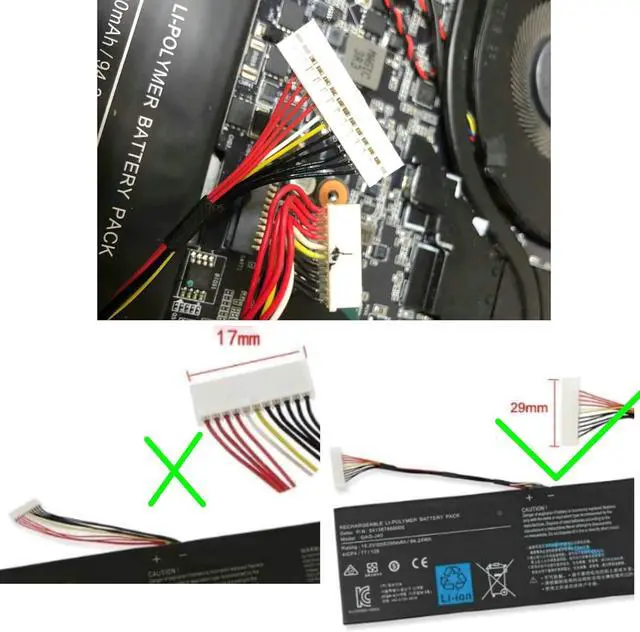
There are two kinds of connectors in this model
We sell the wide connector
In order to avoid buying the wrong
please check your old batteries before buying.
:
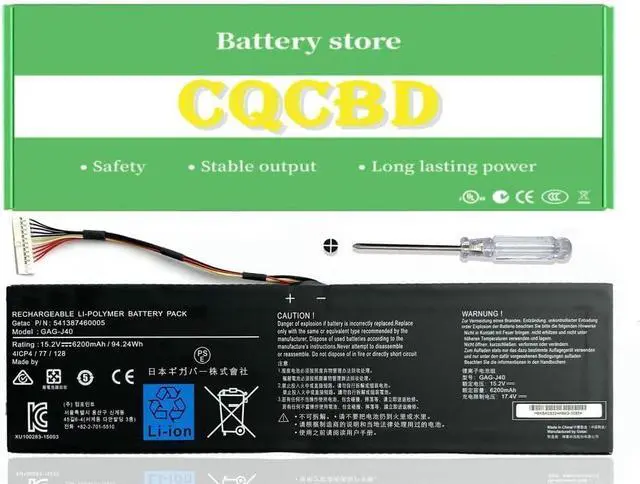
Battery Type: Li-Polymer
Voltage: 15.2V
Capacity:94.24Wh 6200mAh
Compatible Part Numbers:
GAG-J40
541387460002
541387460003
541387460005
4ICP4/77/128
Compatible Laptop/Notebook Models:
For Gigabyte Aero 14 Series:
Gigabyte Aero 14 (GTX 1050 TI)
Gigabyte Aero 14 (GTX 965M)
Gigabyte Aero 14-V7 14-K7
Gigabyte Aero 14-W-CF2
Gigabyte Aero 14-W-CF2For
Gigabyte Aero 14-P64WV6
Gigabyte Aero 14 P64WV7-De325Tb
Gigabyte Aero 15 Series:
Gigabyte Aero 15 (RTX 20 Series)
Gigabyte Aero 15W Series
Gigabyte Aero 15X Series
Gigabyte Aero 15 CLASSIC-SA
Gigabyte Aero 15 CLASSIC-YA
Gigabyte Aero 15 X8 XA 15-X9 15-Y9
Gigabyte Aero 15 Classic
Gigabyte Aero 15X (I7-8750H)
Gigabyte Aero 15X V8
Gigabyte Aero 15X V8-BK4
Gigabyte Aero 15-x9-9rt5
Gigabyte Aero 17 Series:
Gigabyte Aero 17 HDR(INTEL 9TH GEN)
Gigabyte Aero 17 XA RP77
Gigabyte Aero 17 XA HDR
Gigabyte Aorus 17 YA Gaming
Gigabyte Aorus X5 V6 V7 V8
Gigabyte Aorus X7 V6 V7
Gigabyte Aorus X7 Dt V6 V7 V8
Gigabyte p34gv2
For Optimal Use battery:
New battery received, discharge the battery to 5% (not 0%) for the fist use, then charge and cycle 3-4 times to wake up the new battery.
The important point is to perform a full discharge and charge every other month to extend the battery life.
Do not connect adapter for a long time while using the battery. It may damage the battery.
Avoid artificial shocks, disassembly, crush or puncture. Do not dispose of it in fire or water.
How to install a new battery:
1.emove the old battery, carefully install the new battery on the battery box, tighten the screws, and then connect the wires of the new battery.
2. If you have questions about installing a new battery, you can search for the installation of laptop/tablet models on YouTube.
This method may help you.
1. please reinstall and check if the interface is fully connected.
Please disconnect the old battery, and hold down the power button for 20 seconds, then connect the new battery. This drains the residual or flea power and once the laptop is reassembled the battery will function properly.
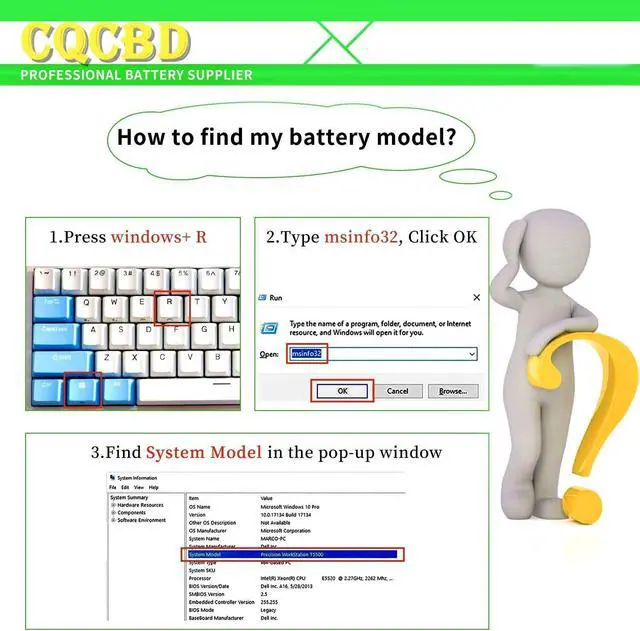
2. Battery cannot be identified by your laptop or it doesn't seem to work. That may be caused by different situations. Please check by yourself first as below steps.
Could be caused by battery loose. Remove the battery and try to reinstall more than once.
May be due to conductive material damaged which the laptop motherboard and battery anode and cathode contact position, you can try to confirm it with your original battery.
Check whether the battery drive is in normal condition, if not, download the corresponding driver software to update.
Take out the battery and press the power button for about 15 seconds to consume the internal residual power (Do not connect the power cord), and then reinstall the battery.
You can try several times.
Within 2years, if the battery has any fault, please feel free to contactUs to replace it Note: This item is 29cm wide connector If the new battery is not recognized during the initial installation





 here!
here!