Your Browsing History
Meet Your Seller
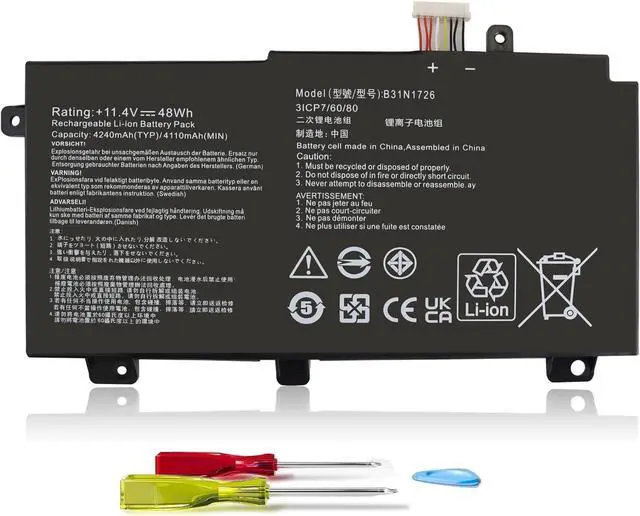
B31N1726 11.4V 48Wh Laptop Battery for ASUS TUF Gaming FX504 FX504G FX504GD FX504GE FX504GM FX505 FX505DT FX505DV FX505DU FX505DY FX505GT FX505GE FX505GD FX505GM FX80 FX80G FX80GD FX80GE FX80GM FX86
- #107,569 in Computers & Accessories (See Top 100 in Computers & Accessories)
- #7,363 in Laptop Batteries
- 5 star4 star3 star2 star1 star5 star100%0%0%0%0%100%
- 5 star4 star3 star2 star1 star4 star100%0%0%0%0%0%
- 5 star4 star3 star2 star1 star3 star100%0%0%0%0%0%
- 5 star4 star3 star2 star1 star2 star100%0%0%0%0%0%
- 5 star4 star3 star2 star1 star1 star100%0%0%0%0%0%
- Bruce P. Douglass5 out of 5 starsExcellent battery replacement and easy to install, plus a charging tipReviewed in the United States on April 10, 2025Vine Customer Review of Free ProductBrief content visible, double tap to read full content.Full content visible, double tap to read brief content.B31N1726 11.4V 48Wh Laptop Battery for ASUS TUF Gaming FX504 FX504G FX504GD FX504GE FX504GM FX505 FX505DT FX505DV FX505DU FX505DY FX505GT FX505GE FX505GD FX505GM FX80 FX80G FX80GD FX80GE FX80GM FX86Great battery replacement and easy to install - plus a battery settings tipI have an Asus FX504GM gaming laptop and the battery was compl
+
+
Overview
Specs
Reviews
Any questions? Our AI mode will help you find out quickly.
Try me now
For purchasing the correct replacement battery, please check your original battery's model number and also the specific laptop model.
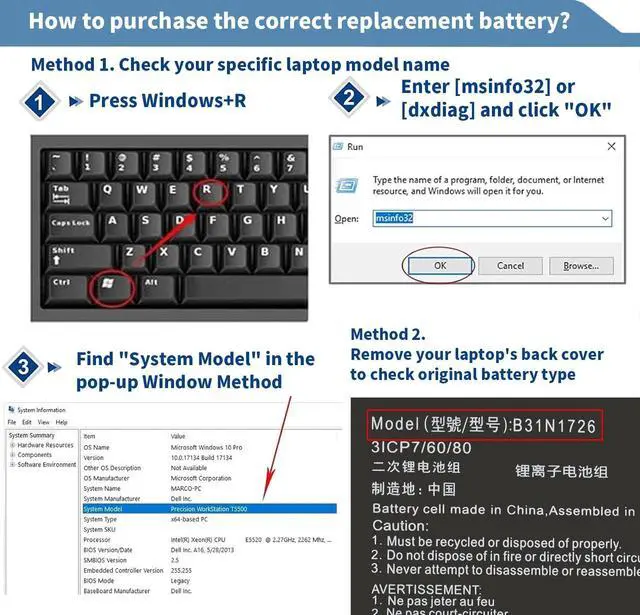
Step 1. Remove your laptop back cover to check your original batterys model number and shape. Then search the model number to find the correct replacement battery.
Step 2. Check your specific laptop model name by pressing [Win] + [R] key and entering [msinfo32] or [dxdiag] , then click OK to find your system model. Find the replacement battery base on your laptop model name.
About battery compatibility:
Please check the list of compatible models below. The models listed may be incomplete. If you are unsure about compatibility, inquire in the Q&A or click on the Perhanmm storefront to inquire.
Perhanmm is a professional manufacturer and seller of replacement laptop batteries and adapters. We have independent technical team, advanced manufacturing factory, professional sales team and perfect after-sales service system. All products are subject to strict quality control and are constantly being improved. High-quality products and satisfactory service are our constant pursuit. No worries after purchase because we are always here for help. Enjoy your shopping!
Battery Specifications
Brand: Perhanmm
Model Number: B31N1726 Battery
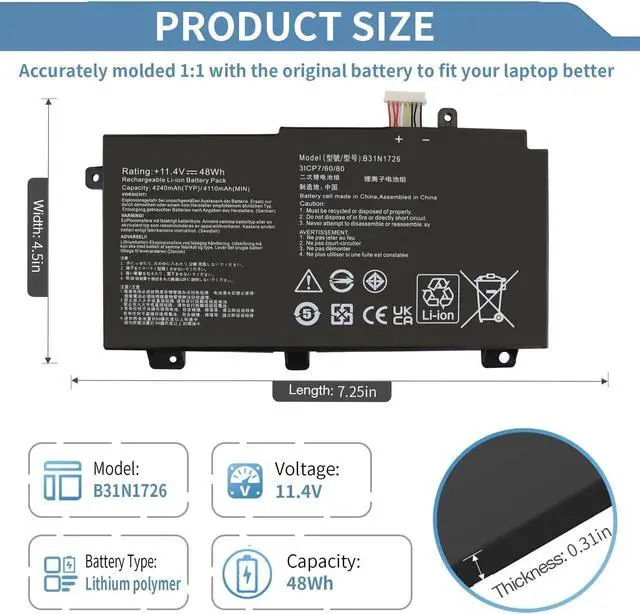
Battery Type: Lithium polymer
Capacity: 48Wh
Voltage: 11.4V
Cells: 3 cells
Condition: 100% New from Manufacturer, Grade A Cells
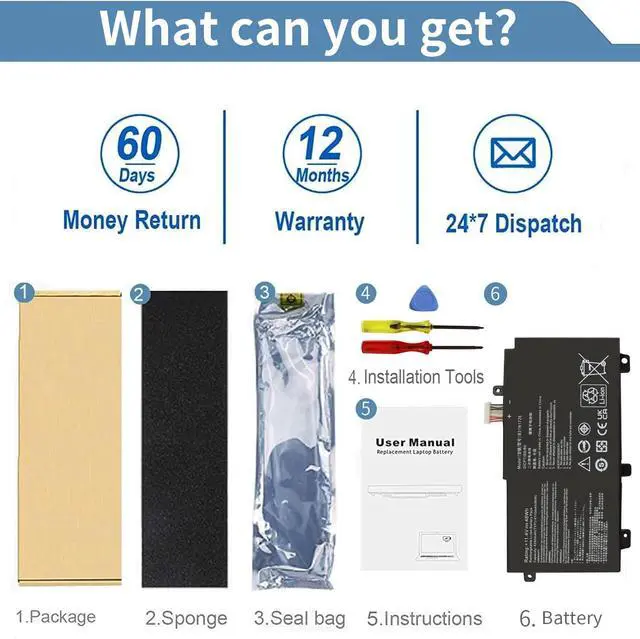
Easy Installation: Battery comes with 2 Screwdrivers & 1 Uncapping Tool for easy & quick installation
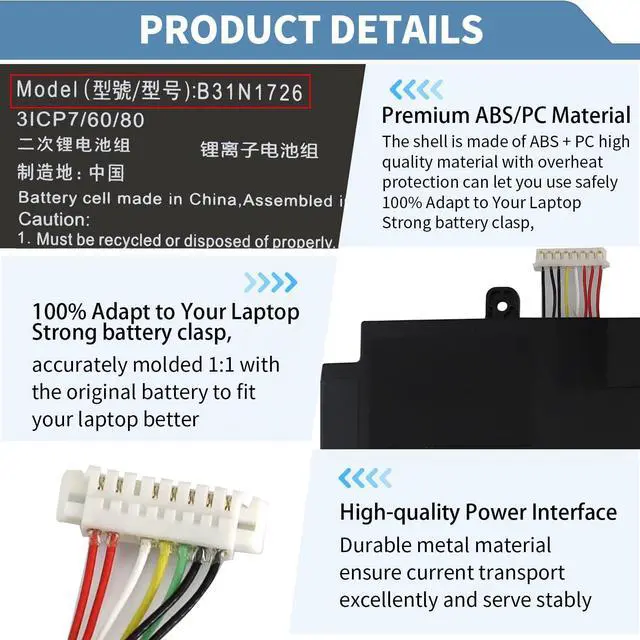
*B31N1726 Battery has two types of cables: SHORT and LONG. The one we sell is SHORT. They can not replace each other.
*So before placing an order, please open the back cover of your laptop, check and confirm your original battery, and compare with our battery pictures to ensure that this is what you need. Especially the length of the cable (long or short).
Compatible With Part Numbers & Models (Ctrl + F for fast search your laptop model)
Replacement for Part Numbers:
B31N1726-1, B31N1726, B31BNEH, B31BN91, A41LK9H, 0B200-02910000.
Compatible with Laptop Models:
for ASUS TUF Gaming FX504 FX504GD FX504GE FX504GM series
for ASUS TUF Gaming FX505DT FX505DV FX505DU FX505DY series
for ASUS TUF Gaming FX505GE FX505GD FX505GM FX505GT series
for ASUS FX80 FX80G FX80GD FX80GE FX80GM series
for ASUS FX86 FX86FE FX86FM series
for ASUS TUF Gaming A15 FA506 FA506IU series
for ASUS TUF Gaming A17 FA706II series
When it comes to laptop batteries - it all boils down to the battery cells inside.
As laptop battery users ourselves, we want to provide batteries that are not only durable, but also safe to use. We use Top Quality Battery Cells to ensure longer battery life, good durability and lower power consumption. All of our batteries are capable of providing more than 500 recharge cycles over the life of the battery.
All of our batteries are brand new from manufacturer. Same size as original battery, can fit perfectly in your device without any issues. Not just a purchase but an investment in extending the life and functionality of your laptop.
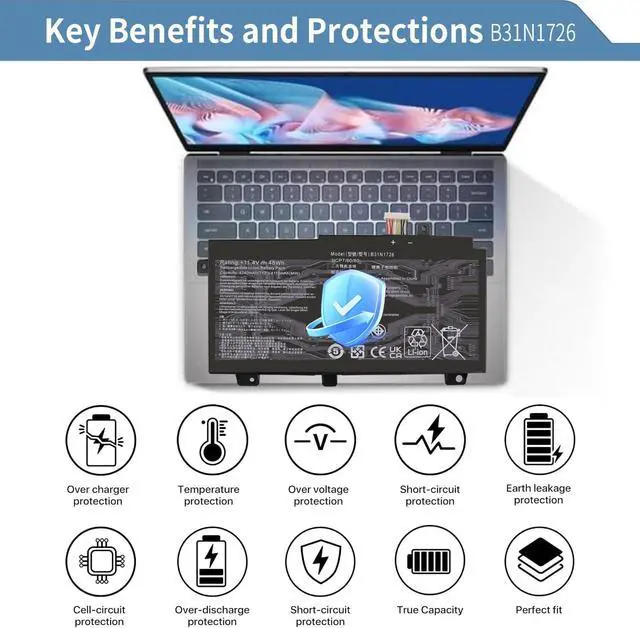
Each battery has a variety of built-in protections, including short circuit, overheat, overload and over-voltage protection, to maximize the safety of battery use.
1. Turn off the laptop and disconnect the power.
2. Open the laptop base, remove the old battery, install the new one into the case, and then put the laptop base back on.
(*Package comes with small tools needed to remove the base of laptop and replace battery.)
3. The included instruction is clear and easy to follow, making the replacement process manageable even for someone with minimal technical experience.
(*For anyone unsure about the installation, numerous helpful YouTube tutorials guide you through the entire process seamlessly.)
How to purchase the correct replacemen

Step 1. Remove your laptop back cover to check your original batterys model number and shape. Then search the model number to find the correct replacement battery.
Step 2. Check your specific laptop model name by pressing [Win] + [R] key and entering [msinfo32] or [dxdiag] , then click OK to find your system model. Find the replacement battery base on your laptop model name.
About battery compatibility:
Please check the list of compatible models below. The models listed may be incomplete. If you are unsure about compatibility, inquire in the Q&A or click on the Perhanmm storefront to inquire.
Perhanmm is a professional manufacturer and seller of replacement laptop batteries and adapters. We have independent technical team, advanced manufacturing factory, professional sales team and perfect after-sales service system. All products are subject to strict quality control and are constantly being improved. High-quality products and satisfactory service are our constant pursuit. No worries after purchase because we are always here for help. Enjoy your shopping!
Battery Specifications
Brand: Perhanmm
Model Number: B31N1726 Battery
Battery Type: Lithium polymer
Capacity: 48Wh
Voltage: 11.4V
Cells: 3 cells
Condition: 100% New from Manufacturer, Grade A Cells
Easy Installation: Battery comes with 2 Screwdrivers & 1 Uncapping Tool for easy & quick installation
*B31N1726 Battery has two types of cables: SHORT and LONG. The one we sell is SHORT. They can not replace each other.
*So before placing an order, please open the back cover of your laptop, check and confirm your original battery, and compare with our battery pictures to ensure that this is what you need. Especially the length of the cable (long or short).
Compatible With Part Numbers & Models (Ctrl + F for fast search your laptop model)
Replacement for Part Numbers:
B31N1726-1, B31N1726, B31BNEH, B31BN91, A41LK9H, 0B200-02910000.
Compatible with Laptop Models:
for ASUS TUF Gaming FX504 FX504GD FX504GE FX504GM series
for ASUS TUF Gaming FX505DT FX505DV FX505DU FX505DY series
for ASUS TUF Gaming FX505GE FX505GD FX505GM FX505GT series
for ASUS FX80 FX80G FX80GD FX80GE FX80GM series
for ASUS FX86 FX86FE FX86FM series
for ASUS TUF Gaming A15 FA506 FA506IU series
for ASUS TUF Gaming A17 FA706II series
When it comes to laptop batteries - it all boils down to the battery cells inside.
As laptop battery users ourselves, we want to provide batteries that are not only durable, but also safe to use. We use Top Quality Battery Cells to ensure longer battery life, good durability and lower power consumption. All of our batteries are capable of providing more than 500 recharge cycles over the life of the battery.
All of our batteries are brand new from manufacturer. Same size as original battery, can fit perfectly in your device without any issues. Not just a purchase but an investment in extending the life and functionality of your laptop.
Each battery has a variety of built-in protections, including short circuit, overheat, overload and over-voltage protection, to maximize the safety of battery use.
1. Turn off the laptop and disconnect the power.
2. Open the laptop base, remove the old battery, install the new one into the case, and then put the laptop base back on.
(*Package comes with small tools needed to remove the base of laptop and replace battery.)
3. The included instruction is clear and easy to follow, making the replacement process manageable even for someone with minimal technical experience.
(*For anyone unsure about the installation, numerous helpful YouTube tutorials guide you through the entire process seamlessly.)
How to purchase the correct replacemen
Warranty & Returns
Warranty, Returns, And Additional Information
Warranty
- Please contact the Seller directly for warranty information. Warranty information may also be found on the Manufacturer's website.
- CONTACT
Return Policies
- Return for refund within: 30 days
- Return for replacement within: 30 days
- This item is covered by LionTech Direct Return Policy
Manufacturer Contact Info
- For a directory of all our manufacturers, please click below.
- Manufacturers Directory
LOADING...