Your Browsing History
Meet Your Seller
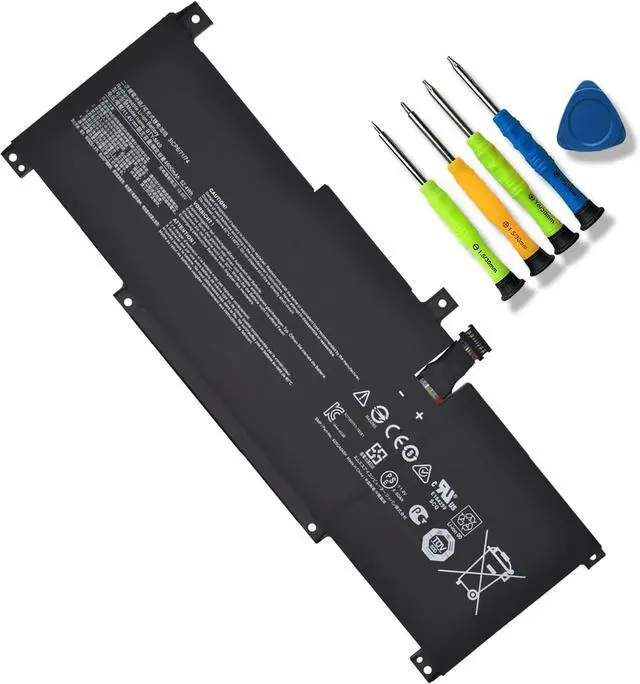
JOTACT BTY-M49 Laptop Battery Compatible with MSI Prestige 14 A10SC A10SC-009 A10RB B10MW-017US MS-14C2 A11SCX Summit E14 A11SCS A11SCST 14 B4M MS-14DK B10RAS B11SB Series 11.4V 52.4Wh 3- Cell
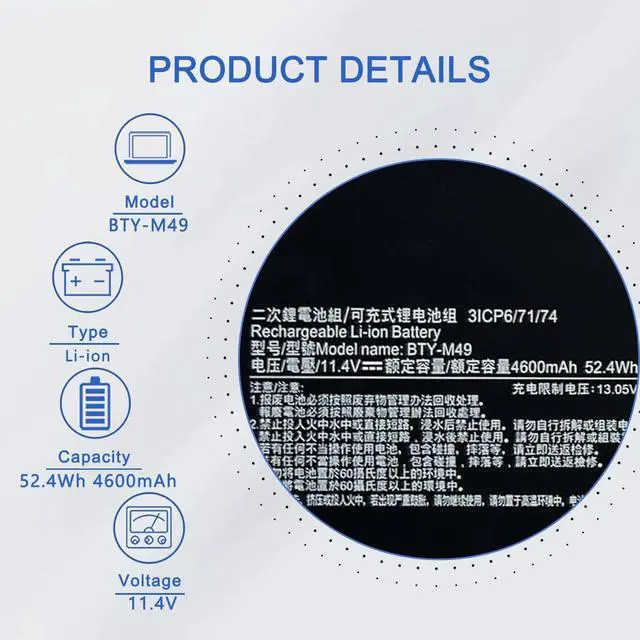
- SpecificationsBattery Model :BTY-M49Voltage: 11.4V ; Capacity: 11.4V 52.4Wh 4600mAh; Battery Type:Lithium ion
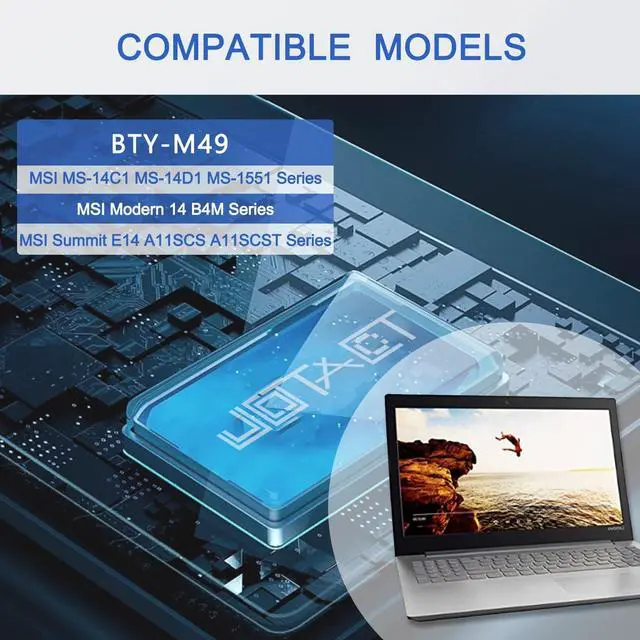
- Compatible with Laptop ModelsFor MSI Summit E14 A11SCS A11SCS-021UK A11SCS-031TW A11SCS-075FR Series; MSI Summit E14 A11SCST A11SCST-071ZA A11SCST-081UK A11SCST-082IT Series; MSI Modern 14 B4M(MS-14DK); MSI Modern 14 B10M(MS-14D1); MSI Modern 14 B10RAS(MS-14D1); MSI Modern 14 B10RASW(MS-14D1); MSI Modern 14 B10RBSW B10RBSW-025ES B10RBSW-030PL B10RBSW-031PL B10RBSW-032DE B10RBSW-033DE B10RBSW-052FR B10RBSW-063XES B10RBSW-064XES; MSI Modern 14 B11SB B11SB-214CZ B11SB-289 B11SB-290 Series
- Replacement for Part NumberBTY-M49 3ICP6/71/74 BTYM49
- Quality AssuranceAll our products are Certified by CE, and FCC strictly test to ensure both safety and longer life. And standards compliance for environment safety. All our products are 100% brand-new from manufacturer.
- Packaged Included1 battery 1* instruction manual Packaged by sponge or bubbles to prevent damage.
+
+
Overview
Specs
Reviews
Any questions? Our AI mode will help you find out quickly.
Try me now
Why the laptop does not recognize the battery
Could be caused by battery loose. Please re-install the battery and make sure that the battery cable and the motherboard interface are tightly inserted.
Maybe due to conductive material damaged which the laptop motherboard and battery anode and cathode contact position, you can try to confirm it with your original battery.
Check whether the battery drive is in normal condition, if not, download the corresponding driver software to update.
There is a problem with the computer detection software, which usually just restart the computer.
How to use the new battery correctly
1. When using your new battery for the first time, you need to prime the battery by charging it to 100% and discharging it to 20% for 3 times. If you don't know how to install a new laptop battery, you can search "How to install a new laptop battery?" on website.
2. DO NOT let the battery drain to 0%: If you constantly let it drain to 0%, the battery becomes unstable will be seriously degraded.
3. DO NOT keep your battery always fully charged: Just like emptying your battery to 0%, keeping your battery permanently charged at 100% is very harmful. As time goes by, this will increase its internal resistance and reduce its capacity.
4. Perform regular charging cycles: If you dont use your Laptop battery very often, it is important to cycle it (discharge => charge) regularly, at least once a month. Please store the unused battery fully charged. Do not store at low power to prevent reduce the lifespan of a battery.
5.The battery life depends on how you use your laptop. If you open a lot of software at the same time, in the office, while listening to music, while browsing the Internet, also watching a movie, then the battery will drain fast; If you don't have a lot of software running on your computer, and you're only on standby or browsing the web, the battery will last longer.
Easy Ways To Maximize Battery Life:
1. Change your laptop power plan settings. I would suggest you choose the power saver plan. Then Change advanced power settings, scroll down to find Processor power management. Click the On-battery option and reduce the processor state to 20%.
2. Always keep your laptop neat and clean. The dust easily enters the hardware through the vents which are meant to release the heat generated from various computer components. It then blocks the vents preventing the outflow of the heat. This damages the computer parts including the battery.
3. Close Wi-Fi, Bluetooth, and other settings. You should keep the Bluetooth and WiFi off when youre watching movies or doing other things which dont require network connectivity. This can help your computer save precious battery life.
1.Battery Buckle
The laptop is tightly connected to the buckle, stabilizing the battery to ensure no loosening, solid and safe.
2.Battery Connector
Interface metal and fixed insulator are made of good materials to ensure stable current input and durability.
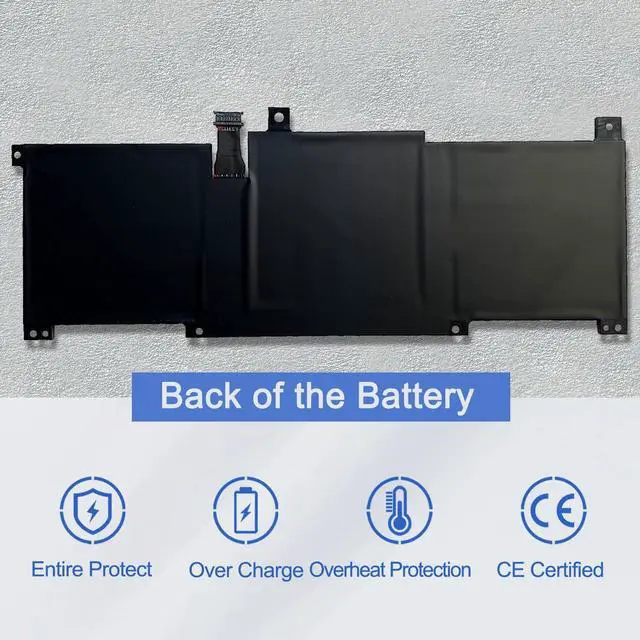
3.Back of the Battery
The shell is made of ABS + PC composite material casting, good heat and flame retardant performance, good resistance to wear and tear, safe to use. Designed same size as original battery, 100% compatible to meet OEM specifications.
Step 1: Press Windows + R to open Run window.
Step 2: Input "msinfo32" in the empty box and click OK to open System Information.
Step 3: Keep in the System Summary section, and you will find the System Model item in the right pane.
Compatible Models (use "Ctrl+F to find your model quickly")
Replacement for MSI Summit E14 A11SCS A11SCST Series.
Summit E14 A11SCS-021UK , Summit E14 A11SCS-031TW , Summit E14 A11SCS-037ES , Summit E14 A11SCS-075EN , Summit E14 A11SCS-088
Summit E14 A11SCST-069NE , Summit E14 A11SCST-071ZA , Summit E14 A11SCST-072RU , Summit E14 A11SCST-073PL
Summit E14 A11SCST-076EN , Summit E14 A

Could be caused by battery loose. Please re-install the battery and make sure that the battery cable and the motherboard interface are tightly inserted.
Maybe due to conductive material damaged which the laptop motherboard and battery anode and cathode contact position, you can try to confirm it with your original battery.
Check whether the battery drive is in normal condition, if not, download the corresponding driver software to update.
There is a problem with the computer detection software, which usually just restart the computer.
How to use the new battery correctly
1. When using your new battery for the first time, you need to prime the battery by charging it to 100% and discharging it to 20% for 3 times. If you don't know how to install a new laptop battery, you can search "How to install a new laptop battery?" on website.
2. DO NOT let the battery drain to 0%: If you constantly let it drain to 0%, the battery becomes unstable will be seriously degraded.
3. DO NOT keep your battery always fully charged: Just like emptying your battery to 0%, keeping your battery permanently charged at 100% is very harmful. As time goes by, this will increase its internal resistance and reduce its capacity.
4. Perform regular charging cycles: If you dont use your Laptop battery very often, it is important to cycle it (discharge => charge) regularly, at least once a month. Please store the unused battery fully charged. Do not store at low power to prevent reduce the lifespan of a battery.
5.The battery life depends on how you use your laptop. If you open a lot of software at the same time, in the office, while listening to music, while browsing the Internet, also watching a movie, then the battery will drain fast; If you don't have a lot of software running on your computer, and you're only on standby or browsing the web, the battery will last longer.
Easy Ways To Maximize Battery Life:
1. Change your laptop power plan settings. I would suggest you choose the power saver plan. Then Change advanced power settings, scroll down to find Processor power management. Click the On-battery option and reduce the processor state to 20%.
2. Always keep your laptop neat and clean. The dust easily enters the hardware through the vents which are meant to release the heat generated from various computer components. It then blocks the vents preventing the outflow of the heat. This damages the computer parts including the battery.
3. Close Wi-Fi, Bluetooth, and other settings. You should keep the Bluetooth and WiFi off when youre watching movies or doing other things which dont require network connectivity. This can help your computer save precious battery life.
1.Battery Buckle
The laptop is tightly connected to the buckle, stabilizing the battery to ensure no loosening, solid and safe.
2.Battery Connector
Interface metal and fixed insulator are made of good materials to ensure stable current input and durability.
3.Back of the Battery
The shell is made of ABS + PC composite material casting, good heat and flame retardant performance, good resistance to wear and tear, safe to use. Designed same size as original battery, 100% compatible to meet OEM specifications.
Step 1: Press Windows + R to open Run window.
Step 2: Input "msinfo32" in the empty box and click OK to open System Information.
Step 3: Keep in the System Summary section, and you will find the System Model item in the right pane.
Compatible Models (use "Ctrl+F to find your model quickly")
Replacement for MSI Summit E14 A11SCS A11SCST Series.
Summit E14 A11SCS-021UK , Summit E14 A11SCS-031TW , Summit E14 A11SCS-037ES , Summit E14 A11SCS-075EN , Summit E14 A11SCS-088
Summit E14 A11SCST-069NE , Summit E14 A11SCST-071ZA , Summit E14 A11SCST-072RU , Summit E14 A11SCST-073PL
Summit E14 A11SCST-076EN , Summit E14 A
Warranty & Returns
Warranty, Returns, And Additional Information
Warranty
- Please contact the Seller directly for warranty information. Warranty information may also be found on the Manufacturer's website.
- CONTACT
Return Policies
- Return for refund within: 30 days
- Return for replacement within: 30 days
- This item is covered by LionTech Direct Return Policy
Manufacturer Contact Info
- For a directory of all our manufacturers, please click below.
- Manufacturers Directory
LOADING...