Your Browsing History
Meet Your Seller
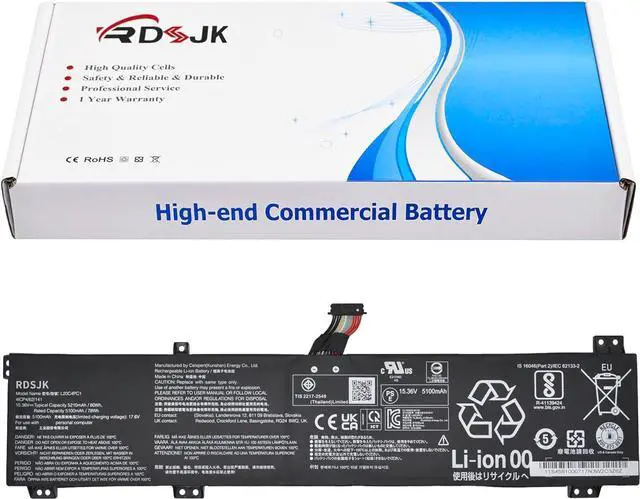
L20C4PC1 L20D4PC1 L20L4PC1 L20M4PC1 Laptop Battery for Lenovo Legion 5 Pro-16ACH6 16ACH6H 16ITH6 16ITH6H Legion 5-15ITH6 15ITH6H 15ACH6 15ACH6A 15ACH6H Legion 7-16ITHg6 16ACHg6 Series 15.36V 80Wh
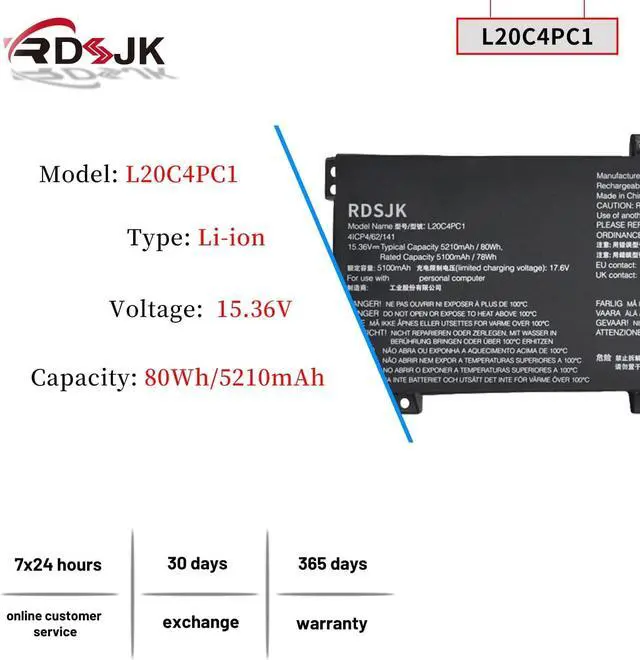
- Battery type: Li-ion; Voltage: 15.36V; Capacity: 80Wh/5210mAh; Cells: 4-cell
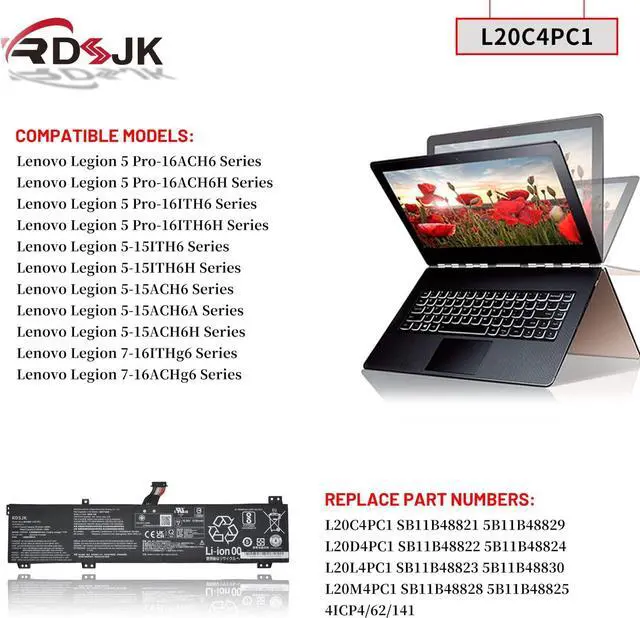
- Compatible Models: Fit for Lenovo Legion 5 Pro-16ACH6 Pro-16ACH6H Pro-16ITH6 Pro-16ITH6H / Legion 5-15ITH6 5-15ITH6H 5-15ACH6 Legion 5-15ACH6A 5-15ACH6H Legion 7-16ITHg6 Legion 7-16ACHg6 Series; Fit for Lenovo Legion 5 15ACH 82JU Series, Fit for Lenovo Legion 5 Pro 16ACH6H 82JQ Series; Fit for Lenovo Legion 7 16ACHg6 82N6 Series
- Replace Part Numbers: L20C4PC1 SB11B48821 5B11B48829 L20D4PC1 SB11B48822 5B11B48824 L20L4PC1 SB11B48823 5B11B48830 L20M4PC1 SB11B48828 5B11B48825 4ICP4/62/141
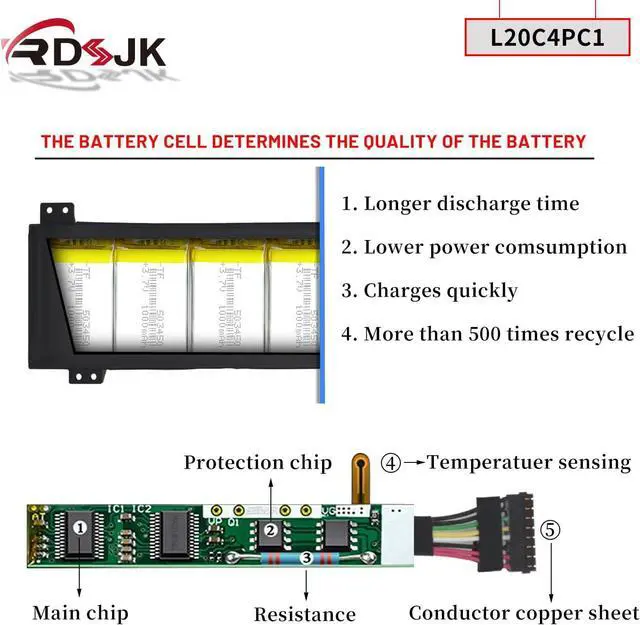
- 100% New from Manufacturer. Up to 500 recharge cycles over the life of the battery. The actual operation time will depend on how much electricity is required by the device and how you use it
- For first use, please discharge the battery to 5%(not to 0%) and then charge to 95%, and cycle 3-4 times.
+
+
Overview
Specs
Reviews
Any questions? Our AI mode will help you find out quickly.
Try me now
Specifications:
Battery Type: Li-ion
Voltage: 15.36V
Capacity: 80Wh/5210mAh
Condition: Brand New
Replace Part Numbers:
L20C4PC1 SB11B48821 5B11B48829 L20D4PC1 SB11B48822 5B11B48824 L20L4PC1 SB11B48823 5B11B48830 L20M4PC1 SB11B48828 5B11B48825 4ICP4/62/141
How to find your laptop model?
1. Press Windows + R;
2. Type "msinfo32", then click "OK";
3. Find "System Model" in the pop-up window.
Compatible Models: (use "Ctrl+F" to find your model quickly)
Fit for Lenovo Legion 5 Pro-16ACH6 Series
Fit for Lenovo Legion 5 Pro-16ACH6H Series
Fit for Lenovo Legion 5 Pro-16ITH6 Series
Fit for Lenovo Legion 5 Pro-16ITH6H Series
Fit for Lenovo Legion 5-15ITH6 Series
Fit for Lenovo Legion 5-15ITH6H Series
Fit for Lenovo Legion 5-15ACH6 Series
Fit for Lenovo Legion 5-15ACH6A Series
Fit for Lenovo Legion 5-15ACH6H Series
Fit for Lenovo Legion 7-16ITHg6 Series
Fit for Lenovo Legion 7-16ACHg6 Series
LEGION 5 PRO 82JD SERIES
LEGION 5 PRO 82JD000AFR 82JD000BFR 82JD000CFR 82JD000DRK 82JD000ERK 82JD000GRK 82JD000HSB 82JD000JSB 82JD000KRK 82JD000MRU
LEGION 5 PRO 82JD000PRU 82JD000QRU 82JD000RRK 82JD000SRK 82JD000TGE 82JD000VRM 82JD000YSC 82JD0011HH 82JD0012HH 82JD0014GM
LEGION 5 PRO 82JD0015GM 82JD0018ID 82JD0019YA 82JD001AYA 82JD001DUK 82JD001FRK 82JD001GRK 82JD001HRK 82JD001JKR 82JD001KKR
LEGION 5 PRO 82JD001LKR 82JD001MKR 82JD001NRK 82JD001PFR 82JD001QSB 82JD001RSB 82JD001SSB 82JD001TSB 82JD001USB 82JD001VSB
LEGION 5 PRO 82JD001WSB 82JD001XSB 82JD001YTW 82JD0020TW 82JD0021TW 82JD0022TW 82JD0023TW 82JD0024TW 82JD0025TW 82JD0026TW
LEGION 5 PRO 82JD0027MX 82JD0028MX 82JD002ATX 82JD002BMJ 82JD002CMJ 82JD002DMJ 82JD002EMJ 82JD002FMJ 82JD002GMJ 82JD002HMJ
LEGION 5 PRO 82JD002JMJ 82JD002KIX 82JD002LCK 82JD002MCK 82JD002NTA 82JD002PTA 82JD002QTA 82JD002RTA 82JD002STA 82JD002TTA
LEGION 5 PRO 82JD002UTA 82JD002VTA 82JD002XIX 82JD002YCY 82JD0031AU 82JD0033KR 82JD0034KR 82JD0035KR 82JD0036KR 82JD0037KR
LEGION 5 PRO 82JD0038KR 82JD0039KR 82JD003AKR 82JD003BKR 82JD003CKR 82JD003DKR 82JD003EKR 82JD003FKR 82JD003GKR 82JD003HKR
LEGION 5 PRO 82JD003JKR 82JD003KHH 82JD003LHH 82JD003MHH 82JD003NHH
Legion 5 15ACH 82JU00BRGE 82JU00BTGE 82JU00C6GE-FL
Legion 7 16ACHG5
Legion 7i 16ITH6
Legion R7000P 2021, R9000P
Legion 5 Pro Disassembly
Legion 5 Pro 16ACH6H 82JQ000NSB 82JQ0019FR 82JQ001HGE
Legion 5 Pro 16ACH6H 82JQ001RFR 82JQ001WPH 82JQ001XPH
Legion 5 Pro 16ACH6H 82JQ0041MJ 82JQ005RTW 82JQ0075TA
Legion 5 Pro 16ACH6H 82JQ007KMH 82JQ009CHH 82JQ001FGE
Legion 5 16ACH6H(82JQ001PGE)
Legion 7 16ACHg6 82N6000FRU 82N6000LFR 82N6000RUK
Legion 7 16ACHg6 82N6000SUK 82N6000TSB 82N6000YTA
Legion 7 16ACHg6 82N60013CK 82N6001QMX 82N60038VN
Legion 7 16ACHg6 82N60039VN 82N60048CK 82N6004AMX
Legion 7 16ACHg6 82N6005NCY 82N6005SMH 82N6005VMH
Legion 7 16ACHg6 82N6005WMB 82N60060MB 82N6007LCL
Legion 7 16ACHg6 82N6008BHH 82N6008EFR 82N60099GE
1. Discharge the new battery use to 5%(not to 0%) and then charge to 95%, and cycle 3-5 times.
2. Do not disassemble, crush or puncture. Do not dispose of in fire or water.
3. If you remove battery for a long time, charge more than 80% at least one time within one months.
4. When using the battery, care should be taken to prevent exposure and moisture.
1. Before disassembling your laptop, put the old battery charge below 25%. If a fully charged lithium battery is accidentally punctured, it will have serious consequences.
2. Please keep every screw you removed.
3. Make sure that interface is correctly connected to its socket.
4. Please protect your screen and touchpad.
1. Remove all battery drivers.
2. Remove battery.
3. Connect laptop using AC charger, double check no battery drivers installed
Connect battery.
4. Drivers will install automatically.
5. Full charge the battery by ac adapter.
6. Leave

Battery Type: Li-ion
Voltage: 15.36V
Capacity: 80Wh/5210mAh
Condition: Brand New
Replace Part Numbers:
L20C4PC1 SB11B48821 5B11B48829 L20D4PC1 SB11B48822 5B11B48824 L20L4PC1 SB11B48823 5B11B48830 L20M4PC1 SB11B48828 5B11B48825 4ICP4/62/141
How to find your laptop model?
1. Press Windows + R;
2. Type "msinfo32", then click "OK";
3. Find "System Model" in the pop-up window.
Compatible Models: (use "Ctrl+F" to find your model quickly)
Fit for Lenovo Legion 5 Pro-16ACH6 Series
Fit for Lenovo Legion 5 Pro-16ACH6H Series
Fit for Lenovo Legion 5 Pro-16ITH6 Series
Fit for Lenovo Legion 5 Pro-16ITH6H Series
Fit for Lenovo Legion 5-15ITH6 Series
Fit for Lenovo Legion 5-15ITH6H Series
Fit for Lenovo Legion 5-15ACH6 Series
Fit for Lenovo Legion 5-15ACH6A Series
Fit for Lenovo Legion 5-15ACH6H Series
Fit for Lenovo Legion 7-16ITHg6 Series
Fit for Lenovo Legion 7-16ACHg6 Series
LEGION 5 PRO 82JD SERIES
LEGION 5 PRO 82JD000AFR 82JD000BFR 82JD000CFR 82JD000DRK 82JD000ERK 82JD000GRK 82JD000HSB 82JD000JSB 82JD000KRK 82JD000MRU
LEGION 5 PRO 82JD000PRU 82JD000QRU 82JD000RRK 82JD000SRK 82JD000TGE 82JD000VRM 82JD000YSC 82JD0011HH 82JD0012HH 82JD0014GM
LEGION 5 PRO 82JD0015GM 82JD0018ID 82JD0019YA 82JD001AYA 82JD001DUK 82JD001FRK 82JD001GRK 82JD001HRK 82JD001JKR 82JD001KKR
LEGION 5 PRO 82JD001LKR 82JD001MKR 82JD001NRK 82JD001PFR 82JD001QSB 82JD001RSB 82JD001SSB 82JD001TSB 82JD001USB 82JD001VSB
LEGION 5 PRO 82JD001WSB 82JD001XSB 82JD001YTW 82JD0020TW 82JD0021TW 82JD0022TW 82JD0023TW 82JD0024TW 82JD0025TW 82JD0026TW
LEGION 5 PRO 82JD0027MX 82JD0028MX 82JD002ATX 82JD002BMJ 82JD002CMJ 82JD002DMJ 82JD002EMJ 82JD002FMJ 82JD002GMJ 82JD002HMJ
LEGION 5 PRO 82JD002JMJ 82JD002KIX 82JD002LCK 82JD002MCK 82JD002NTA 82JD002PTA 82JD002QTA 82JD002RTA 82JD002STA 82JD002TTA
LEGION 5 PRO 82JD002UTA 82JD002VTA 82JD002XIX 82JD002YCY 82JD0031AU 82JD0033KR 82JD0034KR 82JD0035KR 82JD0036KR 82JD0037KR
LEGION 5 PRO 82JD0038KR 82JD0039KR 82JD003AKR 82JD003BKR 82JD003CKR 82JD003DKR 82JD003EKR 82JD003FKR 82JD003GKR 82JD003HKR
LEGION 5 PRO 82JD003JKR 82JD003KHH 82JD003LHH 82JD003MHH 82JD003NHH
Legion 5 15ACH 82JU00BRGE 82JU00BTGE 82JU00C6GE-FL
Legion 7 16ACHG5
Legion 7i 16ITH6
Legion R7000P 2021, R9000P
Legion 5 Pro Disassembly
Legion 5 Pro 16ACH6H 82JQ000NSB 82JQ0019FR 82JQ001HGE
Legion 5 Pro 16ACH6H 82JQ001RFR 82JQ001WPH 82JQ001XPH
Legion 5 Pro 16ACH6H 82JQ0041MJ 82JQ005RTW 82JQ0075TA
Legion 5 Pro 16ACH6H 82JQ007KMH 82JQ009CHH 82JQ001FGE
Legion 5 16ACH6H(82JQ001PGE)
Legion 7 16ACHg6 82N6000FRU 82N6000LFR 82N6000RUK
Legion 7 16ACHg6 82N6000SUK 82N6000TSB 82N6000YTA
Legion 7 16ACHg6 82N60013CK 82N6001QMX 82N60038VN
Legion 7 16ACHg6 82N60039VN 82N60048CK 82N6004AMX
Legion 7 16ACHg6 82N6005NCY 82N6005SMH 82N6005VMH
Legion 7 16ACHg6 82N6005WMB 82N60060MB 82N6007LCL
Legion 7 16ACHg6 82N6008BHH 82N6008EFR 82N60099GE
1. Discharge the new battery use to 5%(not to 0%) and then charge to 95%, and cycle 3-5 times.
2. Do not disassemble, crush or puncture. Do not dispose of in fire or water.
3. If you remove battery for a long time, charge more than 80% at least one time within one months.
4. When using the battery, care should be taken to prevent exposure and moisture.
1. Before disassembling your laptop, put the old battery charge below 25%. If a fully charged lithium battery is accidentally punctured, it will have serious consequences.
2. Please keep every screw you removed.
3. Make sure that interface is correctly connected to its socket.
4. Please protect your screen and touchpad.
1. Remove all battery drivers.
2. Remove battery.
3. Connect laptop using AC charger, double check no battery drivers installed
Connect battery.
4. Drivers will install automatically.
5. Full charge the battery by ac adapter.
6. Leave
Warranty & Returns
Warranty, Returns, And Additional Information
Warranty
- Please contact the Seller directly for warranty information. Warranty information may also be found on the Manufacturer's website.
- CONTACT
Return Policies
- Return for refund within: 30 days
- Return for replacement within: 30 days
- This item is covered by LionTech Direct Return Policy
Manufacturer Contact Info
- For a directory of all our manufacturers, please click below.
- Manufacturers Directory
LOADING...