Your Browsing History
Meet Your Seller
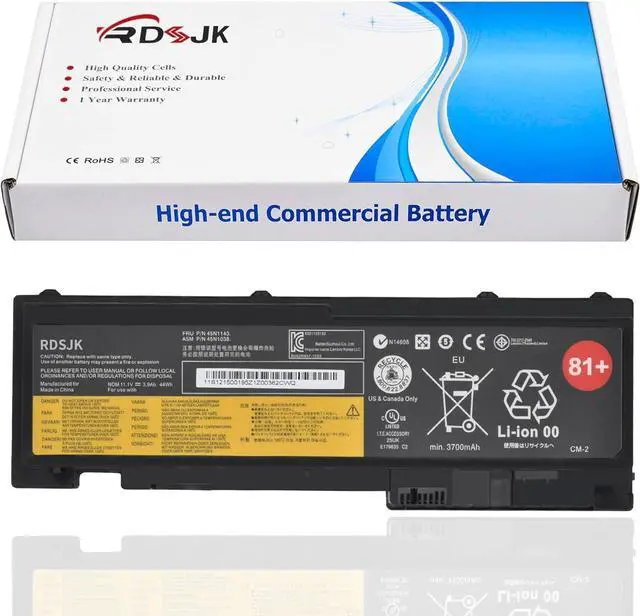
T430S 81+ Laptop Battery for Lenovo ThinkPad T420i T420s T420s 4171-4176 T430s T430si T420si 0A36287 42T4844 42T4845 42T4846 42T4847 45N1036 45N1037 45N1038 45N1039 45N1064 45N1065 45N1143 11.1V 44Wh
- Battery type: Li-ion; Voltage: 11.1V; Capacity: 44Wh; Cells: 6-cell
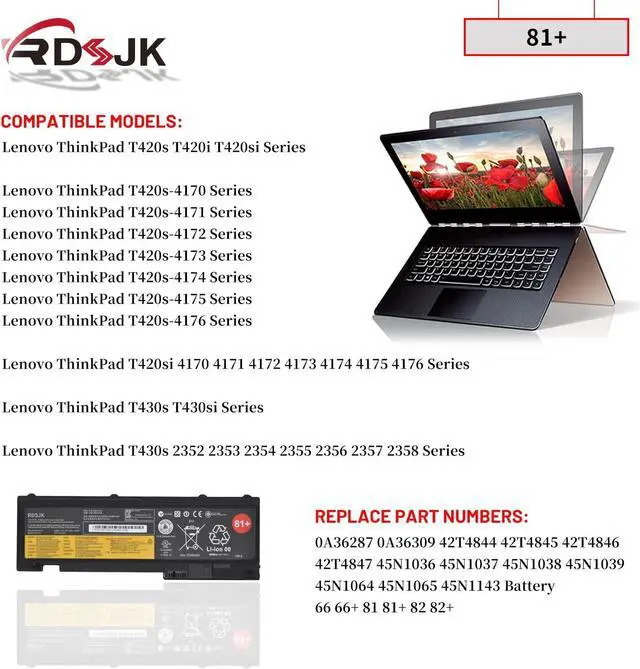
- Compatible Models: Fit for Lenovo ThinkPad T420s T420i T420si Series, Fit for Lenovo ThinkPad T420s-4170 T420s-4171 T420s-4172 T420s-4173 T420s-4174 T420s-4175 T420s-4176 Series, Fit for Lenovo ThinkPad T420si 4170 4171 4172 4173 4174 4175 4176 Series, Fit for Lenovo ThinkPad T430s T430si Series, Fit for Lenovo ThinkPad T430s 2352 2353 2354 2355 2356 2357 2358 Series
- Replace Part Numbers: 0A36287 0A36309 42T4844 42T4845 42T4846 42T4847 45N1036 45N1037 45N1038 45N1039 45N1064 45N1065 45N1143 Battery 66 Battery 66+ Battery 81 Battery 81+ Battery 82 Battery 82+
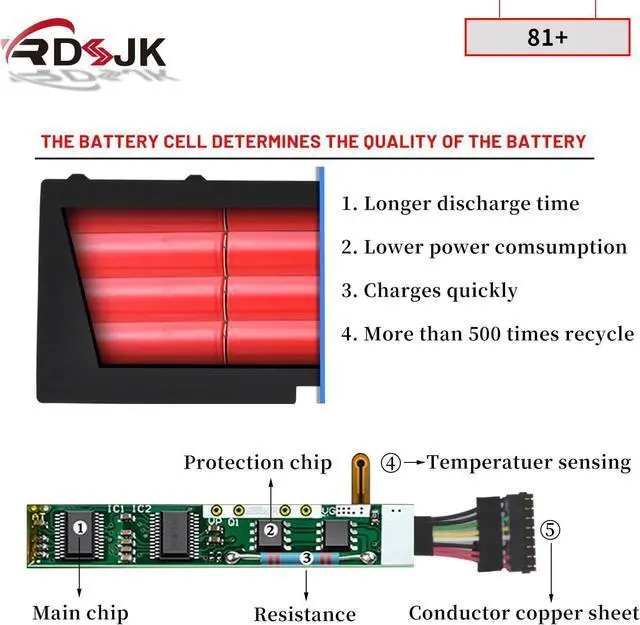
- 100% New from Manufacturer. Up to 500 recharge cycles over the life of the battery. The actual operation time will depend on how much electricity is required by the device and how you use it
- For first use, please discharge the battery to 5%(not to 0%) and then charge to 95%, and cycle 3-4 times.
+
+
Overview
Specs
Reviews
Any questions? Our AI mode will help you find out quickly.
Try me now
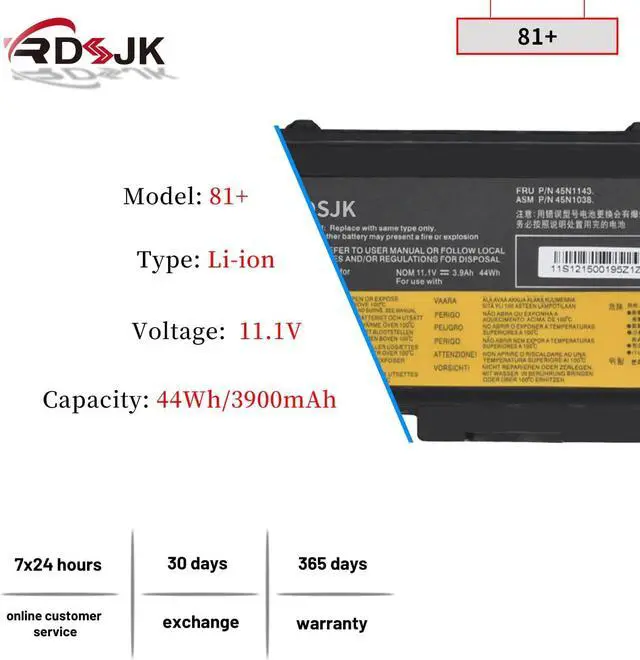
Specifications:
Battery Type: Li-ion
Voltage: 11.1V
Capacity: 44Wh/3900mAh
Condition: Brand New
Replace Part Numbers:
0A36287 0A36309 42T4844 42T4845 42T4846 42T4847 45N1036 45N1037 45N1038 45N1039 45N1064 45N1065 45N1143 Battery 66 Battery 66+ Battery 81 Battery 81+ Battery 82 Battery 82+
How to find your laptop model?
1. Press Windows + R.
2. Type "msinfo32", then click "OK".
3. Find "System Model" in the pop-up window.
Compatible Models: (use "Ctrl+F" to find your model quickly)
Lenovo ThinkPad T420i Series
4170A11 4171A12 41716EC 4170A25 4172A25 4172A16
Lenovo ThinkPad T420s Series
4173A39 4171A58 4171A57 4171A13 4174EM7 4172A21
4173PU9 4172A35 4172A24 4171A22 4171A42 4171A24
4171A49 4172A36 4172A18 4172A34 4171A59 4172A26
4171A96 4172A17 4173A41 4171A25 4171A15 4171A35
Lenovo ThinkPad T430s Series
2355C72 2355C92 2355CB6 2355G3C 23522RC 2352A32
23522SC 2352A94 2352A13 2352A31 2352A98 2355BT5
2355AK6 235244C 235243C 23524BC 2353C15 235245C
235246C 2355HNC 2355A83 2355BF2 2355AK7 2355B54
Lenovo ThinkPad T430S T430Si, Type 2352 2353 2354 2355 2356 2357 2358 Series
T430s 2352-2JU 2352-2KU 2353-2LU 2353-2MU 2353-2NU 2353-67U 2353-68U 2353-69U 2353-6AU 2353-6BU 2353-6CU 2353-6DU
T430s 2353-6EU 2353-6FU 2353-6GU 2353-6HU 2353-9KU 2353-9LU 2353-9MU 2353-9VU 2353-9WU 2353-ABU 2353-ALU 2353-AXU
T430s 2353-AYU 2353-AZU 2353-B2U 2353-B3U 2353-B4U 2353-B5U 2353-B6U 2353-B7U 2355-G2G 2355-G2U 2355-G3G 2355-G3U
T430s 2355-GMU 2355-GTU 2355-GUU 2355-HCU 2355-HDG 2355-HDU 2355-HEU 2355-HFG 2355-HFU 2355-HGG 2355-HGU 2355-HHG
T430s 2355-HHU 2355-HJG 2355-HJU 2355-HKG 2355-HKU 2355-HLG 2355-HLU 2355-HMG 2355-HMU 2355-JCU 2355-JEU 2355-JQU
T430s 2355-K6G 2355-K6U 2355-K7G 2355-K7U 2355-K8U 2355-KMU 2355-KNU 2355-KPU 2356-G2G 2356-G2U 2356-G3G 2356-G3U
T430s 2356-GBG 2356-GCG 2356-GDG 2356-GJG 2356-GJU 2356-GPG 2356-GPU 2356-GRG 2356-GRU 2356-GTG 2356-GTU 2356-GUG
T430s 2356-GUU 2356-H7G 2356-H7U 2356-H8G 2356-H8U 2356-H9G 2356-H9U 2356-HAG 2356-HAU 2356-HBG 2356-HBU 2356-HCG
T430s 2356-HCU 2356-L2G 2356-L3G 2356-L4G 2356-L5G 2356-L6G 2356-L7G 2356-L8G 2356-L9U 2356-LAG 2356-LAU 2356-LBG
T430s 2356-LBU 2356-LCG 2356-LCU 2356-LDG 2356-LDU 2356-LNG 2356-LPG 2356-LQG 2356-LRG 2356-MGU 2356-MHU 2356-MJU
T430s 2356-MLG 2356-MMG 2356-N2G 2356-N3G 2356-N4G 2356-N5G 2356-N6G 2356-N7G
Lenovo ThinkPad T420s-4170 Series
T420S 4170-27U 4170-32U 4170-33U 4170-3Bu 4170-3Du
Lenovo ThinkPad T420s-4171 Series
T420S 4171-52U 4171-53U 4171-6Ju 4171-6Wu 4171-6Zu 4171-74U 4171-7Fu
Lenovo ThinkPad T420s-4172 Series
Lenovo ThinkPad T420s-4173 Series
T420S 4173-28U 4173-29U 4173-2Au 4173-2Bu 4173-Ksu 4173-Ktu
T420S 4173-Kuu 4173-L5U 4173-L6U 4173-L8U 4173-Lbu 4173-Luu 4173-Lvu
Lenovo ThinkPad T420s-4174 Series
T420S 4174-28U 4174-29U 4174-2AU 4174-2BU 4174-L8U 4174-PPU
Lenovo ThinkPad T420s-4175 Series
Lenovo ThinkPad T420s-4176 Series
Lenovo ThinkPad T420si 4170 4171 4172 4173 4174 4175 4176 Series
1. Discharge the new battery use to 5%(not to 0%) and then charge to 95%, and cycle 3-5 times.
2. Do not disassemble, crush or puncture. Do not dispose of in fire or water.
3. If you remove battery for a long time, charge more than 80% at least one time within one months.
4. When using the battery, care should be taken to prevent exposure and moisture.
1. Before disassembling your laptop, put the old battery charge below 25%. If a fully charged lithium battery is accidentally punctured, it will have serious consequences.
2. Please keep every screw you removed.
3. Make sure that interface is correctly connected to its socket.
4. Please protect your screen and touchpad.
1. Remove all battery drivers.
2. Remove battery.
3. Connect laptop using AC charger, double check no battery dri

Battery Type: Li-ion
Voltage: 11.1V
Capacity: 44Wh/3900mAh
Condition: Brand New
Replace Part Numbers:
0A36287 0A36309 42T4844 42T4845 42T4846 42T4847 45N1036 45N1037 45N1038 45N1039 45N1064 45N1065 45N1143 Battery 66 Battery 66+ Battery 81 Battery 81+ Battery 82 Battery 82+
How to find your laptop model?
1. Press Windows + R.
2. Type "msinfo32", then click "OK".
3. Find "System Model" in the pop-up window.
Compatible Models: (use "Ctrl+F" to find your model quickly)
Lenovo ThinkPad T420i Series
4170A11 4171A12 41716EC 4170A25 4172A25 4172A16
Lenovo ThinkPad T420s Series
4173A39 4171A58 4171A57 4171A13 4174EM7 4172A21
4173PU9 4172A35 4172A24 4171A22 4171A42 4171A24
4171A49 4172A36 4172A18 4172A34 4171A59 4172A26
4171A96 4172A17 4173A41 4171A25 4171A15 4171A35
Lenovo ThinkPad T430s Series
2355C72 2355C92 2355CB6 2355G3C 23522RC 2352A32
23522SC 2352A94 2352A13 2352A31 2352A98 2355BT5
2355AK6 235244C 235243C 23524BC 2353C15 235245C
235246C 2355HNC 2355A83 2355BF2 2355AK7 2355B54
Lenovo ThinkPad T430S T430Si, Type 2352 2353 2354 2355 2356 2357 2358 Series
T430s 2352-2JU 2352-2KU 2353-2LU 2353-2MU 2353-2NU 2353-67U 2353-68U 2353-69U 2353-6AU 2353-6BU 2353-6CU 2353-6DU
T430s 2353-6EU 2353-6FU 2353-6GU 2353-6HU 2353-9KU 2353-9LU 2353-9MU 2353-9VU 2353-9WU 2353-ABU 2353-ALU 2353-AXU
T430s 2353-AYU 2353-AZU 2353-B2U 2353-B3U 2353-B4U 2353-B5U 2353-B6U 2353-B7U 2355-G2G 2355-G2U 2355-G3G 2355-G3U
T430s 2355-GMU 2355-GTU 2355-GUU 2355-HCU 2355-HDG 2355-HDU 2355-HEU 2355-HFG 2355-HFU 2355-HGG 2355-HGU 2355-HHG
T430s 2355-HHU 2355-HJG 2355-HJU 2355-HKG 2355-HKU 2355-HLG 2355-HLU 2355-HMG 2355-HMU 2355-JCU 2355-JEU 2355-JQU
T430s 2355-K6G 2355-K6U 2355-K7G 2355-K7U 2355-K8U 2355-KMU 2355-KNU 2355-KPU 2356-G2G 2356-G2U 2356-G3G 2356-G3U
T430s 2356-GBG 2356-GCG 2356-GDG 2356-GJG 2356-GJU 2356-GPG 2356-GPU 2356-GRG 2356-GRU 2356-GTG 2356-GTU 2356-GUG
T430s 2356-GUU 2356-H7G 2356-H7U 2356-H8G 2356-H8U 2356-H9G 2356-H9U 2356-HAG 2356-HAU 2356-HBG 2356-HBU 2356-HCG
T430s 2356-HCU 2356-L2G 2356-L3G 2356-L4G 2356-L5G 2356-L6G 2356-L7G 2356-L8G 2356-L9U 2356-LAG 2356-LAU 2356-LBG
T430s 2356-LBU 2356-LCG 2356-LCU 2356-LDG 2356-LDU 2356-LNG 2356-LPG 2356-LQG 2356-LRG 2356-MGU 2356-MHU 2356-MJU
T430s 2356-MLG 2356-MMG 2356-N2G 2356-N3G 2356-N4G 2356-N5G 2356-N6G 2356-N7G
Lenovo ThinkPad T420s-4170 Series
T420S 4170-27U 4170-32U 4170-33U 4170-3Bu 4170-3Du
Lenovo ThinkPad T420s-4171 Series
T420S 4171-52U 4171-53U 4171-6Ju 4171-6Wu 4171-6Zu 4171-74U 4171-7Fu
Lenovo ThinkPad T420s-4172 Series
Lenovo ThinkPad T420s-4173 Series
T420S 4173-28U 4173-29U 4173-2Au 4173-2Bu 4173-Ksu 4173-Ktu
T420S 4173-Kuu 4173-L5U 4173-L6U 4173-L8U 4173-Lbu 4173-Luu 4173-Lvu
Lenovo ThinkPad T420s-4174 Series
T420S 4174-28U 4174-29U 4174-2AU 4174-2BU 4174-L8U 4174-PPU
Lenovo ThinkPad T420s-4175 Series
Lenovo ThinkPad T420s-4176 Series
Lenovo ThinkPad T420si 4170 4171 4172 4173 4174 4175 4176 Series
1. Discharge the new battery use to 5%(not to 0%) and then charge to 95%, and cycle 3-5 times.
2. Do not disassemble, crush or puncture. Do not dispose of in fire or water.
3. If you remove battery for a long time, charge more than 80% at least one time within one months.
4. When using the battery, care should be taken to prevent exposure and moisture.
1. Before disassembling your laptop, put the old battery charge below 25%. If a fully charged lithium battery is accidentally punctured, it will have serious consequences.
2. Please keep every screw you removed.
3. Make sure that interface is correctly connected to its socket.
4. Please protect your screen and touchpad.
1. Remove all battery drivers.
2. Remove battery.
3. Connect laptop using AC charger, double check no battery dri
Warranty & Returns
Warranty, Returns, And Additional Information
Warranty
- Please contact the Seller directly for warranty information. Warranty information may also be found on the Manufacturer's website.
- CONTACT
Return Policies
- Return for refund within: 30 days
- Return for replacement within: 30 days
- This item is covered by LionTech Direct Return Policy
Manufacturer Contact Info
- For a directory of all our manufacturers, please click below.
- Manufacturers Directory
LOADING...