Your Browsing History
Meet Your Seller
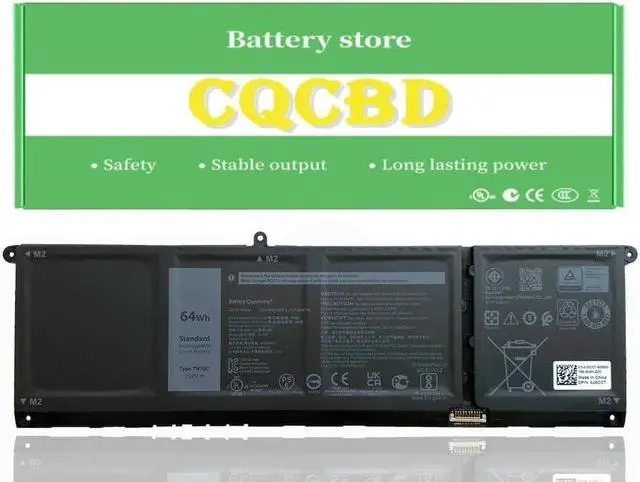
CQCQ TN70C XDY9K N9XX1 V6W33 Battery for DELL inspiron 15 5518 5418 5415 5515 7415 5310 3515 3511 5510 5410 3510 for DELL Vostro 5510 5410 3510 3515 3511 for DELL Latitude 3320 3520 3420 (15.2V 64Wh)
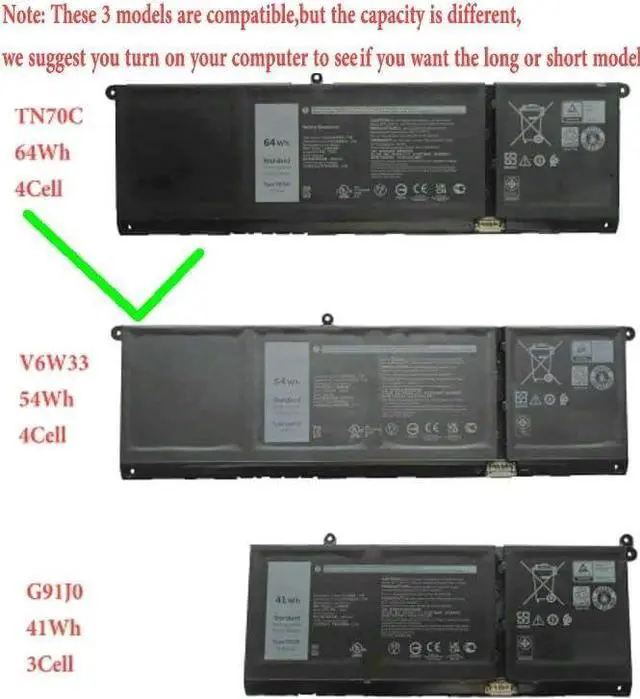
- Note: There are Three types of batteries compatible with this notebook, please check your old battery model before purchasing,
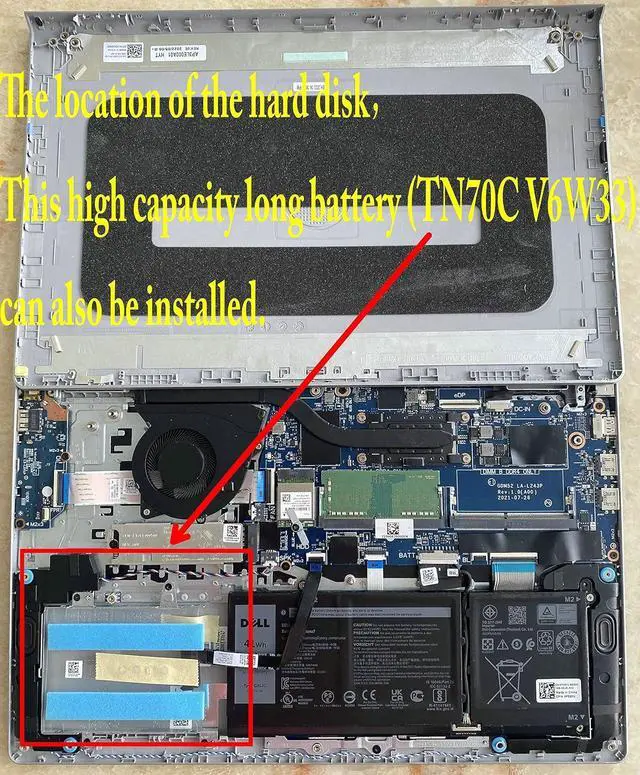
- If you have a hard drive, you can only buy a short battery (GJ1J0), if you don't have a hard drive, you can buy a long battery (TN70C).
- Fit For: For DELL Latitude 3320 3520 3420 ,For DELL Vostro 5510 5410 3510 3515 3511
- Battery Condition:100% Brand New!Grade A cells ensure fast charges and low power consumption.
- Within 2 years, if the battery has any fault, please feel free to contact us to replace it
+
+
Overview
Specs
Reviews
Any questions? Our AI mode will help you find out quickly.
Try me now
Efficient and Reliable
Grade A Cells
FCC / CE / RoHS Certified
More Charging Cycles
Long Lasting Performance
Battery Type: Li-ion
Voltage: 15.2V
Capacity: 64Wh
Battery Condition:100% Brand New
Compatible Part Numbers:
TN70C V6W33 G91J0 0WV3K8 0VKYJX
0MVK11 0XDY9K PG8YJ 0PG8YJ 927N5 N9XX1
0927N5 FH3K2 0FH3K2 MGCM5 0MGCM5 JGCCT
Compatible Laptop/Notebook Models:
For Dell Inspiron 15 3510 3511 3515 3520 3521 3525 3530 3535 series
For Dell Inspiron 13 5310 5320 5330 series
For Dell Inspiron 14 5410 5415 5418 5420 5425 5430 5435 series
For Dell Inspiron 14 Plus 7420 series
For Dell Inspiron 15 5510 5515 5518 series
For Dell Inspiron 16 5625 5630 5635 series
For Dell Inspiron 14 5410 2-in-1 Series
For Dell Inspiron 14 7415 2-in-1 Series
For Dell Inspiron 14 7420 2-in-1 Series
For Dell Inspiron 14 7425 2-in-1 Series
For Dell Inspiron 14 7430 2-in-1 Series
For Dell Inspiron 14 7435 2-in-1 Series
For Dell Latitude 3320 3330 3420 3430 3520 3530 series
For Dell Latitude 5430 Chromebook series
For Dell Vostro 15 3510 3511 3515 3520 3525 3530 3535 series
For Dell Vostro 13 5310 5320 series
For Dell Vostro 14 3420 3425 3430 3435 5410 5415 series
For Dell Vostro 15 5510 5515 series
For Dell Vostro 16 5620 5625 5630 5635 series
There are 3 battery models may fit for the laptop:
V6W33 54Wh,
TN70C 64Wh
G91J0 41Wh.
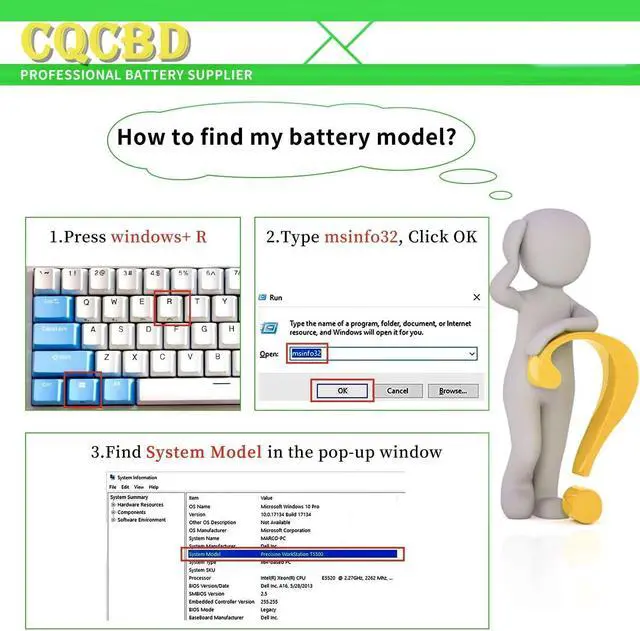
Please check your original battery and confirm it is
V6W33 and TN70C
For Optimal Use battery:
New battery received, discharge the battery to 5% (not 0%) for the fist use, then charge and cycle 3-4 times to wake up the new battery.
The important point is to perform a full discharge and charge every other month to extend the battery life.
Do not connect adapter for a long time while using the battery. It may damage the battery.
Avoid artificial shocks, disassembly, crush or puncture. Do not dispose of it in fire or water.
How to install a new battery:
1.emove the old battery, carefully install the new battery on the battery box, tighten the screws, and then connect the wires of the new battery.
2. If you have questions about installing a new battery, you can search for the installation of laptop/tablet models on YouTube.
This method may help you.
For Optimal Use battery:
Battery Installation is easy, but we also recommend you to learn related installation video on the web in advance, or just find a repair technician for help.
Please be careful when install battery.Any damage caused by improper operation will be your own responsibility, hope understand.
If the new battery is not recognized during the initial installation
1. please reinstall and check if the interface is fully connected.
Please disconnect the old battery, and hold down the power button for 20 seconds, then connect the new battery. This drains the residual or flea power and once the laptop is reassembled the battery will function properly.
2. Battery cannot be identified by your laptop or it doesn't seem to work. That may be caused by different situations. Please check by yourself first as below steps.
Could be caused by battery loose. Remove the battery and try to reinstall more than once.
May be due to conductive material damaged which the laptop motherboard and battery anode and cathode contact position, you can try to confirm it with your original battery.
Check whether the battery drive is in normal condition, if not, download the corresponding driver software to update.
Take out the battery and press the power button for about 15 seconds to consume the internal residual power (Do not connect the power cord), and then reinstall the battery.
You can try several times.
Within 2years, if the battery has any fault, please feel free to contactUs to replace it : NOTE:

Grade A Cells
FCC / CE / RoHS Certified
More Charging Cycles
Long Lasting Performance
Battery Type: Li-ion
Voltage: 15.2V
Capacity: 64Wh
Battery Condition:100% Brand New
Compatible Part Numbers:
TN70C V6W33 G91J0 0WV3K8 0VKYJX
0MVK11 0XDY9K PG8YJ 0PG8YJ 927N5 N9XX1
0927N5 FH3K2 0FH3K2 MGCM5 0MGCM5 JGCCT
Compatible Laptop/Notebook Models:
For Dell Inspiron 15 3510 3511 3515 3520 3521 3525 3530 3535 series
For Dell Inspiron 13 5310 5320 5330 series
For Dell Inspiron 14 5410 5415 5418 5420 5425 5430 5435 series
For Dell Inspiron 14 Plus 7420 series
For Dell Inspiron 15 5510 5515 5518 series
For Dell Inspiron 16 5625 5630 5635 series
For Dell Inspiron 14 5410 2-in-1 Series
For Dell Inspiron 14 7415 2-in-1 Series
For Dell Inspiron 14 7420 2-in-1 Series
For Dell Inspiron 14 7425 2-in-1 Series
For Dell Inspiron 14 7430 2-in-1 Series
For Dell Inspiron 14 7435 2-in-1 Series
For Dell Latitude 3320 3330 3420 3430 3520 3530 series
For Dell Latitude 5430 Chromebook series
For Dell Vostro 15 3510 3511 3515 3520 3525 3530 3535 series
For Dell Vostro 13 5310 5320 series
For Dell Vostro 14 3420 3425 3430 3435 5410 5415 series
For Dell Vostro 15 5510 5515 series
For Dell Vostro 16 5620 5625 5630 5635 series
There are 3 battery models may fit for the laptop:
V6W33 54Wh,
TN70C 64Wh
G91J0 41Wh.
Please check your original battery and confirm it is
V6W33 and TN70C
For Optimal Use battery:
New battery received, discharge the battery to 5% (not 0%) for the fist use, then charge and cycle 3-4 times to wake up the new battery.
The important point is to perform a full discharge and charge every other month to extend the battery life.
Do not connect adapter for a long time while using the battery. It may damage the battery.
Avoid artificial shocks, disassembly, crush or puncture. Do not dispose of it in fire or water.
How to install a new battery:
1.emove the old battery, carefully install the new battery on the battery box, tighten the screws, and then connect the wires of the new battery.
2. If you have questions about installing a new battery, you can search for the installation of laptop/tablet models on YouTube.
This method may help you.
For Optimal Use battery:
Battery Installation is easy, but we also recommend you to learn related installation video on the web in advance, or just find a repair technician for help.
Please be careful when install battery.Any damage caused by improper operation will be your own responsibility, hope understand.
If the new battery is not recognized during the initial installation
1. please reinstall and check if the interface is fully connected.
Please disconnect the old battery, and hold down the power button for 20 seconds, then connect the new battery. This drains the residual or flea power and once the laptop is reassembled the battery will function properly.
2. Battery cannot be identified by your laptop or it doesn't seem to work. That may be caused by different situations. Please check by yourself first as below steps.
Could be caused by battery loose. Remove the battery and try to reinstall more than once.
May be due to conductive material damaged which the laptop motherboard and battery anode and cathode contact position, you can try to confirm it with your original battery.
Check whether the battery drive is in normal condition, if not, download the corresponding driver software to update.
Take out the battery and press the power button for about 15 seconds to consume the internal residual power (Do not connect the power cord), and then reinstall the battery.
You can try several times.
Within 2years, if the battery has any fault, please feel free to contactUs to replace it : NOTE:
Warranty & Returns
Warranty, Returns, And Additional Information
Warranty
- Please contact the Seller directly for warranty information. Warranty information may also be found on the Manufacturer's website.
- CONTACT
Return Policies
- Return for refund within: 30 days
- Return for replacement within: 30 days
- This item is covered by LionTech Direct Return Policy
Manufacturer Contact Info
- For a directory of all our manufacturers, please click below.
- Manufacturers Directory
LOADING...