

Your Browsing History
- Free 30-day Returns
$79.99



Meet Your Seller

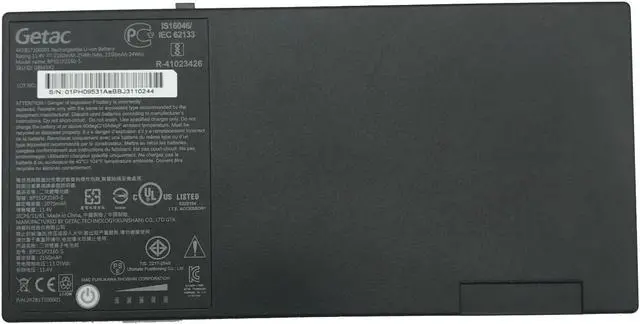

Genuine BP3S1P2160-S Battery For Getac F110 GGA Tablet PC 441857100001
- Battery Rating: 11.4V
- Battery Capacity: 2100mAh / 24Wh
- Battery Type: Li-Polymer battery
- Condition: new battery
- Battery Color: Black
- Warranty: 12 Months
- Compatible Machine Models:
- 2ICP7/64/84, 3ICP6/51/61, 242857100001, 242888700087, 441857100001, 441888700086, 441888700088, BP3S1P2160, BP3S1P2160-S, BP3S1P2290, BP3S1P2290 A, GBM3X2
- Compatible Part Numbers:
- F110, F110 G2, F110 G2-Core i5 5300U 2 3 GHz, F110 GGA 734020, Getac F110, Getac F110 G2, Getac F110 G3, Getac F110 G4
+
+
Overview
Specs
Reviews

Any questions? Our AI mode will help you find out quickly.
Try me now
Note:
1. When the new battery is used for the first time, please fully charge it before use, use it to about 10%-15% and then full it again to activate lithium ions to reach the maximum capacity.
2. Remember not to discharge the new battery to 0%, otherwise it is easy to damage the battery and make the battery life shorter.
3. If the battery is not used for a long time and needs to be charged to more than 70% for storage, the storage time should not exceed 3 months.
4. Do not plug in and out the battery during charging.
5. Do not remove the battery when it is in use.
6. After the battery runs out, charge it in time. If you do not charge it for a long time, the battery may be damaged.
7. If it is often connected to the charger, the computer must use the battery alone at least 2-3 times a month
8. Regularly clean the dust of the laptop fan to increase heat dissipation and reduce power consumption, which can effectively extend the battery life.
1. When the new battery is used for the first time, please fully charge it before use, use it to about 10%-15% and then full it again to activate lithium ions to reach the maximum capacity.
2. Remember not to discharge the new battery to 0%, otherwise it is easy to damage the battery and make the battery life shorter.
3. If the battery is not used for a long time and needs to be charged to more than 70% for storage, the storage time should not exceed 3 months.
4. Do not plug in and out the battery during charging.
5. Do not remove the battery when it is in use.
6. After the battery runs out, charge it in time. If you do not charge it for a long time, the battery may be damaged.
7. If it is often connected to the charger, the computer must use the battery alone at least 2-3 times a month
8. Regularly clean the dust of the laptop fan to increase heat dissipation and reduce power consumption, which can effectively extend the battery life.
Warranty & Returns
Warranty, Returns, And Additional Information
Warranty
- Please contact the Seller directly for warranty information. Warranty information may also be found on the Manufacturer's website.
- CONTACT
Return Policies
- Return for refund within: 30 days
- Return for replacement within: 30 days
- This item is covered by B-IN Electronics Return Policy
Manufacturer Contact Info
- For a directory of all our manufacturers, please click below.
- Manufacturers Directory
LOADING...