

Your Browsing History

Meet Your Seller

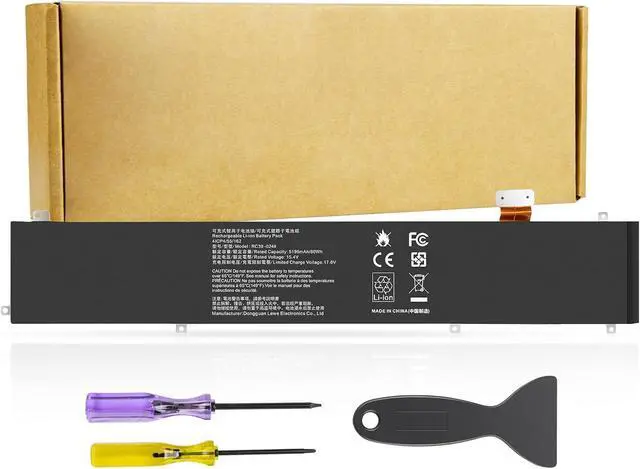
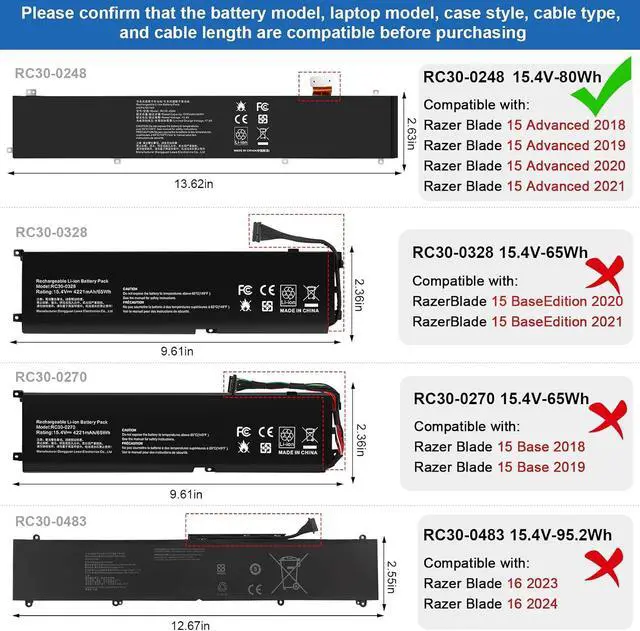
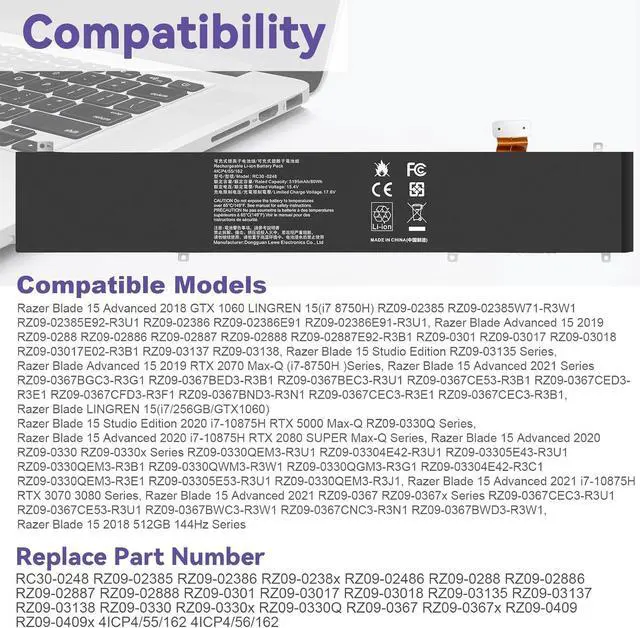


RC30-0248 Battery Replacement for Razer Blade Advanced 15 2018 2019 2020 2021 RTX 2060 2070 2080 RZ09-02385 RZ09-02386 RZ09-02386E92 RZ09-02486 RZ09-02886 RZ09-02887 RZ09-0301 RZ09-03135 4ICP4/55/162
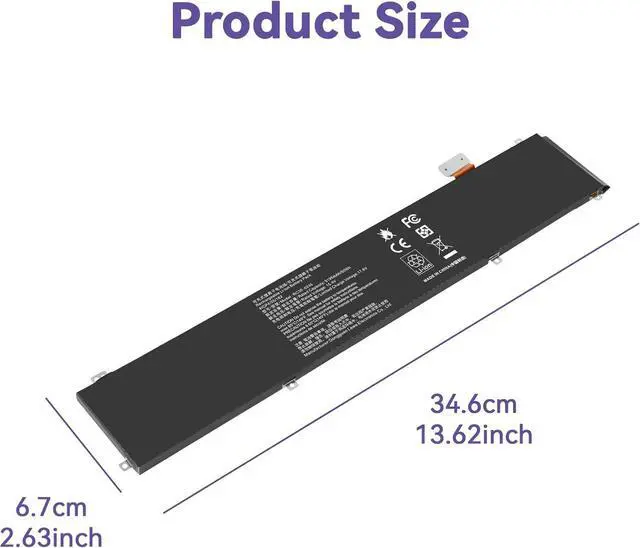
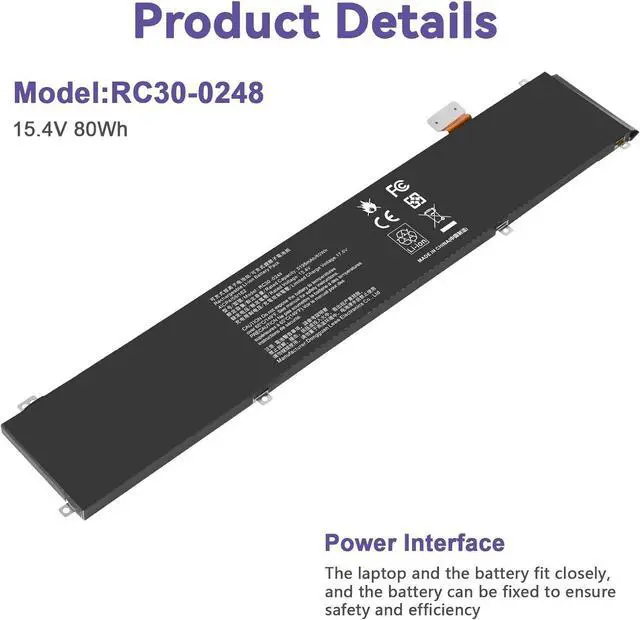
- SpecificationsVoltage:15.4V;Capacity:80Wh;100% brand new from manufacture. Grade A product ensure fast charges and low power consumption.
- Compatible Part Number:RC30-0248 RZ09-02385 RZ09-02386 RZ09-02486 RZ09-0288 RZ09-02886 RZ09-02887 RZ09-02888 RZ09-0301 RZ09-03017 RZ09-03018 RZ09-03135 RZ09-03137 RZ09-03138 RZ09-0330 RZ09-0330x RZ09-0367 RZ09-0367x 4ICP4/55/162
- Compatible Laptop ModelsFor Razer Blade 15 Advanced 2018 SeriesRazer Blade 15 2018 512GB 144Hz SeriesRazer Blade LINGREN 15(i7/256GB/GTX1060) SeriesRazer Blade 15 Advanced 2018 GTX 1060/1070 (i7 8750H) SeriesRazer Blade 15 Advanced RZ09-02386 RZ09-02386W91 RZ09-02386E52 RZ09-02386E91 RZ09-02386E91-R3U1 RZ09-02386E92 RZ09-02486 SeriesRazer Blade 15 Advanced RZ09-02385 RZ09-02385W71-R3W1 RZ09-02385E92-R3U1 RZ09-02385E71-R3U1 Series
- Compatible Laptop ModelsFor Razer Blade 15 Advanced 2019 SeriesRazer Blade 15 2019 Advanced RTX 2060 SeriesRazer Blade Advanced 15 RTX 2070 Max-Q (i7-8750H ) SeriesRazer Blade 15 Advan
+
+
Overview
Specs
Reviews

Any questions? Our AI beta will help you find out quickly.
Try me now
Compatible Models: (use "Ctrl+F" to find your model quickly
Razer Blade 15 Advanced 2018 Series
Razer Blade 15 Advanced 2019 Series
Razer Blade 15 Advanced 2020 Series
Razer Blade 15 Advanced 2021 Series
Razer Blade 15 Advanced 2018 Series
Razer Blade 15 2018 512GB 144Hz Series
Razer Blade LINGREN 15(i7/256GB/GTX1060) Series
Razer Blade 15 Advanced 2018 GTX 1060/1070 (i7 8750H) Series
Razer Blade 15 Advanced RZ09-02386 RZ09-02386W91 RZ09-02386E52 RZ09-02386E91 RZ09-02386E91-R3U1 RZ09-02386E92 RZ09-02486 Series
Razer Blade 15 Advanced RZ09-02385 RZ09-02385W71-R3W1 RZ09-02385E92-R3U1 RZ09-02385E71-R3U1 Series
Razer Blade 15 Advanced 2019 Series
Razer Blade 15 2019 Advanced RTX 2060 Series
Razer Blade Advanced 15 RTX 2070 Max-Q (i7-8750H ) Series
Razer Blade 15 Advanced 2019 RTX 2080 Max-Q Series
Razer Blade 15 Advanced (i7-9750H/RTX 2080/4K P3 OLED) Series
Razer Blade 15 Advanced RZ09-0288 RZ09-02886 RZ09-02887 RZ09-02888 RZ09-02887E92-R3B1 Series
Razer Blade 15 Advanced RZ09-0301 RZ09-03017 RZ09-03017E01 RZ09-03017E01-R3B1 RZ09-03017E02-R3B1 RZ09-03018 RZ09-03018E52 RZ09-03018E52-R3U1 RZ09-03017E02-R3B1 RZ09-03017E01-R3U1 Series
Razer Blade Advanced 15 RTX 2060 Max-Q RZ09-02886E92-R3U1 Series
Razer Blade 15 Studio Edition RZ09-03135 Series
Razer Blade 15 Advanced RZ09-03137 RZ09-03138 Series
Razer Blade 15 Advanced Model (i7-9750H, RTX 2080 Max-Q, 240 Hz) Series
Razer Blade 15 Advanced 2020 Series
Razer Blade 15 Advanced 2020 RTX 2070 Max-Q (i7-10875H) Series
Razer Blade 15 Advanced 2020 RZ09-0330 RZ09-0330x Series
RZ09-0330QEM3-R3U1 RZ09-03304E42-R3U1 RZ09-03305E43-R3U1 RZ09-0330QEM3-R3B1 RZ09-0330QWM3-R3W1
RZ09-0330QGM3-R3G1 RZ09-03304E42-R3C1 RZ09-0330QEM3-R3E1 RZ09-03305E53-R3U1 RZ09-0330QEM3-R3J1
Razer Blade 15 Advanced 2021 Series
Razer Blade 15 Advanced 2021 RTX 3070 3080 (i7-10750H) Series
Razer Blade 15 Advanced 2021 RZ09-0367 RZ09-0367x Series
RZ09-0367CEC3-R3U1 RZ09-0367BED3-R3U1 RZ09-0367CE53-R3U1 RZ09-0367BWC3-R3W1 RZ09-0367CNC3-R3N1 RZ09-0367BWD3-R3W1
RZ09-0367BED3-R341 RZ09-0367CED3-R341 RZ09-0367CGC3-R3G1 RZ09-0367BND3-R3N1 RZ09-0367CEC3-R3E1 RZ09-0367CEC3-R3B1
RZ09-0367BGC3-R3G1 RZ09-0367BED3-R3B1 RZ09-0367BEC3-R3U1 RZ09-0367CE53-R3B1 RZ09-0367CED3-R3E1 RZ09-0367CFD3-R3F1 RZ09-0409
1. You need to turn off the laptop and disconnect the power at the same time.
2. Disconnect the old battery from the motherboard to avoid unnecessary damage caused by disassembling the battery. Then unscrew the old battery and save it.
3. Take out the old battery, install the new battery on the battery box, tighten the screws, and connect the wires of the new battery.
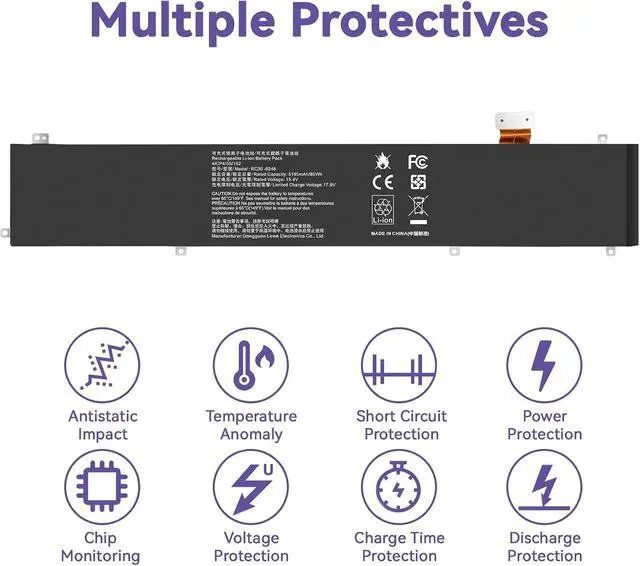
Upgraded electric core technology, energy density increased by 30%, reduce losslessconsumption, 500+ times of bad circulation
Attention to detail to achieve a tight fit with the computer How to install a new battery? Long battery life and durable construction Multi-protection materials for operation at temperatures from -10 to 35 degrees Celsius.
Razer Blade 15 Advanced 2018 Series
Razer Blade 15 Advanced 2019 Series
Razer Blade 15 Advanced 2020 Series
Razer Blade 15 Advanced 2021 Series
Razer Blade 15 Advanced 2018 Series
Razer Blade 15 2018 512GB 144Hz Series
Razer Blade LINGREN 15(i7/256GB/GTX1060) Series
Razer Blade 15 Advanced 2018 GTX 1060/1070 (i7 8750H) Series
Razer Blade 15 Advanced RZ09-02386 RZ09-02386W91 RZ09-02386E52 RZ09-02386E91 RZ09-02386E91-R3U1 RZ09-02386E92 RZ09-02486 Series
Razer Blade 15 Advanced RZ09-02385 RZ09-02385W71-R3W1 RZ09-02385E92-R3U1 RZ09-02385E71-R3U1 Series
Razer Blade 15 Advanced 2019 Series
Razer Blade 15 2019 Advanced RTX 2060 Series
Razer Blade Advanced 15 RTX 2070 Max-Q (i7-8750H ) Series
Razer Blade 15 Advanced 2019 RTX 2080 Max-Q Series
Razer Blade 15 Advanced (i7-9750H/RTX 2080/4K P3 OLED) Series
Razer Blade 15 Advanced RZ09-0288 RZ09-02886 RZ09-02887 RZ09-02888 RZ09-02887E92-R3B1 Series
Razer Blade 15 Advanced RZ09-0301 RZ09-03017 RZ09-03017E01 RZ09-03017E01-R3B1 RZ09-03017E02-R3B1 RZ09-03018 RZ09-03018E52 RZ09-03018E52-R3U1 RZ09-03017E02-R3B1 RZ09-03017E01-R3U1 Series
Razer Blade Advanced 15 RTX 2060 Max-Q RZ09-02886E92-R3U1 Series
Razer Blade 15 Studio Edition RZ09-03135 Series
Razer Blade 15 Advanced RZ09-03137 RZ09-03138 Series
Razer Blade 15 Advanced Model (i7-9750H, RTX 2080 Max-Q, 240 Hz) Series
Razer Blade 15 Advanced 2020 Series
Razer Blade 15 Advanced 2020 RTX 2070 Max-Q (i7-10875H) Series
Razer Blade 15 Advanced 2020 RZ09-0330 RZ09-0330x Series
RZ09-0330QEM3-R3U1 RZ09-03304E42-R3U1 RZ09-03305E43-R3U1 RZ09-0330QEM3-R3B1 RZ09-0330QWM3-R3W1
RZ09-0330QGM3-R3G1 RZ09-03304E42-R3C1 RZ09-0330QEM3-R3E1 RZ09-03305E53-R3U1 RZ09-0330QEM3-R3J1
Razer Blade 15 Advanced 2021 Series
Razer Blade 15 Advanced 2021 RTX 3070 3080 (i7-10750H) Series
Razer Blade 15 Advanced 2021 RZ09-0367 RZ09-0367x Series
RZ09-0367CEC3-R3U1 RZ09-0367BED3-R3U1 RZ09-0367CE53-R3U1 RZ09-0367BWC3-R3W1 RZ09-0367CNC3-R3N1 RZ09-0367BWD3-R3W1
RZ09-0367BED3-R341 RZ09-0367CED3-R341 RZ09-0367CGC3-R3G1 RZ09-0367BND3-R3N1 RZ09-0367CEC3-R3E1 RZ09-0367CEC3-R3B1
RZ09-0367BGC3-R3G1 RZ09-0367BED3-R3B1 RZ09-0367BEC3-R3U1 RZ09-0367CE53-R3B1 RZ09-0367CED3-R3E1 RZ09-0367CFD3-R3F1 RZ09-0409
1. You need to turn off the laptop and disconnect the power at the same time.
2. Disconnect the old battery from the motherboard to avoid unnecessary damage caused by disassembling the battery. Then unscrew the old battery and save it.
3. Take out the old battery, install the new battery on the battery box, tighten the screws, and connect the wires of the new battery.
Upgraded electric core technology, energy density increased by 30%, reduce losslessconsumption, 500+ times of bad circulation
Attention to detail to achieve a tight fit with the computer How to install a new battery? Long battery life and durable construction Multi-protection materials for operation at temperatures from -10 to 35 degrees Celsius.
Warranty & Returns
Warranty, Returns, And Additional Information
Warranty
- Please contact the Seller directly for warranty information. Warranty information may also be found on the Manufacturer's website.
- CONTACT
Return Policies
- Return for refund within: 45 days
- Return for replacement within: 45 days
- This item is covered by Xalvion E-Commerce Limited Return Policy
Manufacturer Contact Info
- For a directory of all our manufacturers, please click below.
- Manufacturers Directory
LOADING...