

Your Browsing History

Meet Your Seller

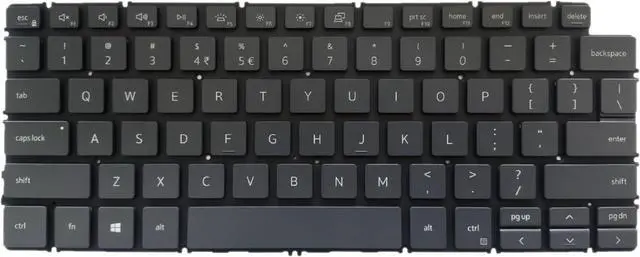


for Dell Inspiron 14 7405 2-in-1 Backlit Black Keyboard, UI Layout
- [Backlight: Yes] [Keyboard Layout: US International] If your old keyboard doesn't have backlit, the backlit function will not work on your laptop.
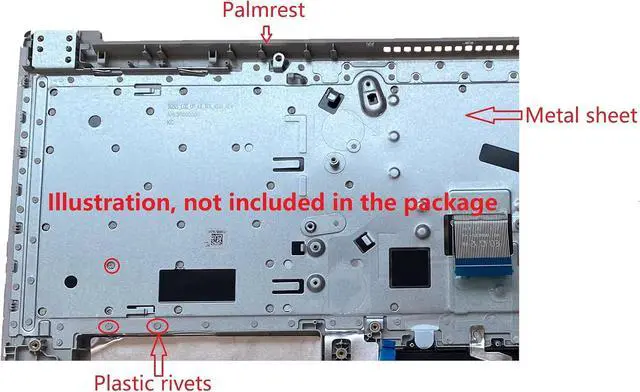
- This item doesn't come with the palmrest, please check our photo and description before purchase.
- 1. When you disassemble the laptop you will see the old keyboard was cover by a metal sheet and fixed by many plastic rivets.
- 2. You must remove all the plastic rivets, then you can take the old keyboard out from the palmrest and put the new keyboard into it.
- 3. Tested before shipment. If some keys don't work after installed, please clean the ribbon cable end and reseat it to make sure all the pins of the cable are connected with the pins in the socket.
+
+
Overview
Specs
Reviews

Any questions? Our AI beta will help you find out quickly.
Try me now
[Backlight: Yes] [Keyboard Layout: US International] If your old keyboard doesn't have backlit, the backlit function will not work on your laptop.
This item doesn't come with the palmrest, please check our photo and description before purchase.
1. When you disassemble the laptop you will see the old keyboard was cover by a metal sheet and fixed by many plastic rivets.
2. You must remove all the plastic rivets, then you can take the old keyboard out from the palmrest and put the new keyboard into it.
3. Tested before shipment. If some keys don't work after installed, please clean the ribbon cable end and reseat it to make sure all the pins of the cable are connected with the pins in the socket.
This item doesn't come with the palmrest, please check our photo and description before purchase.
1. When you disassemble the laptop you will see the old keyboard was cover by a metal sheet and fixed by many plastic rivets.
2. You must remove all the plastic rivets, then you can take the old keyboard out from the palmrest and put the new keyboard into it.
3. Tested before shipment. If some keys don't work after installed, please clean the ribbon cable end and reseat it to make sure all the pins of the cable are connected with the pins in the socket.
Warranty & Returns
Warranty, Returns, And Additional Information
Warranty
- Please contact the Seller directly for warranty information. Warranty information may also be found on the Manufacturer's website.
- CONTACT
Return Policies
- Return for refund within: 45 days
- Return for replacement within: 45 days
- This item is covered by Xalvion E-Commerce Limited Return Policy
Manufacturer Contact Info
- For a directory of all our manufacturers, please click below.
- Manufacturers Directory
LOADING...