

Your Browsing History

Meet Your Seller

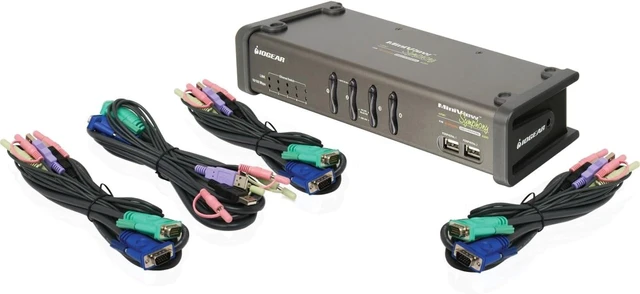

IOGEAR 4-Port MiniView Symphony Multi-function KVM Switch with Cables, GCS1774
- Controls four computers with a single VGA monitor, USB keyboard and mouse; Four 6 ft (1.8m) cables included
- Superior video quality - up to 2048 x 1536
- Built-in USB 2.0 peripheral sharing with data transfer rates of up to 480 Mbps; Built-in 5 port 10/100 Mbps Ethernet switch Share one set of speakers with all your computers
- Independent switching of KVM, USB peripherals, and audio focus; Port selection via Hotkeys and front push-buttons
- Auto scan mode for monitoring all computers
- Power on detection automatically switches to the first powered on port
- Keyboard and mouse emulation for error-free boot up
- Firmware upgradeable; TAA Compliant
+
+
Overview
Specs
Reviews

Any questions? Our AI mode will help you find out quickly.
Try me now
Product Description IOGEARs Symphony multi-function 4-Port KVM Switch represents the new wave in KVM technology. The Symphony allows you to control four computers using a single VGA monitor, USB keyboard and mouse. In addition, it has a built-in USB 2.0 hub, Ethernet 10/100 switch, and audio sharing capabilities. With its built-in USB 2.0 High Speed hub, slow transfer rates are a thing of the past. Fully compatible with USB 2.0 standards, this KVM allows you to share your USB peripherals and transfer data at up to 480 Mbps. In addition, the audio ports allow you to connect one set of speakers and microphone, and share them among your computers. To complement your KVM setup, IOGEARs Symphony KVM sports a full-featured Ethernet 10/100 switch. This built-in Ethernet switch allows you to easily network and share internet with your computers. Among its many features, it supports auto-sensing, 10/100 Mbps speed, and is fully compliant with 802.3 networking standard.
From the Manufacturer IOGEAR's Symphony multi-function 4-Port KVM Switch represents the new wave in KVM technology. The Symphony allows you to control four computers using a single VGA monitor, USB keyboard and mouse. In addition, it has a built-in USB 2.0 hub, Ethernet 10/100 switch, and audio sharing capabilities. With its built-in USB 2.0 High Speed hub, slow transfer rates are a thing of the past. Fully compatible with USB 2.0 standards, this KVM allows you to share your USB peripherals and transfer data at up to 480 Mbps. In addition, the audio ports allow you to connect one set of speakers and microphone, and share them among your computers. To complement your KVM setup, IOGEAR's Symphony KVM sports a full-featured Ethernet 10/100 switch. This built-in Ethernet switch allows you to easily network and share internet with your computers. Among its many features, it supports auto-sensing, 10/100 Mbps speed, and is fully compliant with 802.3 networking standard.
Features
Four 6 ft (1.8m) cables included
Multi-function USB KVM switch integrates a USB 2.0 hub, Ethernet switch, and audio
Controls four computers with a single VGA monitor, USB keyboard and mouse
Built-in USB 2.0 peripheral sharing to share printers, scanners, hard drives, etc., with data transfer rates of up to 480 Mbps.
Built-in 5 port 10/100 Mbps Ethernet switch allows you to easily network and share Internet with your computers
Share one set of speakers with all your computers
Independent switching of KVM, USB peripherals, and audio focus
Port selection via Hotkeys and front push-buttons
Auto scan mode for monitoring all computers
Power on detection ? automatically switches to the first powered on port
Superior video quality - up to 2048 x 1536
Firmware upgradeable
Easy installation ? no software required
Keyboard and mouse emulation for error-free boot up
Hot pluggable ? add or remove computers without powering down the switch
Compatible with multiple operating platforms (PC, Mac, and Sun)
Product Description From the Manufacturer
From the Manufacturer IOGEAR's Symphony multi-function 4-Port KVM Switch represents the new wave in KVM technology. The Symphony allows you to control four computers using a single VGA monitor, USB keyboard and mouse. In addition, it has a built-in USB 2.0 hub, Ethernet 10/100 switch, and audio sharing capabilities. With its built-in USB 2.0 High Speed hub, slow transfer rates are a thing of the past. Fully compatible with USB 2.0 standards, this KVM allows you to share your USB peripherals and transfer data at up to 480 Mbps. In addition, the audio ports allow you to connect one set of speakers and microphone, and share them among your computers. To complement your KVM setup, IOGEAR's Symphony KVM sports a full-featured Ethernet 10/100 switch. This built-in Ethernet switch allows you to easily network and share internet with your computers. Among its many features, it supports auto-sensing, 10/100 Mbps speed, and is fully compliant with 802.3 networking standard.
Features
Four 6 ft (1.8m) cables included
Multi-function USB KVM switch integrates a USB 2.0 hub, Ethernet switch, and audio
Controls four computers with a single VGA monitor, USB keyboard and mouse
Built-in USB 2.0 peripheral sharing to share printers, scanners, hard drives, etc., with data transfer rates of up to 480 Mbps.
Built-in 5 port 10/100 Mbps Ethernet switch allows you to easily network and share Internet with your computers
Share one set of speakers with all your computers
Independent switching of KVM, USB peripherals, and audio focus
Port selection via Hotkeys and front push-buttons
Auto scan mode for monitoring all computers
Power on detection ? automatically switches to the first powered on port
Superior video quality - up to 2048 x 1536
Firmware upgradeable
Easy installation ? no software required
Keyboard and mouse emulation for error-free boot up
Hot pluggable ? add or remove computers without powering down the switch
Compatible with multiple operating platforms (PC, Mac, and Sun)
Product Description From the Manufacturer
Warranty & Returns
Warranty, Returns, And Additional Information
Warranty
- Please contact the Seller directly for warranty information. Warranty information may also be found on the Manufacturer's website.
- Read full details
- CONTACT
Return Policies
- Return for refund within: 30 days
- Return for replacement within: 30 days
- This item is covered by PartsPro Store Return Policy
Manufacturer Contact Info
- For a directory of all our manufacturers, please click below.
- Manufacturers Directory
LOADING...