

Your Browsing History

Meet Your Seller

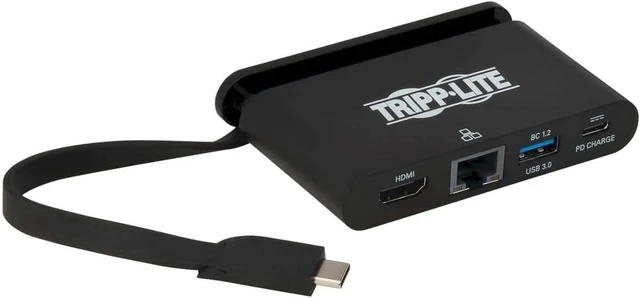
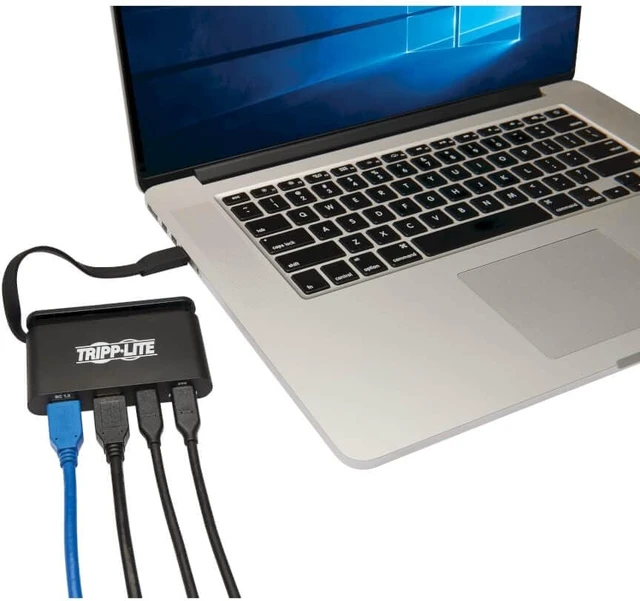
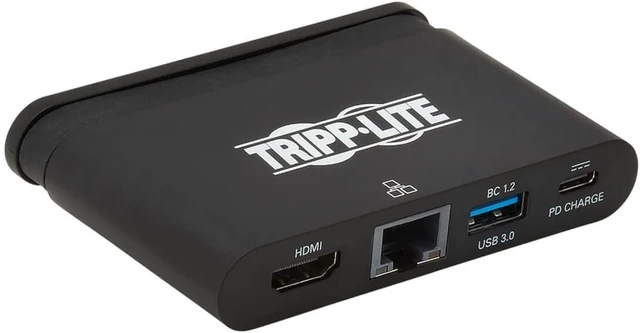
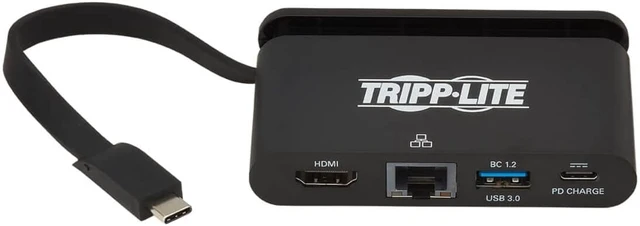
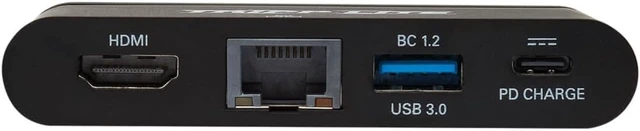
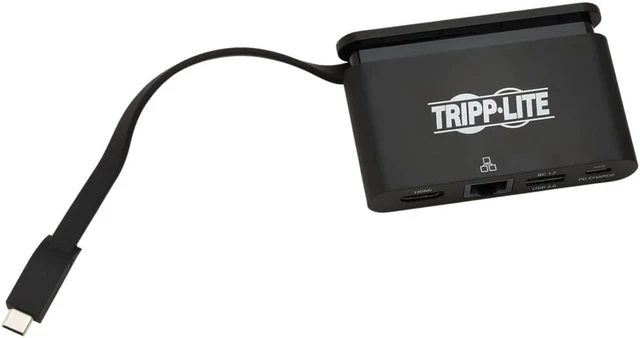


Tripp Lite USB-C Hub with 4K HDMI, Gigabit Ethernet, USB-A, USB-C PD Charging (5A, 100W), Thunderbolt 3, DisplayPort Alt Mode, 5 Gbps, Black (U444-T6N-H4GUBC)
- DYNAMIC USB-C ADAPTER: This USB 3.1 Gen 1 USB-C adapter contains a 4K HDMI port, USB-A port, wired Gigabit Ethernet port, and USB-C PD charging port, which connect to a USB-C or Thunderbolt 3 device. The Power Delivery port provides 5A (100W) power output for charging connected devices. This USB 3.1 C adapter helps you transmit digital audio and 4K video from your tablet, laptop, Chromebook, MacBook, smartphone or PC to an HDMI-enabled television, monitor or projector.
- ULTRA HIGH DEFINITION 4K HDMI ADAPTER: Delivers UHD picture quality at resolutions up to 3840 x 2160 (4K x 2K) @ 30 Hz, great as a MacBook HDMI adapter. Also transmits 4K video and digital audio from sources supporting USB-C DisplayPort Alt Mode to a compatible monitor, television or projector without installing special software drivers.
- POWERFUL GIGABIT ETHERNET ADAPTER: The RJ45 port offers access to a Gigabit Ethernet network when Wi-Fi is unavailable or when a wired connection offers faster speeds. Connect using a
+
+
Overview
Specs
Reviews

Any questions? Our AI mode will help you find out quickly.
Try me now
USB 3.1 Type-C Adapter Connects an HDMI Monitor to Your USB-C or Thunderbolt 3 Device
This USB 3.1 C adapter helps you transmit digital audio and 4K video from your tablet, laptop, Chromebook, MacBook, smartphone or PC to an HDMI-enabled television, monitor or projector. Its an ideal tool for giving video presentations in conference rooms and classrooms, editing multiple documents on a larger screen, or streaming video for digital signage in crystal-clear 4K.
Supports USB-C DisplayPort Alternate Mode for Transmitting Audio/Video Signals
By connecting the self-storing USB-C cable to a source device that supports USB DisplayPort Alt Mode, you can output 4K video and digital audio to a compatible monitor, television or projector without installing special software drivers.
Transmits Crystal-Clear 4K HDMI Video and Digital Audio
To send digital audio and Ultra High Definition video to a 4K-ready HDMI television, projector or monitor, connect the HDMI port to the display using an HDMI cable (such as Tripp Lites P568-Series high-speed HDMI cables, sold separately). The USB to HDMI 4K adapter supports video resolutions up to 3840 x 2160 (4K x 2K) at 30 Hz, as well as HDCP 1.4 and HDMI 1.4 compatibility. Its backward compatible with 1080p displays, allowing you to use it with older equipment.
Connects USB Peripherals and Transfers Data at Fast USB 3.1 Gen 1 Speeds
The USB-A port accepts USB peripherals, such as a flash drive, mouse, keyboard or printer, and provides up to 1.5 amps (7.5 watts) for charging and powering mobile devices. It transfers data at speeds up to 5 Gbps, which is 10 times faster than USB 2.0. The USB Type-C adapter is backward compatible with previous USB generations, so you can continue using older peripherals while getting high-speed performance from new devices.
PD Charging Port Charges Connected Device via AC Wall Charger
The USB-C Power Delivery 3.0 port provides power output up to 5 amps (100 watts), which is more than sufficient for charging and powering the connected source device, such as a MacBook or Chromebook. Just connect the devices AC wall charger to the USB-C PD port and enjoy fast USB 3.1 Gen 1 data transfer speeds up to 5 Gbps. Like the USB-A port, it is backward compatible with previous USB generations.
Accesses a Wired Gigabit Ethernet Network
The RJ45 port offers access to a Gigabit Ethernet network when Wi-Fi is unavailable or when a wired connection offers faster speeds. Connect using a UTP cable (such as Tripp Lites N201-Series Cat6 snagless patch cables, sold separately), and enjoy true 10/100/1000 Mbps Ethernet speeds for fast data transfers.
Self-Storing USB-C Cable Connects in Either Direction
Connect the reversible USB-C plug to your source devices USB-C or Thunderbolt 3 port. The fumble-free USB-C plug connects in either direction to ensure fast, easy connection every time. The six-inch cable wraps into the adapter when not in use, making the unit easy to carry in a briefcase or laptop bag for connecting on the go.
Ready to Use Right Out of the Package
The plug-and-play USB 3.1 Type-C adapter is specifically designed for the MacBook, Google Chromebook Pixel and other laptops, tablets and devices equipped with a USB-C or Thunderbolt 3 port. It requires no software, drivers or external power.
This USB 3.1 C adapter helps you transmit digital audio and 4K video from your tablet, laptop, Chromebook, MacBook, smartphone or PC to an HDMI-enabled television, monitor or projector. Its an ideal tool for giving video presentations in conference rooms and classrooms, editing multiple documents on a larger screen, or streaming video for digital signage in crystal-clear 4K.
Supports USB-C DisplayPort Alternate Mode for Transmitting Audio/Video Signals
By connecting the self-storing USB-C cable to a source device that supports USB DisplayPort Alt Mode, you can output 4K video and digital audio to a compatible monitor, television or projector without installing special software drivers.
Transmits Crystal-Clear 4K HDMI Video and Digital Audio
To send digital audio and Ultra High Definition video to a 4K-ready HDMI television, projector or monitor, connect the HDMI port to the display using an HDMI cable (such as Tripp Lites P568-Series high-speed HDMI cables, sold separately). The USB to HDMI 4K adapter supports video resolutions up to 3840 x 2160 (4K x 2K) at 30 Hz, as well as HDCP 1.4 and HDMI 1.4 compatibility. Its backward compatible with 1080p displays, allowing you to use it with older equipment.
Connects USB Peripherals and Transfers Data at Fast USB 3.1 Gen 1 Speeds
The USB-A port accepts USB peripherals, such as a flash drive, mouse, keyboard or printer, and provides up to 1.5 amps (7.5 watts) for charging and powering mobile devices. It transfers data at speeds up to 5 Gbps, which is 10 times faster than USB 2.0. The USB Type-C adapter is backward compatible with previous USB generations, so you can continue using older peripherals while getting high-speed performance from new devices.
PD Charging Port Charges Connected Device via AC Wall Charger
The USB-C Power Delivery 3.0 port provides power output up to 5 amps (100 watts), which is more than sufficient for charging and powering the connected source device, such as a MacBook or Chromebook. Just connect the devices AC wall charger to the USB-C PD port and enjoy fast USB 3.1 Gen 1 data transfer speeds up to 5 Gbps. Like the USB-A port, it is backward compatible with previous USB generations.
Accesses a Wired Gigabit Ethernet Network
The RJ45 port offers access to a Gigabit Ethernet network when Wi-Fi is unavailable or when a wired connection offers faster speeds. Connect using a UTP cable (such as Tripp Lites N201-Series Cat6 snagless patch cables, sold separately), and enjoy true 10/100/1000 Mbps Ethernet speeds for fast data transfers.
Self-Storing USB-C Cable Connects in Either Direction
Connect the reversible USB-C plug to your source devices USB-C or Thunderbolt 3 port. The fumble-free USB-C plug connects in either direction to ensure fast, easy connection every time. The six-inch cable wraps into the adapter when not in use, making the unit easy to carry in a briefcase or laptop bag for connecting on the go.
Ready to Use Right Out of the Package
The plug-and-play USB 3.1 Type-C adapter is specifically designed for the MacBook, Google Chromebook Pixel and other laptops, tablets and devices equipped with a USB-C or Thunderbolt 3 port. It requires no software, drivers or external power.
Warranty & Returns
Warranty, Returns, And Additional Information
Warranty
- Please contact the Seller directly for warranty information. Warranty information may also be found on the Manufacturer's website.
- Read full details
- CONTACT
Return Policies
- Return for refund within: 30 days
- Return for replacement within: 30 days
- This item is covered by FluffyNest Return Policy
Manufacturer Contact Info
- For a directory of all our manufacturers, please click below.
- Manufacturers Directory
LOADING...