Your Browsing History
Meet Your Seller
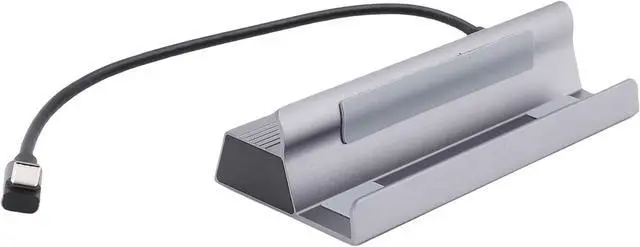
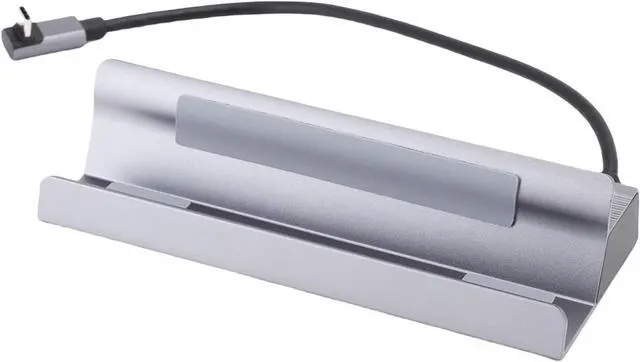
FILFEEL 6-in USB C Docking Station 4K120Hz USB Hub with 100W PD Charging & Gigabit Ethernet RJ45 for Laptop Desktop Expansion Aluminum Alloy Hub for MacOS
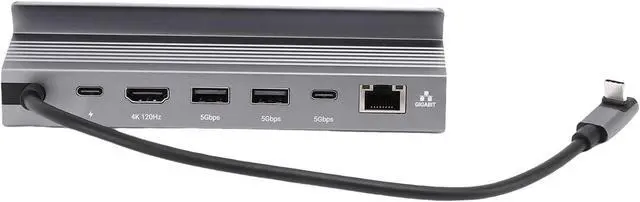
- 6-in- Versatile Connectivity: This USB C Docking Station serves as a complete desktop expansion solution, integrating one 4K120Hz port, one RJ45 Gigabit Ethernet port, two USB 3.0 ports (5Gbps), and one PD input port into a single compact aluminum alloy enclosure enabling simultaneous high-resolution display output, stable wired networking, fast peripheral data transfer, and up to 100W power without sacrificing performance or compatibility a
- 4K120Hz High-Definition Video Output: This USB C Docking Station delivers ultra-, low-latency 4K resolution at 120Hz via , supporting dynamic HDR and wide color for professional video editing, competitive gaming, and immersive multimedia presentations ensuring - clarity, reduced motion blur, and seamless frame pacing without screen tearing or lag on compatible monitors and laptops.
- 100W Power with Data Integrity: This USB C Docking Station supports full 100W Power pass-through while maintaining native 5Gbps data speeds on USB 3.0 and i
+
+
Overview
Specs
Reviews
Any questions? Our AI mode will help you find out quickly.
Try me now
1. 6 IN 1 CONNECTION: Enjoy maximum versatility with the 6 in 1 USB hub that allows for seamless connectivity among multiple devices. This innovative docking station eliminates the hassle of switching between different ports.
2. HD OUTPUT: Wth the HD multimedia interface 4K120Hz output of this USB C dock. Whether for gaming, movies, or presentations, the high definition transmission ensures clear images.
3. SUPPORT FAST CHARGING: The expansion dock supports up to 100W rapid charging through power delivery, allowing you to quickly charge your devices without sacrificing data transfer speed.
4. NETWORK CONNECTIVITY: The integrated RJ45 port delivers impressive speeds of up to 1000Mbps, making this docking station ideal for online gaming, streaming, or transferring large files.
5. ALUMINUM ALLOY SHELL DESIGN: Crafted with a sturdy aluminum alloy exterior, this expansion dock fits easily into your work area, while its lightweight structure makes it a portable solution for on the go professionals.
Spec:
Item Type: USB C Docking Station
Material: Metal, Aluminum Alloy Shell
Input Interface: Type C
USB3.0: 5Gbps
Type C: 5Gbps
HD Multimedia Interface: 4K120Hz
PD: 100W (Maximum)
RJ45: 1000Mbps
Compatible systems: for , for OS X, for Linux
How to Use:
Basic connection, plug and play
packing list:
1 x USB C Docking Station
Notice:
1. Regularly clean the interface of the docking station to avoid poor contacting caused by dust.
2. Avoid frequent plugging and unplugging to reduce interface wear.
3. When not in use for a long time, disconnect the power supply and connecting wires.

2. HD OUTPUT: Wth the HD multimedia interface 4K120Hz output of this USB C dock. Whether for gaming, movies, or presentations, the high definition transmission ensures clear images.
3. SUPPORT FAST CHARGING: The expansion dock supports up to 100W rapid charging through power delivery, allowing you to quickly charge your devices without sacrificing data transfer speed.
4. NETWORK CONNECTIVITY: The integrated RJ45 port delivers impressive speeds of up to 1000Mbps, making this docking station ideal for online gaming, streaming, or transferring large files.
5. ALUMINUM ALLOY SHELL DESIGN: Crafted with a sturdy aluminum alloy exterior, this expansion dock fits easily into your work area, while its lightweight structure makes it a portable solution for on the go professionals.
Spec:
Item Type: USB C Docking Station
Material: Metal, Aluminum Alloy Shell
Input Interface: Type C
USB3.0: 5Gbps
Type C: 5Gbps
HD Multimedia Interface: 4K120Hz
PD: 100W (Maximum)
RJ45: 1000Mbps
Compatible systems: for , for OS X, for Linux
How to Use:
Basic connection, plug and play
packing list:
1 x USB C Docking Station
Notice:
1. Regularly clean the interface of the docking station to avoid poor contacting caused by dust.
2. Avoid frequent plugging and unplugging to reduce interface wear.
3. When not in use for a long time, disconnect the power supply and connecting wires.
Warranty & Returns
Warranty, Returns, And Additional Information
Warranty
- Please contact the Seller directly for warranty information. Warranty information may also be found on the Manufacturer's website.
- CONTACT
Return Policies
- Return for refund within: 30 days
- Return for replacement within: 30 days
- This item is covered by PartsPro Store Return Policy
Manufacturer Contact Info
- For a directory of all our manufacturers, please click below.
- Manufacturers Directory
LOADING...