

Your Browsing History

Meet Your Seller

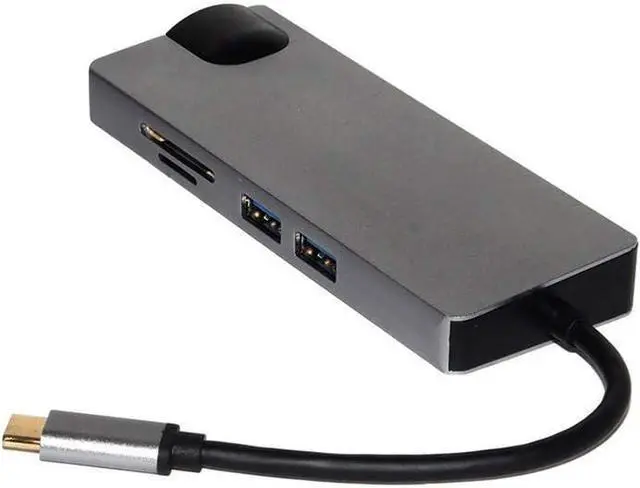


Greatstar USB C Hub Adapter USB C to HDMI VGA for MacBook Air Pro 2018 Type-C USB-C Hub USB 3.0 Card Reader PD Port
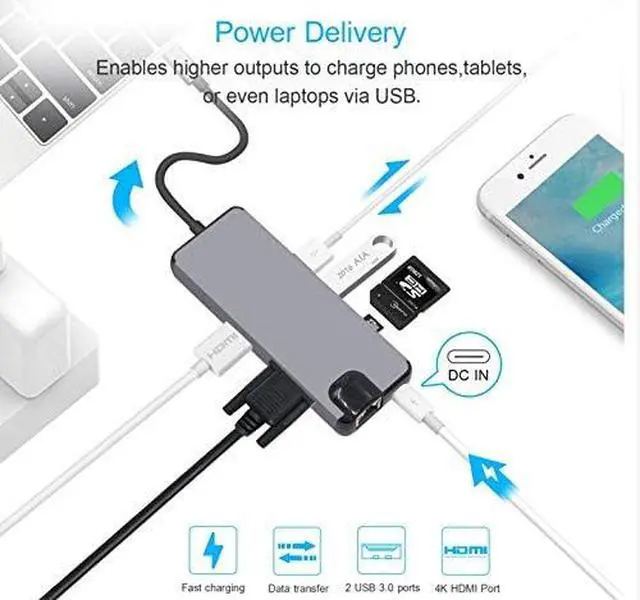
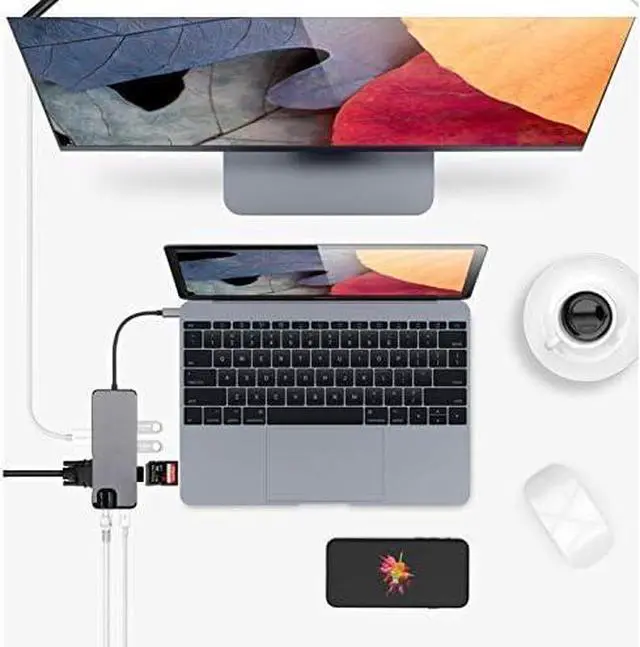
- .This 8-in-1 USB-C Hub expands your computer's limited USB connectivity with [ One HDMI Output Port] , [One Gigabit Ethernet Port(RJ Port 45)], [the USB-C Charging Port], [ One VAG Port], [2 USB 3.0 Ports], [ One SD and TF Card Slot], [USB-C Female Port Charger ] .
- .USB Hub C to HDMI output port: Up to 4K UHD (3840x2160 @ Hz 30) or 2K / 1080p / 720p / 480p / 360p
- USB Hub C to Ethernet Lan Rj45 Adapter (RJ-45 port): 10 / 100/1000 Mbps
- .USB C hub for VGA Adapter: Support HDMI and VGA output dual screen display simultaneously, resolution up to 1920 * 1080 P. A perfect solution for entertainment and work.
- USB 3.0 Type-A Port: Data Transfer: Up to 5gbps 5
- .SD / TF Card Slot: Support Memory Card Capacity: Up to 512 GB, Read / Write Speed: Up to 104 MB / S
- USB-Type C Port Charging: Charging: (Charging laptop only)
- System Requirements: Laptop with an available ethernet port USB-C port Windows 7/8 / 8.1 / 10, macOS X v10.0 or above
- .Package List:1*USB C Hub
+
+
Overview
Specs
Reviews

Any questions? Our AI mode will help you find out quickly.
Try me now
This 8-in-1 USB-C Hub expands your computer's limited USB connectivity with [ One HDMI Output Port] , [One Gigabit Ethernet Port(RJ Port 45)], [the USB-C Charging Port], [ One VAG Port], [2 USB 3.0 Ports], [ One SD and TF Card Slot], [USB-C Female Port Charger ] .
USB Hub C to HDMI output port: Up to 4K UHD (3840x2160 @ Hz 30) or 2K / 1080p / 720p / 480p / 360p
USB Hub C to Ethernet Lan Rj45 Adapter (RJ-45 port): 10 / 100/1000 Mbps
USB C hub for VGA Adapter: Support HDMI and VGA output dual screen display simultaneously, resolution up to 1920 * 1080 P. A perfect solution for entertainment and work.
USB 3.0 Type-A Port: Data Transfer: Up to 5gbps 5
SD / TF Card Slot: Support Memory Card Capacity: Up to 512 GB, Read / Write Speed: Up to 104 MB / S
USB-Type C Port Charging: Charging: (Charging laptop only)
System Requirements: Laptop with an available ethernet port USB-C port Windows 7/8 / 8.1 / 10, macOS X v10.0 or above operating system
Notes
1. for connection Stable, connect a power adapter to the center when using high-power devices.
2. The USB-C female port of this product is for USB-C laptop charging only whose USB-C Delivery
USB Power (PD) port and does not support data transfer.
3. A 4K-capable display and HDMl cable are required to achieve 3840x2160 resolution.
Tips
4 ways to help reduce radio frequency interference to the USB 3.0 wireless connection of some laptops.
Connect the laptop to a 5GHz Free WiFi network.
Connect devices 2 (eg mouse and keyboard) to 2.0 USB ports on laptop
3 Connect the USB 3.0 hub to the laptop with a 1-foot or higher quality USB 3.0 cable extension;
Keep USB 3.0 devices away from the host computer.
Use 4 shielded high quality USB 3.0 devices / cables / connectors.
USB to HDMI C VGA RJ45 8 in 1 Card Reader
USB Hub C to HDMI output port: Up to 4K UHD (3840x2160 @ Hz 30) or 2K / 1080p / 720p / 480p / 360p
USB Hub C to Ethernet Lan Rj45 Adapter (RJ-45 port): 10 / 100/1000 Mbps
USB C hub for VGA Adapter: Support HDMI and VGA output dual screen display simultaneously, resolution up to 1920 * 1080 P. A perfect solution for entertainment and work.
USB 3.0 Type-A Port: Data Transfer: Up to 5gbps 5
SD / TF Card Slot: Support Memory Card Capacity: Up to 512 GB, Read / Write Speed: Up to 104 MB / S
USB-Type C Port Charging: Charging: (Charging laptop only)
System Requirements: Laptop with an available ethernet port USB-C port Windows 7/8 / 8.1 / 10, macOS X v10.0 or above operating system
Notes
1. for connection Stable, connect a power adapter to the center when using high-power devices.
2. The USB-C female port of this product is for USB-C laptop charging only whose USB-C Delivery
USB Power (PD) port and does not support data transfer.
3. A 4K-capable display and HDMl cable are required to achieve 3840x2160 resolution.
Tips
4 ways to help reduce radio frequency interference to the USB 3.0 wireless connection of some laptops.
Connect the laptop to a 5GHz Free WiFi network.
Connect devices 2 (eg mouse and keyboard) to 2.0 USB ports on laptop
3 Connect the USB 3.0 hub to the laptop with a 1-foot or higher quality USB 3.0 cable extension;
Keep USB 3.0 devices away from the host computer.
Use 4 shielded high quality USB 3.0 devices / cables / connectors.
USB to HDMI C VGA RJ45 8 in 1 Card Reader
Warranty & Returns
Warranty, Returns, And Additional Information
Warranty
- Please contact the Seller directly for warranty information. Warranty information may also be found on the Manufacturer's website.
- CONTACT
Return Policies
- Return for refund within: 30 days
- Return for replacement within: 30 days
- This item is covered by PartsPro Store Return Policy
Manufacturer Contact Info
- For a directory of all our manufacturers, please click below.
- Manufacturers Directory
LOADING...