

Your Browsing History
- Free 30-day Returns
$97.99

Meet Your Seller




DisplayPort to HDMI Adapter 1 in 3 Out | 4K60Hz, DP Source to HDMI Splitter Extended Display port splitter for 3 monitors, MST Hub for Desktop,Laptop,NVIDIA, AMD Graphics Card - MACOS Not Support MST
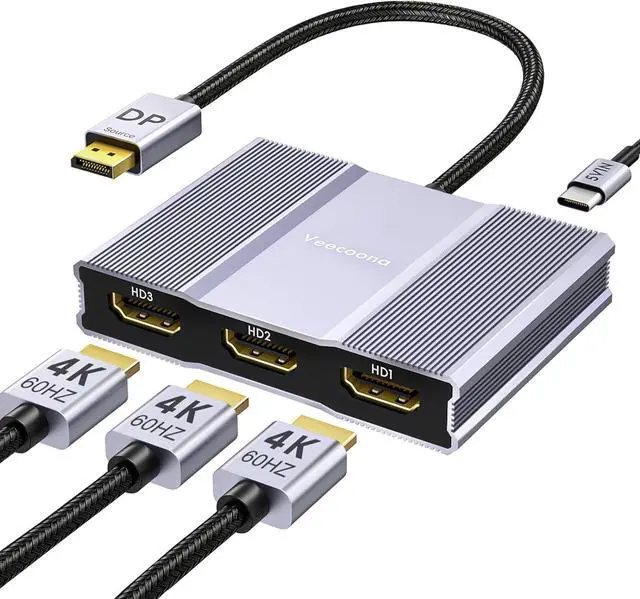
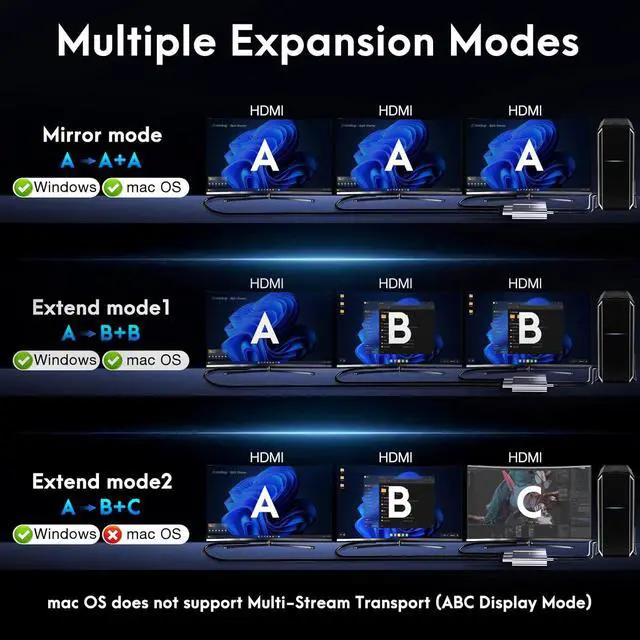
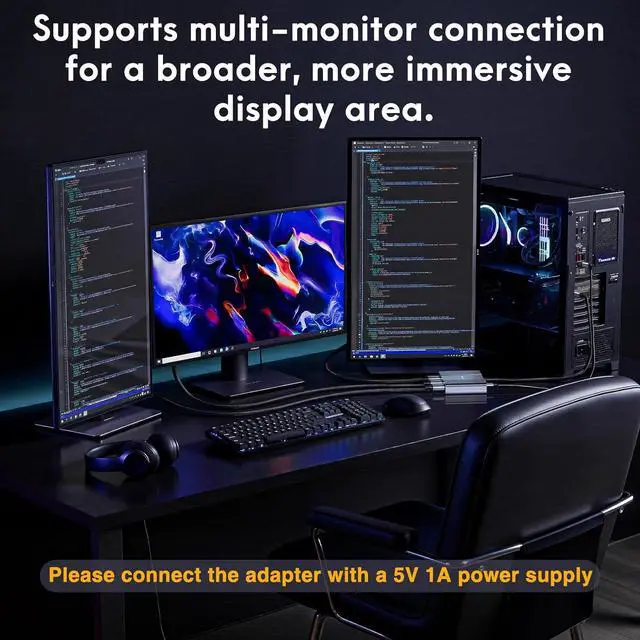
- Displayport to HDMI Splitter for 3 Monitors Adapter The DisplayPort to HDMI MST Hub effortlessly connects your DP-enabled devices to up to three HDMI monitors, supporting both mirror and extended display modes for multi-screen setups. Not compatible with Mac OS system. Note: PCs with integrated GPUs only support mirroring mode or can extend display to just one monitor.
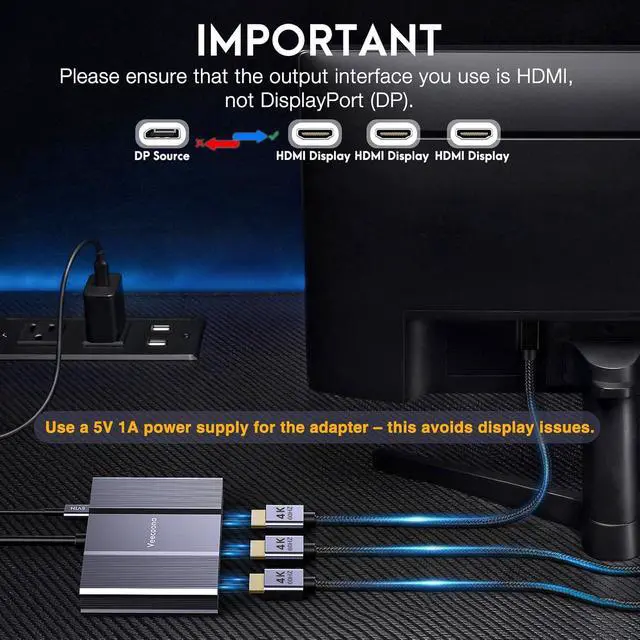
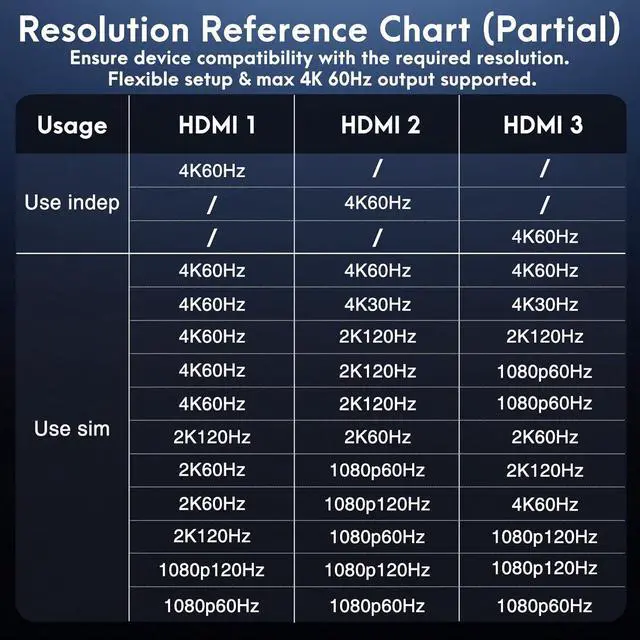
- 4K Ultra HD ResolutionThis hdmi splitter extended display delivers stunning 4K@60Hz ultra-high definition, supporting simultaneous use of up to three monitors for vivid, high-contrast visuals and vibrant color reproduction. It also offers seamless backward compatibility with 2K@120Hz/60Hz and 1080P@120Hz/60Hz resolutions. Note: Requires connection to a 5V 1A power supply; a USB-C power cord is included in the package.
- Plug and PlayThe DisplayPort Splitter for 3 Monitorsfeatures plug-and-play functionality, incompatible with docking stations/hubs/adapters. Simple setup steps: 1. Connect to your display with a 4K@
+
+
Overview
Specs
Reviews

Any questions? Our AI mode will help you find out quickly.
Try me now
Displayport to HDMI Splitter for 3 Monitors Adapter The DisplayPort to HDMI MST Hub effortlessly connects your DP-enabled devices to up to three HDMI monitors, supporting both mirror and extended display modes for multi-screen setups. Not compatible with Mac OS system. Note: PCs with integrated GPUs only support mirroring mode or can extend display to just one monitor.
4K Ultra HD ResolutionThis hdmi splitter extended display delivers stunning 4K@60Hz ultra-high definition, supporting simultaneous use of up to three monitors for vivid, high-contrast visuals and vibrant color reproduction. It also offers seamless backward compatibility with 2K@120Hz/60Hz and 1080P@120Hz/60Hz resolutions. Note: Requires connection to a 5V 1A power supply; a USB-C power cord is included in the package.
Plug and PlayThe DisplayPort Splitter for 3 Monitorsfeatures plug-and-play functionality, incompatible with docking stations/hubs/adapters. Simple setup steps: 1. Connect to your display with a 4K@60Hz HDMI cable; 2. Power it via USB if needed; 3. Plug the DP connector into your PC's DisplayPort.
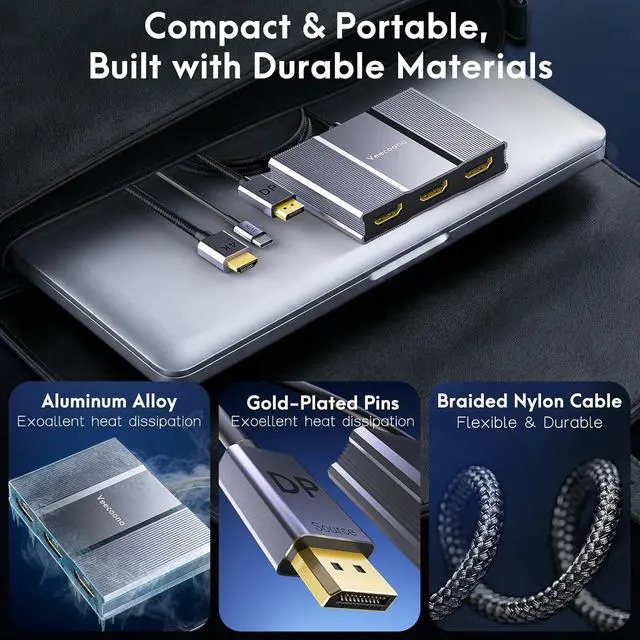
Premium Aluminum HousingThis Multi-Screen Display Adapter boasts top-tier construction with a nylon-braided cable, integrated aluminum alloy shell, and gold-plated ports. The nylon-braided cable boosts durability and resists scratches and cable damage, while the aluminum alloy shell delivers excellent heat dissipation to prevent overheating issues and minimize signal loss for lossless transmission. Gold-plated ports ensure ultra-stable, interference-free signal transfer for consistent performance.
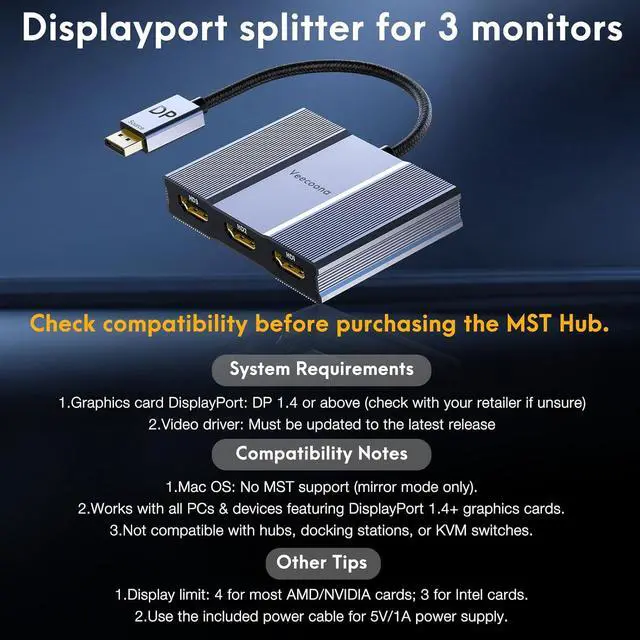
Wide CompatibilityThis DisplayPort splitter features premium chips, offering full compatibility with all devices equipped with DP/DP++/DisplayPort++ source portsincluding desktops (HP, Dell, Lenovo) and graphics cards (AMD, NVIDIA). It enables simultaneous connection to three HDMI-enabled devices such as TVs, monitors and projectors.Note: Ensure your graphics card supports a minimum of 18Gbps bandwidth; otherwise, multi-monitor extended display cannot be achieved.
Key Tips1. Connect the included USB-C cable (5V/1A min.) first before use. 2. Direct DP connection only; incompatible with hubs, docking stations, KVM switches/adapters. 3. macOS: SST mirroring only, no MST extended display; 4. GPU Requirement: 18Gbps bandwidth (DP 1.2/1.4/2.1), must support multi-screen output; update GPU driver if display issues occur. 5. High GPU performance required; incompatible with most laptop DP ports. 6. Compatible with HDMI 1.2/2.0/2.1 monitors.
4K Ultra HD ResolutionThis hdmi splitter extended display delivers stunning 4K@60Hz ultra-high definition, supporting simultaneous use of up to three monitors for vivid, high-contrast visuals and vibrant color reproduction. It also offers seamless backward compatibility with 2K@120Hz/60Hz and 1080P@120Hz/60Hz resolutions. Note: Requires connection to a 5V 1A power supply; a USB-C power cord is included in the package.
Plug and PlayThe DisplayPort Splitter for 3 Monitorsfeatures plug-and-play functionality, incompatible with docking stations/hubs/adapters. Simple setup steps: 1. Connect to your display with a 4K@60Hz HDMI cable; 2. Power it via USB if needed; 3. Plug the DP connector into your PC's DisplayPort.
Premium Aluminum HousingThis Multi-Screen Display Adapter boasts top-tier construction with a nylon-braided cable, integrated aluminum alloy shell, and gold-plated ports. The nylon-braided cable boosts durability and resists scratches and cable damage, while the aluminum alloy shell delivers excellent heat dissipation to prevent overheating issues and minimize signal loss for lossless transmission. Gold-plated ports ensure ultra-stable, interference-free signal transfer for consistent performance.
Wide CompatibilityThis DisplayPort splitter features premium chips, offering full compatibility with all devices equipped with DP/DP++/DisplayPort++ source portsincluding desktops (HP, Dell, Lenovo) and graphics cards (AMD, NVIDIA). It enables simultaneous connection to three HDMI-enabled devices such as TVs, monitors and projectors.Note: Ensure your graphics card supports a minimum of 18Gbps bandwidth; otherwise, multi-monitor extended display cannot be achieved.
Key Tips1. Connect the included USB-C cable (5V/1A min.) first before use. 2. Direct DP connection only; incompatible with hubs, docking stations, KVM switches/adapters. 3. macOS: SST mirroring only, no MST extended display; 4. GPU Requirement: 18Gbps bandwidth (DP 1.2/1.4/2.1), must support multi-screen output; update GPU driver if display issues occur. 5. High GPU performance required; incompatible with most laptop DP ports. 6. Compatible with HDMI 1.2/2.0/2.1 monitors.
Warranty & Returns
Warranty, Returns, And Additional Information
Warranty
- Please contact the Seller directly for warranty information. Warranty information may also be found on the Manufacturer's website.
- CONTACT
Return Policies
- Return for refund within: 30 days
- Return for replacement within: 30 days
- This item is covered by CITY BUSINESS Official Return Policy
Manufacturer Contact Info
- For a directory of all our manufacturers, please click below.
- Manufacturers Directory
LOADING...