

Your Browsing History

Meet Your Seller

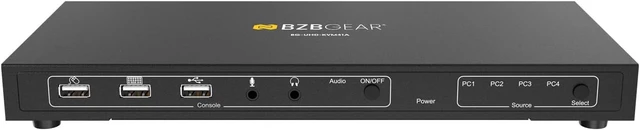


BZBGEAR 4x1 4K UHD KVM Switcher with USB 2.0 Ports for Peripherals and Audio Support - BG-UHD-KVM41A
- Share an HDTV or display, USB keyboard & mouse, audio output and microphone between up to 4 USB/HDMI computers and devices
- Provides an additional USB 2.0 sharing port with over-current detection and protection
- Switch between devices via IR remote control or front push button
- Supports 4K@30Hz and PC's UXGA 1920x1200 resolutions
- Metal housing for better RF shielding
+
+
Overview
Specs
Reviews

Any questions? Our AI mode will help you find out quickly.
Try me now
The BG-UHD-KVM41A is a 4K HDMI USB 2.0 KVM switch. With support for resolutions up to 4K@30Hz, this device allows users to control four computers and share USB peripherals from a single workstation. Perfect for offices, software programmers, and support desks, users can easily switch between multiple operating systems without leaving their seat.
Connectivity and Features
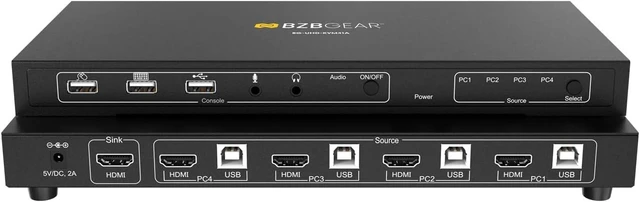
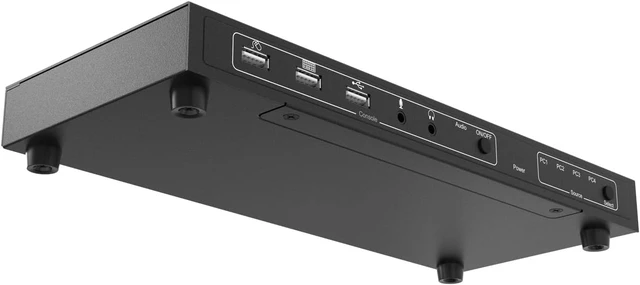
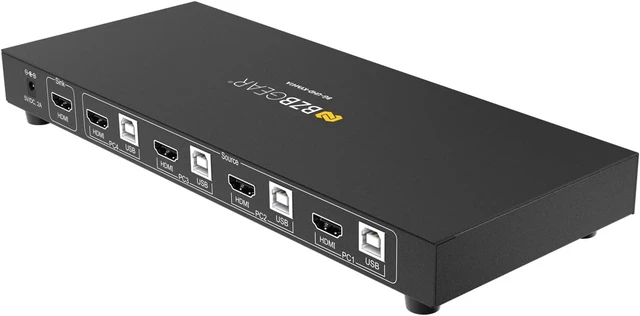
The rear panel of the BG-UHD-KVM41A is equipped with four PC connections, each including one USB 2.0 type-B host port and one HDMI 1.4 input. There is also one HDMI 1.4 output for connection to a monitor. On the front panel, there are three USB 2.0 ports for a keyboard, mouse, and a spare port for additional devices. The BG-UHD-KVM41A also provides 3.5mm audio connections for a microphone and headphones/speakers.
Control
The BG-UHD-KVM41A is simple to operate using the front panel buttons. The source select button toggles between the four connected computers, switching the HDMI and peripheral connections. It can also be operated using hotkeys. There is also an audio toggle which enables/disables the audio in/out connections.
Share an HDTV or display, USB keyboard & mouse, headphones, and microphone between 4 USB/HDMI computers
Provides an additional USB 2.0 sharing port with over-current detection and protection
Switch between devices via the front push buttons or hotkey commands
Supports all digital audio modes
Video bandwidth: up to 18Gb/s
Metal housing for better RF shielding
Supports resolutions up to 4K@60Hz Input Ports 4 HDMI, 4 USB 2.0 Host, 3 USB 2.0 Peripheral, 1 analog audio Output Ports 1 HDMI, 1 Analog Audio Control Panel Buttons Power Supply AC 100 - 240V 50/60Hz Weight 1lbs 12oz [793g] Dimensions 10.7"(W) x 4.5"(D) x 1.25"(H) [272mm (W) x 114mm (D) x 32mm (H)] Housing Metal Enclosure 1. USB Mouse Port: Connect to a USB mouse.
2. USB Keyboard Port: Connect to a USB keyboard.
3. USB Port: Connect to other USB devices.
4. MIC: Connect to a microphone.
5. Audio out: Connect to earphones.
6. Audio LED: Audio ON/OFF Indication.
7. Audio Switch: Switch to enable/disable the MIC/Audio out function.
8. Port LED: Indicate which HDMI source is selected.
9. Port Select: Switch between the HDMI sources.
10. Power Jack: Connect to the included power adapter.
11. HDMI Sink: Connect to local HDMI Display.
12. PC1-4 HDMI Inputs: Connect to the source/remote device's HDMI output.
13. PC1-4 USB Type-B Port: Connect to the source/remote PC's USB port for USB control.
Overview Features Specifications Interface
Connectivity and Features
The rear panel of the BG-UHD-KVM41A is equipped with four PC connections, each including one USB 2.0 type-B host port and one HDMI 1.4 input. There is also one HDMI 1.4 output for connection to a monitor. On the front panel, there are three USB 2.0 ports for a keyboard, mouse, and a spare port for additional devices. The BG-UHD-KVM41A also provides 3.5mm audio connections for a microphone and headphones/speakers.
Control
The BG-UHD-KVM41A is simple to operate using the front panel buttons. The source select button toggles between the four connected computers, switching the HDMI and peripheral connections. It can also be operated using hotkeys. There is also an audio toggle which enables/disables the audio in/out connections.
Share an HDTV or display, USB keyboard & mouse, headphones, and microphone between 4 USB/HDMI computers
Provides an additional USB 2.0 sharing port with over-current detection and protection
Switch between devices via the front push buttons or hotkey commands
Supports all digital audio modes
Video bandwidth: up to 18Gb/s
Metal housing for better RF shielding
Supports resolutions up to 4K@60Hz Input Ports 4 HDMI, 4 USB 2.0 Host, 3 USB 2.0 Peripheral, 1 analog audio Output Ports 1 HDMI, 1 Analog Audio Control Panel Buttons Power Supply AC 100 - 240V 50/60Hz Weight 1lbs 12oz [793g] Dimensions 10.7"(W) x 4.5"(D) x 1.25"(H) [272mm (W) x 114mm (D) x 32mm (H)] Housing Metal Enclosure 1. USB Mouse Port: Connect to a USB mouse.
2. USB Keyboard Port: Connect to a USB keyboard.
3. USB Port: Connect to other USB devices.
4. MIC: Connect to a microphone.
5. Audio out: Connect to earphones.
6. Audio LED: Audio ON/OFF Indication.
7. Audio Switch: Switch to enable/disable the MIC/Audio out function.
8. Port LED: Indicate which HDMI source is selected.
9. Port Select: Switch between the HDMI sources.
10. Power Jack: Connect to the included power adapter.
11. HDMI Sink: Connect to local HDMI Display.
12. PC1-4 HDMI Inputs: Connect to the source/remote device's HDMI output.
13. PC1-4 USB Type-B Port: Connect to the source/remote PC's USB port for USB control.
Overview Features Specifications Interface
Warranty & Returns
Warranty, Returns, And Additional Information
Warranty
- Please contact the Seller directly for warranty information. Warranty information may also be found on the Manufacturer's website.
- CONTACT
Return Policies
- Return for refund within: 30 days
- Return for replacement within: 30 days
- This item is covered by PartsPro Store Return Policy
Manufacturer Contact Info
- For a directory of all our manufacturers, please click below.
- Manufacturers Directory
LOADING...