

Your Browsing History

Meet Your Seller
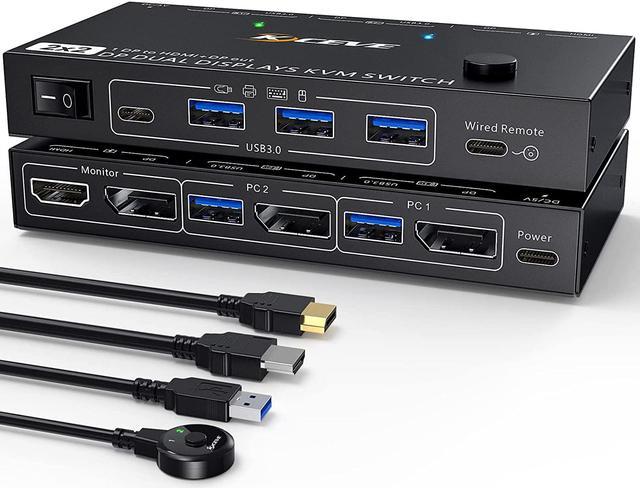


KVM Switch Dual Monitor DisplayPort 1.4 8K@30H 4K@144Hz for 2 Computers,DP1.4 KVM Switch with 3 USB3.0 and 1 USB-C 1 in 2 Out,Backnward Compatible DP1.2 with DP+UBS Cables and Wired Controller
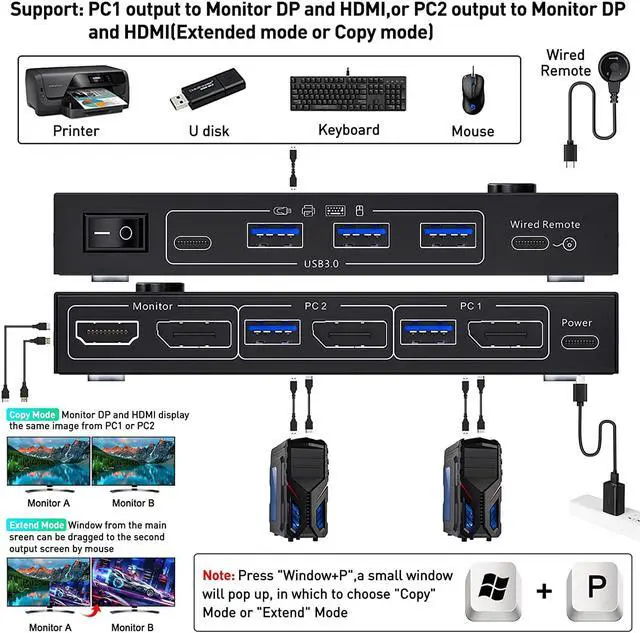
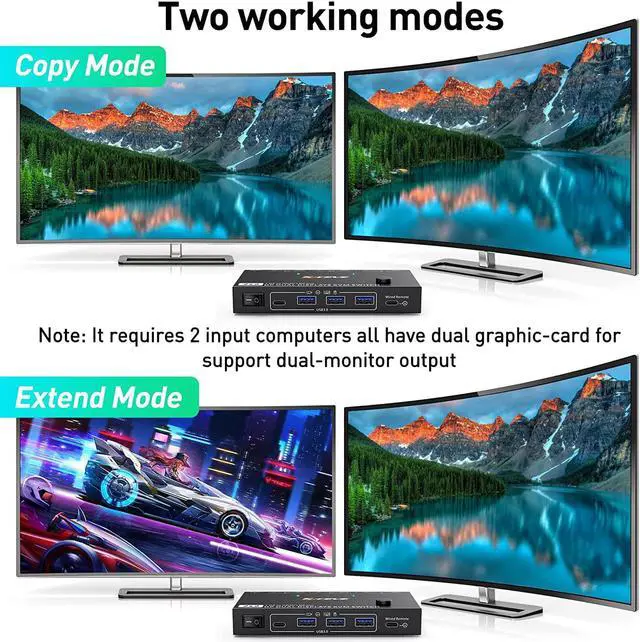
- Dual Monitor KVM Switch DP 1.4 In DP 1.4 +HDMI2.1 OutDual DP1.4 input To DP1.4 + HDMI2.1 output KVM Switch helps 2 computers or laptops to share 2 monitorsDP1.4+HDMI2.1,1 set of keyboard, mouse and 3 USB 3.0 + 1 Type-C devices,support extend mode and copy mode. Note:Press "Window+P",a small window will pop up, in which to choose "Copy" Mode or "Extend" Mode.
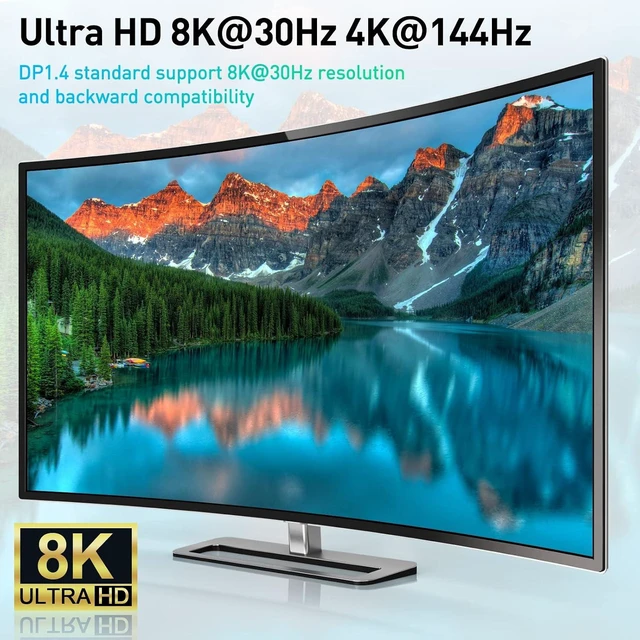
- Ultra HD 8K@30Hz 4K@144Hz DP 1.4 KVM Switch supports max. resolution of 8K@30Hz, 4K@144Hz and downward compatible lower resolution and DP1.2. Note:If need to achieve 8K@30Hz, 4K@144Hz, 4K@120Hz, in addition to the computers and monitors to support this resolution, also need to use a real 8K DP1.4 cables and real 8K HDMI2.1 cable.What comes with the package is DP1.4 cable, USB3.0 cable, wired controller and USB C power cable, NO HDMI cable.
- DP1.4 KVM Switches with 3 USB 3.0 Ports+1 USB C PortDual monitor Displayport USB Switch with 3 USB 3.0 Ports+1 USB C Port which can recognize wired/wireless keyboard,mouse,prin
+
+
Overview
Specs
Reviews

Any questions? Our AI mode will help you find out quickly.
Try me now
Features:
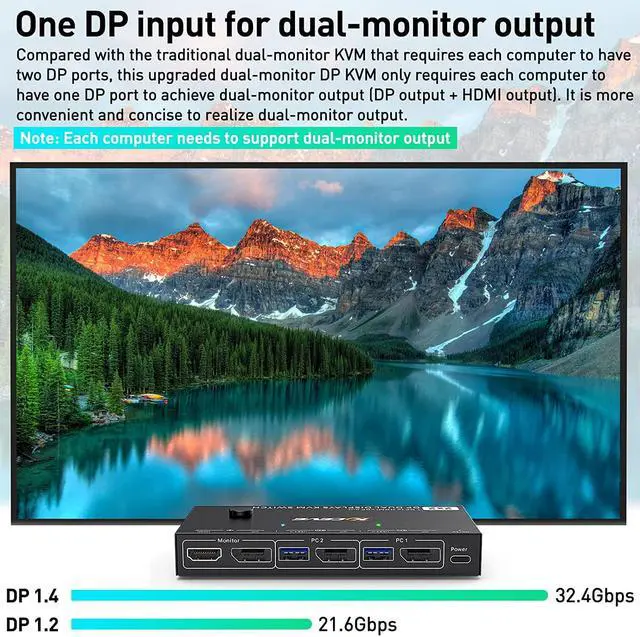
Only one DP port is required for each input computer to achieve dual-screen output (DP + HDMI output)
2 computers share 4 USB devices (3 USB3.0 devices + 1 Type C device) and two monitors
Dual monitor output supports extended and copy display.
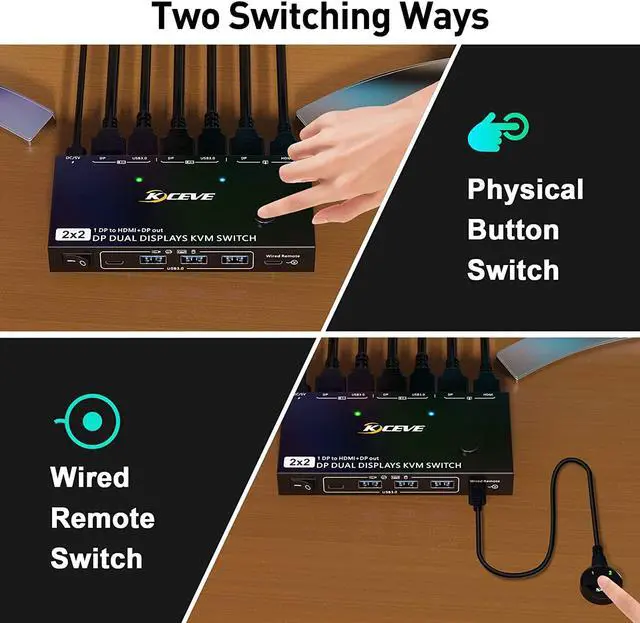
Switching mode: push-button switch and wired remote control.
Supports wired or wireless keyboard and mouse.
Support for most major operating systems, including Windows, Linux, and Mac
Support the highest resolution 8K@30Hz,4K@144Hz, downward compatible.
Supoort DP 1.2 and downward compatible.
Supported audio formats are LPCM2/5.1/7.1CH, Dolby 5.1CH.
Built-in ESD electrostatic protection.
Note:
Each computer requires dual graphics cards to support dual-screen output
Connection steps:
Step 1. Connect x DP1.4 cable +1 x USB3.0 cable to PC 1 and KVM
Step 2. Connect x DP1.4 cable +1 x USB3.0 cable to PC 2 and KVM
Step 3. Connect 1 x DP1.4 and 1 x HDMI cable between the KVM and the monitors.(DP monitor and HDMI monitor)
Step 4. Connect the keyboard and mouse to the USB ports on the KVM.
Step 5. Insert the USB devices into the USB port on the KVM.
Step 6. Plug the desktop controller into the SELECT port and remotely switch between PC1 and PC2.
* * *Note * * *
Each computer must be connected with DP cable and USB cable to keep the keyboard, mouse, and monitor working properly. If there is a USB connection to the computer and KVM, but the mouse and keyboard or other USB devices are not recognized, please connect the power supply (power cord is included in the package)
After connecting the computer to the monitor using the KVM, set the screen output mode (press Windows+P) on the keyboard and select the output mode in the dialog box that is displayed. Otherwise, only 1 of the two connected monitors has an image.
MAC-MINI (M1, M2 do not support extended mode)
The KVM switch dual monitor supports the resolution up to 8K@30Hz, which is backward compatible with lower resolution.
Important Notes
The above resolution data is from KCEVE Lab. The resolution may vary depending on the connected device and connection cable.
According to the resolution allocation rules: if your input resolution is 8K@30Hz, if two monitors work at the same time, the highest resolution of each monitor is 4K@60Hz. If it is a single-screen output, it can reach 8K@30Hz or 4K@144Hz , but requires an 8K connection cable.
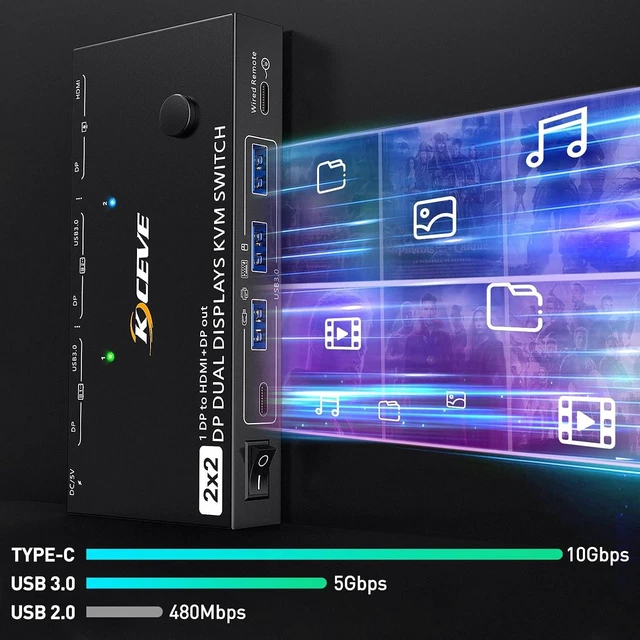
Supports 4 USB outputs, including 3 USB-A 3.0 and 1 USB-C, breaking the traditional pattern of 4 USB-A. Allows more options for exporting USB devices.
The data transfer speed of USB-A 3.0 and USB-C far exceeds the traditional USB2.0.
Downwardly compatible with USB2.0 and USB1.1, it can be applied to USB devices such as printers, wired/wireless mice and keyboards.
Note:
If the input USB3.0 ports are not connected or connected incorrectly, the output USB device will not be recognized.
If you use a light-emitting keyboard or mechanical keyboard or high-powered USB devices, or when the USB is not recognized and recognition is not stable, please connect the power cable (included in the package)
Switching button on the control panelW
ired control switching
NOTE
The two color indicators show which computer to switch to.
The length of the wired controller is 1.52m/4.98ft, which is long enough to make it very easy to use.
with adhesive, so that the control panel can be fixed to the desktop or keyboard.
In normal use, it can be used normally without connecting "Power", because the USB port can not only transmit data but also provide power supply.
However, when using a high-power USB device or when the recognition is unstable, additional power supply needs to be provided, which will make the KVM work more stably.
NOTE:
The USB-C cable included in the package is a charging cable and is intended to be connected to the "Power" port and must
Only one DP port is required for each input computer to achieve dual-screen output (DP + HDMI output)
2 computers share 4 USB devices (3 USB3.0 devices + 1 Type C device) and two monitors
Dual monitor output supports extended and copy display.
Switching mode: push-button switch and wired remote control.
Supports wired or wireless keyboard and mouse.
Support for most major operating systems, including Windows, Linux, and Mac
Support the highest resolution 8K@30Hz,4K@144Hz, downward compatible.
Supoort DP 1.2 and downward compatible.
Supported audio formats are LPCM2/5.1/7.1CH, Dolby 5.1CH.
Built-in ESD electrostatic protection.
Note:
Each computer requires dual graphics cards to support dual-screen output
Connection steps:
Step 1. Connect x DP1.4 cable +1 x USB3.0 cable to PC 1 and KVM
Step 2. Connect x DP1.4 cable +1 x USB3.0 cable to PC 2 and KVM
Step 3. Connect 1 x DP1.4 and 1 x HDMI cable between the KVM and the monitors.(DP monitor and HDMI monitor)
Step 4. Connect the keyboard and mouse to the USB ports on the KVM.
Step 5. Insert the USB devices into the USB port on the KVM.
Step 6. Plug the desktop controller into the SELECT port and remotely switch between PC1 and PC2.
* * *Note * * *
Each computer must be connected with DP cable and USB cable to keep the keyboard, mouse, and monitor working properly. If there is a USB connection to the computer and KVM, but the mouse and keyboard or other USB devices are not recognized, please connect the power supply (power cord is included in the package)
After connecting the computer to the monitor using the KVM, set the screen output mode (press Windows+P) on the keyboard and select the output mode in the dialog box that is displayed. Otherwise, only 1 of the two connected monitors has an image.
MAC-MINI (M1, M2 do not support extended mode)
The KVM switch dual monitor supports the resolution up to 8K@30Hz, which is backward compatible with lower resolution.
Important Notes
The above resolution data is from KCEVE Lab. The resolution may vary depending on the connected device and connection cable.
According to the resolution allocation rules: if your input resolution is 8K@30Hz, if two monitors work at the same time, the highest resolution of each monitor is 4K@60Hz. If it is a single-screen output, it can reach 8K@30Hz or 4K@144Hz , but requires an 8K connection cable.
Supports 4 USB outputs, including 3 USB-A 3.0 and 1 USB-C, breaking the traditional pattern of 4 USB-A. Allows more options for exporting USB devices.
The data transfer speed of USB-A 3.0 and USB-C far exceeds the traditional USB2.0.
Downwardly compatible with USB2.0 and USB1.1, it can be applied to USB devices such as printers, wired/wireless mice and keyboards.
Note:
If the input USB3.0 ports are not connected or connected incorrectly, the output USB device will not be recognized.
If you use a light-emitting keyboard or mechanical keyboard or high-powered USB devices, or when the USB is not recognized and recognition is not stable, please connect the power cable (included in the package)
Switching button on the control panelW
ired control switching
NOTE
The two color indicators show which computer to switch to.
The length of the wired controller is 1.52m/4.98ft, which is long enough to make it very easy to use.
with adhesive, so that the control panel can be fixed to the desktop or keyboard.
In normal use, it can be used normally without connecting "Power", because the USB port can not only transmit data but also provide power supply.
However, when using a high-power USB device or when the recognition is unstable, additional power supply needs to be provided, which will make the KVM work more stably.
NOTE:
The USB-C cable included in the package is a charging cable and is intended to be connected to the "Power" port and must
Warranty & Returns
Warranty, Returns, And Additional Information
Warranty
- Please contact the Seller directly for warranty information. Warranty information may also be found on the Manufacturer's website.
- CONTACT
Return Policies
- Return for refund within: 30 days
- Return for replacement within: 30 days
- This item is covered by FluffyNest Return Policy
Manufacturer Contact Info
- For a directory of all our manufacturers, please click below.
- Manufacturers Directory
LOADING...