

Your Browsing History

Meet Your Seller
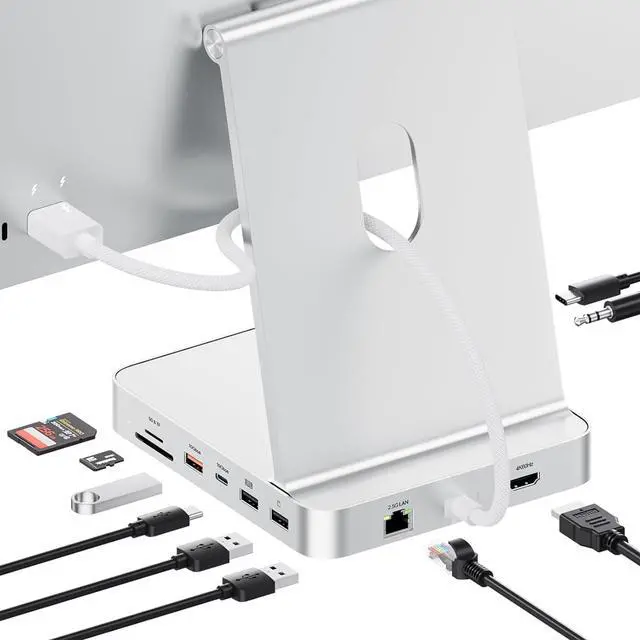


11-in-1 USB C Hub for iMac 24" 2021-2024 with M.2 NVMe 4TB SSD Enclosure
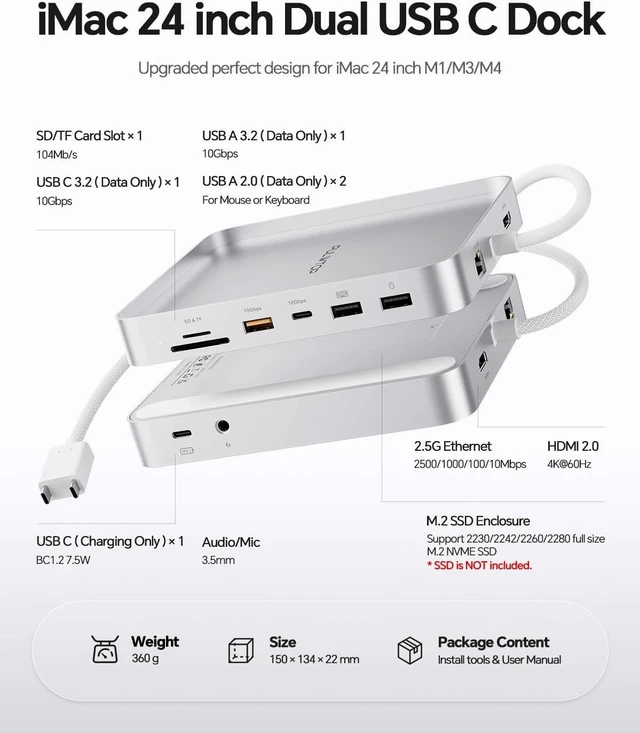
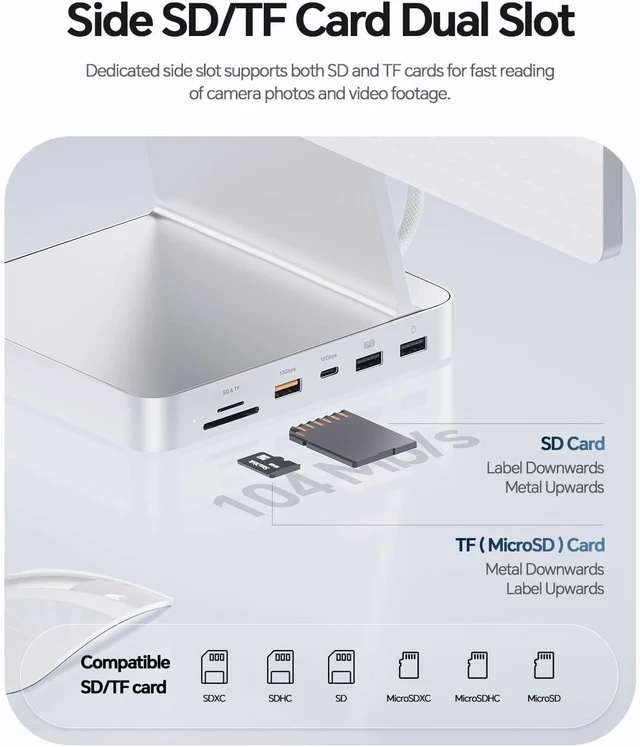
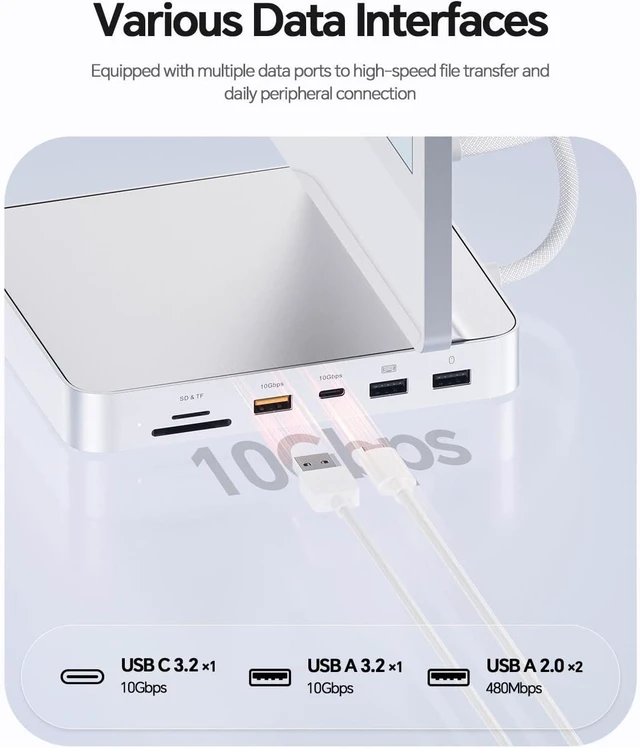
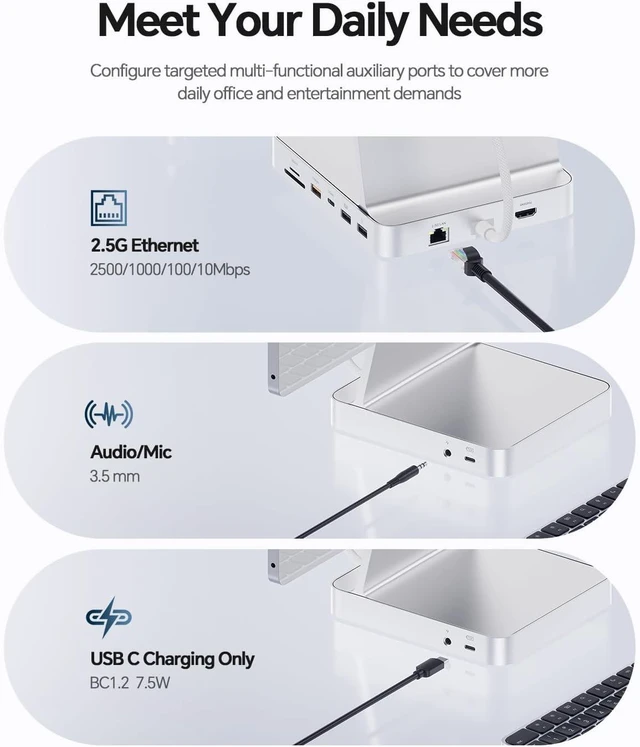
- 11-IN-1 USB C HUB DESIGNED FOR IMAC 24 INCH - Custom-designed for iMac 24 inch 2021/2023/2024, both an iMac dock stand and an iMac hub docking station. As a functional imac 24 inch accessories, this imac hub features a 4K 60Hz HDMI, M.2 SSD enclosure, 2.5G ethernet, USB C 3.2 Gen2 10Gbps, USB A 3.2 Gen2 10Gbps, USB C 2.0 with BC1.2 7.5W charging, 2 x USB A 2.0, SD/TF card reader, 3.5mm audio/mic jack, providing comprehensive connectivity and powerful productivity for your iMac
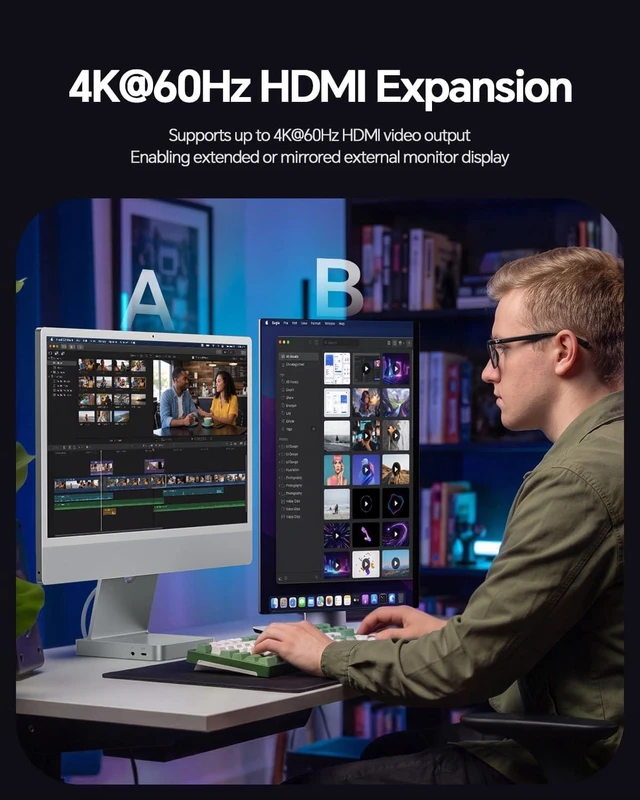
- 4K HDMI HD OUTPUT & 2.5G WIRED ETHERNET - HDMI output up to 4K@60Hz, the imac usb hub with HDMI is easy to mirror or extend your imac 24 inch M1 M3 M4 to a larger HDTV, monitor or projector to improve your work effiency and elevate your movie or gaming experience. A wired gigabit ethernet port up to 2.5 Gbps enables fast, steady network connection for full HD movies, 3D video games, online meetings, entertainment, etc. NOTE: The imac hub MUST connect to one of iMac's Thunderbolt ports to extend external displa
+
+
Overview
Specs
Reviews

Any questions? Our AI mode will help you find out quickly.
Try me now
1Side Ports2M.2 NVMe SSD Enclosure3Dual USB C to Host 4How to Connect5Aluminum Alloy
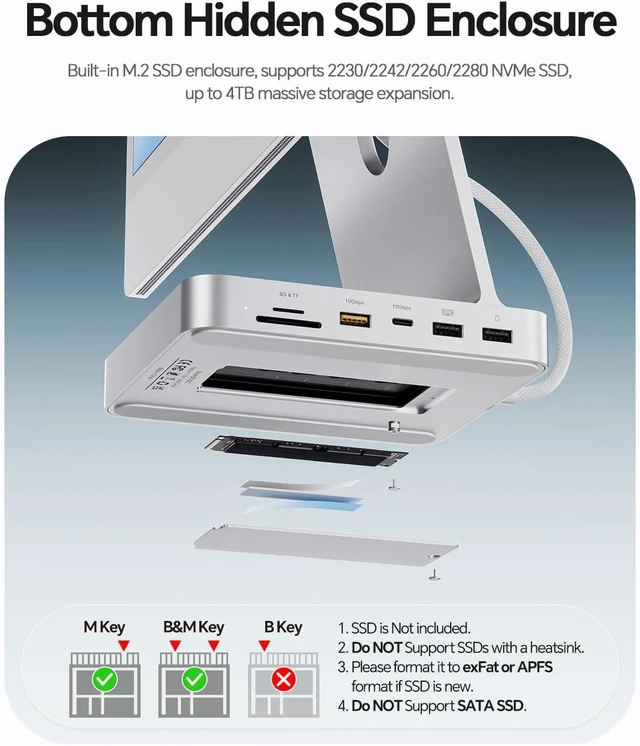
14K@60Hz Display24TB SSD Enclosure3How to install SSD4Fast Data Transfer5What is in the Box Product Name 11 in 2 USB C Hub for iMac 24 inch (Model: BD182C-Silver) Input 2 x USB C Male 3.2 Gen2 (Dual Type C to Dual Open,USB C 10Gbps Full-featured + USB C 10Gbps Data only) Output 1 x RJ45 Ethernet 2500/1000/100/10Mbps; 1 x HDMI 2.0 4K@60Hz; 1 x 3.5mm Audio & Mic jack; 1 x PCIe 3.0 NVMe SSD enclosure 10Gbps; 2 x USB A 2.0 480Mbps; 1 x USB C 2.0 480Mbps & BC1.2 7.5W; 1 x USB A 3.2 Gen2 10Gbps; 1 x USB C 3.2 Gen2 10Gbps; 1 x SD/TF 3.0 104Mbps Material Aluminum Dimension Approx. 135 x 88 x 59mm Weight Approx. 450g Compatible SSDs Support up to 4TB PCIe NVMe M.2 SSD (size: 2230/2242/2260/2280) that complies with M key and B+M Key, NOT support SSD with heat sinks and SATA SSD Compatible Devices Specially designed for 2021/2023/2024 24 inch iMac M1/M3/M4, both a iMac 2024 stand desk mount and a USB-C docking station NOTE 1 If your SSD are new, please format your new SSD into "exFat" or "apfs " format. STEPS: 1) PUT new SSD into the dock; 2) Connect the dock to your device; 3) Click the "Disk Utility"and format NOTE 2 All USB-A ports ONLY support data transfer, DO NOT support charging, DO NOT support CD readers, Apple SuperDrive;
14K@60Hz Display24TB SSD Enclosure3How to install SSD4Fast Data Transfer5What is in the Box Product Name 11 in 2 USB C Hub for iMac 24 inch (Model: BD182C-Silver) Input 2 x USB C Male 3.2 Gen2 (Dual Type C to Dual Open,USB C 10Gbps Full-featured + USB C 10Gbps Data only) Output 1 x RJ45 Ethernet 2500/1000/100/10Mbps; 1 x HDMI 2.0 4K@60Hz; 1 x 3.5mm Audio & Mic jack; 1 x PCIe 3.0 NVMe SSD enclosure 10Gbps; 2 x USB A 2.0 480Mbps; 1 x USB C 2.0 480Mbps & BC1.2 7.5W; 1 x USB A 3.2 Gen2 10Gbps; 1 x USB C 3.2 Gen2 10Gbps; 1 x SD/TF 3.0 104Mbps Material Aluminum Dimension Approx. 135 x 88 x 59mm Weight Approx. 450g Compatible SSDs Support up to 4TB PCIe NVMe M.2 SSD (size: 2230/2242/2260/2280) that complies with M key and B+M Key, NOT support SSD with heat sinks and SATA SSD Compatible Devices Specially designed for 2021/2023/2024 24 inch iMac M1/M3/M4, both a iMac 2024 stand desk mount and a USB-C docking station NOTE 1 If your SSD are new, please format your new SSD into "exFat" or "apfs " format. STEPS: 1) PUT new SSD into the dock; 2) Connect the dock to your device; 3) Click the "Disk Utility"and format NOTE 2 All USB-A ports ONLY support data transfer, DO NOT support charging, DO NOT support CD readers, Apple SuperDrive;
Warranty & Returns
Warranty, Returns, And Additional Information
Warranty
- Please contact the Seller directly for warranty information. Warranty information may also be found on the Manufacturer's website.
- CONTACT
Return Policies
- Return for refund within: 30 days
- Return for replacement within: 30 days
- This item is covered by FluffyNest Return Policy
Manufacturer Contact Info
- For a directory of all our manufacturers, please click below.
- Manufacturers Directory
LOADING...