

Your Browsing History

Meet Your Seller

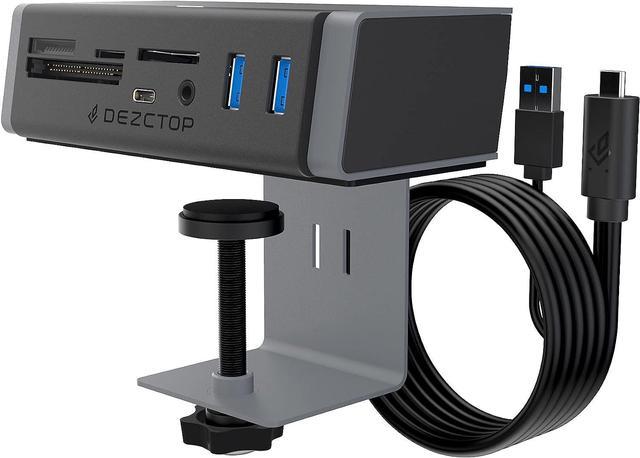


DEZCTOP USB 3.2 Gen 2 Clamp Hub 7-in-1 Adapter with Card Reader Speeds up to 10Gbps, 4.92Ft USB-C Cable and USB-A Adapter USB Splitter Compatible with all USB-A/USB-C laptops for Windows, macOS, Linux
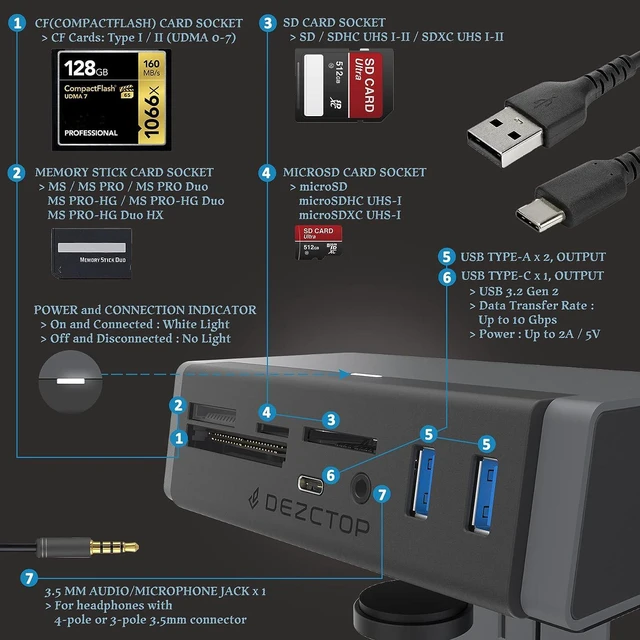
- 7-in-1 Docking Station: Connected through a USB Type-C port, the Hub expands into 3 USB ports which provide a transfer speed two times faster than the usual ones, four types of memory card readers, along an audio/microphone jack.
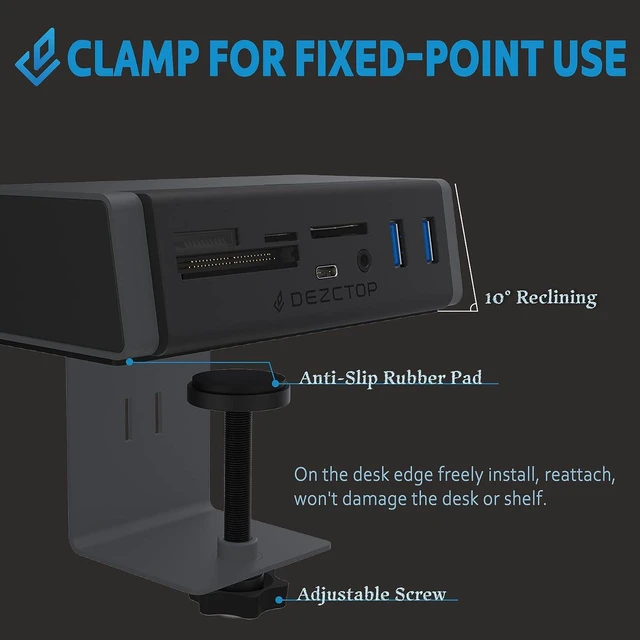
- Clamp USB Hub: Designed for fixed-point use with a 10-degree reclining angle to the surface and the anti-slip rubber pad below and with an adjustable screw, on the freely install, reattach, no sticking, drilling, and won't damage the desk or shelf.
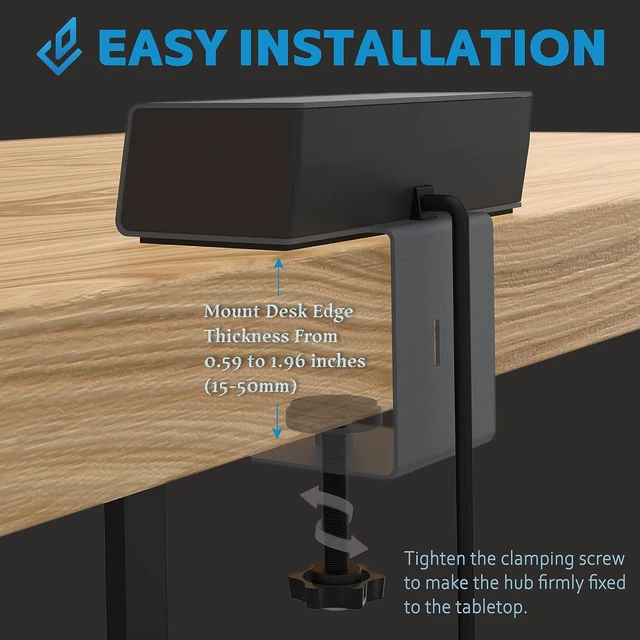
- Easy Installation: Effortless the USB-C 7-in-1 hub is easy and sturdy and allows you to mount desk edge thickness from 0.59 to 1.96 inches (15-50mm) tabletop without occupying much space and keeping your desktop neat; get working straight out of the box.
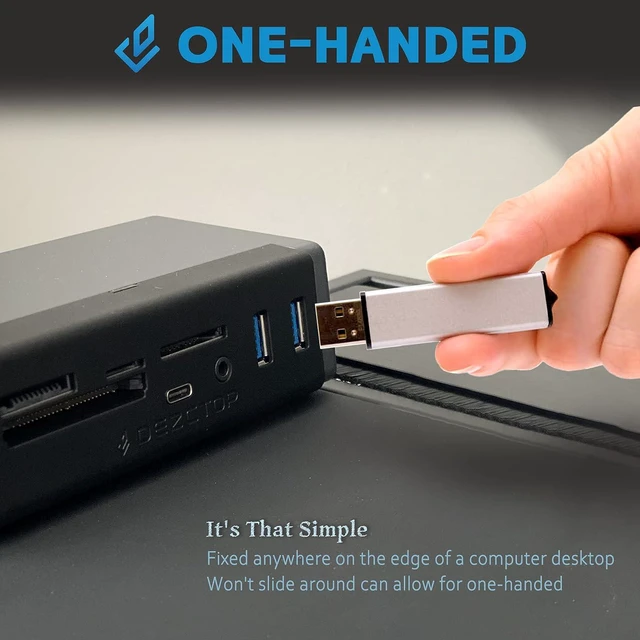
- One-handed: The 7-in-1 USB Hub is Tailored for static use, fixed anywhere on the edge of a computer desktop, then it won't slide around and can allow for one-handed it's that simple.
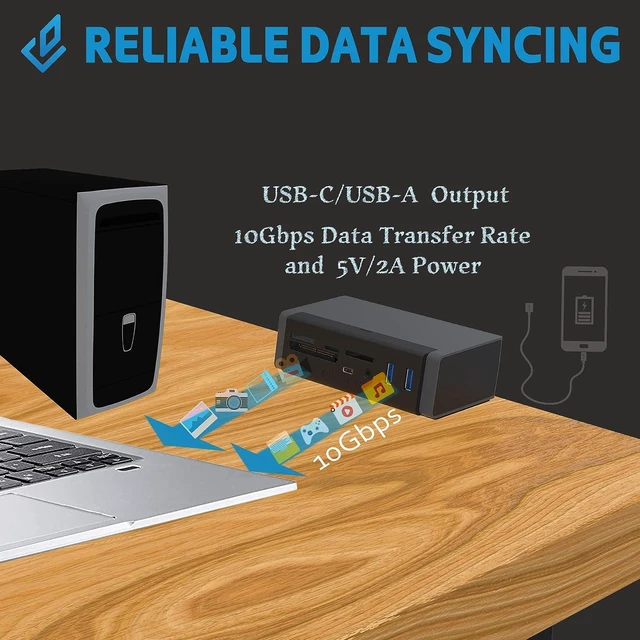
- Reliable Data Syncing: supports USB 3.2 Gen 2, and you can reach speeds up to
+
+
Overview
Specs
Reviews

Any questions? Our AI mode will help you find out quickly.
Try me now
Clamp the DEZCTOP USB-C 7-in-1 Hub anywhere on the edge of the tabletop as you wish. With the 10° angular surfaces and anti-slip mat, the hub provides perfect stability for inserting and removing devices with ease. For multiple adapters reduce cable clutter with this specifically designed hub.
Just on the desk edge reattach and tighten the clamping screw to make the hub firmly fixed to the tabletop and won't damage the desk or shelf.
Fixed anywhere on the edge of a computer desktop cabling, keep Your workspace clean and clutter-free and stylish aesthetic with full practicality.
The 7-in-1 Hub simply plug it in and it will work straight out of the box without the need for drivers. Fully supported by Windows, macOS, and Linux.
Converting Ports into 7 Functions, and transferring Data at Up to 10 Gbps the Hub is an all-in-one tool for your desktop IO needs.
The hub is compatible with earlier USB 3.2 Gen 1 and USB 2.0 devices and provides full bandwidth pass-through to ensure no speed penalty.
The USB-C 7-in-1 Hub supports SD 4.0, CompactFlash, and Memory Stick cards. This gives high transfer speeds and full compatibility with the latest DSLR cameras.
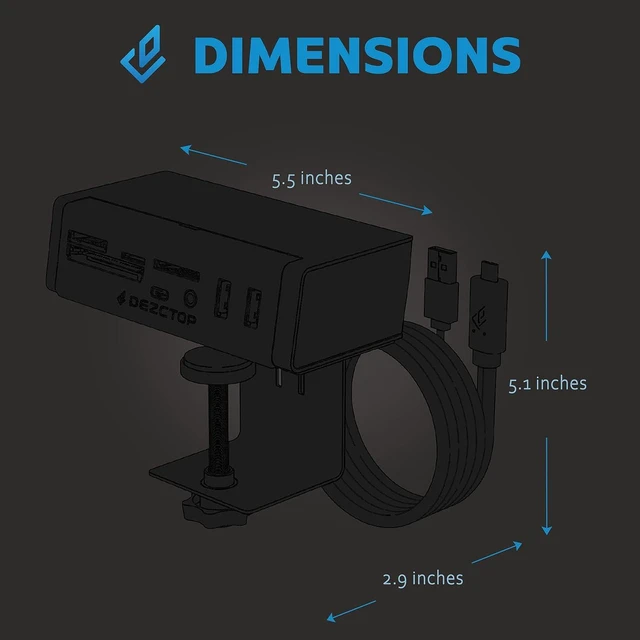
Dimensions (WxDxH) 5.5 x 2.9 x 5.1 in Mounting Clamped at 15-50 mm tabletop Cable Length 1.5 m Package Gross Weight 1.8 lbs System Requirement Computers with USB Type-C port (Windows 11/10/8.1/8/7/macOS/Linux) Input/USB Type-C USB Type-C USB 3.2 Gen 2 x 1; USB Type-A For power supply; Data Transfer Rate: Up to 10 Gbps; Power: Up to 3A at 5V Output / USB Port USB Type-C USB 3.2 Gen 2 *1 / USB Type-A USB 3.2 Gen 2 *2 ; Data Transfer Rate: Up to 10 Gbps ; Power: Up to 2A at 5V Output / Audio/ Microphone 3.5mm audio jack x 1, For headphones with 4-pole or 3-pole 3.5mm connector Output / Memory Cards SD / SDHC UHS I-II / SDXC UHS I-II microSD / microSDHC UHS-I / microSDXC UHS-I Memory Stick / MS PRO / MS PRO Duo / MS PRO-HG / MS PRO-HG Duo / MS PRO-HG Duo HX CompactFlash Type I / II (UDMA 0-7) Can the USB-C 7-in-1 hub be used without a Type-C port?
A Yes, the USB-C 7-in-1 hub requires a Type-C port for data transmission. If there is no Type-C port, it cannot be used. Alternatively, you can purchase a Type-C to Type-A converter cable to use it.
Do I need to plug in both transmission cables?
A Yes, Type-A provides additional voltage. If it is not used and multiple devices are used simultaneously, it may not be able to be read. On the other hand, Type-C is mainly used for data transmission.
Why is my 7-in-1 hub not responding?
A Please make sure both cables are plugged in, otherwise, there will be no response.
TYPE-C 7-IN-1 Clamp USB Hub - Tailored for Stationary Use INPUT ANTI-SLIP MAT 10° ANGULAR SURFACE ADJUSTABLE CLAMPING Cable Length 1.5 M 7-in-1 station Hub provides numerous connectivity outputs from one USB-C and 1 USB 3.2 Gen2 input. The USB-C 7-in-1 Hub Feature Freely Install Clean and Clutter Plug and Play All in One Station Capturing Moments That Last Forever USB Type-C 7-in-1 Hub Detail Can the USB-C 7-in-1 hub be used without a Type-C port?
Do I need to plug in both transmission cables?
Why is my 7-in-1 hub not responding?
Just on the desk edge reattach and tighten the clamping screw to make the hub firmly fixed to the tabletop and won't damage the desk or shelf.
Fixed anywhere on the edge of a computer desktop cabling, keep Your workspace clean and clutter-free and stylish aesthetic with full practicality.
The 7-in-1 Hub simply plug it in and it will work straight out of the box without the need for drivers. Fully supported by Windows, macOS, and Linux.
Converting Ports into 7 Functions, and transferring Data at Up to 10 Gbps the Hub is an all-in-one tool for your desktop IO needs.
The hub is compatible with earlier USB 3.2 Gen 1 and USB 2.0 devices and provides full bandwidth pass-through to ensure no speed penalty.
The USB-C 7-in-1 Hub supports SD 4.0, CompactFlash, and Memory Stick cards. This gives high transfer speeds and full compatibility with the latest DSLR cameras.
Dimensions (WxDxH) 5.5 x 2.9 x 5.1 in Mounting Clamped at 15-50 mm tabletop Cable Length 1.5 m Package Gross Weight 1.8 lbs System Requirement Computers with USB Type-C port (Windows 11/10/8.1/8/7/macOS/Linux) Input/USB Type-C USB Type-C USB 3.2 Gen 2 x 1; USB Type-A For power supply; Data Transfer Rate: Up to 10 Gbps; Power: Up to 3A at 5V Output / USB Port USB Type-C USB 3.2 Gen 2 *1 / USB Type-A USB 3.2 Gen 2 *2 ; Data Transfer Rate: Up to 10 Gbps ; Power: Up to 2A at 5V Output / Audio/ Microphone 3.5mm audio jack x 1, For headphones with 4-pole or 3-pole 3.5mm connector Output / Memory Cards SD / SDHC UHS I-II / SDXC UHS I-II microSD / microSDHC UHS-I / microSDXC UHS-I Memory Stick / MS PRO / MS PRO Duo / MS PRO-HG / MS PRO-HG Duo / MS PRO-HG Duo HX CompactFlash Type I / II (UDMA 0-7) Can the USB-C 7-in-1 hub be used without a Type-C port?
A Yes, the USB-C 7-in-1 hub requires a Type-C port for data transmission. If there is no Type-C port, it cannot be used. Alternatively, you can purchase a Type-C to Type-A converter cable to use it.
Do I need to plug in both transmission cables?
A Yes, Type-A provides additional voltage. If it is not used and multiple devices are used simultaneously, it may not be able to be read. On the other hand, Type-C is mainly used for data transmission.
Why is my 7-in-1 hub not responding?
A Please make sure both cables are plugged in, otherwise, there will be no response.
TYPE-C 7-IN-1 Clamp USB Hub - Tailored for Stationary Use INPUT ANTI-SLIP MAT 10° ANGULAR SURFACE ADJUSTABLE CLAMPING Cable Length 1.5 M 7-in-1 station Hub provides numerous connectivity outputs from one USB-C and 1 USB 3.2 Gen2 input. The USB-C 7-in-1 Hub Feature Freely Install Clean and Clutter Plug and Play All in One Station Capturing Moments That Last Forever USB Type-C 7-in-1 Hub Detail Can the USB-C 7-in-1 hub be used without a Type-C port?
Do I need to plug in both transmission cables?
Why is my 7-in-1 hub not responding?
Warranty & Returns
Warranty, Returns, And Additional Information
Warranty
- Please contact the Seller directly for warranty information. Warranty information may also be found on the Manufacturer's website.
- CONTACT
Return Policies
- Return for refund within: 30 days
- Return for replacement within: 30 days
- This item is covered by FluffyNest Return Policy
Manufacturer Contact Info
- For a directory of all our manufacturers, please click below.
- Manufacturers Directory
LOADING...