




What does "Bi-Directional" mean for this cable? How do I use it?
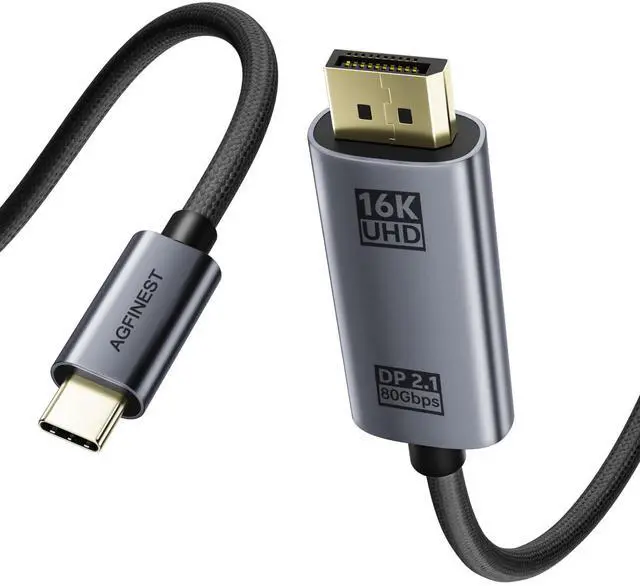
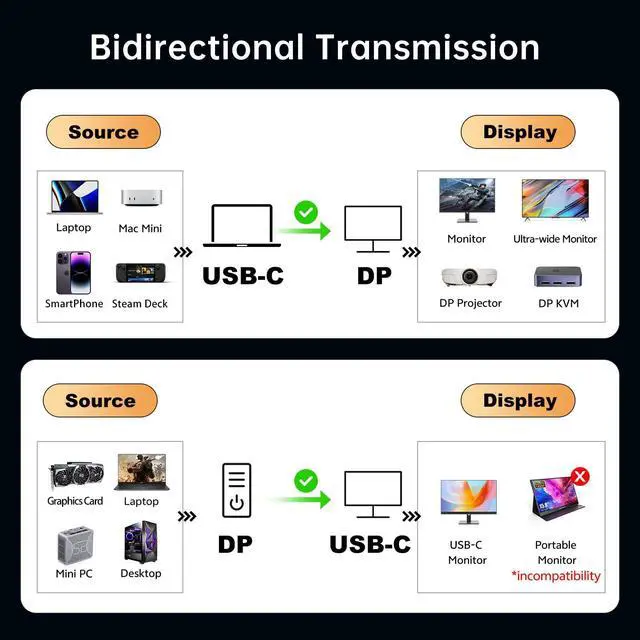
"Bi-Directional" means you can connect in two ways: 1) a USB-C/Thunderbolt laptop to a DP monitor, or 2) a DP graphics card to a USB-C display. The USB-C display must support Video Input. It does not transmit power.
What specific devices are needed to use this cable's full 80Gbps capability?
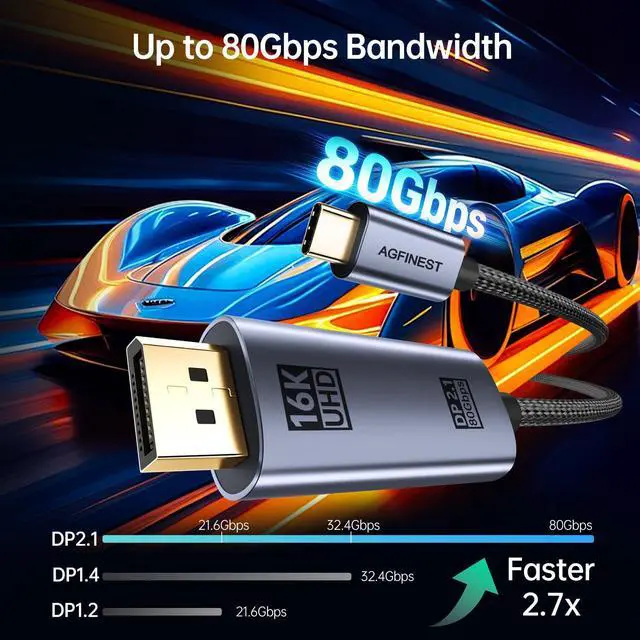
To unlock 80Gbps, both source and monitor must support DP 2.1 UHBR20: a Thunderbolt 5 laptop, an RTX 50 Series GPU, or a UHBR20 monitor like the AORUS FO32U2P. It auto-downscales to the highest speed both devices support (e.g., UHBR13.5 or DP 1.4).
Why is my setup not reaching 8K@120Hz or 4K@240Hz?
Maximum resolution/refresh rate is limited by the least capable device (GPU or monitor). While our cable supports DP 2.1 UHBR20, if your device only supports DP 1.4, it will run at DP 1.4 specs. Verify your device specifications.
What should I do if I encounter no signal, flickering, or black screen?
Ensure devices are on and cable is fully inserted. Check computer's display settings and monitor input source. Try a different port or update graphics driver. Our cable's premium shielding prevents most interference.
How is the build quality and what support do you offer if I have an issue?
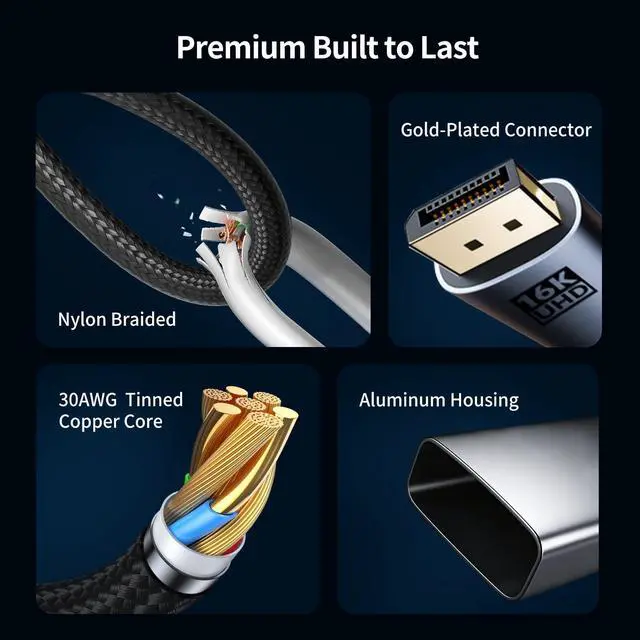
Built for reliability with an aluminum alloy housing, triple-layer EMI shielding, gold-plated connectors, and a durable double-braided nylon jacket. We stand behind our quality and offer comprehensive product support.
More options
 4.9FT USBC to DP2.1 cable | 3.3FT USBC to DP2.1 cable | 6.6FT USBC to DP2.1 cable |  6.6FT USBC to DP1.4 cable |  10FT USBC to DP1.4 cable |  3.3FT USBC to DP2.1 cable | 6.6FT USBC to DP2.1 cable | |
|---|---|---|---|---|---|---|---|
Customer Reviews | — | — | — | — | — | — | — |
Price | — | — | — | — | — | — | — |
Length | 4.9 FT | 3.3FT | 6.6 FT | 6.6FT | 10FT | 3.3 FT | 6.6 FT |
Max Display Support | 16K@60HZ | 16K@60HZ | 16K@60HZ | 8K@60HZ | 8K@60HZ | 16K@30HZ | 16K@30HZ |
Bidirectional | ? | ? | ? | ? | ? | ? | ? |
HDR | ? | ? | ? | ? | ? | ? | ? |
VRR | ? | ? | ? | ? | ? | ? | ? |


What does "Bi-Directional" mean for this cable? How do I use it?
"Bi-Directional" means you can connect in two ways: 1) a USB-C/Thunderbolt laptop to a DP monitor, or 2) a DP graphics card to a USB-C display. The USB-C display must support Video Input. It does not transmit power.
What specific devices are needed to use this cable's full 80Gbps capability?
To unlock 80Gbps, both source and monitor must support DP 2.1 UHBR20: a Thunderbolt 5 laptop, an RTX 50 Series GPU, or a UHBR20 monitor like the AORUS FO32U2P. It auto-downscales to the highest speed both devices support (e.g., UHBR13.5 or DP 1.4).
Why is my setup not reaching 8K@120Hz or 4K@240Hz?
Maximum resolution/refresh rate is limited by the least capable device (GPU or monitor). While our cable supports DP 2.1 UHBR20, if your device only supports DP 1.4, it will run at DP 1.4 specs. Verify your device specifications.
What should I do if I encounter no signal, flickering, or black screen?
Ensure devices are on and cable is fully inserted. Check computer's display settings and monitor input source. Try a different port or update graphics driver. Our cable's premium shielding prevents most interference.
How is the build quality and what support do you offer if I have an issue?
Built for reliability with an aluminum alloy housing, triple-layer EMI shielding, gold-plated connectors, and a durable double-braided nylon jacket. We stand behind our quality and offer comprehensive product support.
More options
4.9FT USBC to DP2.1 cable | 3.3FT USBC to DP2.1 cable | 6.6FT USBC to DP2.1 cable | 6.6FT USBC to DP1.4 cable | 10FT USBC to DP1.4 cable | 3.3FT USBC to DP2.1 cable | 6.6FT USBC to DP2.1 cable |
|---|---|---|---|---|---|---|
| Customer Reviews | ||||||
| — | — | — | — | — | — | — |
| Price | ||||||
| — | — | — | — | — | — | — |
| Length | ||||||
| 4.9 FT | 3.3FT | 6.6 FT | 6.6FT | 10FT | 3.3 FT | 6.6 FT |
| Max Display Support | ||||||
| 16K@60HZ | 16K@60HZ | 16K@60HZ | 8K@60HZ | 8K@60HZ | 16K@30HZ | 16K@30HZ |
| Bidirectional | ||||||
| ? | ? | ? | ? | ? | ? | ? |
| HDR | ||||||
| ? | ? | ? | ? | ? | ? | ? |
| VRR | ||||||
| ? | ? | ? | ? | ? | ? | ? |