

Your Browsing History
- Free 30-day Returns
$114.35
Ships from China.

Meet Your Seller




Baseus USB Hub HDMI-Compatible 4K Type C to USB 3.0 Splitter PD 100W Dock Station for MacBook Pro Air M1 8/6/5/4 Ports in 1 HUB Color: Silver (6 in 1 USB C HUB)
- Baseus USB Hub HDMI-Compatible 4K Type C to USB 3.0 Splitter PD 100W Dock Station for MacBook Pro Air M1 8/6/5/4 Ports in 1 HUB Color: Silver (6 in 1 USB C HUB)
+
+
Overview
Specs
Reviews

Any questions? Our AI mode will help you find out quickly.
Try me now
Note:
1. Please ensure that your laptop's USB-C port supports PD Power Delivery, DP Alt Mode and Data Transfer. Otherwise, some interface functions of the docking station can't be used.
Please consult your laptop's manual or contact the manufacturer for this information. (The Laptop has TB 3 / USB-C 3.1 Gen 2 / USB-C 3.2 Gen 2 port support power deliver, HDMI output and 10Gb/s data transfer. The USB-C 3.1
Gen 1 port: 5Gb/s (data transfer only) can't support HDMI display. )
For phone/tablet itself needs to support the OTG function data transmissionand support wired screen projectionvideo transmission.
( If the type c is USB 2.0, which only support transfer data with low speed, cannot support HDM
Idisplay. )
Xiaomi phones don't supportwired screen projection/HDM
Idisplay.
2. When it is not possible to connect properly a hard disk and other monitor/device with high power consumption, please connect the charger to the Type C (PD) port of the product to charge the computer and other devices.
The USB C hub itself consumes a certain amount of power consumption: for example, if your computer needs 65W, we recommended using a 90W charger. So we suggest using a non-original PD charger with larger power to ensure normal use.
3. The TypeC (PD) port Cannot be used for charging phone or computer directly, which is used for work with PD cable and charger to supply power for the hub, then the TypeC male port can charging for your computer and usb port can charging for your phone.
Please Notice:
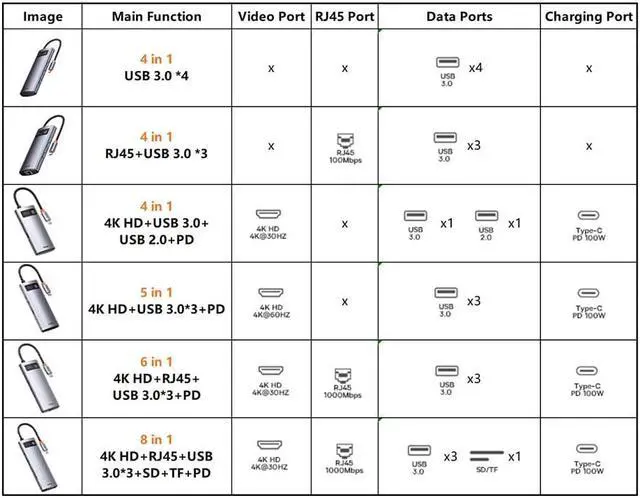
These series contain different models option, different model has different interface and appearance, please choose suitable model before purchase.
For4 in 1 4USB 3.0 / 4 in 1 RJ45 3USBhubs, which don't contain HDMI port, please notice and check that clearly.
For4 in 1 4USB 3.0 / 4 in 1 HDMI 2USB/5 in 1 hubs, which don't contain RJ45 port, please notice and check that clearly.
And for4 in 1 RJ45 3USBmodel, which RJ45 port only support 100Mbps max.
Multi-functional Type-C HUB Docking Station
4 IN 1 4USB HUB: USB 3.0 x4
4 IN 1 RJ45 3USB HUB: USB 3.0 x3| RJ45 x1
4 IN 1 4KHD 2USB HUB: USB 2.0 | USB 3.0 | PD 100W Port | 4K HD
5 IN 1 USB C HUB: USB 3.0 x3 | PD 100W Port | 4K HD
6 IN 1 USB C HUB: USB 3.0 x3 | PD 100W Port | 4K HD | RJ45 x1
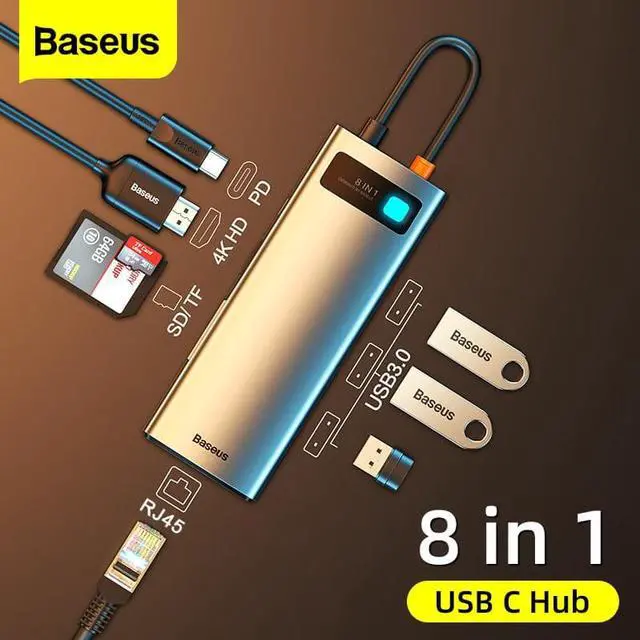
8 IN 1 USB C HUB: USB 3.0 x3 | PD 100W Port | 4K HD | RJ45 x1 | SD/TF Card Slot x1
IMPORTANT NOTE
- Especially for Type C Port Laptop/Tablets/Phone
- Please ensure the Laptop has tb 3 / USB-C 3.1 Gen 2 /USB-C 3.1 Gen 1 (Support Power Delivery) to support multiple-display before purchase.
- All USB ports support Charging and Data Transfer.
Expansion While Charging
Support 100W PD fast charge and have phones, tabletand laptopfully charged all the time.
Note: the actual output power is determined by the power of a charger.
This HUB supports up to 100W fast charging.
*The above data are measured by the Baseus laboratory, the actual use will be slightly different depending on the specific circumstances.
Screen Mirroring forConferences
Connect to a projector, TV, monitor and otherbigger screens via 4K HD for dual-screen display.
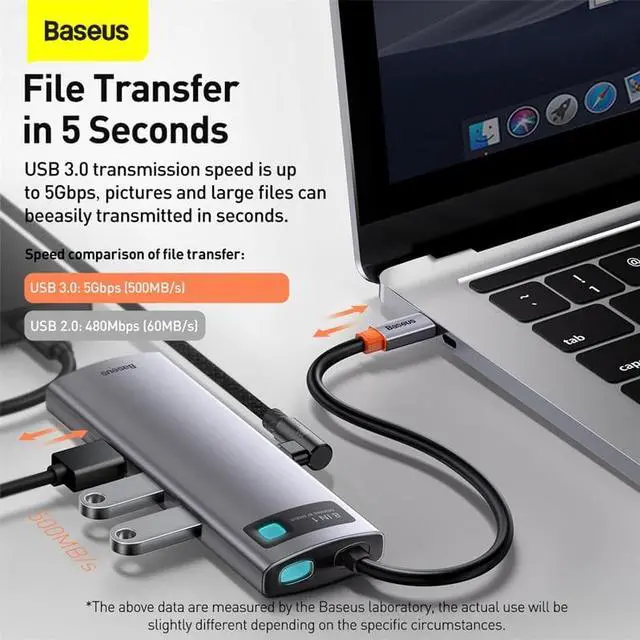
Efficient Transmission, FileTransferin 5 Seconds
The pictures and large files can be easilytransmitted in seconds.
Mini and Portable, A Plug Can be Stored
OTG Function, Unlock the new function of phones
*Only supports Type-C interfaces, phones/taplets must support OTG.
1. Please ensure that your laptop's USB-C port supports PD Power Delivery, DP Alt Mode and Data Transfer. Otherwise, some interface functions of the docking station can't be used.
Please consult your laptop's manual or contact the manufacturer for this information. (The Laptop has TB 3 / USB-C 3.1 Gen 2 / USB-C 3.2 Gen 2 port support power deliver, HDMI output and 10Gb/s data transfer. The USB-C 3.1
Gen 1 port: 5Gb/s (data transfer only) can't support HDMI display. )
For phone/tablet itself needs to support the OTG function data transmissionand support wired screen projectionvideo transmission.
( If the type c is USB 2.0, which only support transfer data with low speed, cannot support HDM
Idisplay. )
Xiaomi phones don't supportwired screen projection/HDM
Idisplay.
2. When it is not possible to connect properly a hard disk and other monitor/device with high power consumption, please connect the charger to the Type C (PD) port of the product to charge the computer and other devices.
The USB C hub itself consumes a certain amount of power consumption: for example, if your computer needs 65W, we recommended using a 90W charger. So we suggest using a non-original PD charger with larger power to ensure normal use.
3. The TypeC (PD) port Cannot be used for charging phone or computer directly, which is used for work with PD cable and charger to supply power for the hub, then the TypeC male port can charging for your computer and usb port can charging for your phone.
Please Notice:
These series contain different models option, different model has different interface and appearance, please choose suitable model before purchase.
For4 in 1 4USB 3.0 / 4 in 1 RJ45 3USBhubs, which don't contain HDMI port, please notice and check that clearly.
For4 in 1 4USB 3.0 / 4 in 1 HDMI 2USB/5 in 1 hubs, which don't contain RJ45 port, please notice and check that clearly.
And for4 in 1 RJ45 3USBmodel, which RJ45 port only support 100Mbps max.
Multi-functional Type-C HUB Docking Station
4 IN 1 4USB HUB: USB 3.0 x4
4 IN 1 RJ45 3USB HUB: USB 3.0 x3| RJ45 x1
4 IN 1 4KHD 2USB HUB: USB 2.0 | USB 3.0 | PD 100W Port | 4K HD
5 IN 1 USB C HUB: USB 3.0 x3 | PD 100W Port | 4K HD
6 IN 1 USB C HUB: USB 3.0 x3 | PD 100W Port | 4K HD | RJ45 x1
8 IN 1 USB C HUB: USB 3.0 x3 | PD 100W Port | 4K HD | RJ45 x1 | SD/TF Card Slot x1
IMPORTANT NOTE
- Especially for Type C Port Laptop/Tablets/Phone
- Please ensure the Laptop has tb 3 / USB-C 3.1 Gen 2 /USB-C 3.1 Gen 1 (Support Power Delivery) to support multiple-display before purchase.
- All USB ports support Charging and Data Transfer.
Expansion While Charging
Support 100W PD fast charge and have phones, tabletand laptopfully charged all the time.
Note: the actual output power is determined by the power of a charger.
This HUB supports up to 100W fast charging.
*The above data are measured by the Baseus laboratory, the actual use will be slightly different depending on the specific circumstances.
Screen Mirroring forConferences
Connect to a projector, TV, monitor and otherbigger screens via 4K HD for dual-screen display.
Efficient Transmission, FileTransferin 5 Seconds
The pictures and large files can be easilytransmitted in seconds.
Mini and Portable, A Plug Can be Stored
OTG Function, Unlock the new function of phones
*Only supports Type-C interfaces, phones/taplets must support OTG.
Warranty & Returns
Warranty, Returns, And Additional Information
Warranty
- Please contact the Seller directly for warranty information. Warranty information may also be found on the Manufacturer's website.
- CONTACT
Return Policies
- Return for refund within: 30 days
- Return for replacement within: 30 days
- This item is covered by Mingsheng Keji Return Policy
Manufacturer Contact Info
- For a directory of all our manufacturers, please click below.
- Manufacturers Directory
LOADING...