

Your Browsing History

Meet Your Seller




Visit EmpressTech Store
FOLLOW
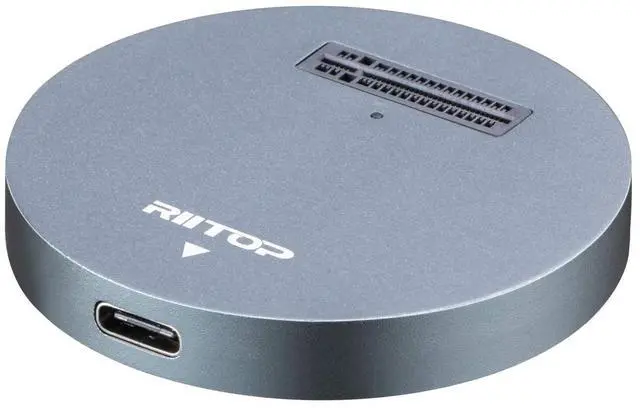
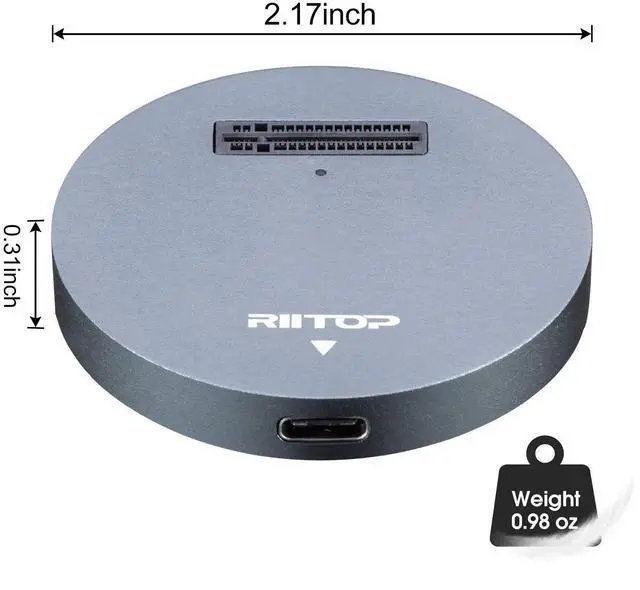
NVMe to USB Docking Station, External M.2 PCI-e NVMe SSD to USB-C Reader Adapter for M.2 (M Key) SSD
Limited time offer, ends 10/15 By EmpressTech
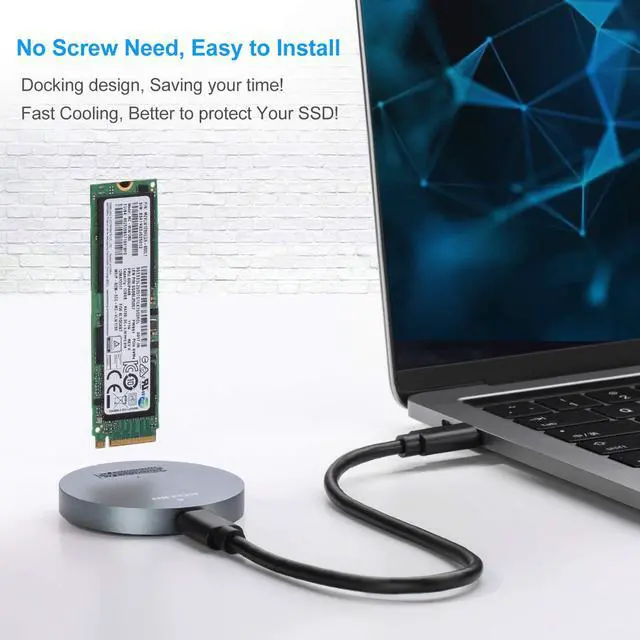
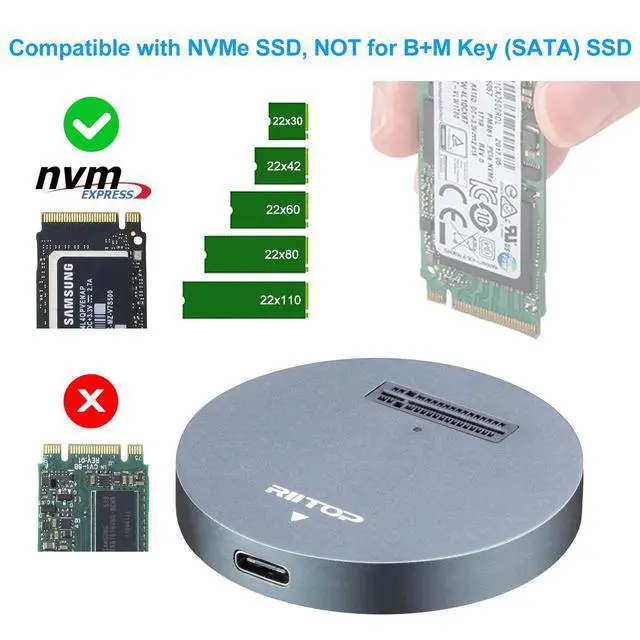
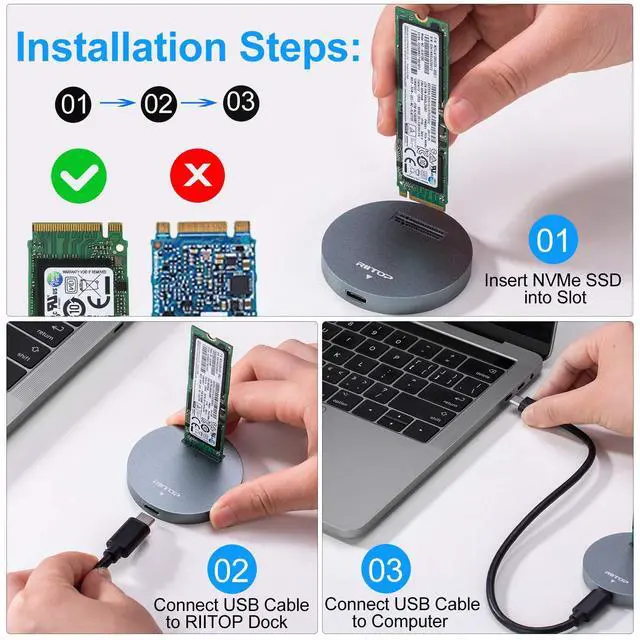
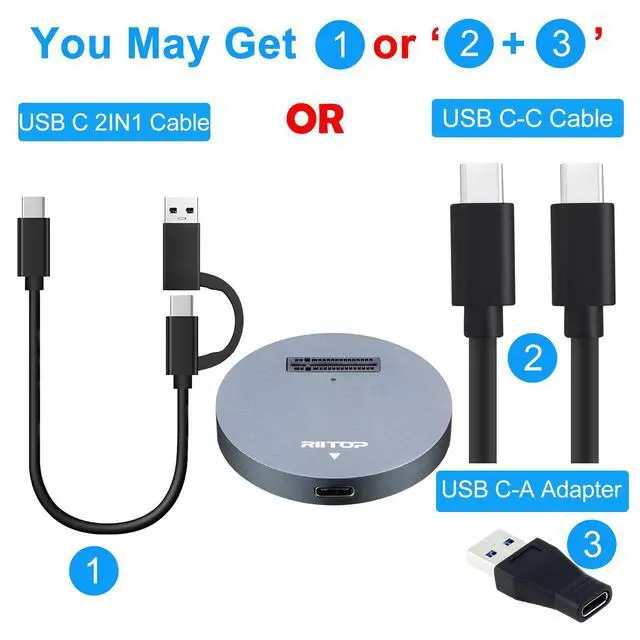
- This RIITOP NVMe to USB Adapter is Designed for those who own Multiple NVMe M.2 SSDs that need to be frequently pluging and unpluging. No mounting screws need, simply insert the NVMe M.2 device and connect USB-C cable, you can start using it as external SSD immediately.; RIITOP NVMe to USB Docking Station Compatibility: Support most of M.2 PCI-e M key NVMe SSDs (Capacity 2TB), Compatible with Samsung 970 EVO /950Pro/ 960Evo/ XP941/ PM951/ PM961/ SM951/ SM962, WD Black NVMe SSD and so on. Only Support M.2 PCI-e Based M Key NVMe SSD; NVMe Dock Installation: 1. Insert NVMe SSD into Slot 2. Connect USB Cable to Computer; Please Note: 1. The Temperature of the entire Operating SSD may exceed 60 ° C. Please do not touch the SSD. 2. It can NOT support "Hot-Plugging". Please don't exchange the SSDs when connecting 3. DO NOT support PCI-e M Key AHCI SSD, SATA based B+M key or B Key SSD, Please check with the picture.; Package including: 1x M2 NVMe to USB Docking, 1x USB C to USB C Cable; 1x USB C to A Adapter ( Please Note: The USB C to A Adapter may be a single one, or join together with the cable)
+
+
Overview
Specs
Reviews

Any questions? Our AI mode will help you find out quickly.
Try me now
Product description Convert Your NVMe M. 2 SSD to USB 3.1 as an external drive RIITOP NVMe to USB Adapter is ideal for those who own multiple NVMe M. 2 SSDs that need to be frequently plug and unplug. No mounting screws need, simply insert the NVMe M. 2 device and connect the USB cable, and you can start using immediately. The SSD docking base is a USB 3.1 Type-C adapter that allows users to insert NVMe M. 2 devices vertically. Please insert carefully to avoid damaging the connector of SSD Designed Exclusively for NVMe M.
2 SSD Supports the non-volatile memory express (NVMe) SSD, The connector standard adopts NVMe M. 2 SSD Compatible with M.
2 NVMe SSD ONLY: Samsung SM951- NVMe, PM951-NVMe, 950 Pro NVMe SSD, SM961, PM961, 960 EVO, 960 Pro, 970 EVO, 970 Pro. INTEL 600P. Liteon T10. And other PCIE M. 2 NVMe SSD. NOT Support PCI-e Based M Key AHCI SSD, or any B/B+M Key SATA Based SSD.
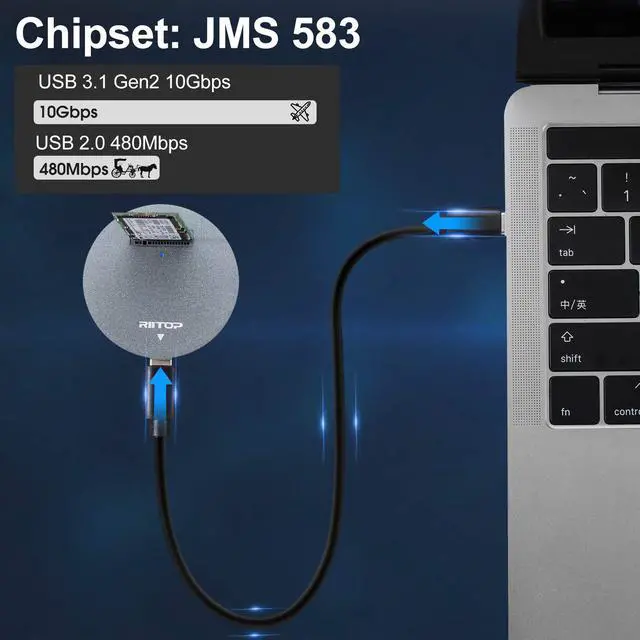
Please Note: 1. The temperature of the entire operating SSD may exceed 60 ° C. Please do not touch the SSD during operation. 2. It can NOT support "Hot-Plugging". Please don't exchange the SSDs when connecting. USB 3.1 (Gen 2) Type-C Interface The docking Station adopts USB 3.1 (Gen2), Type-C interface which supports high-speed transfer rates of up to 10 Gbps.
Chipset: JMS583 USB 3.1 Gen 2 to PCIe Gen3 x2 Bridge Controller The JMS583 is a USB 3.1 Gen 2 to PCIe Gen3 x 2 bridge controller between USB host and PCIe storage device. The USB 3.1 Gen 2 interface offers data transfer speed up to 10Gbps, doubling the USB 3.1 Gen 1 data rate. Meanwhile, the downstream port of the JMS583 is compatible with storage device with PCIe interface, such as SSD. The PCIe port is compliant with PCIe Gen3 x 2 specifications. Support Windows XP / 7 / 8 / 10 and Mac OS. No driver required. Installation Steps 1. Insert NVMe SSD into Slot 2. Connect USB Cable to Dock 3. Connect USB Cable to
Computer Please note: it can NOT be identified if insert SSD after USB Cable connected to Computer. Package Including 1x M2 NVMe to USB Dock 1x USB C to USB C Cable 1x USB C to A Adapter See More
2 SSD Supports the non-volatile memory express (NVMe) SSD, The connector standard adopts NVMe M. 2 SSD Compatible with M.
2 NVMe SSD ONLY: Samsung SM951- NVMe, PM951-NVMe, 950 Pro NVMe SSD, SM961, PM961, 960 EVO, 960 Pro, 970 EVO, 970 Pro. INTEL 600P. Liteon T10. And other PCIE M. 2 NVMe SSD. NOT Support PCI-e Based M Key AHCI SSD, or any B/B+M Key SATA Based SSD.
Please Note: 1. The temperature of the entire operating SSD may exceed 60 ° C. Please do not touch the SSD during operation. 2. It can NOT support "Hot-Plugging". Please don't exchange the SSDs when connecting. USB 3.1 (Gen 2) Type-C Interface The docking Station adopts USB 3.1 (Gen2), Type-C interface which supports high-speed transfer rates of up to 10 Gbps.
Chipset: JMS583 USB 3.1 Gen 2 to PCIe Gen3 x2 Bridge Controller The JMS583 is a USB 3.1 Gen 2 to PCIe Gen3 x 2 bridge controller between USB host and PCIe storage device. The USB 3.1 Gen 2 interface offers data transfer speed up to 10Gbps, doubling the USB 3.1 Gen 1 data rate. Meanwhile, the downstream port of the JMS583 is compatible with storage device with PCIe interface, such as SSD. The PCIe port is compliant with PCIe Gen3 x 2 specifications. Support Windows XP / 7 / 8 / 10 and Mac OS. No driver required. Installation Steps 1. Insert NVMe SSD into Slot 2. Connect USB Cable to Dock 3. Connect USB Cable to
Computer Please note: it can NOT be identified if insert SSD after USB Cable connected to Computer. Package Including 1x M2 NVMe to USB Dock 1x USB C to USB C Cable 1x USB C to A Adapter See More
Warranty & Returns
Warranty, Returns, And Additional Information
Warranty
- Please contact the Seller directly for warranty information. Warranty information may also be found on the Manufacturer's website.
- CONTACT
Return Policies
- Return for refund within: 30 days
- Return for replacement within: 30 days
- This item is covered by EmpressTech Return Policy
Manufacturer Contact Info
- For a directory of all our manufacturers, please click below.
- Manufacturers Directory
LOADING...