Your Browsing History
Meet Your Seller
HP USB-C Mini Dock
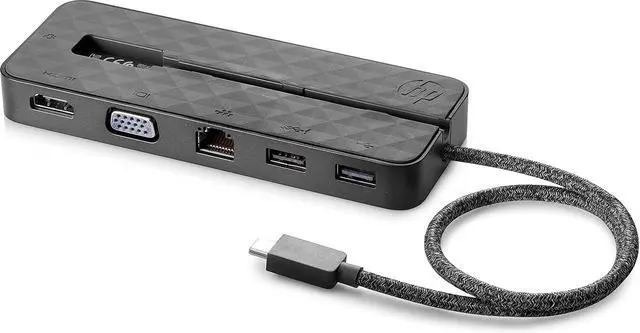
- Drive an external display with HDMI support up to 4K or VGA support up to 1080p
- Support network manageability[3] of your device and the dock with PXE boot support, Wake-on LAN, MAC Address Pass-Through, and LAN/WLAN switching.[4]
- Deliver pass-through charging to your notebook PC or tablet when you connect its USB-C AC adapter to the docks USB-C port.
- Connect to your Gigabit Ethernet through the RJ-45 port and your accessories through a USB-C or USB port.
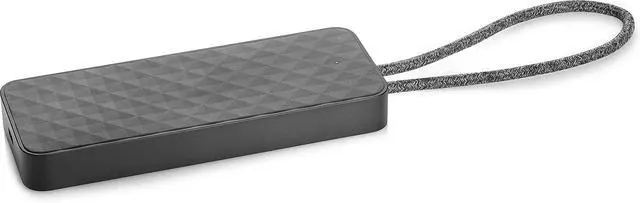
- Carry the dock by hand with the soft-coated USB-C cable that loops and folds neatly into a channel on the bottom of the dock to become a comfortable wrist strap, or pack it to go in your bag alongside your mobile device.

+
+
Overview
Specs
Reviews
Any questions? Our AI beta will help you find out quickly.
Try me now
Drive an external display with HDMI support up to 4K or VGA support up to 1080p
Support network manageability[3] of your device and the dock with PXE boot support, Wake-on LAN, MAC Address Pass-Through, and LAN/WLAN switching.[4]
Deliver pass-through charging to your notebook PC or tablet when you connect its USB-C AC adapter to the docks USB-C port.
Connect to your Gigabit Ethernet through the RJ-45 port and your accessories through a USB-C or USB port.
Carry the dock by hand with the soft-coated USB-C cable that loops and folds neatly into a channel on the bottom of the dock to become a comfortable wrist strap, or pack it to go in your bag alongside your mobile device.
Support network manageability[3] of your device and the dock with PXE boot support, Wake-on LAN, MAC Address Pass-Through, and LAN/WLAN switching.[4]
Deliver pass-through charging to your notebook PC or tablet when you connect its USB-C AC adapter to the docks USB-C port.
Connect to your Gigabit Ethernet through the RJ-45 port and your accessories through a USB-C or USB port.
Carry the dock by hand with the soft-coated USB-C cable that loops and folds neatly into a channel on the bottom of the dock to become a comfortable wrist strap, or pack it to go in your bag alongside your mobile device.
Warranty & Returns
Warranty, Returns, And Additional Information
Warranty
- Please contact the Seller directly for warranty information. Warranty information may also be found on the Manufacturer's website.
- Read full details
- CONTACT
Return Policies
- Return for refund within: 30 days
- Return for replacement within: 30 days
- This item is covered by PrimeVolt’Shop Return Policy
Manufacturer Contact Info
- For a directory of all our manufacturers, please click below.
- Manufacturers Directory
LOADING...