• $64.99
  • Free 30-day Returns
  • Price alert
    Shop it at NeweggBusiness.

    Meet Your Seller

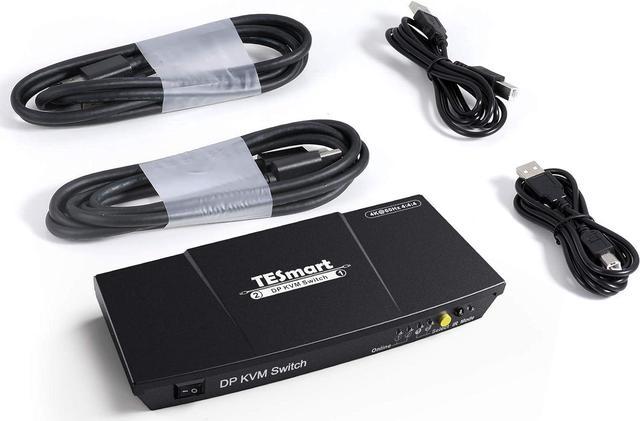
    TESmart 2 DisplayPort 2x1 Port KVM Switch 4K@60Hz 4:4:4 Ultra HD | DP KVM Switch with Extra USB 2.0 Port Supports Auto Scan&IR Remote Control Includes 2 PC DisplayPort cables + 2 PC USB cables

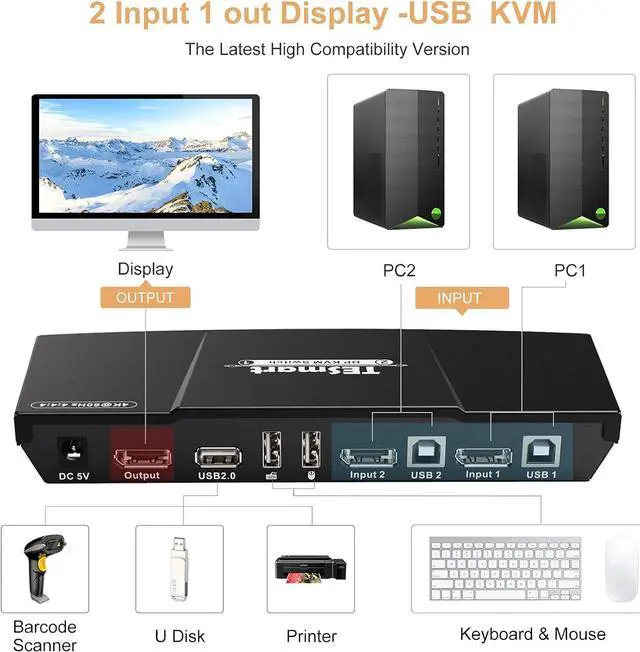
    • [4 PCs Shared with 1 Set Keyboard and Mouse] - Create a simplified workstation with 4 computers with this 4 ports Display Port KVM switch.
    • [4-Port DP KVM Switch with USB2.0 Port] - Supports connecting your usb 2.0 port device such as Scanner/USB driver/3D Printer/Monitor Camera.
    • [4x1 DP KVM Switch Support 4K Resolution] - Superior Video Quality. 3840x2160@60hz with 4K source and capable monitor. Support auto switching to monitor computers in a specified time interval.
    • [4K DP KVM Switch is Easy to Operate and Install] - Easily Switch Inputs. Keyboard hotkeys, mouse gestures, push button, or remote control (CR2025 battery is not included)
    • [A Higher Level of Keyboard and Mouse Compatibility] - It supports keyboard and mouse pass-through mode (Semi-DDM USB), takes advantage of DDM (Dynamic Device Mapping) technology, compatible with more keyboard and mouse devices.
    +
    +
    Overview
    Specs
    Reviews (5)
    avatar

    Any questions? Our AI beta will help you find out quickly.

    Key Features

    KVM--Using only 1 set of keyboard, mouse and monitor to control 4 PCs.
    4K@60Hz--Support resolution up to 3840*2160 60Hz.
    Auto Switching-- Auto-scanning with adjustable time interval from 1 to 250 seconds.
    No Delay--Available to use keyboard and mouse without any delay after switching inputs.
    Hot Plug--Support hot plug, connect or disconnect devices to the KVM switch at any time without turning off devices.
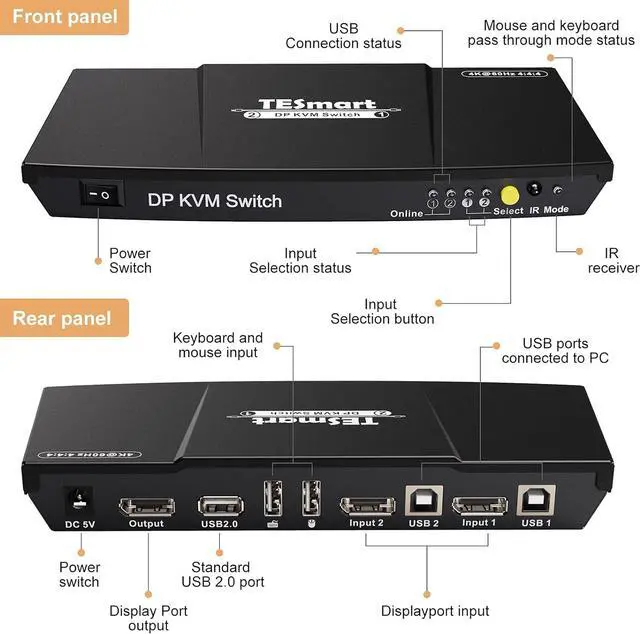
    Multiple Switching--Support front panel buttons, IR signals, keyboard hot keys and mouse gesture to control KVM to switch inputs.
    Hotkey--Triggers assignable to either Scroll Lock or Right-CTRL
    Spare USB port--With extra standard USB 2.0 hub port, it is possible to connect bar code scanner, USB hard drive or other USB devices to KVM just as you have plug these devices directly to computer.
    Pass Through--Keyboard and mouse pass through mode allows for better compatibility plus multimedia key functions.
    NO battery--Please install CR2025 battery before use (battery not included).

    Dedicated mouse & keyboard ports have emulation programming. Second gen chipsets have Passthrough Mode to send special characters such as multimedia keys (play, pause, volume up/down), which improves keyboard compatibility. Keyboard software such as Logitech Options, Corsair iCUE, etc conflicts with the emulation and limits the ability to use macro keys.

    We recommend using the KVMs USB 2.0 port as a workaround if this software if needed. USB 2.0 port does not have emulation programming and KVM will not recognize hotkey commands. Please use a powered USB hub to expand USB connectivity.


    Warranty & Returns

    Warranty, Returns, And Additional Information

    Warranty

    • Please contact the Seller directly for warranty information. Warranty information may also be found on the Manufacturer's website.
    • CONTACT

    Return Policies

    • Return for refund within: 30 days
    • Return for replacement within: 30 days
    • This item is covered by BuyTESmart Return Policy

    Manufacturer Contact Info

    LOADING...