IHDAPP KVM Switch for 1 Laptop & 1 Desktop share 3 Monitors 4K@60Hz, USB C HDMI 3 Monitor KVM Switch, Docking Station KVM Switches with 4 USB 3.0 Port, 87W PD Charging, Wired Remote and Power Adapter
Limited time offer, ends 05/16 By Smarter & Better Life Marketplace
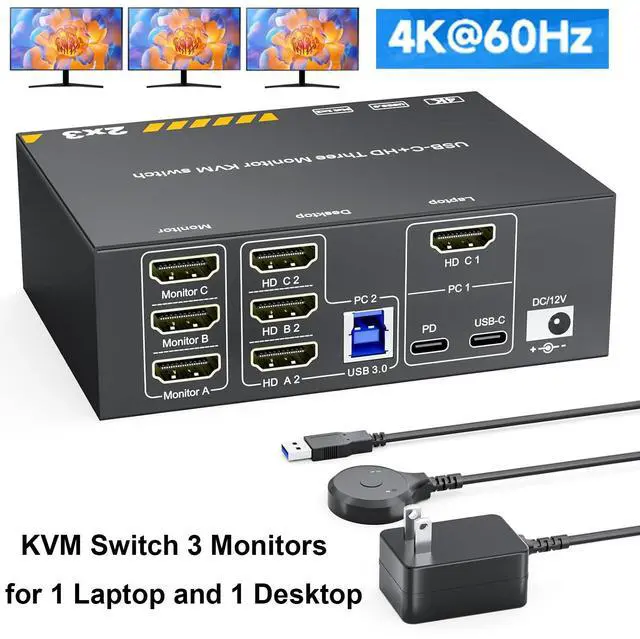
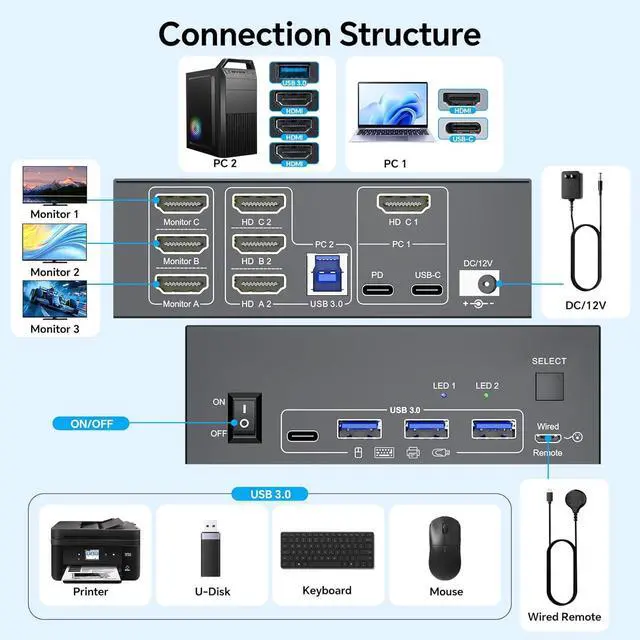
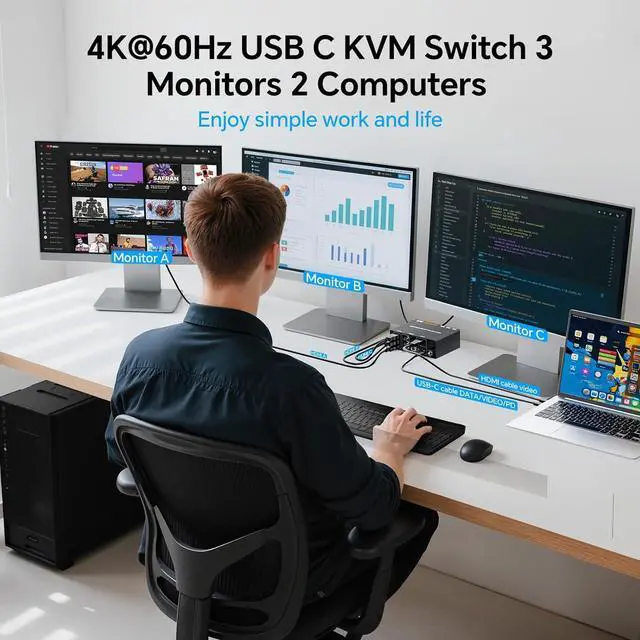
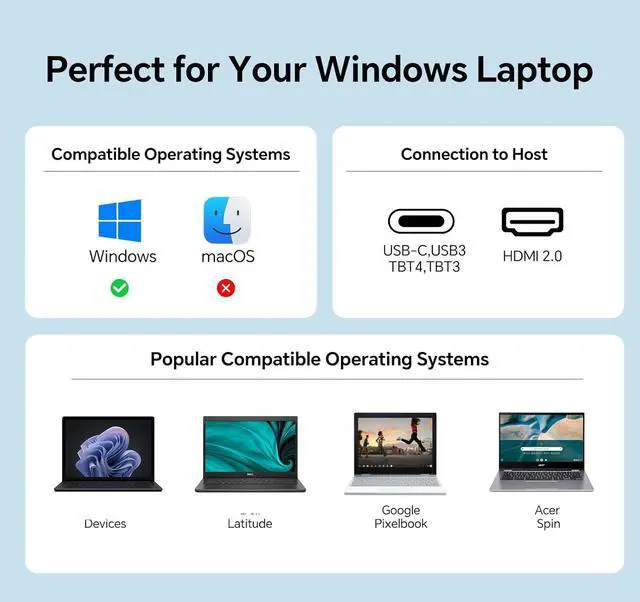
HDMI & USB C KVM Switch: This KVM switch built with 1x HDMI +1x USB-C (MST) input port for laptop, and 1x integrated HDMI +HDMI+HDMI+ USB input port for desktop. Allows you to effortlessly manage 1 Laptop and 1 Desktop to share 3 monitors and 4 USB devices. (Only works with Windows laptops)
Ultra HD 4K Visual Effect: HDMI 2.0 and DP 1.4a (USB-C) compliant, KVM Switch supports resolution up to 4K@60Hz and is backward compatible with 2K@120Hz, 2560x1440@120Hz/60Hz, and 1920x1080@144Hz 120Hz ect.
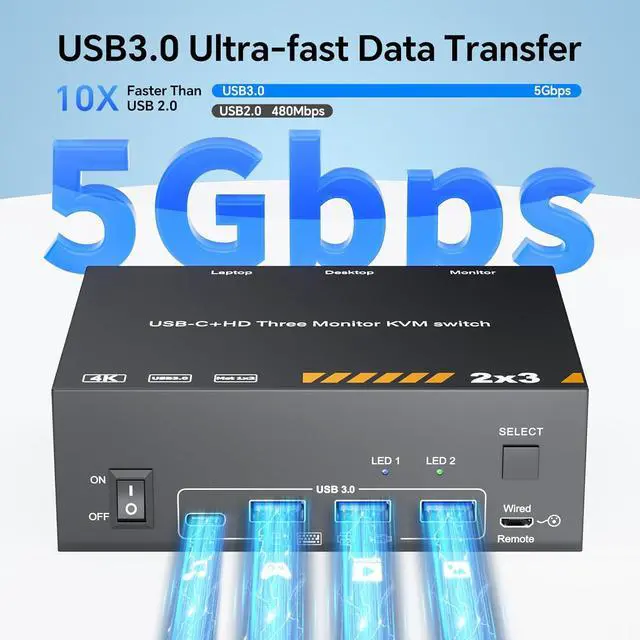
5Gbps KVM Switch USB C: MST Thunderbolt KVM Switch with 3 USB A + 1 USB-C ports securely identifies keyboard, mouse, printer and other USB devices. Supports ultra-fast data transfer up to 5Gbps, backward compatible with USB 3.0/2.0/1.1.
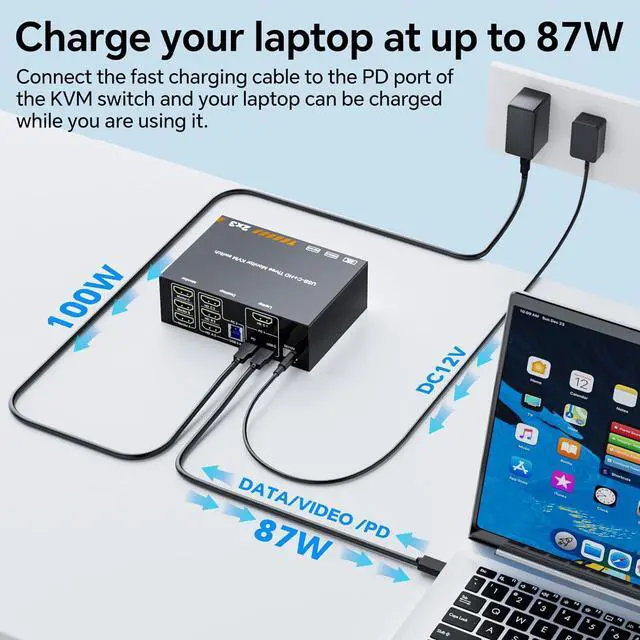
87W PD Charging for Laptops: KVM Switch has the function of charging laptops,Please plug the Type-C charging cable of the 110V power supply into the PD port to power the laptop(PD 100W charging protocol); The actual charging power obtained by the laptop is between 87W.
Great compatibility & 2 switching modes: KVM switch 3 monitors driver-free for Windows, Support PC, Laptop, etc..You can press the button on the panel or use the wired remote (included) to switch the 2 computers. Two color LED indicate the active computer.
Packing List: USB C HDMI KVM Switch, 1 USB C cable for audio and video signal transmission, 1 USB3.0 A-B cable, 1 DC12V power adapter, 1 wired controller, instruction manual. Please purchase 7 additional HDMI cables for need use.
+
+
Overview
Specs
Reviews
Any questions? Our AI beta will help you find out quickly.
Try me now
About this item
HDMI and USB C KVM Switch Triple monitorThis KVM switch 3 monitors 2 computers built with 1x HDMI +1x USB-C (MST) input port for laptop, and 1x integrated HDMI +HDMI+HDMI+ USB input port for desktop. Allows you to effortlessly manage 1 Laptop and 1 Desktop to share 3 monitors and 4 USB devices together.(Only works with Windows laptops)
Ultra HD 4K Visual EffectHDMI 2.0 and DP 1.4a (USB-C) compliant,2 monitors KVM Switch supports resolution up to 4K@60Hz and is backward compatible with 2K@120Hz, 2560x1440@120Hz/60Hz, and 1920x1080@144Hz 120Hz ect. If all three screens are unusable, please test them one by one: HDMI port, USB C port, and PC1 or PC2. Test them separately and contact customer service for a solution.
5Gbps KVM Switch USB C MST Thunderbolt KVM Switch with 3 USB A + 1 USB-C ports securely identifies keyboard, mouse, printer, scanner and other USB devices. USB C KVM Switch 1x Destop+1x Laptops 3 monitors supports ultra-fast data transfer up to 5Gbps, backward compatible with USB 3.0/2.0/1.1. Triple monitor KVM switch USB C will not damage USB devices such as hard drives
87W PD Charging for LaptopsMST KVM Switch HDMI USB C has the function of charging laptops,Please plug the Type-C charging cable of the 220V power supply into the PD port to power the laptop(PD 100W charging protocol); The actual charging power obtained by the laptop is between 87W.
Great compatibility & 2 switching modesKVM switch 3 monitors driver-free for Windows, Support PC, Laptop, etc..You can press the button on the panel or use the wired remote (included) to switch the 2 computers. Two color LED indicate the active computer.
Packing List USB C HDMI KVM Switch, 1 USB C cable for audio and video signal transmission, 1 USB3.0 A-B cable, 1 DC12V power adapter, 1 wired controller, instruction manual.Please purchase 7 additional HDMI cables for need use.
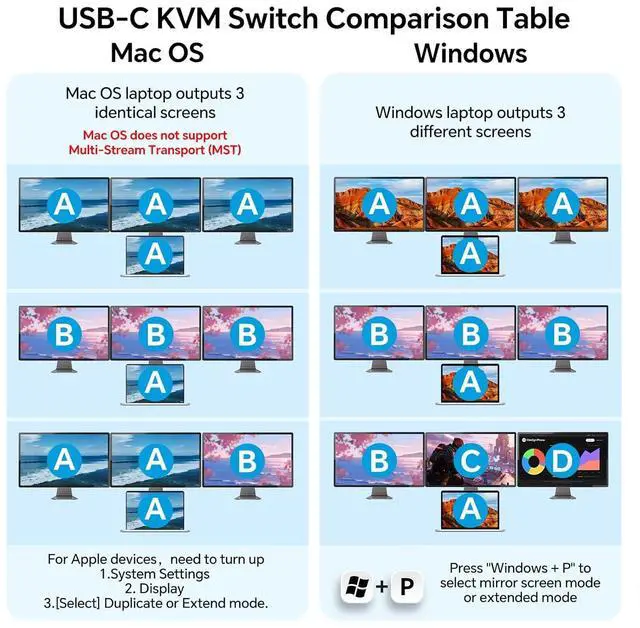
MST USB C+HDMI KVMSimply connect 1 HDMI cable +1 Type-C cable between laptop and USB-C KVM switch, and you can display 2 different screens on 3 HDMI monitors (Copy or extend). The USB-C port of the MST USB-C switch 1 in 2 out is fully functional. Make sure your laptop has display expansion features.
NOTE: 1. Support PD 87W to power laptops. Please connect the 220V power supply to the KVM PD port; 2. USB C interface of your device must support Thunderbolt 3 or above standards to use it; 3.Windows can support extended mode ABC with three different screens. Apple Mac computers do not support extended mode, only copy mode. Those who mind should buy with caution; 4.Laptop must have both USB-C +HDMI ports; 5.If you experience screen flickering, a blue screen, or a black screen during use, press the rocker switch and power cycle, try replacing the USB-C cable, or lower the monitor resolution to ensure a smooth image.
Learn more about the Detailed Specifications
Details
Type
USB C, HDMI
PC Connectors
USB C, HDMI
Computer Connections
2 Ports
Monitor Connections
3 Ports
Video Resolution
HDMI 2.0 and DP 1.4a (USB-C) compliant,2 monitors KVM Switch supports resolution up to 4K@60Hz and is backward compatible with 2K@120Hz, 2560x1440@120Hz/60Hz, and 1920x1080@144Hz 120Hz ect.
PC Selection
Push Buttons and Wired Controller
LED Indicators
Yes
Features
Power Features
Come with DC 12V Power Adapter
USB Features
MST Thunderbolt KVM Switch with 3 USB A + 1 USB-C ports securely identifies keyboard, mouse, printer, scanner and other USB devices.
Application
This KVM switch 3 monitors 2 computers built with 1x HDMI +1x USB-C (MST) input port for laptop, and 1x integrated HDMI +HDMI+HDMI+ USB input port for desktop. Allows you to effortlessly manage 1 Laptop and 1 Desktop to share 3 monitors and 4 USB devices together.(Only works with Windows laptops)
Features
Great compatibility & 2 switching modes
Dimensions & Weight
Dimensions
8.66 x 5.91 x 2.36 inches
Weight
1.65 Pounds
Package Contents
Package Contents
1 USB C HDMI KVM Switch, 1 USB C cable for audio and video signal transmission, 1 USB3.0 A-B cable, 1 DC12V power adapter, 1 wired controller, instruction manual.
Additional Information
First Listed on Newegg
September 28, 2025
There are no reviews yet.
Do you own this product?
Warranty & Returns
Warranty, Returns, And Additional Information
Warranty
Please contact the Seller directly for warranty information. Warranty information may also be found on the Manufacturer's website.