• $399.99
  • Free 30-day Returns
  • Ships from China.
    Price alert
    Shop it at NeweggBusiness.

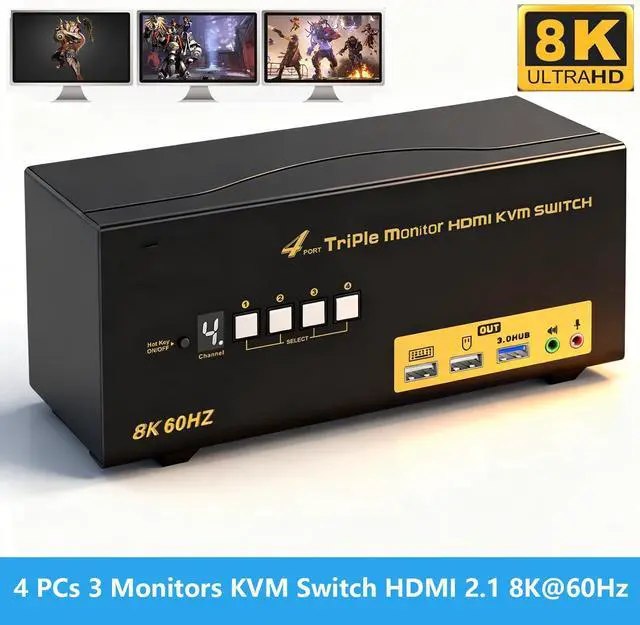
    IHDAPP USB 3.0 Triple Display HDMI KVM Switch, HDMI 2.1 8K@60Hz 4K@120Hz Triple Monitor KVM Switch for 3 Monitors 4 Computers, Supports EDID Emulation, Hotkey, Audio and Mic, with All Input Cables

    Limited time offer, ends 04/18 By Smarter & Better Life Marketplace

    • HDMI KVM Switch: If you have 3 or 4 computers or laptops, one for personal or gaming, the other for work, this is a premium tool for you to control them using 1 set of keyboard, mouse and triple extended monitors, and share 1 more USB peripheral.
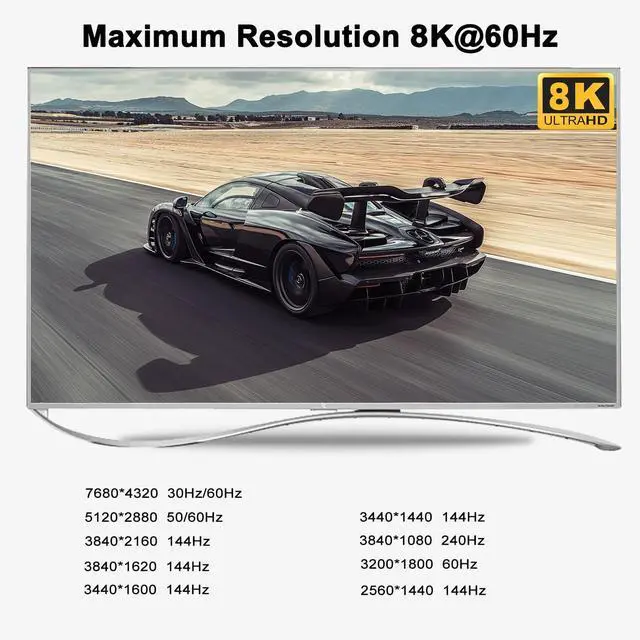
    • 4x3 KVM Switch HDMI 8K 60HZ 4K 144HZ: Newest HDMI 2.1 technology to achieve max. Resolution of 7680*4320@30/60Hz, 5120*2880/1440@50/60Hz, 3840*2160@120hz, 3440*1440@120Hz, 3840*1080@240hz, 2560*1440@120hz, ideal for high resolution needs and gaming without delay. Supports EDID emulation to maintain correct display.
    • USB 3.0 KVM Switch 3 Monitors 4 Computers: The integrated USB 3.0 HUB ports allows you to share 1 more USB peripherals like printers, webcam, or headset between 4 computers. It has 3 HDMI outputs for extended or mirrored displays on one selected computer at the same time.
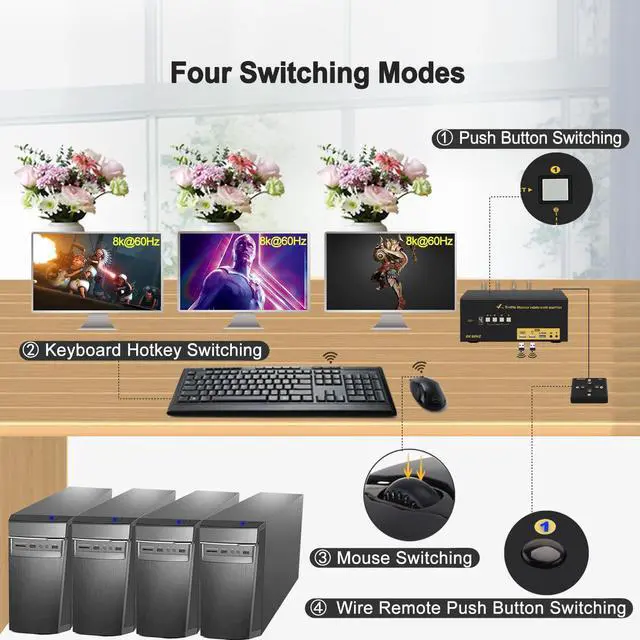
    • 5 Switching Modes: It supports multiple switching modes using keyboard hotkey, mouse roller clicks, push button and wired remote, as well as auto scan with adjustable interval between 8 - 999 seconds for testing and Surveillance purpose.
    • HDMI KVM Switch with Audio and Mic Support: Supports both 3.5mm stereo speaker output (green) and microphone input (pink) and HDMI digital audio through the same green audio port.
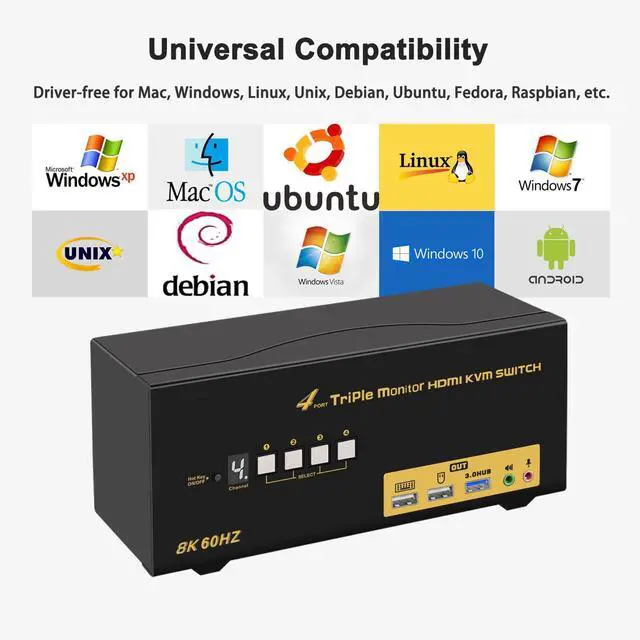
    • Wide Compatibility: Supports Windows, Linux, Mac and most major operation systems, plug and play without any software or driver needed. The package comes with all cables, power adapters except cables for monitors.
    +
    +
    Overview
    Specs
    Reviews
    avatar

    Any questions? Our AI beta will help you find out quickly.

    USB 3.0 Triple Display HDMI KVM Switch, HDMI 2.1 8K@60Hz 4K@120Hz Triple Monitor KVM Switch for 3 Mo

    4 Port HDMI KVM Switch Triple Monitor 8K@60Hz 4K@120Hz Supports Audio and Microphone

    Does Everthing Needed:


    • Control 4 computers / laptops using one set of wired or wireless keyboard and mouse;
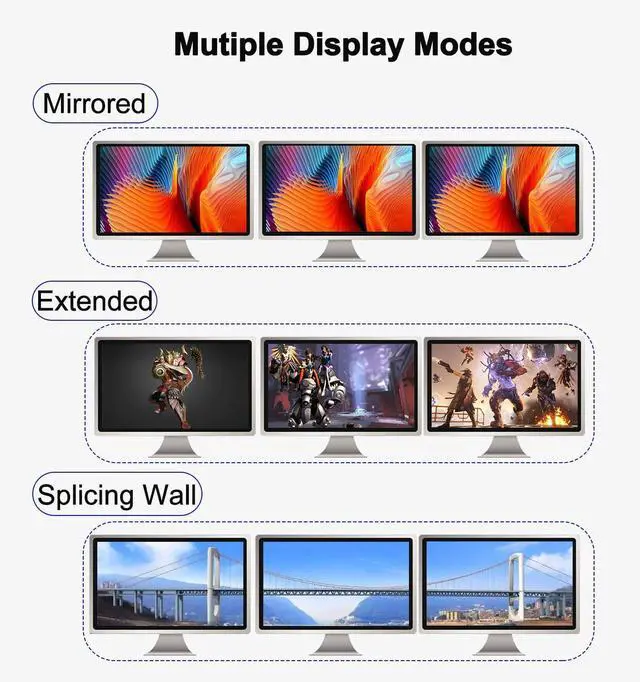
    • Triple (3) HDMI Outputs for Extended, Mirrored or Spliced Display;
    • HDMI 2.1 version supports UHD resolution up to 8K@60Hz, 4K@120Hz, 3840x1080@240Hz with higher downward compatibility; Supports EDID emmulation to maintain correct display.
    • 1 extra USB 3.0 HUB ports with high speed data transfer for sharing USB peripherals like webcam, printer, scanner, jump drive between 2 computers;
    • Cross support multi operation systems including Windows, Linux, Mac and more;
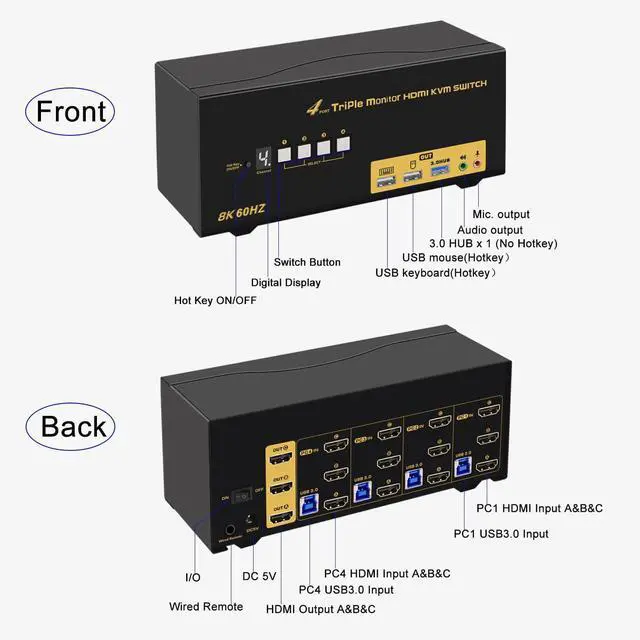
    • 5 advanced switching modes to swap between personal and work within 2-3 seconds, reducing cable plugging and unplugging; With digital display showing current computer selected;
    • The wired remote uses standard 3.5mm aux cable which can be extended to max. 50 ft (15 meters);
    • With hotkey on/off feature for higher compatibility with keyboards and mice with special features;
    • Support Audio with separate speaker output and microphone input;
    • Comes with all cables except cable for monitors which usually comes with monitor.
    5 advanced switching modes to swap between personal and work within 2-3 seconds, reducing cable plug

    Installation Procedures


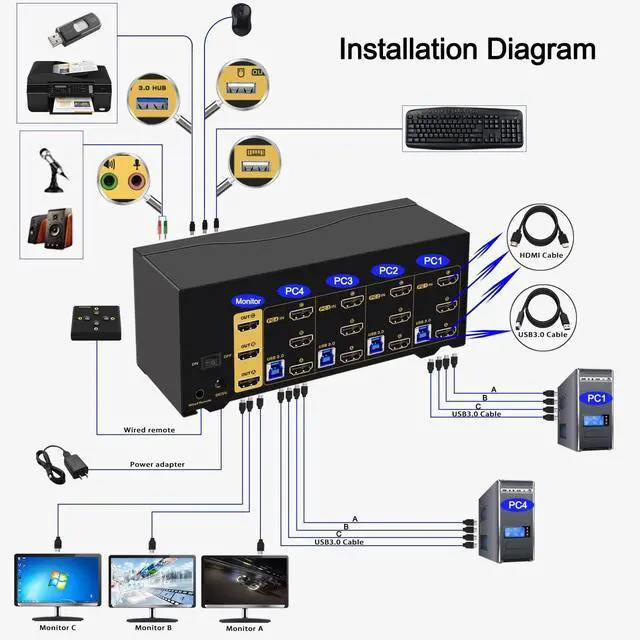
    1. Computer 1: Connect 4 HDMI outputs from computer 1 to PC1 IN A, B ,C ports; Connect USB A-male to USB 3.0 port on computer 1, and USB B-male to USB 1 input on the KVM switch;
    2. Computer 2: Connect 4 HDMI outputs from computer 2 to PC2 IN A, B ,C ports; Connect USB A-male to USB 3.0 port on computer 2, and USB B-male to USB 2 input on the KVM switch;
    3. Computer 3: Connect 4 HDMI outputs from computer 3 to PC3 IN A, B ,C ports; Connect USB A-male to USB 3.0 port on computer 3, and USB B-male to USB 2 input on the KVM switch;
    4. Computer 4: Connect 4 HDMI outputs from computer 4 to PC4 IN A, B ,C ports; Connect USB A-male to USB 3.0 port on computer 4, and USB B-male to USB 2 input on the KVM switch;

    5. Monitor A: Connect primary monitor to HDMI Out A;

    6. Monitor B: Connect extended monitor to HDMI Out B;

    7. Monitor C: Connect extended monitor to HDMI Out C;

    8. Keyboard and Mouse: Connect keyboard and mouse into USB keyboard and mouse port respectively;

    9. Connect USB peripherals to USB 3.0 ports if needed (optional);

    10. After cables being connected, power on the kvm switch first, then monitors, then computers.


    Installation Diagram

    Installation Diagram

    Friendly Reminder


    1. Some keyboard with special features like gaming, programing, multi-media, mechnical, back lights may not be well supported on the USB keybaord and mouse port which are dedicated for hotkeys, if so you can plug the keyboard and mouse into the USB 3.0 ports or turn off the hotkey then the USB keyboard and mouse port will turn into standard USB 2.0 port, without hotkeys, you can use the included wired remoter to switch between computers.
    2. If you are using wireless set of keyboard and mouse which share a unifying dongle, you can plug the dongle into either the USB keyboard or mouse port (hotkey supported), or USB 3.0 port (no hotkeys).
    3. The USB 3.0 cable also draws power from USB 3.0 port on computers to drive the KVM switch, also included a USB to DC power cord as additional power supply if in case the computer does not have a USB 3.0 port.
    Friendly Reminder      Some keyboard with special features like gaming, programing, multi-media, me


    Adapters Will be Needed in Most Cases


    Please be aware of this before order !

    This triple monitor KVM Switch requires 3 HDMI inputs for each computer and 3 HDMI output for monitors. However, most computers especially laptops do not have 3 HDMI outputs, thus reliable adapters will be needed for non-HDMI outputs like USB C, DisplayPort (DVI and VGA is not preferred as they do not support resolution higher than 1080P).


    Enjoy Realistic Picture Quality

    Adapters Will be Needed in Most Cases  Please be aware of this before order !  This triple monitor
    Adapters Will be Needed in Most Cases  Please be aware of this before order !  This triple monitor
    3 Display Modes
    1. Extended Display
    2. Mirrored Display
    3. Spliced Display
    3 Display Modes
    Universal Compatibility

    Cross support most major OS including Windows, Linux, Mac and more.

    Universal Compatibility
    5 Switching Modes
    1. Keyboard Hotkey
    2. Double Click the middle roller of mouse
    3. Push Button on front panel.
    4. Wired remote switch
    5. Auto Scan with adjustable interval time between 8-999 seconds

    5 Switching Modes
    Features
    1. HDMI KVM Switch Triple Monitor 4 Port: If you have 3 or 4 computers or laptops, one for personal or gaming, the other for work, this is a premium tool for you to control them using 1 set of keyboard, mouse and triple extended monitors, and share 1 more USB peripheral. Save your space and equipment spending significantly.
    2. 4x3 KVM Switch HDMI 8K 60HZ 4K 144HZ : Newest HDMI 2.1 technology to achieve max. Resolution of 7680*4320@30/60Hz, 5120*2880/1440@50/60Hz, 3840*2160@120hz, 3440*1440@120Hz, 3840*1080@240hz, 2560*1440@120hz, ideal for high resolution needs and gaming without delay. Supports EDID emulation to maintain correct display.
    3. USB 3.0 KVM Switch 3 Monitors 4 Computers: The integrated USB 3.0 HUB ports allows you to share 1 more USB peripherals like printers, webcam, flash drives or headset between 4 computers. It has 3 HDMI outputs for extended or mirrored displays on one selected computer at the same time.
    4. Not Many KVM Switches with 5 Switching Modes: It supports multiple switching modes using keyboard hotkey, mouse roller clicks, push button and wired remote, as well as auto scan with adjustable interval between 8 - 999 seconds for testing and Surveillance purpose.
    5. HDMI KVM Switch with Audio and Mic Support: Supports both 3.5mm stereo speaker output (green) and microphone input (pink) and HDMI digital audio through the same green audio port. Please refer to user manual for how to set the audio and change between the 2 audio options.
    6. Wide Compatibility and Comes with All Cabels Needed: Supports Windows, Linux, Mac and most major operation systems, plug and play without any software or driver needed. The package comes with all cables, power adapters except cables for monitors which usually comes with monitors. In most cases, adapters will be needed for computers especially laptops that do not have triple HDMI outputs.


    Warranty & Returns

    Warranty, Returns, And Additional Information

    Warranty

    • Please contact the Seller directly for warranty information. Warranty information may also be found on the Manufacturer's website.
    • CONTACT

    Return Policies

    Manufacturer Contact Info

    LOADING...