


• $289.99
  • Free 30-day Returns
  • Ships from China.
    Price alert
    Shop it at NeweggBusiness.

    IHDAPP USB C KVM Switch 2 Monitors 4 Computers Docking Station 4K60Hz for Windows/Mac Thunderbolt KVM with Displaylink Support USB3.0/USB C in DP/HDMI Out Extended/Mirrored Mode for M1 M2 M3 M4

    Limited time offer, ends 07/04 By Smarter & Better Life Marketplace

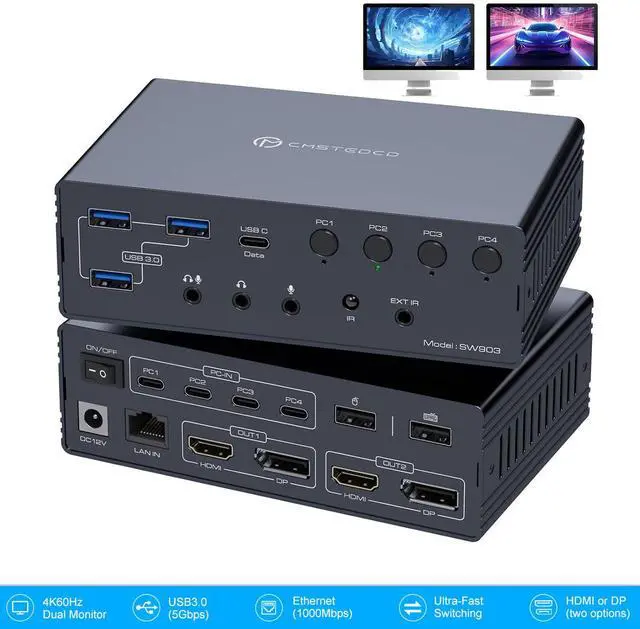
    • Thunderbolt KVM Switch: This KVM docking station seamlessly integrates 4 computers with 2 monitors, while also combining network connections, headphones, microphones, mouse, keyboards, webcams, portable hard drives, and other devices into a complete office and entertainment system
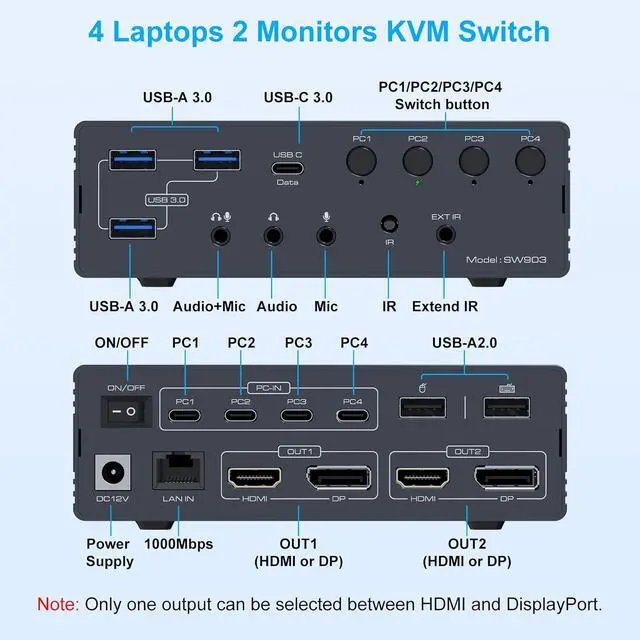
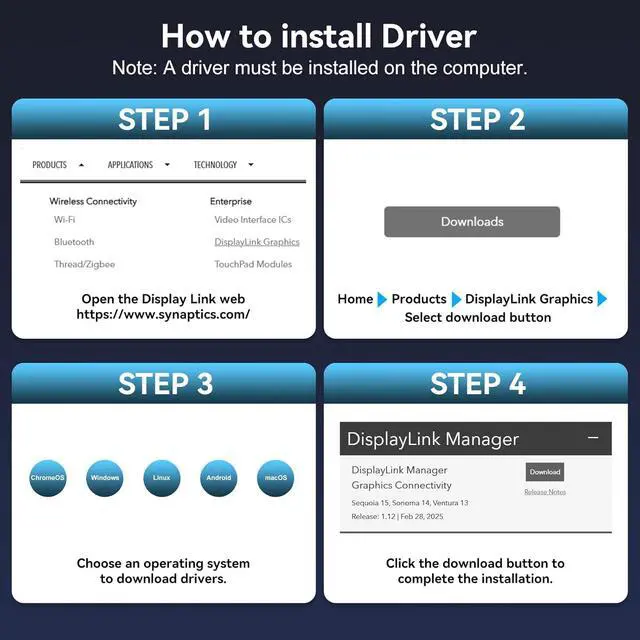
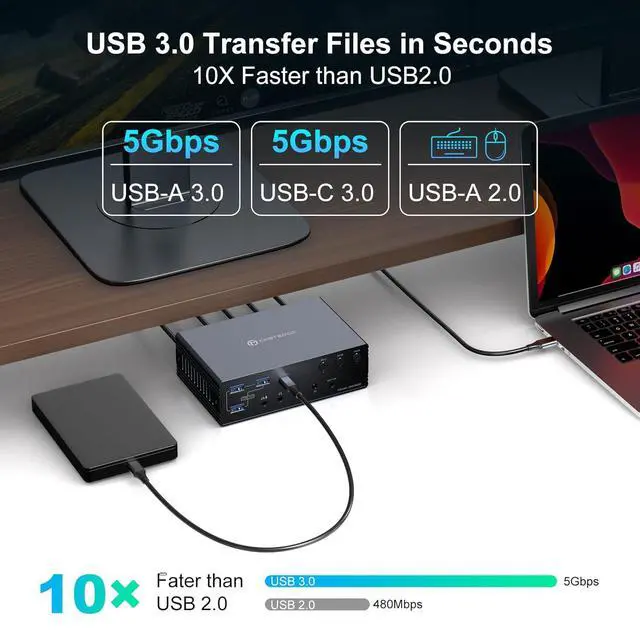
    • Important Notes: 1. DisplayLink drivers must be installed to enable full functionality (set driver to auto-start at system boot,contact technical support if issues arise during driver installation).2. USB input requires minimum USB 3.0 specification.3. Does not support PD charging.4. For 4K@60Hz operation, use high-quality cables supporting DP 1.2 and HDMI 2.0 standards (recommended length: no longer than 3.3 feet)
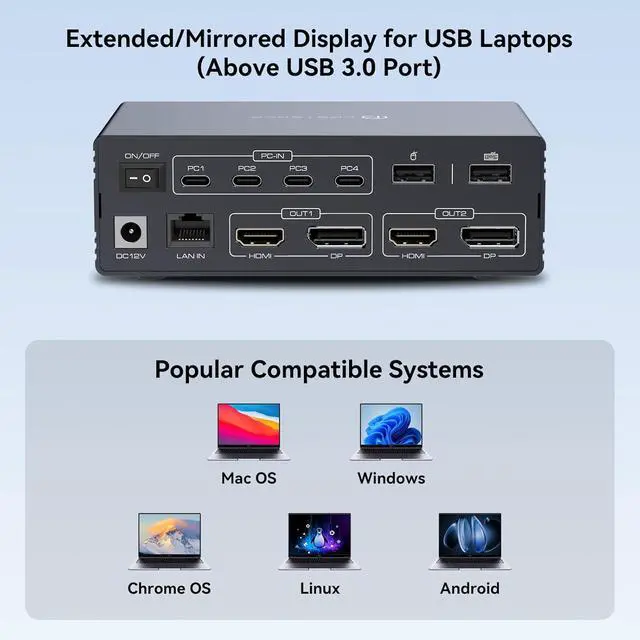
    • Wide Compatibility: This kvm docking dual laptops seamlessly integrates with macOS, Windows, Chrome OS, and Linux and Android systems; compatible with both laptops and desktops. Simply ensure your computer has a USB 3.0 (or higher) port and download the DisplayLink driver to unlock the full functionality of this KVM dock
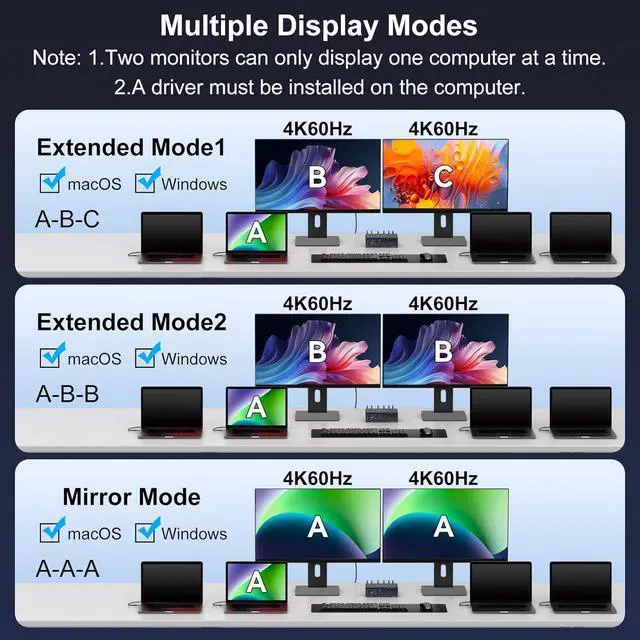
    • Mirroring and Extended Display: The KVM switch supports dual-screen extended mode and mirroring mode, overcoming macOS system limitations to enable dual-screen extended mode under macOS. This allows 2 displays to be configured for extended display or mirrored display (compatible with MacBook, MacBook Air/Pro, and Mac Mini models featuring M1/M2/M3/M4 chips)
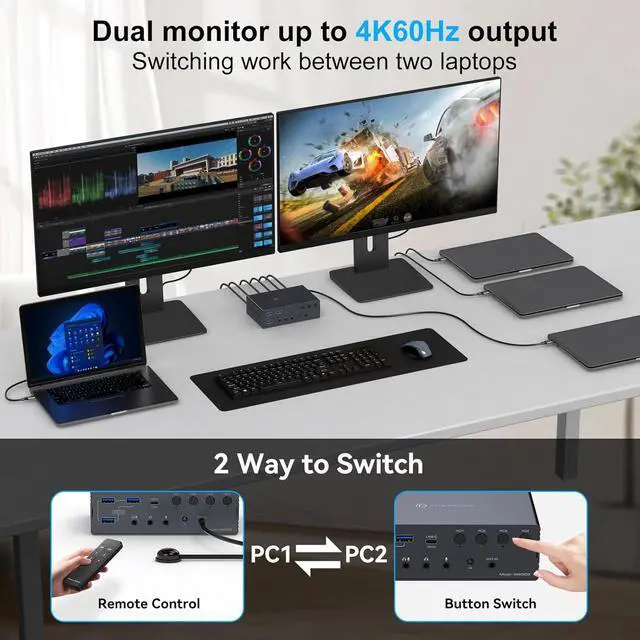
    • Dual 4K@60Hz Display: equipped with HDMI and DisplayPort dual video output interfaces, supporting dual 4K@60Hz.
    +
    +
    Overview
    Specs
    Reviews
    avatar

    Any questions? Our AI beta will help you find out quickly.

    USB C KVM Switch 2 Monitors 4 Computers Docking Station 4K60Hz for Windows/Mac
    USB C KVM Switch 2 Monitors 4 Computers Docking Station 4K60Hz for Windows/Mac
    USB C KVM Switch 2 Monitors 4 Computers Docking Station 4K60Hz for Windows/Mac
    USB C KVM Switch 2 Monitors 4 Computers Docking Station 4K60Hz for Windows/Mac
    USB C KVM Switch 2 Monitors 4 Computers Docking Station 4K60Hz for Windows/Mac
    USB C KVM Switch 2 Monitors 4 Computers Docking Station 4K60Hz for Windows/Mac
    USB C KVM Switch 2 Monitors 4 Computers Docking Station 4K60Hz for Windows/Mac
    USB C KVM Switch 2 Monitors 4 Computers Docking Station 4K60Hz for Windows/Mac
    USB C KVM Switch 2 Monitors 4 Computers Docking Station 4K60Hz for Windows/Mac

    Q & A:


    Q: The display is connected to the displaylink kvm docking station but shows no image

    A: You need to download the driver to use the monitor. Follow the instructions in the user manual or the prompts in the images to download it


    Q: When using macOS, why is the display still unusable even after installing the driver?

    A: You must enable the "Screen Recording" permission to use the display. This permission is required for the DisplayLink driver to access the pixels necessary for operation.


    Q: Can desktop computers use this Mac KVM switch?

    A: Yes, as long as your computer has a USB 3.0 or higher port and you download the DisplayLink driver.


    Q: Can this kvm docking power my laptop?

    A: No, you must use your laptop's own power adapter to supply power


    Q: Can it play media content like Netflix, Disney+, HBO, etc.?

    A: It cannot play certain copyright-protected content.

    Features
    1. Thunderbolt KVM SwitchThis KVM docking station seamlessly integrates 4 computers with two monitors, while also combining network connections, headphones, microphones, mouse, keyboards, webcams, portable hard drives, and other devices into a complete office and entertainment system
    2. Important Notes1. DisplayLink drivers must be installed to enable full functionality (set driver to auto-start at system boot,contact technical support if issues arise during driver installation).2. USB input requires minimum USB 3.0 specification.3. Does not support PD charging.4. For 4K@60Hz operation, use high-quality cables supporting DP 1.2 and HDMI 2.0 standards (recommended length: no longer than 3.3 feet)
    3. Wide Compatibility This kvm docking dual laptops seamlessly integrates with macOS, Windows, Chrome OS, and Linux and Android systems; compatible with both laptops and desktops. Simply ensure your computer has a USB 3.0 (or higher) port and download the DisplayLink driver to unlock the full functionality of this KVM dock
    4. Mirroring and Extended DisplayThe Mac KVM switch supports dual-screen extended mode and mirroring mode, overcoming macOS system limitations to enable dual-screen extended mode under macOS. This allows two displays to be configured for extended display or mirrored display (compatible with MacBook, MacBook Air/Pro, and Mac Mini models featuring M1/M2/M3/M4 chips)
    5. Dual 4K@60Hz DisplayThis kvm docking dual monitor is equipped with HDMI and DisplayPort dual video output interfaces, supporting dual 4K@60Hz Display. The OUT1 and OUT2 ports of the KVM switch are both equipped with HDMI and DP interfaces. You can freely choose HDMI or DP interfaces to connect each output port according to your actual needs
    6. Package ContentsYou will receive: 1. KVM Switch Dock, 2. USBA-C to C Cable ×4, 3. DC12V Power Adapter, 4. Controller, 5. User Manual. Should you encounter any issues during use, please contact us. Our professional technical team is ready to provide solutions


    Warranty & Returns

    Warranty, Returns, And Additional Information

    Warranty

    • Please contact the Seller directly for warranty information. Warranty information may also be found on the Manufacturer's website.
    • CONTACT

    Return Policies

    Manufacturer Contact Info

    LOADING...