• $199.99
  • Free 30-day Returns
  • Ships from China.
    Price alert
    Shop it at NeweggBusiness.

    Hitoor USB C DP Triple Monitor KVM Switch for 1 Laptop 1 Desktop, USB 3.1 KVM Switch 3 Monitors 2 Computer USB C HDMI DP Share 4 USB Device Mouse Keyboard, 100W PD, 4K@60Hz, MST, Power, Wired Remote

    Limited time offer, ends 04/18 By Smart Life Marketplace

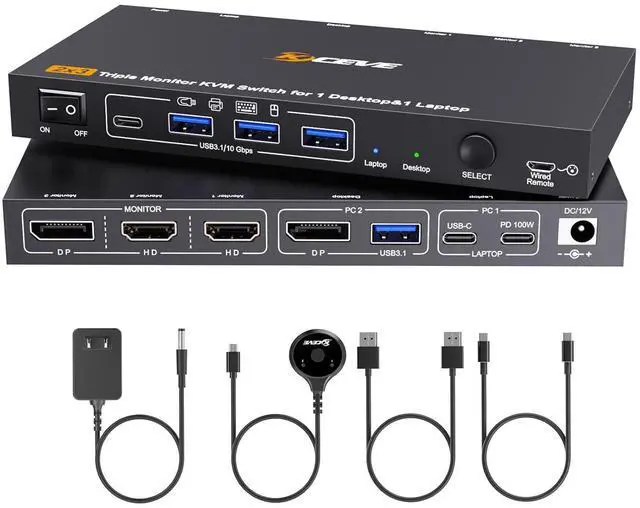
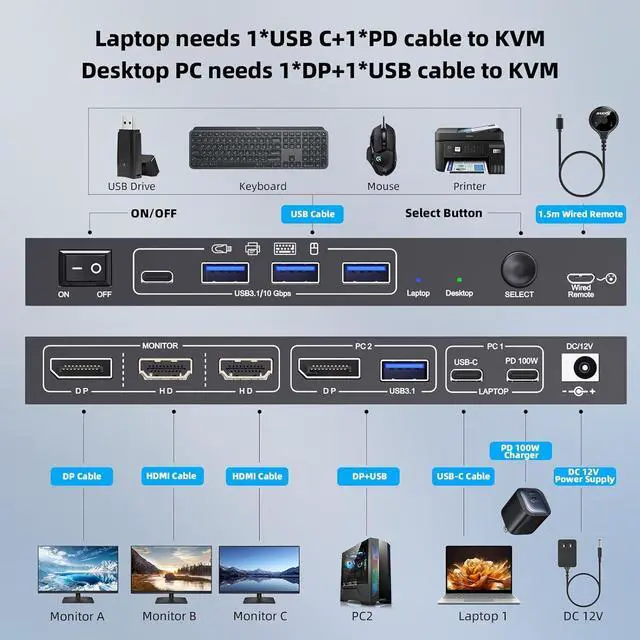
    • KVM Switch 3 Monitors for 1 Laptop and 1 Desktop Perfect for Home & Office: Triple Monitor KVM switch is designed to connect 1 laptop and 1 desktop to 3 shared monitors.
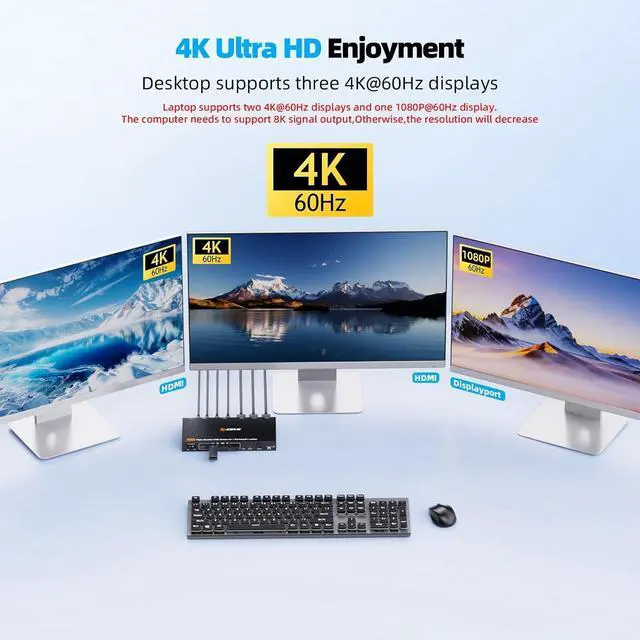
    • with 4K@60Hz & 1080P@60Hz Support: Experience crisp, high-resolution visuals across all 3 screens. KVM Switch 2 computers 3 Monitors (HDMI+HDMI+DP)supports triple 4K@60Hz when connected to a desktop, and 2x 4K@60Hz + 1x 1080P@60Hz with a laptop. Please note: Your computer needs to support 8K signal output to fully enable KVM switch setup for triple 4K@60Hz.
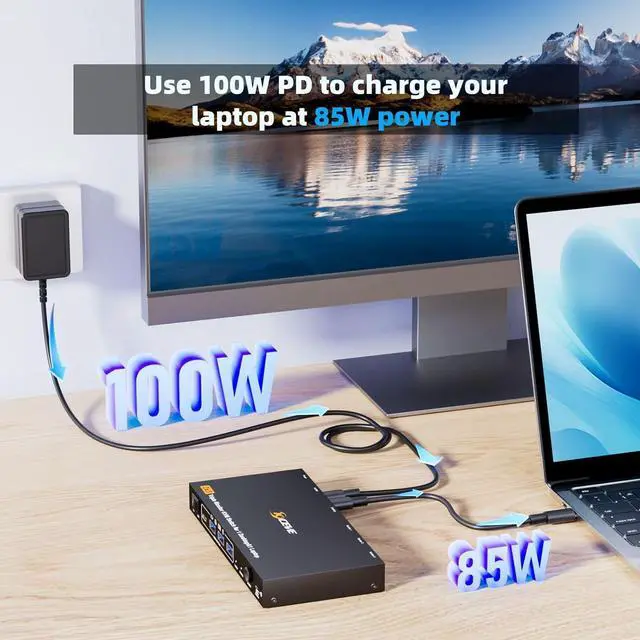
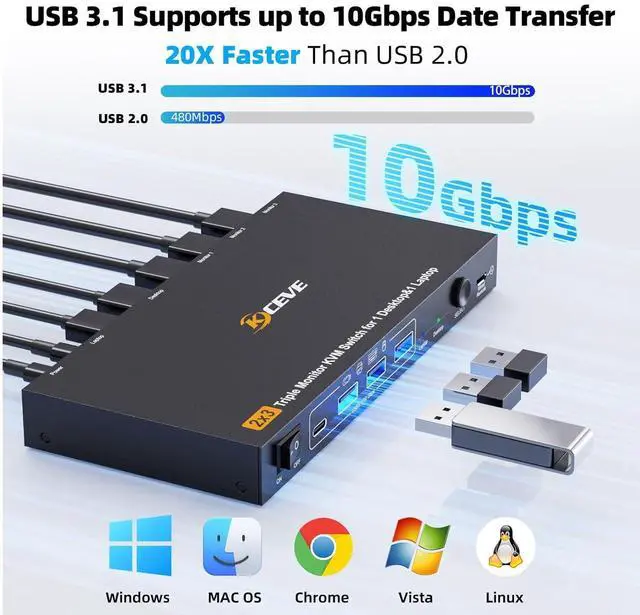
    • USB 3.1 with 10Gbps Speed & 100W PD for Laptop Charging: Equipped with USB 3.1 ports delivering up to 10Gbps data transfer, this KVM Switch also supports 100W Power Delivery to charge your laptop directly.
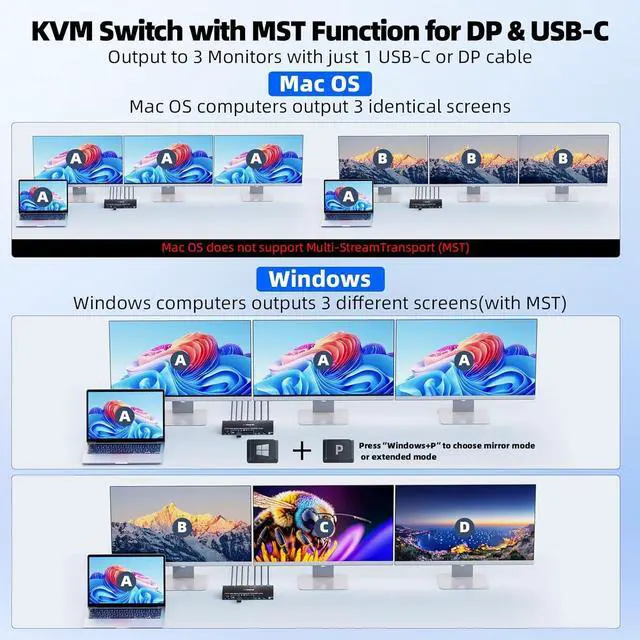
    • with MST Function for DP & USB-C, Enabling Flexible Triple Monitor Management: This KVM Switch features Multi-Stream Transport (MST) support. With MST, your laptop only needs 1 USB-C port and your desktop only needs 1 DisplayPort connection to drive all 3 displays.
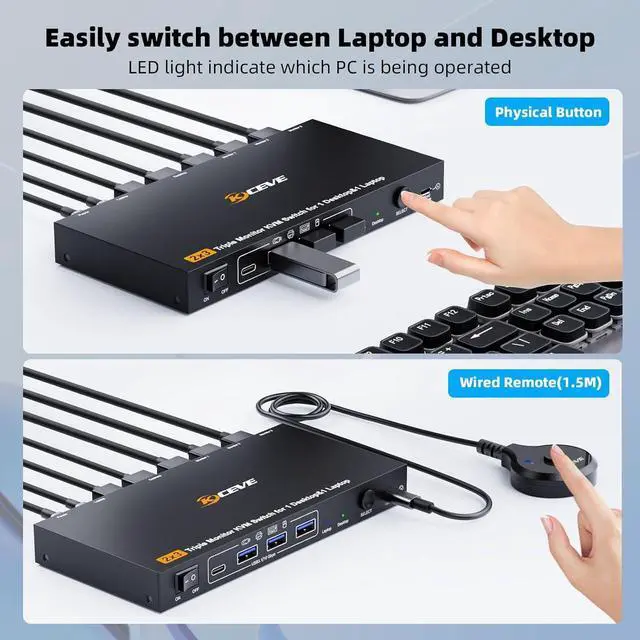
    • Two Switching Methods: Plug and Play, no driver required. Toggle between your laptop and desktop using the physical button on the KVM Switch Laptop and Desktop or the included wired remote. Driver-free for Windows 7/8/10/11/XP/Vista, Mac OS, Chrome,Linux, Unix and Ubuntu etc systems.
    • Supports Extended & Mirror Modes: Switch between extended mode (3 independent screens) and mirror mode (duplicated display) with a simple Windows + P shortcut.
    +
    +
    Overview
    Specs
    Reviews
    avatar

    Any questions? Our AI beta will help you find out quickly.

    USB C DP Triple Monitor KVM Switch for 1 Laptop 1 Desktop, USB 3.1 KVM Switch 3 Monitors 2 Computer


    3 Monitors KVM switch enables seamless switching between 1 Laptop and 1 Desktop, sharing 3 external monitors and 4 USB peripherals

    3 Monitors KVM switch enables seamless switching between 1 Laptop and 1 Desktop, sharing 3 external


    Supports expansion of mainstream systems with simultaneous output of 3 external displays.Supports triple 4K@60Hz when connected to a desktop.Support two 4K@60Hz and one 1080P@60Hz when connected to a laptop.

    Supports expansion of mainstream systems with simultaneous output of 3 external displays.Supports tr


    PD 100W | Connect PD 100W charger to provide 85W charging efficiency for laptop

    PD 100W | Connect PD 100W charger to provide 85W charging efficiency for laptop


    Switch via Button and 1.5m Wired Remote, 5-8 Seconds Response Time

    Switch via Button and 1.5m Wired Remote, 5-8 Seconds Response Time


    Supports 4 USB 3.1 ports with data transfer speeds up to 10Gbps

    Supports 4 USB 3.1 ports with data transfer speeds up to 10Gbps
    Supports 4 USB 3.1 ports with data transfer speeds up to 10Gbps
    Features
    1. KVM Switch 3 Monitors for 1 Laptop and 1 Desktop Perfect for Home & Office The Triple Monitor KVM switch is designed to connect 1 laptop and 1 desktop to 3 shared monitors. Whether youre in a home office or corporate workspace, this KVM Switch 3 Monitors 2 computers setup eliminates cable clutter and lets you seamlessly control both systems with one keyboard, mouse, and triple-display array. Ideal for professionals who use a company laptop alongside a desktop PC.
    2. KVM Switch 2 PC 3 Monitors with 4K@60Hz & 1080P@60Hz Support Experience crisp, high-resolution visuals across all three screens. The KVM Switch 2 computers 3 Monitors (HDMI+HDMI+DP)supports triple 4K@60Hz when connected to a desktop, and 2x 4K@60Hz + 1x 1080P@60Hz with a laptop. Please note: Your computer needs to support 8K signal output to fully enable KVM switch triple monitor setup for triple 4K@60Hz. Suitable for multi-screen multitasking in company offices and home desks.
    3. USB 3.1 with 10Gbps Speed & 100W PD for Laptop Charging Equipped with USB 3.1 ports delivering up to 10Gbps data transfer, this KVM Switch 3 Monitors 2 computers USB C HDMI DP also supports 100W Power Delivery to charge your laptop directly. Great for connecting peripherals and keeping your company laptop powered throughout the workday.
    4. KVM Switch 3 Monitor with MST Function for DP & USB-C, Enabling Flexible Triple Monitor ManagementThis KVM Switch 2 PC 3 Monitors features Multi-Stream Transport (MST) support. With MST, your laptop only needs one USB-C port and your desktop only needs one DisplayPort connection to drive all three displays. Simplifies connecting your laptop and desktop to three monitors. Please ensure both of your computers have sufficient bandwidth to output to three displays.
    5. Supports Extended & Mirror Modes Adapts to Your Workflow Switch between extended mode (three independent screens) and mirror mode (duplicated display) with a simple Windows + P shortcut. This triple monitor KVM switch pc and laptop setup is ideal for office, Multimedia teaching, and collaborative tasks in meeting rooms or personal workspaces.
    6. Two Switching Methods for Effortless Control Between 2 Computers Plug and Play, no driver required. Toggle between your laptop and desktop using the physical button on the KVM Switch Laptop and Desktop or the included wired remote. This KVM switch laptop and desktop design is perfect for users who frequently switch between personal desktop and company laptop in hybrid office environments. driver-free for Windows 7/8/10/11/XP/Vista, Mac OS, Chrome,Linux, Unix and Ubuntu etc systems
    7. Complete All-in-One Solution: 1 Laptop 1 PC 3 Monitor KVM Switch This KVM switch 3 monitor 1 laptop 1 desktop integrates everything you need: triple display support, high-speed USB 3.1, 100W charging, and MST. Whether youre in a home office or corporate setting, this KVM 2 computers 3 monitors system streamlines your workspace and boosts productivity.


    Warranty & Returns

    Warranty, Returns, And Additional Information

    Warranty

    • Please contact the Seller directly for warranty information. Warranty information may also be found on the Manufacturer's website.
    • CONTACT

    Return Policies

    Manufacturer Contact Info

    LOADING...