



• $249.99
  • Free 30-day Returns
  • Ships from China.
    Price alert
    Shop it at NeweggBusiness.

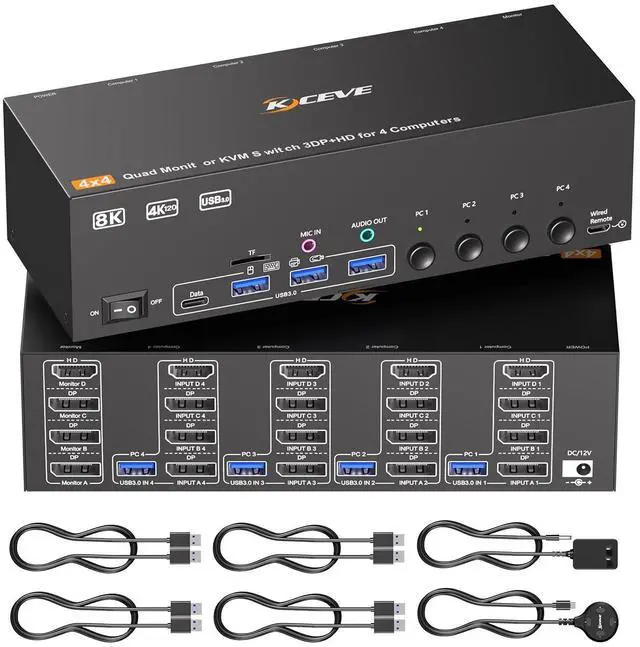
    Hitoor KVM Switch 4 Monitors 4 Computers, HDMI + 3 DisplayPort Quad Monitor KVM Switches, 8K@30Hz/4k@144Hz KVM Switch for 4 PC Share 4 Displays and 4 USB 3.0 Devices, Support Extended/Copy Mode

    Limited time offer, ends 05/16 By Smart Life Marketplace

    • 4 Monitors KVM Switch: This 4 monitors KVM switch is use for DisplayPort and HDMI ports device to share keyboard mouse and 4 monitor. When in copy mode the main screen can be copied to the second output screen. When in extend mode, the window from the main screen can be dragged to the second output screen. Noted: Each computer needs 3 displayport + 1 HDMI connection to make 4 monitors work. USB 3.0 cable must be connected to PC to make USB device (keybaord, mouse, hard driver) work.
    • Support 2 Switching Mode: This KVM switch support physical button and wired control. The wired control is upgraded, it's size is bigger and touch feel is more comfortable. By using the wired control you can hide the kvm switch under the table and keep the desk tidy.
    • Ultra HD 8k Visual Enjoyment: KVM switch for 4 monitors support high resolution of 8K@60Hz, please use 8K HDMI cable and 8K DP cable to achive 8k@60Hz resolution. To achieve 8k resolution please make sure that your monitor, computer, cables are all support 8K.
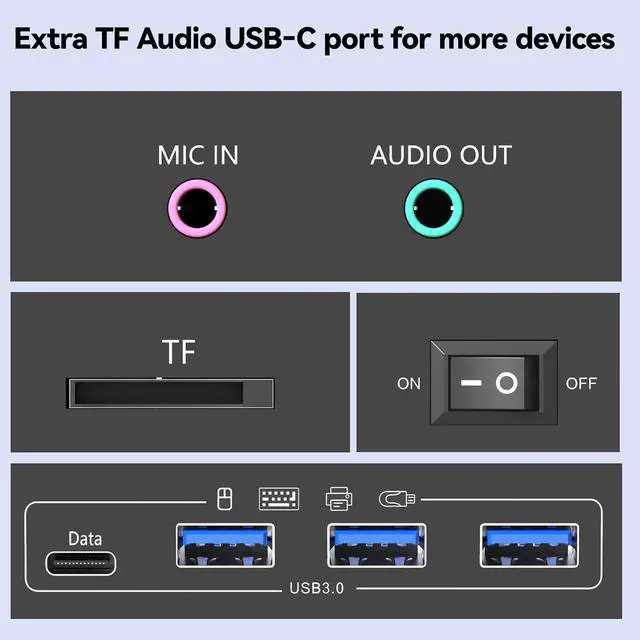
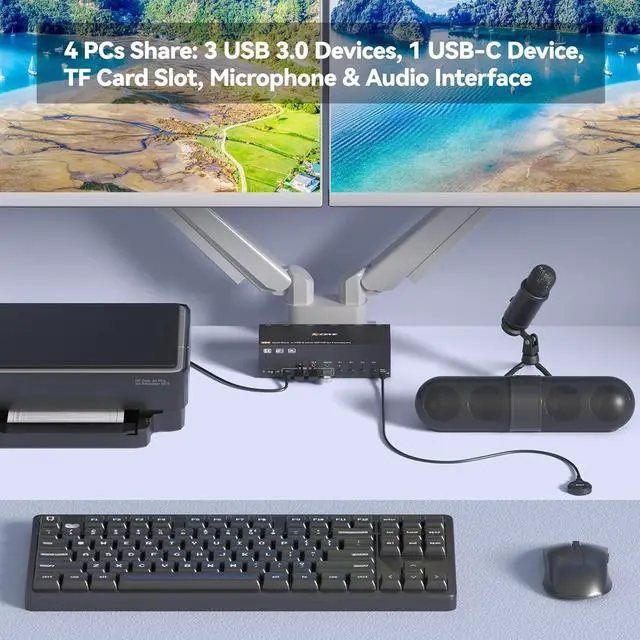
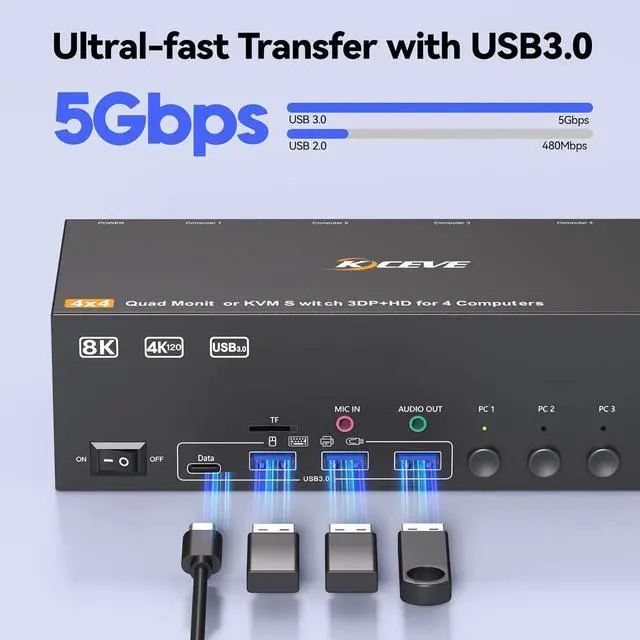
    • With 4 USB 3.0 USB Ports: This KVM switch with 4 USB 3.0 port for sharing mouse, keyboard, USB printers, scanners, etc,. USB 3.0 offers data transfer speeds of up to 5Gbps, while USB 2.0 offers data transfer speeds of only 480Mbps. Note: USB 3.0 cables must be connected to the computer, otherwise USB device can't be worked correctly.
    • Plug and play: Plug and play, drive-free, widely used in many occasions, such as office, conference, teaching, performance, live broadcast etc..
    +
    +
    Overview
    Specs
    Reviews
    avatar

    Any questions? Our AI beta will help you find out quickly.

    KVM Switch 4 Monitors 4 Computers, HDMI + 3 DisplayPort Quad Monitor KVM Switches


    This 3 Displayport+1 HDMI 4 monitor KVM switch is perfect for 4 computers to share 4 monitors and 4 USB 3.0 devices.

    This 3 Displayport+1 HDMI 4 monitor KVM switch is perfect for 4 computers to share 4 monitors and 4


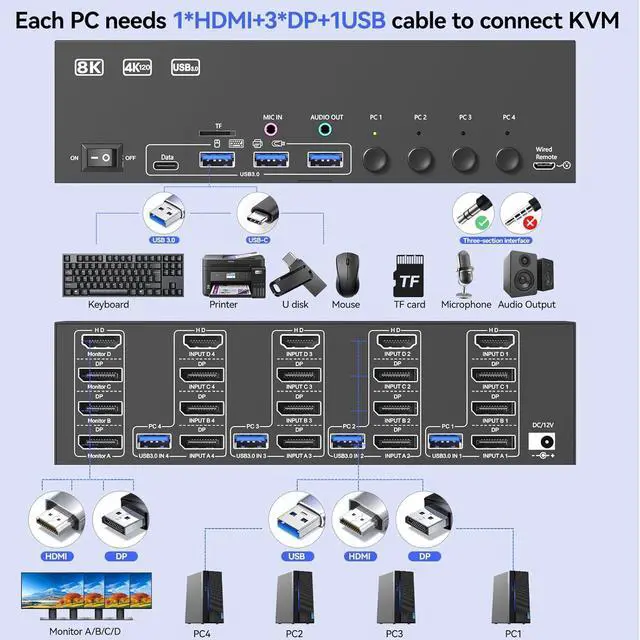
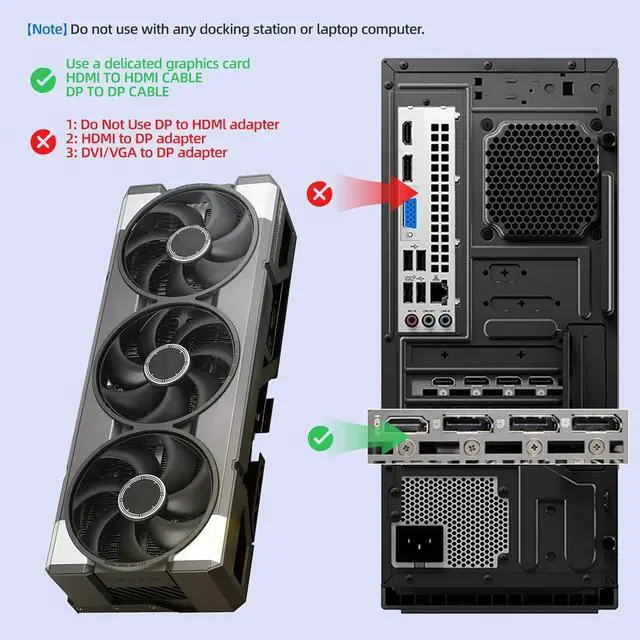
    To make 4 monitors working, each computer will need 1 HDMI cable + 3 DP cables + 1 USB cable connection. Please buy good HDMI and DP cable yourself, if HDMI cable and DP cable is not good enough, the screen will flicker or unstable.

    To make 4 monitors working, each computer will need 1 HDMI cable + 3 DP cables + 1 USB cable connect


    At least 1 or 2 USB 3.0 cable must be connected to the computer, otherwise USB devices such as mice and keyboards will not function properly

    At least 1 or 2 USB 3.0 cable must be connected to the computer, otherwise USB devices such as mice


    By using the wired control you can hide the kvm switch under the table and keep the desk tidy.

    By using the wired control you can hide the kvm switch under the table and keep the desk tidy.
    By using the wired control you can hide the kvm switch under the table and keep the desk tidy.
    By using the wired control you can hide the kvm switch under the table and keep the desk tidy.

    Please connect the 12V DC power adapter to provide sufficient power. Using a shorter 8K HDMI + DP cable can make the KVM switch more stable (It is recommended not to exceed 2 meters).

    Please connect the 12V DC power adapter to provide sufficient power. Using a shorter 8K HDMI + DP ca
    Please connect the 12V DC power adapter to provide sufficient power. Using a shorter 8K HDMI + DP ca
    Please connect the 12V DC power adapter to provide sufficient power. Using a shorter 8K HDMI + DP ca
    Please connect the 12V DC power adapter to provide sufficient power. Using a shorter 8K HDMI + DP ca
    Please connect the 12V DC power adapter to provide sufficient power. Using a shorter 8K HDMI + DP ca
    Features
    1. 4 Monitors KVM Switch is ComingThis 4 monitors KVM switch is designed by our team, it is use for DisplayPort and HDMI ports device to share keyboard mouse and 4 monitor. When in copy mode the main screen can be copied to the second output screen. When in extend mode, the window from the main screen can be dragged to the second output screen. Noted: Each computer needs 3 displayport + 1 HDMI connection to make 4 monitors work. USB 3.0 cable must be connected to PC to make USB device (keybaord, mouse, hard driver) work.
    2. Support 2 Switching ModeThis KVM switch 4 monitors 4 computers support physical button and wired control. The wired control is upgraded, it's size is bigger and touch feel is more comfortable. By using the wired control you can hide the kvm switch under the table and keep the desk tidy.
    3. Ultra HD 8k Visual Enjoyment8K HDMI displayport kvm switch for 4 monitors support high resolution of 8K@60Hz, please use 8K HDMI cable and 8K DP cable to achive 8k@60Hz resolution. To achieve 8k resolution please make sure that your monitor, computer, cables are all support 8K.
    4. With 4 USB 3.0 USB PortsThis DisplayPort HDMI 4 monitors KVM switch with 4 USB 3.0 port for sharing mouse, keyboard, USB printers, scanners, etc,. USB 3.0 offers data transfer speeds of up to 5Gbps, while USB 2.0 offers data transfer speeds of only 480Mbps. Note: USB 3.0 cables must be connected to the computer, otherwise USB device can't be worked correctly.
    5. Plug and playPlug and play, drive-free, widely used in many occasions, such as office, conference, teaching, performance, live broadcast, home theater, etc. It will be our great honner if you purchase the kvm switch from us, we provide one year professional warranty, please feel free to contact with us if you have any questions.


    Warranty & Returns

    Warranty, Returns, And Additional Information

    Warranty

    • Please contact the Seller directly for warranty information. Warranty information may also be found on the Manufacturer's website.
    • CONTACT

    Return Policies

    Manufacturer Contact Info

    LOADING...