• $149.99
  • Free 45-day Returns
  • Ships from China.
    Price alert
    Shop it at NeweggBusiness.

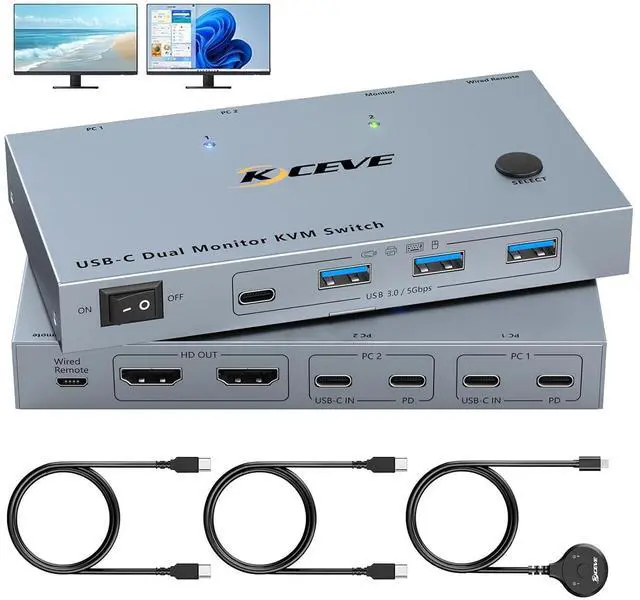
    SMA USB-C KVM Switch 2 Monitors 2 Laptops 4K@60Hz, USB C KVM Switch Dual Monitor HDMI for 2 laptops to Share 2 Monitor and 4 USB3.0 Devices, 80W PD Charging, Wired Remote and Cables Included

    Limited time offer, ends 06/20 By Smart Electronic Marketplace

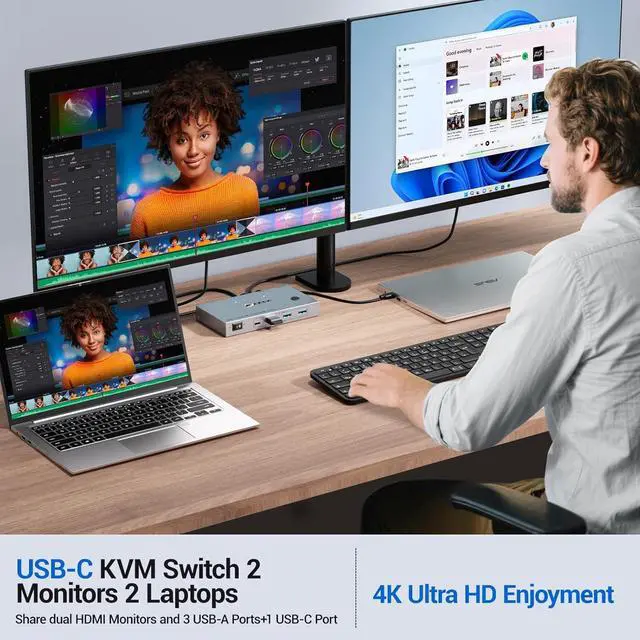
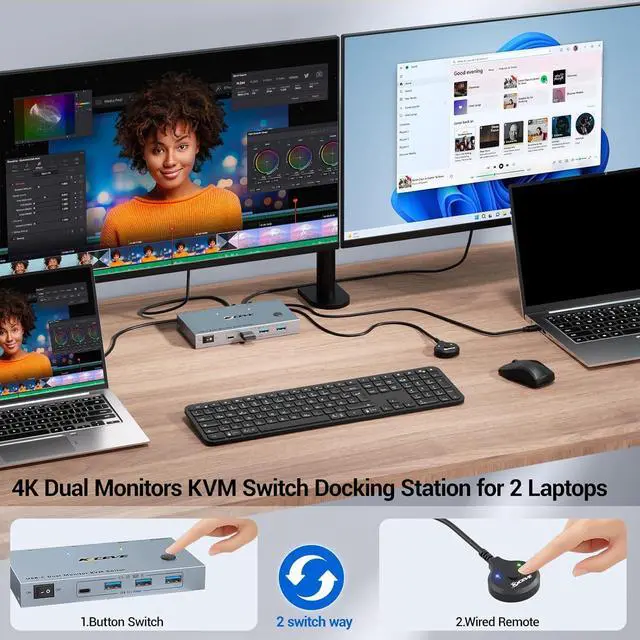
    • USB C KVM Switch 2 Laptops 2 Monitors: The KVM switch allows 2 laptops share 2 monitors and 4 USB devices, such as keyboard, mouse, printer and so on. Dual Monitor KVM switch with usb c supports up to 4K@60Hz, 2K@144Hz /120Hz resolutions and is backward compatible. Note: Mac OS cant output extended dual screens.
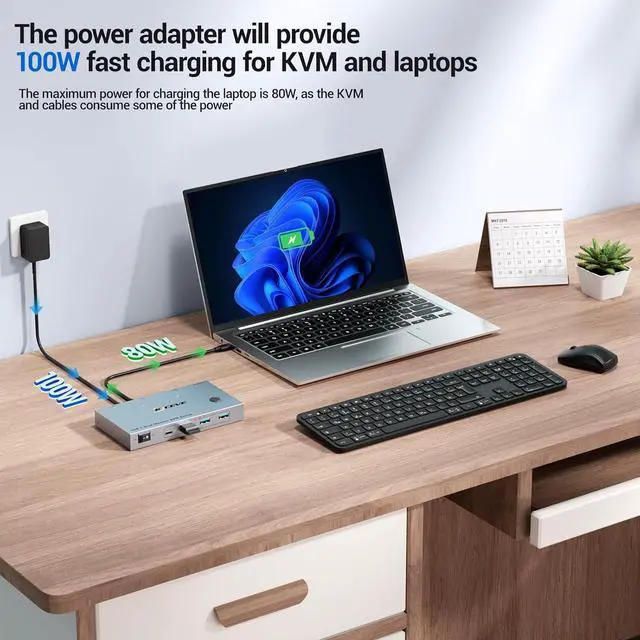
    • PD 80W Fast Charging: KVM Switch comes with a USB-C PD 80W power port, which can provide enough power for your laptop during use and eliminates the hassle of occupied USB-C charging ports!---Meanwhile can ensure the unit works more stably.
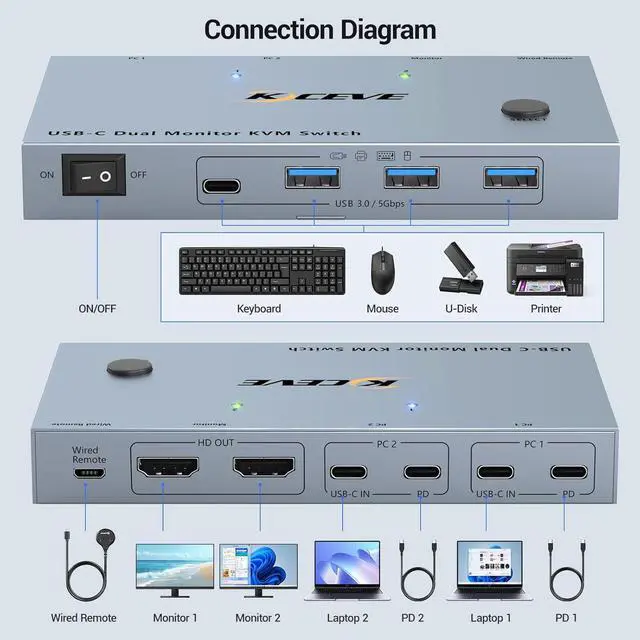
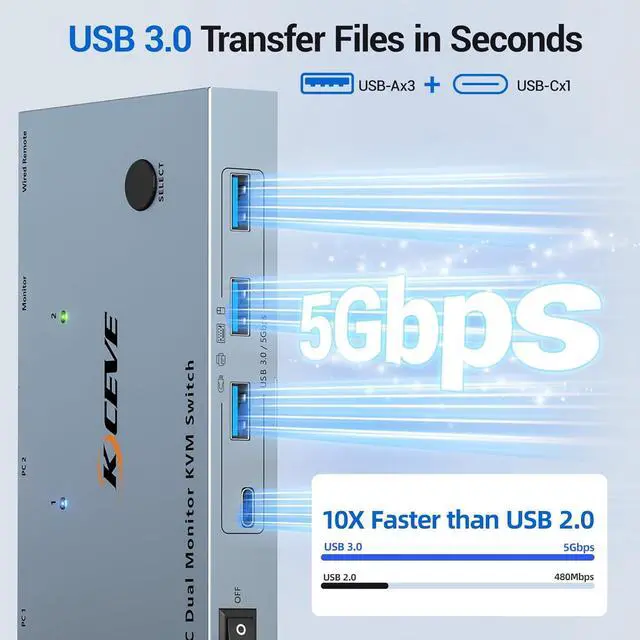
    • 5Gbps Ultra-fast Transfer: USB 3.0 KVM 2 laptops switch transfer files in Seconds. USB-C KVM switches equipped with 4 USB 3.0 ports (3 USB-A Ports +1 USB-C Port) for 2 laptops to share USB devices such as keyboard, mouse, printer, etc., speed up to 5Gbps for data transfer.
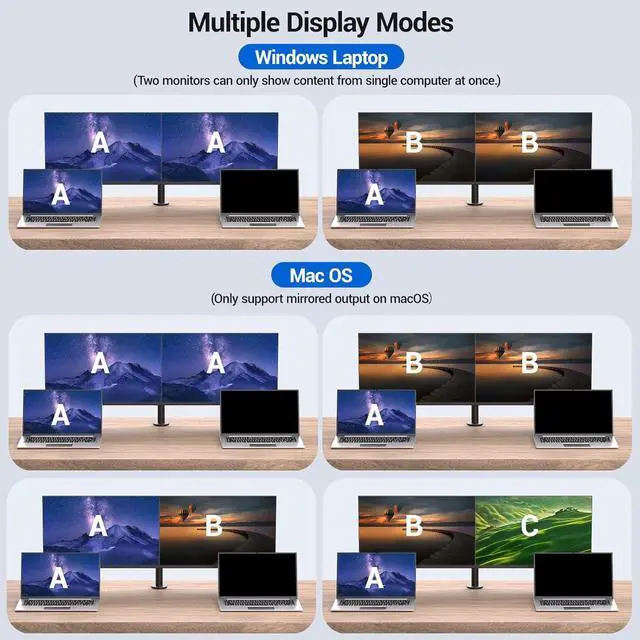
    • Support Different Display Modes: MacOS (M1, M2) system ONLY supports SST mode, which means both monitors will show the same image. Windows system dual monitors support MST (multi-stream transport) mode so two monitors can display the same or different content simultaneously. (NOTE: MacOS system cannot support extended)
    • Please Attention: 1, Please ENSURE it is connected to the power source for charging when using. 2, Please check the laptop is awakened from sleep mode before you switch. 3, Ensure that the connected laptop has a fully functional USB-C port. 4, MacOS doesn't support MST, so it cannot support extended laptop
    +
    +
    Overview
    Specs
    Reviews
    avatar

    Any questions? Our AI beta will help you find out quickly.

    USB C HDMI KVM Switch 2 Monitors 4K@60Hz for 2 Laptops

    USB C KVM switch dual monitor allows 2 laptops to share dual monitors and 4 USB 3.0 devices such as


    USB C KVM switch dual monitor allows 2 laptops to share dual monitors and 4 USB 3.0 devices such as a set of keyboard, mouse, hard drives, U disk, and printer. Supports mirror mode and extended mode.

    Core Advantages and Features of Dual monitors KVM Switch USB C      Wide System Compatibility: Our
    Core Advantages and Features


    1. Wide System Compatibility: Our KVM Switch for 2 Laptops perfectly compatible with various computer operating systems, including Windows (Vista/XP and later versions), Mac OS, Linux, Unix, etc. No additional drivers need to be installed, enabling more convenient cross-system use.
    2. Multi Device Input Support: USB C HDMI KVM Switch can connect to a variety of input devices such as PCs, laptops, Raspberry Pi, Digital Video Recorders (DVR), Network Video Recorders (NVR), etc. It is suitable for different scenarios like offices, gaming, meetings, and meets diverse usage needs.
    3. Two Display Modes Switching: KVM Switch 2 Laptops usb c supports extended mode and mirror mode output. Press the "Windows+p" key combination to switch quickly. (Not: MacOS (M1, M2) system ONLY supports SST mode, so it cannot support extended laptop)

    4. Ultra-HD Image Quality Output: USB C KVM Switch 2 monitors 2 laptops supports ultra-high-definition resolutions of 4K, and is backward compatible with lower resolutions. It presents delicate and clear picture effects, bringing an immersive visual experience.

    5. High-Speed USB Expansion and Transmission: Dual Monitor KVM Switch USB C equipped with 4 USB 3.0 ports, it can share USB peripherals such as mice, keyboards, and scanners. At the same time, it supports a high-speed USB 3.0 data transmission rate of up to 5 Gbps, making peripheral connection and file transmission more efficient.

    Ultra-HD Image Quality Output: USB C KVM Switch 2 monitors 2 laptops supports ultra-high-definition
    Ultra-HD Image Quality Output: USB C KVM Switch 2 monitors 2 laptops supports ultra-high-definition
    Ultra-HD Image Quality Output: USB C KVM Switch 2 monitors 2 laptops supports ultra-high-definition
    Ultra-HD Image Quality Output: USB C KVM Switch 2 monitors 2 laptops supports ultra-high-definition
    Ultra-HD Image Quality Output: USB C KVM Switch 2 monitors 2 laptops supports ultra-high-definition
    Ultra-HD Image Quality Output: USB C KVM Switch 2 monitors 2 laptops supports ultra-high-definition
    Features
    1. USB C KVM Switch 2 Laptops 2 MonitorsThe USB C KVM switch dual monitor allows 2 laptops share 2 monitors and 4 USB devices, such as keyboard, mouse, printer and so on. Dual Monitor KVM switch with usb c supports up to 4K@60Hz, 2K@144Hz /120Hz resolutions and is backward compatible.Note: Mac OS cant output extended dual screens.
    2. PD 80W Fast ChargingUSB C KVM Switch 2 computers 2 monitors comes with a USB-C PD 80W power port, which can provide enough power for your laptop during use and eliminates the hassle of occupied USB-C charging ports!---Meanwhile can ensure the unit works more stably.
    3. 5Gbps Ultra-fast TransferUSB 3.0 KVM 2 laptops switch transfer files in Seconds. USB-C KVM switches equipped with 4 USB 3.0 ports (3 USB-A Ports +1 USB-C Port) for 2 laptops to share USB devices such as keyboard, mouse, printer, etc., speed up to 5Gbps for data transfer.
    4. Support Different Display ModesMacOS (M1, M2) system ONLY supports SST mode, which means both monitors will show the same image. Windows system dual monitors support MST (multi-stream transport) mode so two monitors can display the same or different content simultaneously. (NOTE: MacOS system cannot support extended)
    5. What You Will Get USB C KVM Switch, 2 USB C cable for audio and video signal transmission, 1 wired controller, instruction manual. If you have any questions, please contact us and we will be happy to assist you.
    6. Please Attention1, Please ENSURE it is connected to the power source for charging when using. 2, Please check the laptop is awakened from sleep mode before you switch. 3, Ensure that the connected laptop has a fully functional USB-C port. 4, MacOS doesn't support MST, so it cannot support extended laptop


    Warranty & Returns

    Warranty, Returns, And Additional Information

    Warranty

    • Please contact the Seller directly for warranty information. Warranty information may also be found on the Manufacturer's website.
    • CONTACT

    Return Policies

    Manufacturer Contact Info

    LOADING...