Your Browsing History
- Free 30-day Returns
$63.89
Ships from China.
Meet Your Seller
Vszerda 2x1 USB C KVM Switch 8K@60Hz 4K@120Hz, 2 Port Type C KVM Switch for 2 Computers Share 1 Monitor (HDMI or DP Output), USB C KCM with 4 USB 2.0 Ports, 2 USB-C Cables Included
Limited time offer, ends 07/22 By YuXuan Technology
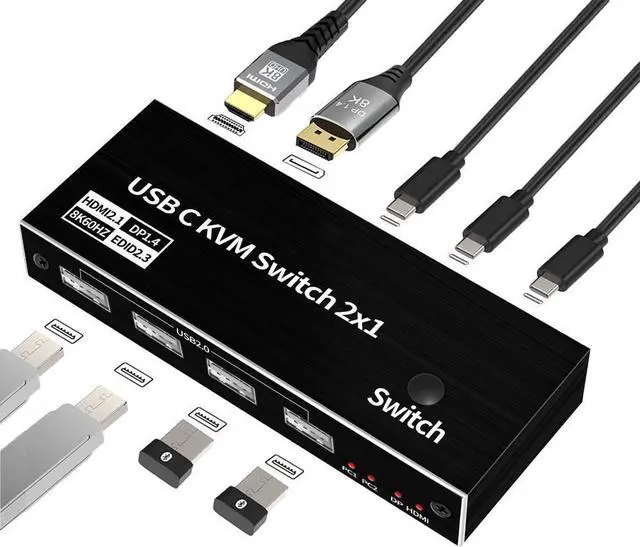
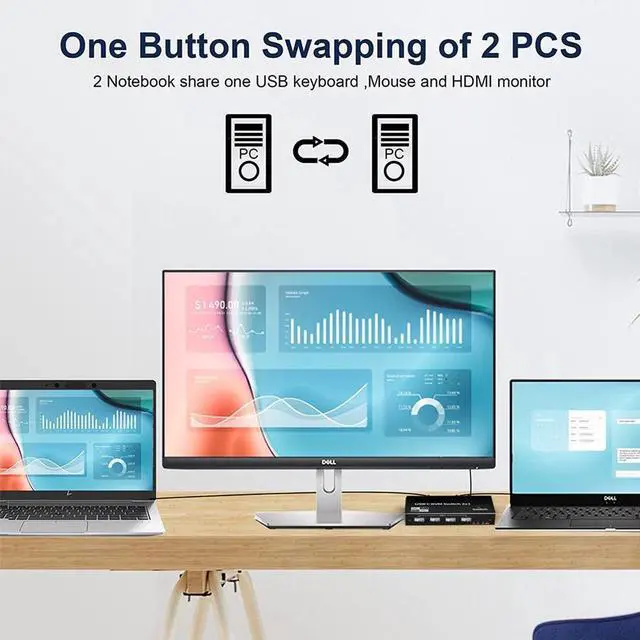
- 8K USB C KVM Switch allows you to share one USB keyboard, USB mouse,2 x USB 2.0 device and one Displayport or HDMI monitor to control 2 Macbook,computers, laptops, game consoles.
- It is designed for multitask with two computers at your necessary, increasing productivity in the office or at home ; You can switch between 2 computers using a manual switch located on the top of the KVM unit.
- Widely used in many occasions:Our This USB-C Switch is easy to use and can be widely used in Studying, Entertainment, Work and other Occasions, ultra-High-Definition Smooth Video and Picture Quality Experience, Multi-source Switching, providing multiple possibilities for work and entertainment
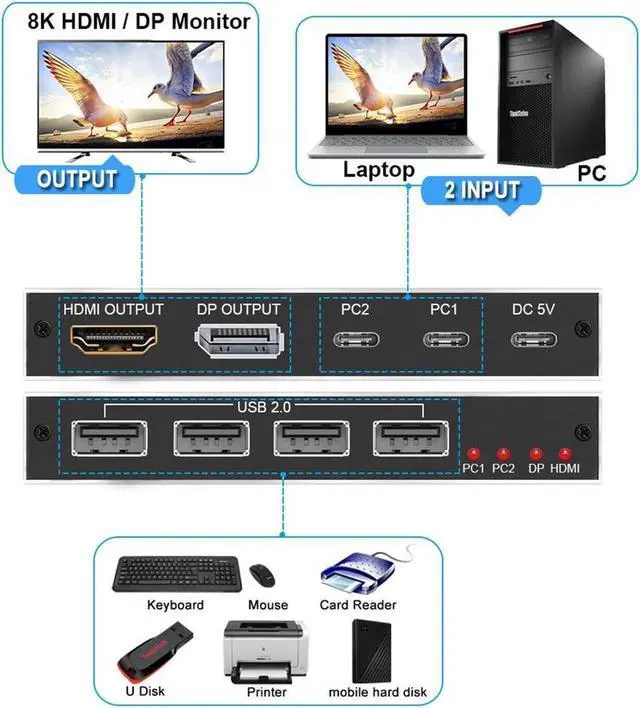
- Input Port: 2 x USB Type C Female Port for USB-C PC Input,1xUSB Type-C Female for Power
- Output Port: 1 x DP Female Port,1x HDMI Female Port,4 x USB 2.0 A Female Port
+
+
Overview
Specs
Reviews
Any questions? Our AI beta will help you find out quickly.
Try me now
8K USB C KVM SWITCH
Displayport 1.4, HDMI 2.1 and HDCP 2.3, 8K@60Hz 4K@120/144Hz 2 port Thunderbolt 4 USB C KVM switch with 4 x USB 2.0 port, support
RGB/YUV 4:4: 4, One-button Switching, HDMI / DP out to be selected by yourself, Not support HotKey switch and PD charge.
Features:
2xUSB-C 8K KVM Switch with one DisplayPort 1.4 or HDMI 2.1 Port for Video, with this 2 Port 8K KVM Switcher, you are able to connect from the switcher's two PC Input Port to your USB-C PC/Laptops via two standard USB-C Gen-2 Cable, then connect from the switcher's Standard DP 1.4 /HDMI 2.1 port to your Monitors via your own displayport 8K Standard Cable, you can press the "Switch"button to switch between two of your PCs.
Note: You must plug our USB C to USB A cable to power the switcher while working
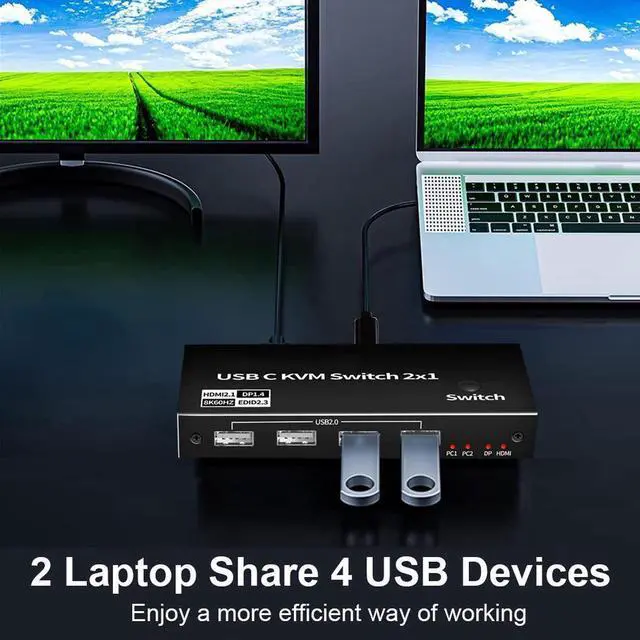
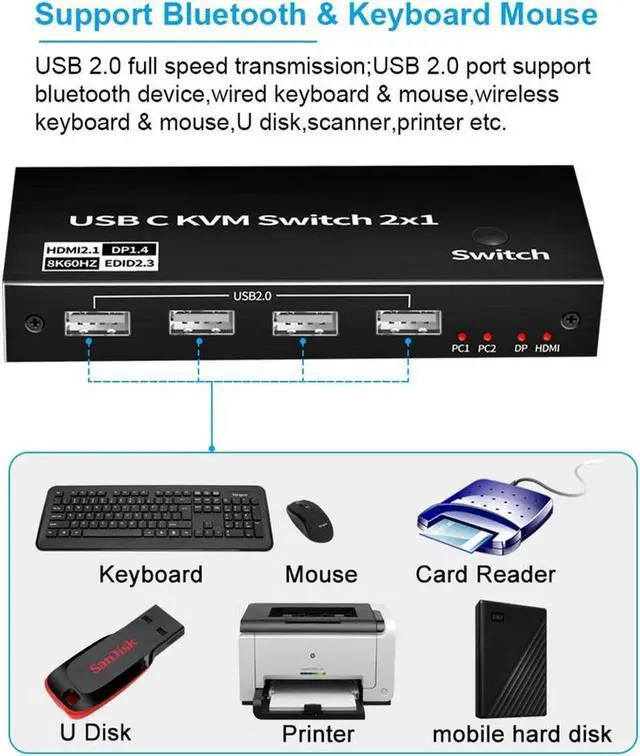
With 4 x USB 2.0 Output Port, two Computers share one set, you can connect 4xUSB 2.0 Output to your USB Mouse, Keyboard, Printer, Disks, or other usb devices, while you switch from one PC to another PC, Your USB device will be synced to your external display without pluging and unpluging the related USB device repeatedly. The USB Port supports the USB 2.0
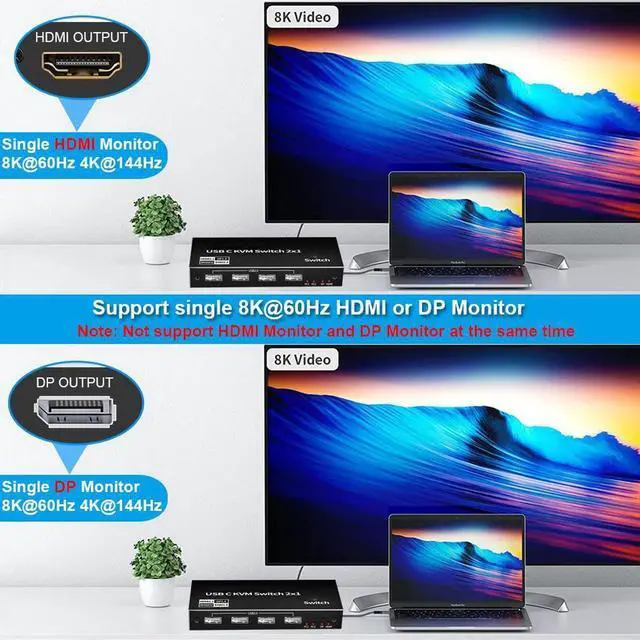
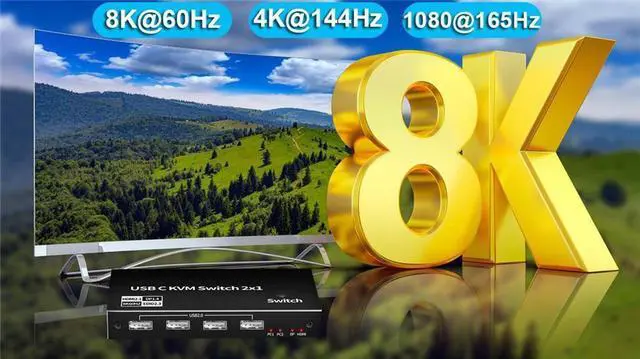
DisplayPort 1.4 or HDMI 2.1 Video Output, with this switch, you can max output 8K@60Hz 4K@144Hz resolution in your external DisplayPort/HDMI Monitors, This requires that your USB-C pc and HDMI/DisplayPort cable Monitors should both supports the max resolution you would like to output, that is, your computer's USB-C port should be thunderbolt 4 and Monitor's DP/HDMI Port should be select(Note: HDMI and DP port could not display at the same time, only support single monitor). If laptops with usb-c Gen-2 Port or Thunderbolt 3 Port, it can only max up to 4K@60Hz
This USB-C KVM switch equipped with two USB-C Gen-2 Cable as accessories to connect your USB-C Laptops, meanwhile, it includes a USB-A to USB-C Cabler for Power. With Multiple USB Ports, solved the problems of insufficient USB Interface, Two computers share one screen, and connect USB devices such as mouse and keyboard synchronously.
Notes: The PC1 Input and PC2 Input only connect to your USB-C PC, these two ports are forbidden to connect to your USB-C Hub
Widely used in many occasions: Our This USB-C Switch is easy to use and can be widely used in Studying, Entertainment, Work and other Occasions, ultra-High-Definition Smooth Video and Picture Quality Experience, Multi-source Switching, providing multiple possibilities for work and entertainment
Input Port: 2 x USB Type C Female Port for USB-C PC Input, 1xUSB Type-C Female for Power
Output Port: 1 x DP Port, 1x HDMI Port, 4 x USB 2.0 Port
Bandwidth: DP
1.4: 32.4G bps /
HDMI 2.1: 48Gbps / USB 2.0: 480Mbps
Resolution:
HDMI/DP: 1080P@60Hz/120Hz/165Hz, 4K@60/120Hz/144Hz (DSC), 8K@30, 8K@60Hz (DSC)
DP Deep Color: 8bit / 10bit / 12bit
Chroma:
4:2: 0 / 4:2: 2 / 4:4: 4
Cable Length: 2.0 m Max(Standard 8K DP/HDMI cable)
Extra Power: Required, via a USB A to USB-C Cable to your USB Devices or Power Adapter
Accessories: 2x 1.2 meter USB-C 3.1 Gen-2 Cable; 1xUSB A to USB C Power Cable; User Manual
USB-C Standard: Thunderbolt 3 /USB-C Gen 2 max supports 4K@60Hz, Thunderbolt 4 max supports 8K@60Hz, Select single HDMI or DP monitor
HDMI Standard: HDMI 2.1 and HDCP 2.3, if USB-C Ports supports Thunderbolt 4, Select single HDMI monitor with 4K@120/144Hz, 8K@60Hz
DP Standard: DisplayPort Standard 1.4 Alternate Mode, if USB-C Ports supports Thunderbolt 4, Select single DP monitor with 4K@120/144Hz, 8K@60Hz
Notes while using:
If your USB-C laptops with USB-C/Thunderbolt 3 Port, you can max output 4K/60Hz in your Displays. If USB-C Laptops with Thunderbolt 4 Port and your Monitors support DP 1.4 or HDMI 2.1, then you can max output 4K@144Hz(Your dp/hdmi cable, your usb-c cable and your dp/hdmi monitors should supports 4K@144Hz).
While connecting, you should power the switch via our attached USB-A to
USB-C Cable. 3: We do not suggest to connect to Phone and Tablet.
HDMI and DP port could not display image at the same time, only support single monitor
Package contents
1 x USB C Thunderbolt 4 KVM Switch
2 x 1.2 meter USB Gen 2 Cable (Type C to Type C)
1 x User Manual

Displayport 1.4, HDMI 2.1 and HDCP 2.3, 8K@60Hz 4K@120/144Hz 2 port Thunderbolt 4 USB C KVM switch with 4 x USB 2.0 port, support
RGB/YUV 4:4: 4, One-button Switching, HDMI / DP out to be selected by yourself, Not support HotKey switch and PD charge.
Features:
2xUSB-C 8K KVM Switch with one DisplayPort 1.4 or HDMI 2.1 Port for Video, with this 2 Port 8K KVM Switcher, you are able to connect from the switcher's two PC Input Port to your USB-C PC/Laptops via two standard USB-C Gen-2 Cable, then connect from the switcher's Standard DP 1.4 /HDMI 2.1 port to your Monitors via your own displayport 8K Standard Cable, you can press the "Switch"button to switch between two of your PCs.
Note: You must plug our USB C to USB A cable to power the switcher while working
With 4 x USB 2.0 Output Port, two Computers share one set, you can connect 4xUSB 2.0 Output to your USB Mouse, Keyboard, Printer, Disks, or other usb devices, while you switch from one PC to another PC, Your USB device will be synced to your external display without pluging and unpluging the related USB device repeatedly. The USB Port supports the USB 2.0
Specifications
and the transfer rate is 480MbpsDisplayPort 1.4 or HDMI 2.1 Video Output, with this switch, you can max output 8K@60Hz 4K@144Hz resolution in your external DisplayPort/HDMI Monitors, This requires that your USB-C pc and HDMI/DisplayPort cable Monitors should both supports the max resolution you would like to output, that is, your computer's USB-C port should be thunderbolt 4 and Monitor's DP/HDMI Port should be select(Note: HDMI and DP port could not display at the same time, only support single monitor). If laptops with usb-c Gen-2 Port or Thunderbolt 3 Port, it can only max up to 4K@60Hz
This USB-C KVM switch equipped with two USB-C Gen-2 Cable as accessories to connect your USB-C Laptops, meanwhile, it includes a USB-A to USB-C Cabler for Power. With Multiple USB Ports, solved the problems of insufficient USB Interface, Two computers share one screen, and connect USB devices such as mouse and keyboard synchronously.
Notes: The PC1 Input and PC2 Input only connect to your USB-C PC, these two ports are forbidden to connect to your USB-C Hub
Widely used in many occasions: Our This USB-C Switch is easy to use and can be widely used in Studying, Entertainment, Work and other Occasions, ultra-High-Definition Smooth Video and Picture Quality Experience, Multi-source Switching, providing multiple possibilities for work and entertainment
Specifications
Input Port: 2 x USB Type C Female Port for USB-C PC Input, 1xUSB Type-C Female for Power
Output Port: 1 x DP Port, 1x HDMI Port, 4 x USB 2.0 Port
Bandwidth: DP
1.4: 32.4G bps /
HDMI 2.1: 48Gbps / USB 2.0: 480Mbps
Resolution:
HDMI/DP: 1080P@60Hz/120Hz/165Hz, 4K@60/120Hz/144Hz (DSC), 8K@30, 8K@60Hz (DSC)
DP Deep Color: 8bit / 10bit / 12bit
Chroma:
4:2: 0 / 4:2: 2 / 4:4: 4
Cable Length: 2.0 m Max(Standard 8K DP/HDMI cable)
Extra Power: Required, via a USB A to USB-C Cable to your USB Devices or Power Adapter
Accessories: 2x 1.2 meter USB-C 3.1 Gen-2 Cable; 1xUSB A to USB C Power Cable; User Manual
USB-C Standard: Thunderbolt 3 /USB-C Gen 2 max supports 4K@60Hz, Thunderbolt 4 max supports 8K@60Hz, Select single HDMI or DP monitor
HDMI Standard: HDMI 2.1 and HDCP 2.3, if USB-C Ports supports Thunderbolt 4, Select single HDMI monitor with 4K@120/144Hz, 8K@60Hz
DP Standard: DisplayPort Standard 1.4 Alternate Mode, if USB-C Ports supports Thunderbolt 4, Select single DP monitor with 4K@120/144Hz, 8K@60Hz
Notes while using:
If your USB-C laptops with USB-C/Thunderbolt 3 Port, you can max output 4K/60Hz in your Displays. If USB-C Laptops with Thunderbolt 4 Port and your Monitors support DP 1.4 or HDMI 2.1, then you can max output 4K@144Hz(Your dp/hdmi cable, your usb-c cable and your dp/hdmi monitors should supports 4K@144Hz).
While connecting, you should power the switch via our attached USB-A to
USB-C Cable. 3: We do not suggest to connect to Phone and Tablet.
HDMI and DP port could not display image at the same time, only support single monitor
Package contents
1 x USB C Thunderbolt 4 KVM Switch
2 x 1.2 meter USB Gen 2 Cable (Type C to Type C)
1 x User Manual
Warranty & Returns
Warranty, Returns, And Additional Information
Warranty
- Please contact the Seller directly for warranty information. Warranty information may also be found on the Manufacturer's website.
- CONTACT
Return Policies
- Return for refund within: 30 days
- Return for replacement within: 30 days
- This item is covered by YuXuan Technology Return Policy
Manufacturer Contact Info
- For a directory of all our manufacturers, please click below.
- Manufacturers Directory
LOADING...