Your Browsing History
- Free 30-day Returns
$299.89
Ships from China.
Meet Your Seller
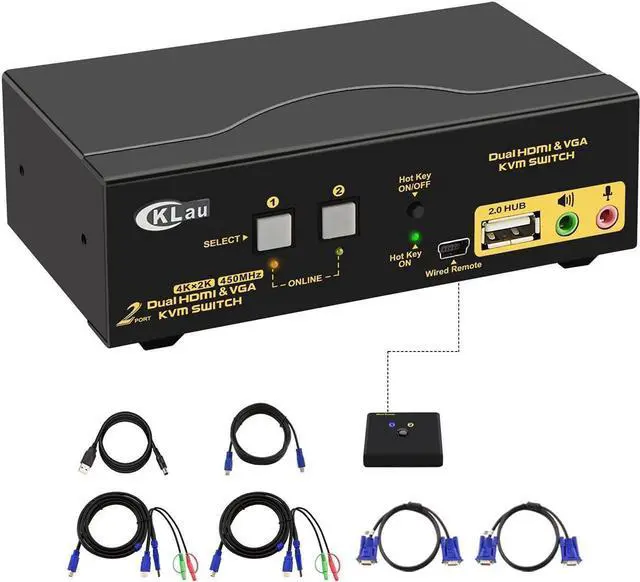
2 Port HDMI + VGA Dual Monitor KVM Switch with Audio, Microphone, USB 2.0 Hub and Cables Support 4Kx2K@30Hz
Limited time offer, ends 07/22 By YuXuan Technology
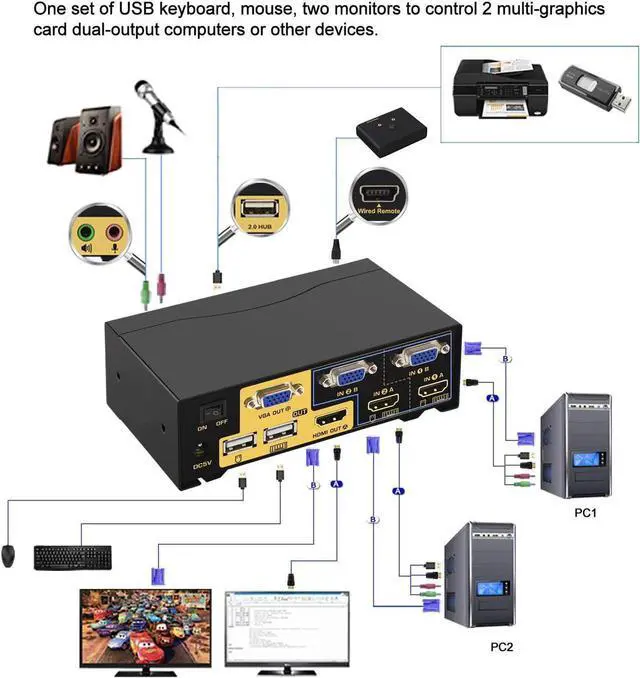
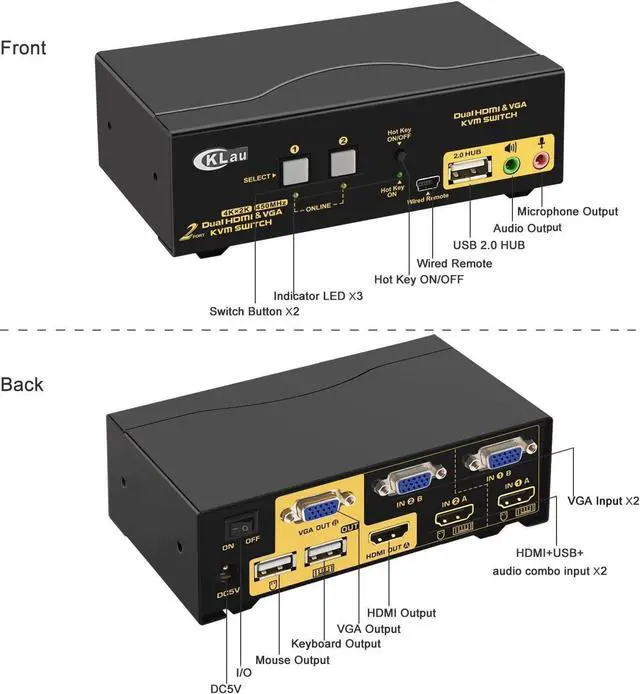
- KVM Swith 2 Port Dual Monitors: one set of USB keyboard, mouse and 2 monitors control 2 multi graphic-card HDMI+VGA computers. With audio and microphone output, USB 2.0 Hub, cables and wire remote push button switch.
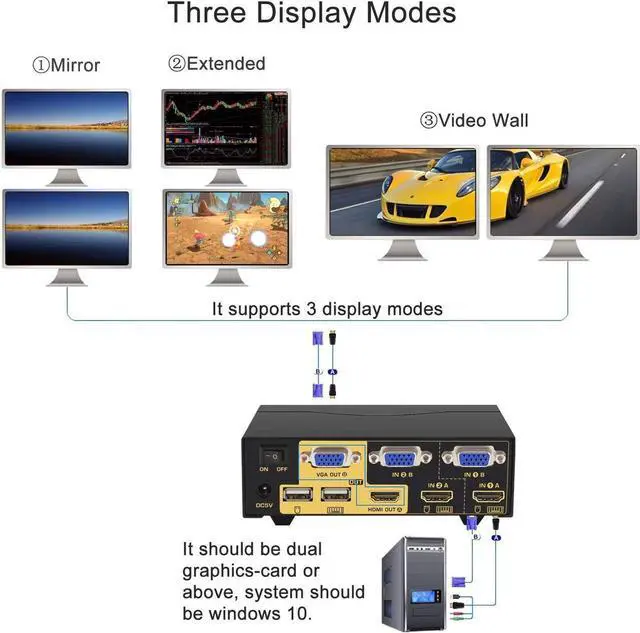
- Support Three Display Modes: extended display, mirror display and video wall display.
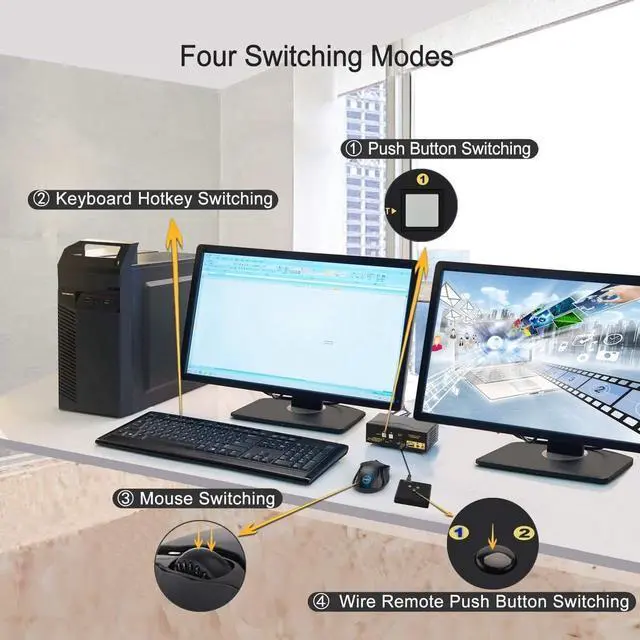
- Support Four Switching Modes: button switching, mouse switching, keyboard hot-key switching and wire remote push button switching(tips: button switching and wire remote push button switching can't be using together).
- Certified HDMI Adopter: we are certified HDMI adopter over 10 years. Compatible Windows 10/7/2000/XP/Vista, Linux, Unix, Mac, Debian, Ubuntu, Fedora, Raspbian, Ubuntu, etc.
- Resolution Compatible: HDMI monitor compatible 3840x2160@30Hz, 1080P, 1080P 3D, 1080I, 720P, 576P, 576I, 480P, 480I. VGA monitor max resolution 2048x1536@60HZ, compatible lower resolution. 12 months warranty.
+
+
Overview
Specs
Reviews
Any questions? Our AI beta will help you find out quickly.
Try me now
Dual Monitor KVM Switch Dual Monitor HDMI KMV Switches KVM Dual Monitor KVM for Mac KVM Switch USB 3.0 KVM Switch 4K
Installation Step
1. Turn off all devices and unplug all the cables;
2. Plug DC5V 2A power adapter into KVM and AC socket;
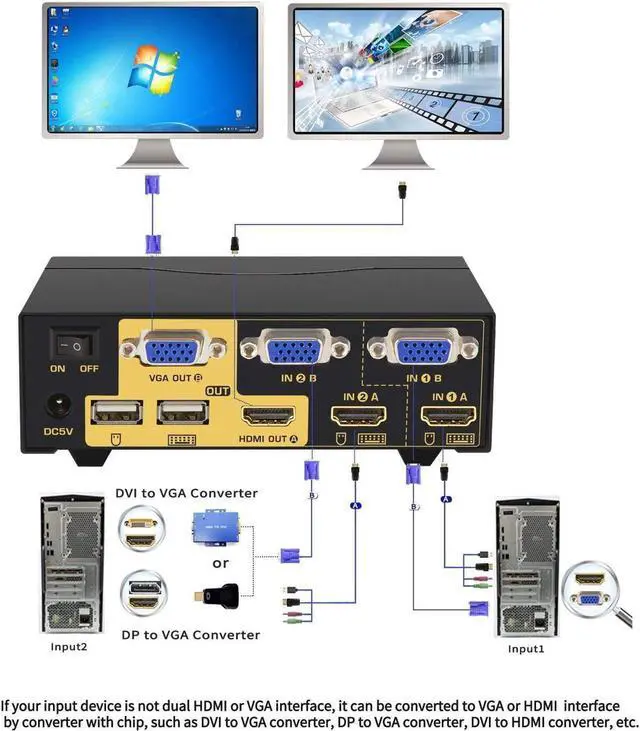
3. Plug USB 3.0 cables, HDMI cables, VGA cables into KVM switch and your computers;
4. Plug HDMI cable, VGA cable into KVM switch and monitors;
5. Plug mouse into mouse slot of KVM switch, plug keyboard into keyboard slot of KVM switch;
6. Plug speaker or USB devices into KVM switch if needed;
7. Turn on KVM switch;
8. Turn on computers.
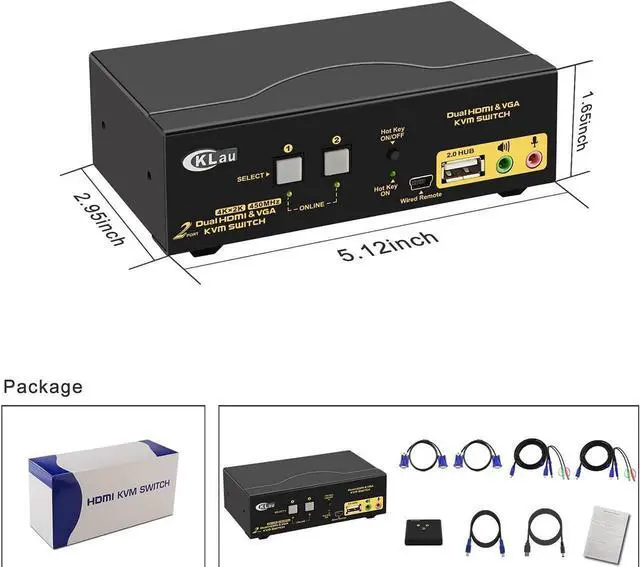
Package: 1 x 2 Port HDMI VGA KVM Switch + 2 x HDMI cable + 2 x VGA cable + 2 x USB 3.0 cable + 1 x User Manual + 1 x DC 5V 2A Power Adapter + 1 x wire remote push button switch

Installation Step
1. Turn off all devices and unplug all the cables;
2. Plug DC5V 2A power adapter into KVM and AC socket;
3. Plug USB 3.0 cables, HDMI cables, VGA cables into KVM switch and your computers;
4. Plug HDMI cable, VGA cable into KVM switch and monitors;
5. Plug mouse into mouse slot of KVM switch, plug keyboard into keyboard slot of KVM switch;
6. Plug speaker or USB devices into KVM switch if needed;
7. Turn on KVM switch;
8. Turn on computers.
Package: 1 x 2 Port HDMI VGA KVM Switch + 2 x HDMI cable + 2 x VGA cable + 2 x USB 3.0 cable + 1 x User Manual + 1 x DC 5V 2A Power Adapter + 1 x wire remote push button switch
Warranty & Returns
Warranty, Returns, And Additional Information
Warranty
- Please contact the Seller directly for warranty information. Warranty information may also be found on the Manufacturer's website.
- CONTACT
Return Policies
- Return for refund within: 30 days
- Return for replacement within: 30 days
- This item is covered by YuXuan Technology Return Policy
Manufacturer Contact Info
- For a directory of all our manufacturers, please click below.
- Manufacturers Directory
LOADING...