Your Browsing History
Meet Your Seller
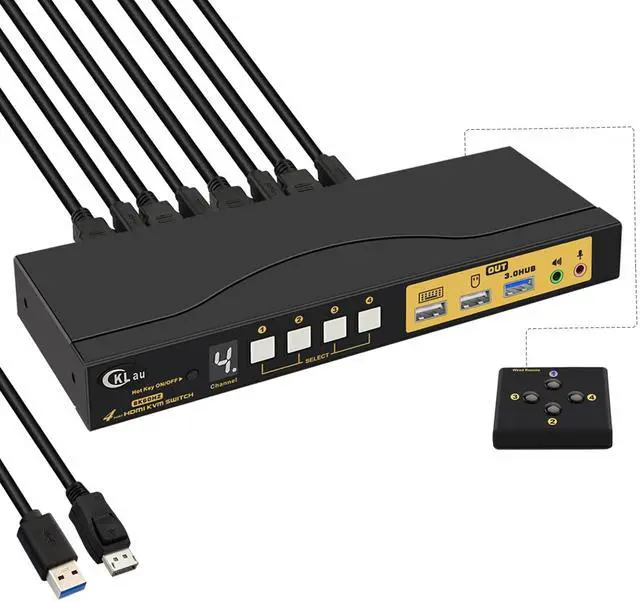
4 Port KVM HDMI Switch with Audio, USB 3.0 Hub, Black, Push Button Actuator, Manual Operation
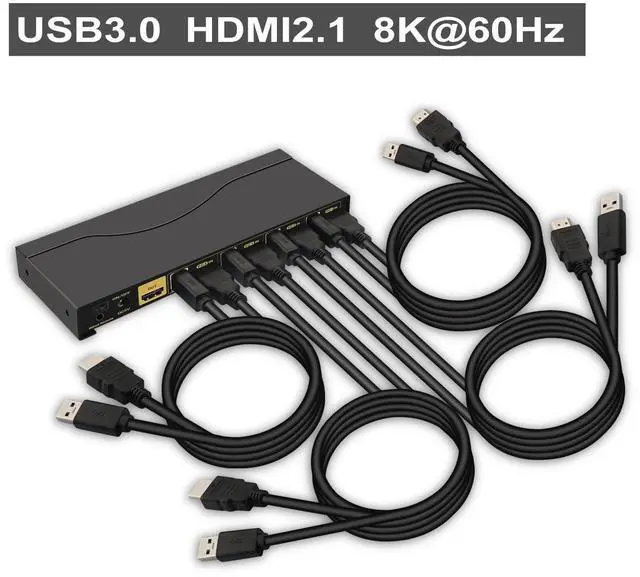
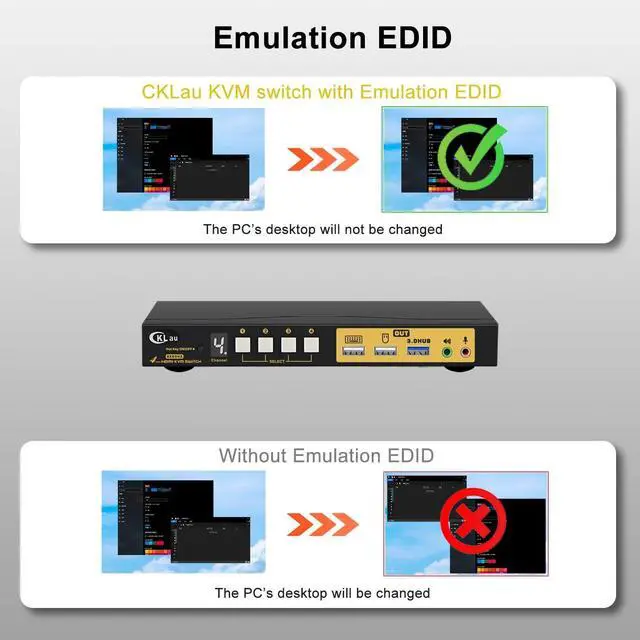
- 1. KVM Switch 4 Computers: 4 computers in, 1 monitor out. It allows 4 PCs/laptops sharing one set of USB keyboard & mouse, 1 monitor, audio, microphone, and 1 USB 3.0 peripheral device. With all input cables. Support emulation EDID, HDMI 2.1, HDCP 2.2, HDR 10. (Emulation EDID default turn on, you can turn it off if needed).
- 2. 4 Computers 1 Monitor Switch: We have been certified HDMI adopters for over 10 years. Resolution compatible 7680x4320@60Hz, 5120x2880@50/60/100/120Hz, 4096x2160@50/60/100/120Hz,3840x2160@60/120/144Hz,3840x1620@60/120/144Hz,3440x1600@60/120/144Hz,3440x1440@60/120/144Hz,3840x1080@60/120/144/165/240Hz, 3200x1800@60/120/144/165/240Hz, 2560x1440@60/120/144/165/240Hz, 2048x1536@60/120/144/165/240Hz, 2048x1280@60/120/144/165/240Hz, 2048x1080@60/120/144/165/240Hz, 1920x1200@60/120/144/165/240Hz, etc.
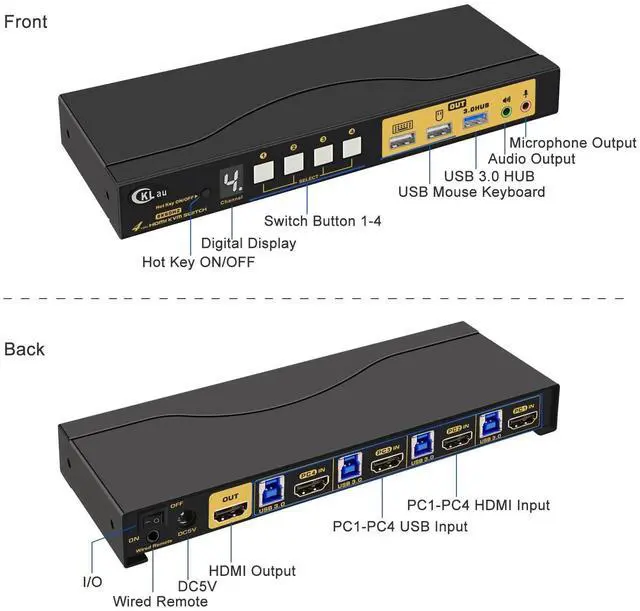
- 3. USB 3.0 KVM Switch: Plug and play. With a digital display, easy to know which computer are using. Drive-free for Windows 10/7/2000/XP/Vista, Linux, Mac, Debian, Ubuntu
+
+
Overview
Specs
Reviews
Any questions? Our AI beta will help you find out quickly.
Try me now
Installation Step:
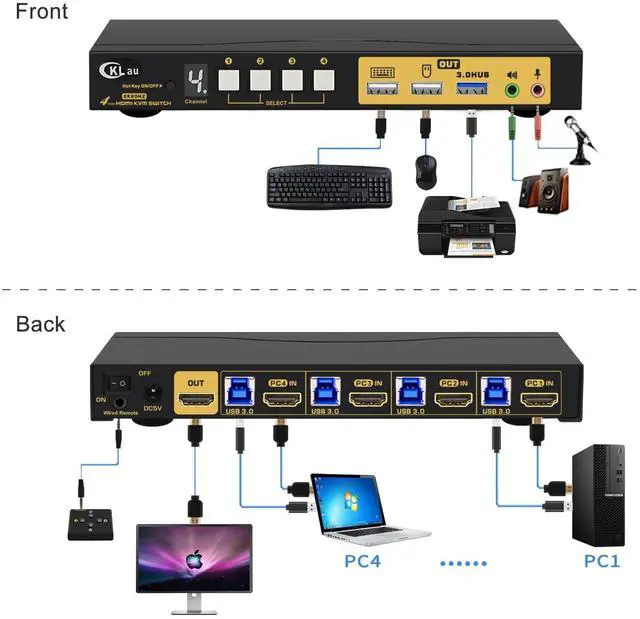
1. Connect the KVM switch and computers by HDMI cables, and USB 3.0 cables that come with the KVM switch;
2. Connect the KVM switch and the monitor by a HDMI cable;
3. Plug the keyboard into the keyboard slot, plug the mouse into the mouse slot of the KVM switch;
4. Plug headset/speaker/wired remote push-button switch/other USB device/power supply into the KVM switch if needed.
Package:
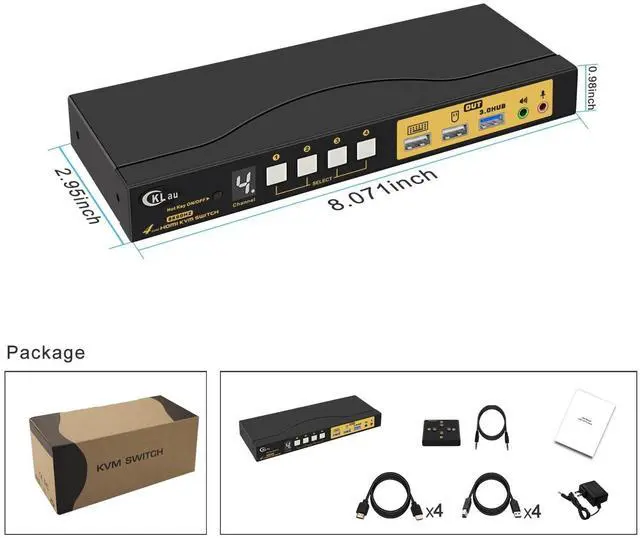
1 x 4 port HDMI KVM switch
4 x HDMI cables
4 x USB 3.0 cables
1 x DC 5V 2A Power adapter
1 x manual
1 x wire remote push button switch
Tips:
1. The KVM switch comes with a DC power adapter, we suggest you plug it into the KVM switch and AC socket, to avoid damaging your devices cause the power supply is not stable.
2. If you want to get 8K60Hz or 4K144Hz resolution, your devices(include computers, docking station, adapter) all should support that resolution. The KVM switch is like a bridge for transferring computers' signals to monitors, it can't change your devices' resolution. For example, all of your computers and the monitor all support 4K144Hz, but one of your computers needs to use an adapter, and this adapter only supports 4K60Hz, then this computer only supports 4K60Hz but not 4K144Hz.
With a USB 3.0 Hub.
With audio, microphone output.
With digital display
We have been certified HDMI adopters for over 10 years.
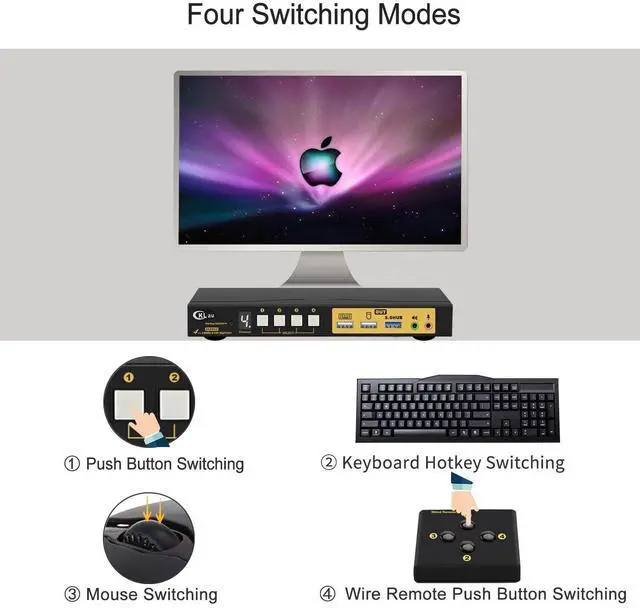
Keyboard Hotkey Switching Num Lock + Num Lock + 1 / 2 / 3 / 4 + Enter, or Ctrl + Ctrl + 1 / 2 / 3 / 4 + Enter, or Scroll Lock+ Scroll Lock+ 1 / 2 / 3 / 4 + Enter Mouse Switching Click the mouse wheel 2 times + left button / right button, and then it will switch to another computer. Manual Button Switching You can press the button one time, then it will switch to that computer. Wire Remote Switching You can press the button of the wired remote one time, it will switch to that computer. 4 Port 8K KVM Switch with Emulation EDID Support Emulation EDID More Advantage 4 Switching Way Optional

1. Connect the KVM switch and computers by HDMI cables, and USB 3.0 cables that come with the KVM switch;
2. Connect the KVM switch and the monitor by a HDMI cable;
3. Plug the keyboard into the keyboard slot, plug the mouse into the mouse slot of the KVM switch;
4. Plug headset/speaker/wired remote push-button switch/other USB device/power supply into the KVM switch if needed.
Package:
1 x 4 port HDMI KVM switch
4 x HDMI cables
4 x USB 3.0 cables
1 x DC 5V 2A Power adapter
1 x manual
1 x wire remote push button switch
Tips:
1. The KVM switch comes with a DC power adapter, we suggest you plug it into the KVM switch and AC socket, to avoid damaging your devices cause the power supply is not stable.
2. If you want to get 8K60Hz or 4K144Hz resolution, your devices(include computers, docking station, adapter) all should support that resolution. The KVM switch is like a bridge for transferring computers' signals to monitors, it can't change your devices' resolution. For example, all of your computers and the monitor all support 4K144Hz, but one of your computers needs to use an adapter, and this adapter only supports 4K60Hz, then this computer only supports 4K60Hz but not 4K144Hz.
With a USB 3.0 Hub.
With audio, microphone output.
With digital display
We have been certified HDMI adopters for over 10 years.
Keyboard Hotkey Switching Num Lock + Num Lock + 1 / 2 / 3 / 4 + Enter, or Ctrl + Ctrl + 1 / 2 / 3 / 4 + Enter, or Scroll Lock+ Scroll Lock+ 1 / 2 / 3 / 4 + Enter Mouse Switching Click the mouse wheel 2 times + left button / right button, and then it will switch to another computer. Manual Button Switching You can press the button one time, then it will switch to that computer. Wire Remote Switching You can press the button of the wired remote one time, it will switch to that computer. 4 Port 8K KVM Switch with Emulation EDID Support Emulation EDID More Advantage 4 Switching Way Optional
Warranty & Returns
Warranty, Returns, And Additional Information
Warranty
- Please contact the Seller directly for warranty information. Warranty information may also be found on the Manufacturer's website.
- CONTACT
Return Policies
- Return for refund within: 30 days
- Return for replacement within: 30 days
- This item is covered by PrimeVolt’Shop Return Policy
Manufacturer Contact Info
- For a directory of all our manufacturers, please click below.
- Manufacturers Directory
LOADING...