AV Access Docking Station KVM Switch 1 Laptop & 2 Desktop PCs, Dual 4K@60Hz Monitors, EDID Emulation, 100W USB-C Charging, Gigabit Ethernet,High Refresh Rates,Ideal for Gaming, Office & Creative Work
  •  
  • $219.99 
  • $177.99
  • Free 30-day Returns
  • Ships from China.
    Price alert
    Shop it at NeweggBusiness.

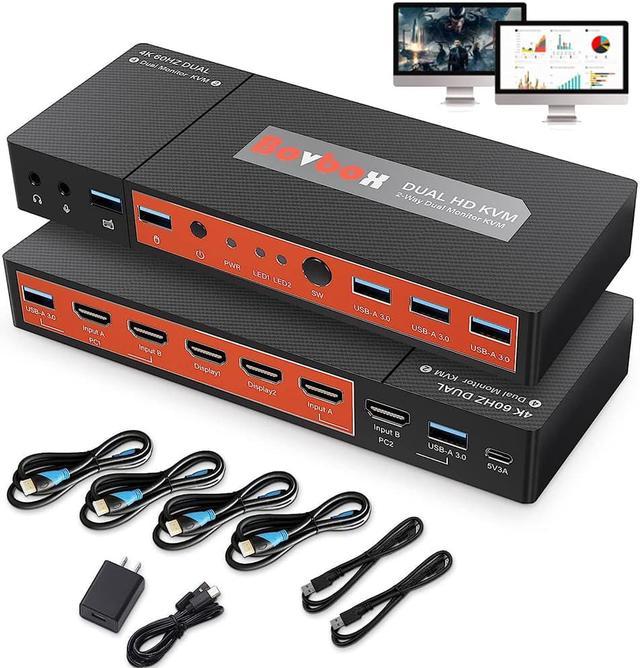
    Dual Monitor HDMI KVM Switcher2 in 2 Out, 2 Port Dual Monitor Extended Display, 4K @60Hz 4:4:4 HDMI KVM Switch for 2 Monitors 2 Computers with 3 USB 3.0 Hub, Audio, Hotkey & Button Switching

    Limited time offer, ends 01/10 By Smart Life Marketplace

    • [KVM Switch 2 Monitors 2 Computers] KVM Switch dual monitor, using only 1 set of keyboard, mouse and 2 monitors to control 2 computers for extended or respective display screens. Meet the needs of your different devices.
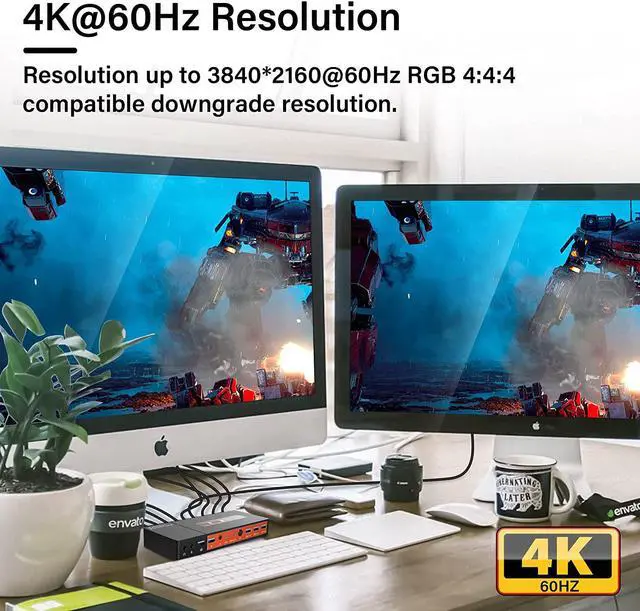
    • [4K@60Hz Visual Enjoyment KVM Dual Monitor] Supports up to 4K@60Hz resolution 4: 4: 4, and is backward com.patible 3840*2160@30HZ2560*1440@60Hz1920*1080P@60Hz etc, makes image display more exquisite and realistic.
    • [3 Ports USB 3.0 Hub] Supports HDMI2.0, transfer rate 18 Gbit/s. HDCP2.3 standards.has extra Standard USB 3.0 ports, allow you to share USB peripherals like printer, scanner, webcam and hard disk between 2 computers with data transfer rate up to 5Gbp/s.
    • [2Switching Methods with Wide Compatibility] with multiple options1.Toggle selection on front panel; 2. Hotkey switch (keys on keyboard). Cross support multiple operation systems & devices: Fully com.patible Windows 10/7/2000/XP/ and Mac, also supports HDMI devices without USB signal input like DVR, NVR etc.
    +
    +
    Overview
    Specs
    Reviews
    avatar

    Any questions? Our AI beta will help you find out quickly.

    image for this item
    HDMI KVM Switch can help you use only 2 computers / PCs share one set of keyboard, mouse and 2 monitors
     

    1.With just a press of the front button or a tap on the keyboard hotkey, you can easily switch between two PC sources.

    2.Dual monitors output support up to 3840x2160@60Hz 4:4:4 ,downward com.patible.output support extended and respective display screens.

    3.With extra 3 USB 3.0 ports and audio support, Meet more demands at work, no need to worry about connecting office equipment.

    4.Com.patible to most major OS including Windows, Linux and Mac etc. Not require any software or drivers.

    5.Support HD-MI 2.0 standard, com. patible with HD-MI 1.4 standard.Include all cables except cable for monitor.

    image for this item
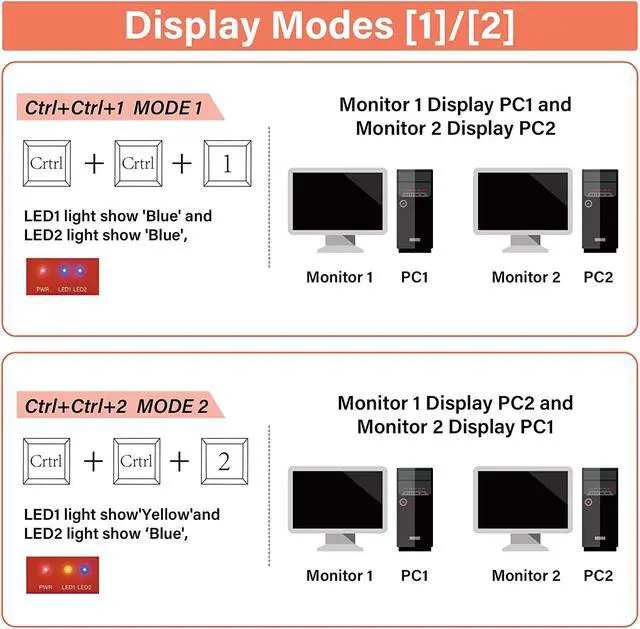
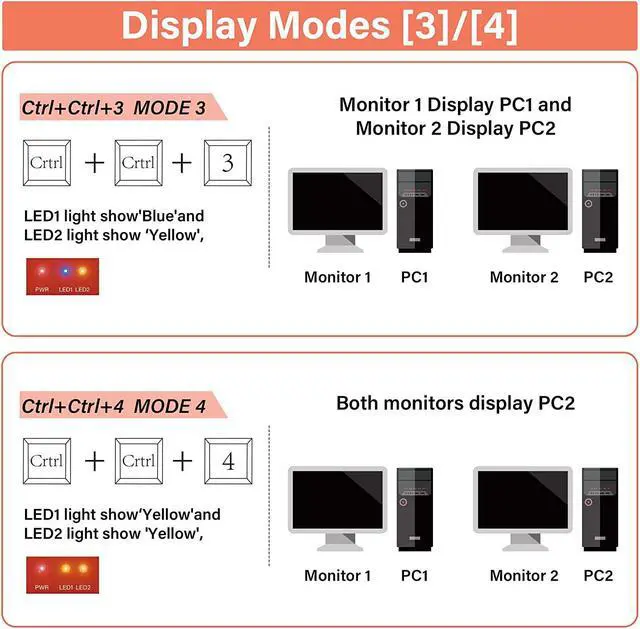
    KVM Switch has 4 Display Modes Support Keyboard Hotkey Switching for 2 Computers
     

    Ctrl+Ctrl+1 for Extended Mode 1

    • LED1 light show ''Blue'' and LED2 light show ''Blue'', Monitor1 Display PC1 and Monitor 2 Display PC1 extension screen.


    Ctrl + Ctrl + 3 for Original Mode

    • LED1 light show 'Blue'' and LED2 light show ''Yellow'', Monitor1 Display PC1 and Monitor 2 Display PC2.


    Ctrl + Ctrl + 4 for Extended Mode 2

    • LED1 light show ''Yellow'' and LED2 light show ''Yellow'', Monitor1 Display PC2 extension screen and Monitor 2 Display PC2.


    Ctrl + Ctrl + 2 for Crisscross Mode

    • LED1 light show 'Yellow'' and LED2 light show ''Blue'', Monitor 1 Display PC2 and Monitor 2 Display PC1.
    image for this item
    2 PCs Share Extra 3 USB 3.0 Ports
    • The 3 Standard USB 3.0 ports 10 times faster than USB 2.0. on front panel allows you to share more USB peripherals like printer, scanner, webcam and hard disk between computers .
    image for this item
    Audio Output and Microphone Jack
    • KVM Switch comes with a 3.5mm Audio Jack port and Microphone Jack, DAC chip inside, which can be inserted into a 3-segment 3.5mm earpiece device and 3-segment microphone.
    image for this item
    Ultra HD 4k Visual Enjoyment
    • Dual Monitor KVM Switch Support 4K @ 60Hz 3840x2160 4:4:4, make the image display more exquisite and realistic, enjoy the most luxurious video instantly!
    image for this item
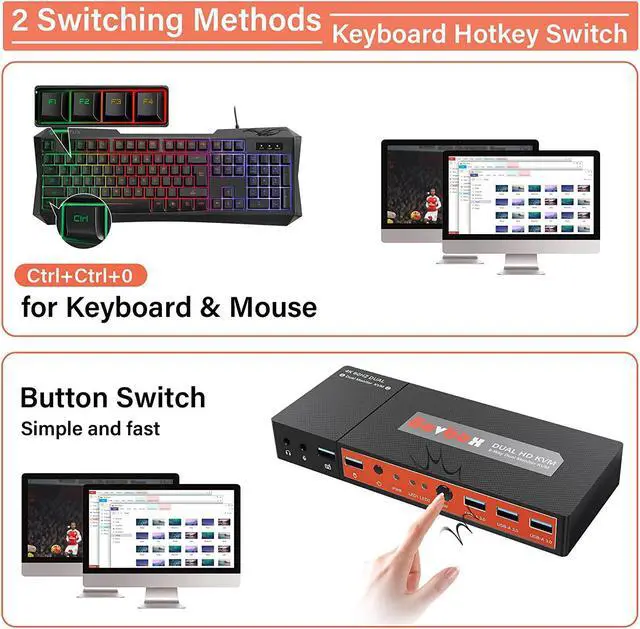
    Two Switching Methods

    Dual monitor KVM switches are available with multiple options

    1.Toggle selection on front panel; 

    2. Hotkey switch (keys on keyboard). 

    zero latency keyboard and mouse switching makes your use smooth and enhance your work efficiency or gaming experience.

    image for this item
    Wide Compatibility

    Cross support multiple operation systems & devices: Fully com.patible Windows 10/7/2000/XP/ and Mac, also supports HD-MI devices without USB signal input like DVR, NVR etc. Plug and play without any software needed.

    image for this item
    What's in the Box:
    • 1 x Dual Monitor KVM Switch
    • 4 x HD-MI Cable
    • 2 x USB 3.0 Cable
    • 1 x Power Adapter (DC 5V/3A)
    • 1 x User Manual
    image for this item
    Important Notes


    1.Whether to support 2-screen or multi-screen display is determined by the function of the computer itself. It has nothing to do with KVM.

    2.Only when your computer supports dual display or multi display, you can use this product to achieve two computers to share two monitors, extended mode.

    3.If your computer only supports single display, then this KVM Switch cannot help you get dual display function.

    4.Highly recommend using a source with dual HD-MI ports for use with this KVM Switch, otherwise, that need VGA/DVI/ DP to HD-MI convertor or docking station.

    5.Please choose the high quality devices, if the convertor/docking station is not good quality, it may lead to not display or reduce the resolution.

    image for this item
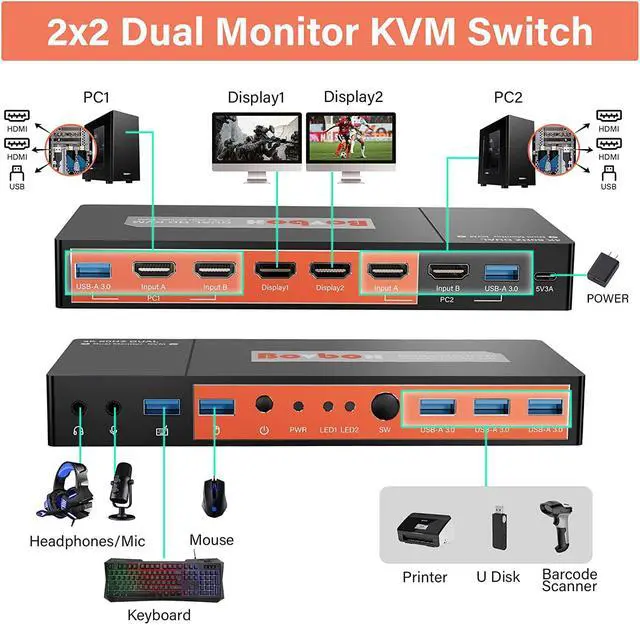
    KVM Switch How to connect?
     

    1) Connect the 1 micro USB cable to the ''5V3A'' port of the KVM to ensure power supply.

    2) Use 1 USB cable and 2 HD-MI cables to connect PC1 to the "USB-A 3.0", "Input A" and "Input B" ports of the KVM switch.

    3) Use 1 USB cable and 2 HD-MI cables to connect PC2 to the "USB-A 3.0", "Input A" and "Input B" ports of the KVM switch.

    4) Use 2 HD-MI cables to connect the 2 monitors to the "Display1" and "Display2" ports of the KVM switch.

    5) Plug the keyboard and mouse into the USB3.0 ports of the KVM switch.

    Features:

    Using only 1 set of keyboard, mouse and 2 monitors to control 2 computers
    Support Unix/Windows/Debian/Ubuntu/Fedora/Mac OS X/Raspbian/Ubuntu for Raspberry Pi and other
    Linux basic System
    Support resolution up to 3840*2160@60HZ
    Support hot plug, disconnect or connect devices to the KVM at any time without turning off PC
    With EDID emulators in each input port, keep PCs always have correct information, prevent displays setting
    change while switchino input ports
    Support keyboard hotkeys and front panel button to control KVM
    Available to use keyboard and mouse without delay
    With extra USB 3.0 port, can use for USB flash disk, scanner, printer or other USB device, transfer faster

    Package Content:

    4x2 Dual Monitor HDMI KVM Switcher 1PCS
    4K HDMI Cable 4PCS
    USB 3.0 Male to Male Cable 2PCS
    5V 3A Power Adapter 1PCS
    USB-A to Type C cable 1PCS
    User Guide 1PCS

    Warranty & Returns

    Warranty, Returns, And Additional Information

    Warranty

    • Please contact the Seller directly for warranty information. Warranty information may also be found on the Manufacturer's website.
    • CONTACT

    Return Policies

    Manufacturer Contact Info

    LOADING...